
Teamcenter Solution Architecture Best Practices: Strategic Implementation for 2026
By 2026, the most expensive mistake in PLM isn’t choosing the wrong software; it’s burying your Siemens Teamcenter environment under a mountain of custom code that makes AI adoption impossible. Many UAE-based industrial leaders find that over-customization leads to high technical debt, causing system performance to degrade just when the business needs to scale. You’ve likely experienced the friction of poor multi-site synchronization or the difficulty of integrating PLM with your existing ERP and MES systems. These bottlenecks don’t just slow down engineering; they halt your progress toward full digital maturity.
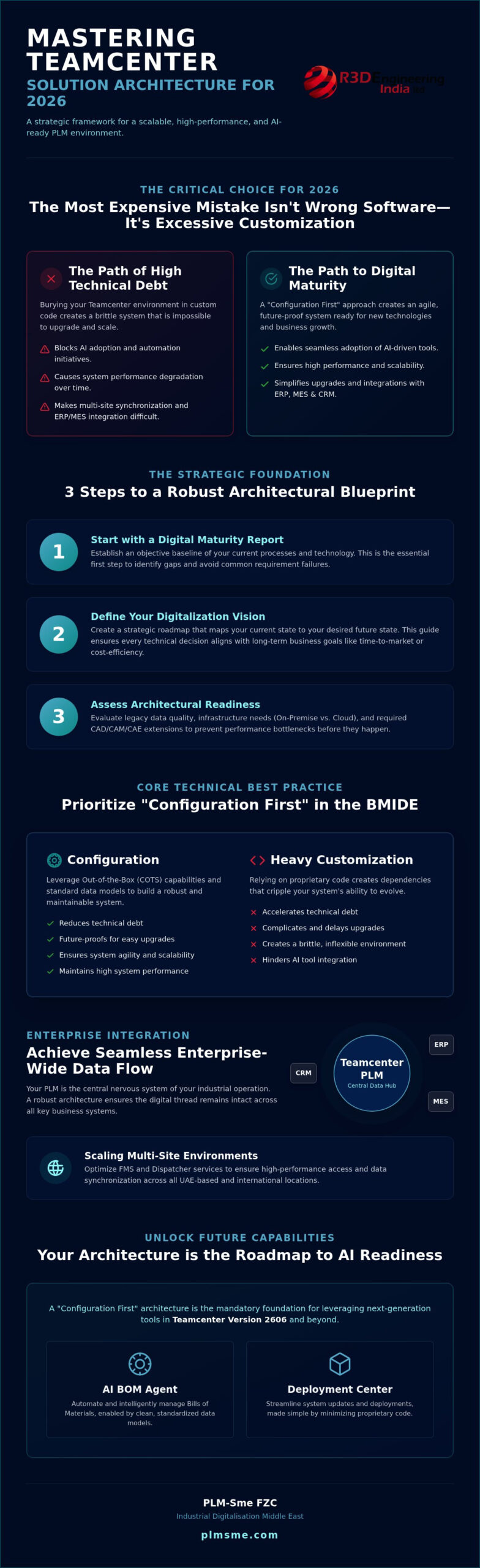
Implementing the right Teamcenter solution architecture best practices is the only way to reverse this trend. This article provides a strategic framework to help you master the architectural principles required for a scalable, high-performance environment. You’ll learn how to leverage the latest features in version 2606, such as the AI BOM agent and Deployment Center, to ensure your system remains agile. We’ll explore a configuration-first methodology that eliminates technical debt, ensures seamless data flow across the enterprise, and establishes a clear roadmap for AI and industrial automation integration.
Key Takeaways
- Discover why a Digital Maturity Report is the essential first step to establishing a robust architectural blueprint and avoiding common requirement failures.
- Learn how to apply Teamcenter solution architecture best practices by prioritizing a “Configuration First” approach within the BMIDE to minimize long-term technical debt.
- Master the strategies for achieving seamless enterprise-wide data flow through optimized integrations with ERP, MES, and CRM systems.
- Explore technical methodologies for scaling multi-site environments across the UAE, focusing on FMS and Dispatcher service optimization for high performance.
- Understand the strategic advantage of partnering with an independent consultant to navigate the latest 2606 version updates and ensure AI readiness.
Establishing a Foundation for Teamcenter Solution Architecture
Effective Teamcenter solution architecture serves as the definitive blueprint for digital thread integrity. It’s the structural framework that ensures engineering data remains consistent, accessible, and actionable from initial design through to manufacturing and service. Adopting Teamcenter solution architecture best practices requires a shift in perspective. You shouldn’t view PLM as a standalone tool, but as the central nervous system of your industrial operation.
Architectural failure rarely stems from software limitations. Instead, it usually begins during the requirements gathering stage. When stakeholders fail to define precise business outcomes, the resulting architecture often becomes a patchwork of reactive customizations. To avoid this, a digital maturity report manufacturing is essential. This report provides an objective baseline, identifying gaps in your current processes and establishing the technical requirements needed for a high-performance environment. This foundation is critical for aligning with UAE national industrial digitalization objectives, which prioritize scalable, AI-ready infrastructure for 2026.
Defining the Digitalization Vision
Success starts with identifying core business drivers, whether you’re focused on accelerating time-to-market, improving product quality, or achieving cost-efficiency through automation. Mapping your current-state architecture against a desired future-state allows you to see exactly where the digital thread breaks. By establishing a digital vision roadmap manufacturing, you create a strategic guide for every technical decision. This roadmap ensures that your implementation of products from Siemens Digital Industries Software remains focused on long-term value rather than short-term fixes. Implementing Teamcenter solution architecture best practices ensures that your system doesn’t just work today, but remains scalable for future technological shifts.
Assessing Architectural Readiness
Before any software is installed, you must evaluate your architectural readiness. This involves a deep dive into legacy data quality and the complexity of migration. Poor data quality in a new system only accelerates technical debt. You must also make critical decisions regarding infrastructure. Whether you choose on-premise servers, a hybrid model, or a cloud-native approach like Teamcenter X, your infrastructure must support your 2026 performance goals. Finally, identify the specific CAD, CAM, or CAE extensions required for your industry to ensure the architecture supports your specific engineering workflows from day one. This proactive assessment prevents the performance bottlenecks that often plague multi-site environments.
Core Technical Best Practices for BMIDE and Data Modeling
The “Configuration First” mantra has become the gold standard for Teamcenter solution architecture best practices in 2026. This approach prioritizes out-of-the-box capabilities over heavy coding. It ensures that the system remains agile and ready for the rapid release cycles of modern software. When you rely on configuration, you significantly reduce the risk of technical debt that often cripples legacy environments. This strategy is essential for maintaining a high-performance system that can scale alongside your business needs.
Managing the balance between Commercial Off-The-Shelf (COTS) functionality and custom code requires a disciplined project management approach within your environment. You must maintain a clear separation between standard Siemens templates and your specific extensions. This discipline future-proofs your system, making it much easier to adopt subsequent Teamcenter versions or transition to cloud-native platforms. By minimizing proprietary code, you ensure that new AI-driven tools, such as the AI BOM agent in version 2606, can function without interference.
Standardizing Data Models in BMIDE
The Business Modeler IDE (BMIDE) acts as the central nervous system of Teamcenter configuration, governing how every data object and business rule behaves within the environment. Standardizing the data model is the most effective way to ensure cross-functional data accessibility. Without rigorous naming conventions and attribute standardization, departments quickly develop data silos that prevent the seamless flow of information. This fragmentation often leads to costly errors during the manufacturing phase.
Designing efficient Item Types and Revision Naming Rules is foundational. You should aim for a lean data model that balances detail with performance. Over-complicating Item Types leads to bloated databases and slower query times. Keeping the model clean facilitates easier integrations with downstream systems like ERP and MES. If your current model feels fragmented, a digital maturity report can help identify exactly where your standardization is failing.
Leveraging Configuration over Customization
In 2026, the industry has moved away from heavy reliance on ITK (Information Toolkit) and SOA customizations. These methods often create significant barriers to upgrades and increase maintenance costs. Instead, architectural leaders utilize the Workflow Designer to automate complex business processes without writing code. This shift is critical for organizations transitioning to a modern PLM solution where cloud compatibility and security are paramount.
Using configuration instead of customization allows your team to focus on process optimization rather than code debugging. It simplifies the user experience and ensures that your PLM environment remains stable during high-load operations. For organizations struggling to manage these technical complexities, engaging with independent PLM consulting ensures that your architecture remains objective and vendor-neutral, focusing purely on your long-term operational goals.
Optimizing Enterprise Integrations: ERP, MES, and CRM
True digital transformation depends on the seamless movement of data across the entire enterprise. Integration isn’t just about connecting software; it’s about orchestrating a unified data flow that eliminates silos between engineering, sales, and manufacturing. Adhering to Teamcenter solution architecture best practices requires selecting the right middleware, such as Teamcenter Gateway for Enterprise Applications (T4EA) or Active Integration. These tools ensure bi-directional data flow, allowing for real-time decision making based on the most current product information available.
Modern organizations are looking beyond simple file transfers. They’re seeking deep functional connectivity. For instance, realizing Teamcenter CRM integration benefits allows engineering teams to gain direct visibility into customer requirements and field feedback. This customer-centric approach to engineering ensures that product updates are driven by actual market needs rather than assumptions. By integrating CRM data into the PLM environment, you create a feedback loop that informs every stage of the product lifecycle.
Orchestrating PLM-ERP Connectivity
Synchronizing the Bill of Materials (BOM) between engineering and manufacturing is a critical architectural requirement. Without a robust integration, the “as-designed” BOM in Teamcenter often drifts from the “as-planned” BOM in the ERP system. This misalignment leads to procurement errors and production delays. Effective architecture automates the transfer of part release cycles and change orders, ensuring that procurement teams always work with the latest approved specifications. This automation significantly reduces manual data entry, which remains one of the primary sources of human error in industrial environments.
Connecting the Shop Floor via MES/MOM
Closing the loop between design and the “as-built” reality requires a tight connection with Manufacturing Execution Systems (MES). By implementing Manufacturing Operations Management (MOM), you gain total shop floor visibility. This allows engineering teams to see exactly how a product is being manufactured and identify design flaws that may cause production bottlenecks. In the context of 2026, leveraging industrial automation solutions GCC becomes a strategic advantage. These solutions allow UAE-based manufacturers to integrate real-time sensor data back into the PLM environment, creating a living digital twin. Following Teamcenter solution architecture best practices in this area ensures that your shop floor data is not just collected, but used to drive continuous product improvement.
Managing System Performance and Scalability in Multi-Site Environments
Designing for global performance in a multi-site environment means more than just adding servers. It requires a precise configuration of the File Management System (FMS) and Dispatcher services to handle heavy data loads across distributed teams. For national operations across the UAE, ensuring low-latency access to engineering data is paramount for maintaining productivity. Implementing Teamcenter solution architecture best practices ensures that your FMS is optimized with local caches and robust volume management to prevent bottlenecks during peak usage hours.
Performance tuning isn’t a one-time event; it’s an ongoing protocol. You should implement health monitoring tools that track server response times and database query performance. As you scale, the Dispatcher service becomes critical for offloading heavy tasks like CAD translation or report generation from the main server. This prevents system lag for end users and maintains a stable environment even as user numbers grow. Regular performance audits are necessary to identify where hardware or network constraints are impacting the user experience.
Optimizing Active Workspace Performance
Active Workspace has transformed user adoption by providing a lighter, web-based interface that is accessible from any device. However, its impact on system load must be managed carefully to avoid sluggish response times. You can optimize performance by configuring client-side vs. server-side rendering based on the hardware capabilities of your workforce. Simplifying the UI to match specific user roles and tasks reduces the amount of data transferred, which speeds up navigation. High-latency networks significantly degrade FMS performance by increasing file transfer times and metadata synchronization delays.
Scaling through Federated Architectures
Choosing between a Multi-Site architecture and a Global Single Instance (GSI) is a pivotal decision for your long-term strategy. Multi-Site is often preferred when data sovereignty or local performance is the priority, while GSI offers a unified source of truth with less administrative overhead. Managing data replication and synchronization schedules is essential to ensure that all sites have access to the latest revisions without overloading the network. Preparing your environment for PLM system architecture consulting audits ensures that your federated model meets industry standards for security and speed.
A high-performing environment is the bedrock of digital transformation. If your current system is struggling with lag or synchronization errors, our experts can help you conduct a comprehensive Siemens Teamcenter consulting assessment to redesign your environment for maximum scalability and performance.
Implementing Best Practices with an Independent PLM Consultant
Selecting the right partner to guide your architectural journey is as significant as the software itself. While many organizations rely on vendors for initial setup, engaging with independent Siemens Teamcenter consulting provides an objective perspective that license-focused resellers often lack. An independent advisor functions as a “thinking partner,” focusing exclusively on how the system supports your long-term digitalization vision rather than meeting sales quotas. This objectivity is vital for ensuring that Teamcenter solution architecture best practices are applied without bias, prioritizing operational efficiency over proprietary add-ons.
A primary goal of independent consulting is avoiding vendor lock-in. By championing a standards-based architecture, consultants ensure your environment remains open and adaptable. This approach relies on the configuration-first principles discussed earlier, allowing you to switch service providers or adopt new Siemens modules without being trapped by opaque, custom-coded layers. This transparency reduces the total cost of ownership and ensures that your system remains a flexible asset rather than a rigid liability.
Navigating the Siemens Partner Ecosystem
Differentiating between software resellers and implementation specialists is vital for long-term success. Resellers are primarily focused on the transaction of licenses, whereas specialists focus on the complex engineering of the solution itself. When evaluating a consultant, you should prioritize their track record within discrete manufacturing and their understanding of the national industrial landscape in the UAE. A partner who understands local regulatory requirements and industry standards can anticipate challenges that a generalist might overlook. They ensure your architecture isn’t just technically sound, but also compliant and strategically aligned with regional growth trends.
Reducing Technical Debt via Retainers
The transition from a successful implementation to a stable “steady state” requires a shift from project-based thinking to continuous improvement. Utilizing a PLM System Administration Retainer is an effective way to manage technical debt proactively. Instead of waiting for a system failure, a retainer allows for incremental architectural enhancements and periodic performance tuning. This proactive stance is essential for managing the release cycles of version 2606 and beyond. It ensures that your AI roadmap isn’t just a conceptual document, but a living strategy that is executed through consistent, manageable updates. By investing in ongoing support, you protect your initial investment and ensure the digital thread remains unbroken as your enterprise evolves.
Building an AI-Ready Industrial Future
Mastering Teamcenter solution architecture best practices is the definitive factor in transforming a stagnant IT asset into a dynamic engine for industrial innovation. By prioritizing a configuration-first approach within the BMIDE and establishing a robust digital thread across ERP, MES, and CRM systems, you ensure your environment is prepared for the AI-driven demands of 2026. A stable, high-performing architecture doesn’t just manage engineering data; it accelerates your time-to-market and enhances product quality across your national operations in the UAE.
As a Siemens Digital Industries Alliance Partner, PLM-Sme provides expert UAE-wide implementation support and specialized digital maturity reports to guide your digital transformation. Partnering with an independent consultant ensures your roadmap remains objective, vendor-neutral, and focused on practical results rather than software licenses. You can secure your Digital Maturity Assessment and Roadmap with PLM-Sme to identify technical gaps and begin building a scalable, future-proof PLM environment today. Your journey toward a seamless, automated enterprise starts with a clear vision and a disciplined technical foundation.
Frequently Asked Questions
What is the difference between configuration and customization in Teamcenter?
Configuration involves using the Business Modeler IDE (BMIDE) to modify the system’s behavior through standard settings, rules, and templates. Customization requires writing proprietary code using ITK or SOA to create new functionalities not available out-of-the-box. Following Teamcenter solution architecture best practices generally prioritizes configuration because it’s easier to maintain and doesn’t break during software upgrades. Minimizing custom code reduces your long-term technical debt and ensures system stability.
How does digital maturity affect Teamcenter solution architecture?
Digital maturity serves as the baseline for your entire architectural strategy. A low maturity level often indicates fragmented data and manual processes, which require a foundational architectural approach to ensure data integrity. Conversely, high maturity allows you to implement advanced features like AI-driven BOM management. We recommend starting with a Digital Maturity Report to identify your current gaps before finalizing any technical design or implementation roadmap for your UAE operations.
Can Teamcenter be integrated with non-Siemens ERP systems?
Yes, Teamcenter is designed to integrate seamlessly with a wide range of non-Siemens enterprise systems. By utilizing middleware like Teamcenter Gateway for Enterprise Applications (T4EA), you can establish bi-directional data flows with ERPs such as SAP, Oracle, or Microsoft Dynamics. This ensures that engineering changes in PLM are reflected in your procurement and production schedules in real-time, maintaining a single version of truth across the entire enterprise.
What are the hardware requirements for a scalable Teamcenter deployment in 2026?
A scalable deployment in 2026 requires high-performance infrastructure that can handle increased data complexity and AI processing. You’ll need servers with multi-core processors, high-speed NVMe storage, and at least 10Gbps network connectivity for multi-site synchronization. While many UAE firms are moving toward cloud-based models like Teamcenter X to offload hardware management, on-premise setups must prioritize high-availability clusters and robust failover mechanisms to ensure constant operational continuity.
How does Active Workspace improve Teamcenter performance for end-users?
Active Workspace improves performance by providing a zero-install, web-based interface that is significantly lighter than the traditional Rich Client. It uses role-based UI configurations to present only the data a specific user needs, which reduces server-side processing and network traffic. This streamlined approach allows engineers and stakeholders to access PLM data on mobile devices or lower-spec workstations without sacrificing speed or functionality during complex engineering data queries.
What is the best way to manage data migration from legacy PLM systems?
The most effective way to manage data migration is through a phased, validation-heavy approach. You must prioritize data cleansing and deduplication in the legacy system before attempting any transfer. Once the data is clean, it should be mapped against the standardized BMIDE model to ensure consistency. Using automated migration tools and performing multiple test runs in a sandbox environment helps you identify potential mapping errors before they impact your production environment.
How often should a Teamcenter architecture audit be performed?
You should perform a comprehensive architecture audit at least once every twelve months or immediately before any major version upgrade. Regular audits help you identify and resolve performance bottlenecks, security vulnerabilities, and accumulating technical debt. These reviews ensure that your system continues to align with Teamcenter solution architecture best practices as your business grows. Consistent monitoring prevents minor configuration drifts from turning into major system failures that disrupt engineering.
What role does AI play in the future of Teamcenter architecture?
AI is becoming the core of modern Teamcenter architecture, particularly with the 2606 version release. It introduces features like the AI BOM agent for automated change execution and AI-powered requirement checks based on INCOSE rules. Future architectures will focus on self-healing systems that use machine learning to optimize performance and predict maintenance needs. This shift requires an architectural foundation that is clean, standardized, and ready to ingest large volumes of high-quality data.