
Teamcenter Performance: Strategic Technical Guide 2026
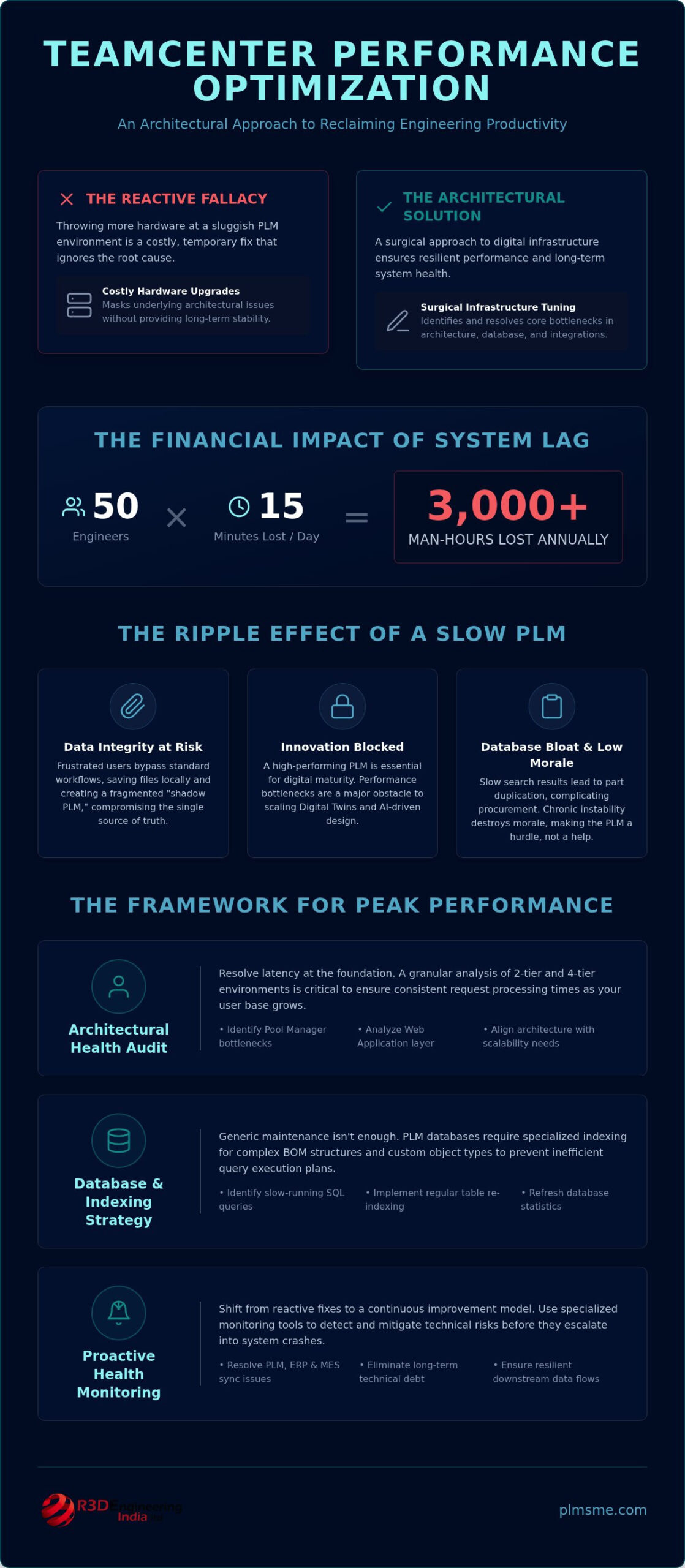
Throwing more hardware at a sluggish PLM environment is often a costly distraction from the underlying architectural reality. While it’s tempting to believe a faster server will solve your latency issues, true system stability requires a more surgical approach to your digital infrastructure. Many engineering leads have grown accustomed to the “spinning wheel” during heavy CAD saves, assuming that Teamcenter performance optimization is simply a matter of increasing server capacity. You’ve likely seen technical debt accumulate from a rushed initial implementation, leading to unpredictable crashes during critical syncs with MES or ERP systems.
This guide establishes a clear framework for identifying the root causes of system fatigue and refining your 4-tier and 2-tier architectures. By prioritizing database health and structural alignment, you can reclaim the hours lost to engineering downtime and ensure your integration layers remain resilient under heavy load. We’ll explore how to identify specific bottlenecks, stabilize downstream data flows, and implement a proactive administration strategy that secures your system’s health well into 2026. This technical roadmap ensures your PLM environment functions as a reliable engine for innovation rather than a barrier to productivity.
Key Takeaways
- Audit the structural health of 2-tier and 4-tier environments to resolve latency at the architectural level rather than relying on temporary hardware upgrades.
- Quantify the financial impact of system lag on engineering productivity to build a data-driven business case for comprehensive Teamcenter performance optimization.
- Streamline data exchange between PLM, ERP, and MES by identifying and resolving synchronization bottlenecks that disrupt downstream manufacturing processes.
- Implement a proactive health check framework using specialized monitoring tools to detect and mitigate technical risks before they lead to system crashes.
- Shift from reactive fixes to a continuous improvement model through specialized administration retainers that eliminate long-term technical debt.
Analyzing the Impact of Teamcenter Latency on Engineering Productivity
Teamcenter performance optimization is more than a technical maintenance task; it’s a direct multiplier for engineering throughput in discrete manufacturing. When a Product Lifecycle Management (PLM) system underperforms, it creates a ripple effect that touches every stage of the development cycle. System latency isn’t just a minor inconvenience for designers. It’s a structural barrier that erodes the efficiency of your most expensive technical assets. In the competitive UAE industrial landscape, where rapid time-to-market is a critical differentiator, a slow PLM environment acts as an anchor on your entire digitalization strategy.
Calculating the hidden costs of system lag requires looking beyond individual sessions. If an engineering team of 50 people loses just 15 minutes per day to “spinning wheels” during saves or metadata updates, the organization loses over 3,000 man-hours annually. This lost time represents a significant drain on innovation capital. When speed drops, data integrity often follows. Users frustrated by slow response times may resort to saving files locally or bypassing standard workflows. This creates a fragmented “shadow PLM” environment that’s difficult to reconcile and introduces significant risk to the single source of truth.
The Engineering Bottleneck: Waiting for PLM
The “dead time” experienced during large CAD assembly check-ins is a primary source of friction. When a system takes several minutes to process a save, the creative flow is broken and productivity stalls. Slow search results are equally damaging. If an engineer can’t find an existing part within seconds, they’re more likely to create a duplicate. This bloats the database and complicates future procurement and manufacturing steps. Over time, chronic instability destroys engineering morale, leading to a culture where the PLM system is viewed as a hurdle rather than an enabler.
Strategic Alignment with Digital Maturity
A high-performing PLM environment is the essential foundation for any sophisticated industrial digitalization roadmap. You can’t successfully implement AI-driven design or advanced industrial automation on a platform that struggles with basic data retrieval. Reviewing your current state through a digital maturity report often reveals that performance bottlenecks are the single greatest obstacle to scaling digital twins. Teamcenter performance optimization ensures that your data infrastructure is resilient enough to support the high-velocity data exchanges required for modern digital transformation. It transforms the system from a static repository into a dynamic asset that accelerates your journey toward total digital maturity.
Evaluating Architectural and Database Health for Scalability
Architecture serves as the structural foundation for all PLM activities. In many UAE industrial environments, the choice between 2-tier and 4-tier deployments is often made during initial setup without considering long-term scalability. While 2-tier environments offer lower latency for high-bandwidth CAD tasks, they lack the centralized management needed for large, distributed teams. Conversely, 4-tier architectures provide the necessary abstraction but introduce potential bottlenecks at the Pool Manager and Web Application layers. Achieving effective Teamcenter performance optimization requires a granular analysis of these layers to ensure that request processing times remain consistent as user counts increase.
Database Tuning and Indexing Strategies
Standard database maintenance protocols aren’t typically sufficient for the complex, deeply nested schemas found in Teamcenter. Unlike generic ERP databases, PLM environments require specialized indexing that accounts for recursive BOM structures and custom object types. Identifying slow-running SQL queries is the first step toward reclaiming system speed. You should prioritize regular table re-indexing and the refreshing of database statistics to prevent the query optimizer from choosing inefficient execution plans. This technical rigor is supported by academic research on PLM performance, which highlights how optimized data structures accelerate the entire product lifecycle. Companies that ignore these database fundamentals often find that even significant hardware investments fail to resolve underlying latency.
FMS and Cache Management Optimization
The File Management System (FMS) is the primary engine for CAD data movement. For organizations operating across different sites, configuring the File Server Cache (FSC) is essential to minimize the impact of network latency. Without a well-defined caching policy, every file request must travel back to the master volume, creating unnecessary traffic and slowing down engineering check-outs. Managing transient volume growth is another critical task; failing to purge temporary files leads to fragmented storage and degraded read/write speeds. By implementing robust client-side and server-side caching, you can ensure that large assemblies load quickly, regardless of the user’s physical location. For teams struggling with these complexities, a professional review of your System and Solution Architecture can pinpoint the specific misconfigurations causing your system lag.
Optimizing Integration Performance Across ERP, MES, and CAD
System speed isn’t determined solely by the core PLM server. It’s often dictated by how efficiently data moves between disparate platforms. In many UAE manufacturing environments, Teamcenter ERP integration becomes a primary source of latency when data synchronization isn’t handled strategically. Integration shouldn’t be an afterthought in Teamcenter performance optimization. When you trigger a BOM transfer to an ERP or MES, the overhead of heavy customizations can cause the user session to hang, leading to the “spinning wheel” mentioned earlier.
Customizations frequently introduce unintended lag. While bespoke code allows for highly specific workflows, it often lacks the efficiency of out-of-the-box integration frameworks. Every additional validation or data mapping step adds milliseconds that aggregate into seconds of delay. On the shop floor, real-time connectivity with MES is vital, but poorly optimized protocols can overwhelm the network. You must prioritize lean data packets and ensure that only essential metadata is exchanged during high-frequency synchronization events.
Streamlining ERP and CRM Data Flows
Moving from real-time to asynchronous processing is one of the most effective ways to maintain system responsiveness. Instead of forcing a user to wait while a massive dataset transfers, the system should queue the task in the background. This approach is particularly beneficial for Teamcenter CRM integration, where redundant data calls can easily bloat the communication layer. By eliminating these unnecessary queries and focusing on delta-only updates, you’ll ensure data consistency across the enterprise without sacrificing the speed engineers expect from their primary workspace.
Managing CAD Data Overhead
CAD, CAM, and CAE data management represents the heaviest load on any PLM infrastructure. To reduce this overhead, you must leverage assembly load options that prioritize speed. Using lightweight representations, such as JT files, allows users to visualize and navigate complex assemblies without loading every underlying geometric detail into memory. This significantly reduces the performance impact of large BOM structures. Additionally, refining your CAD attribute mapping ensures that synchronization happens only when necessary. Don’t map every single parameter; focus on the critical metadata required for downstream manufacturing processes to keep the integration layer lean and responsive.
Implementing a Proactive Health Check and Monitoring Framework
Reactive troubleshooting is a costly habit that keeps engineering teams in a state of perpetual recovery. To transition toward a resilient PLM environment, you must implement a framework that identifies degradation before it results in a system crash. Teamcenter performance optimization relies heavily on the continuous observation of system behavior rather than occasional audits. By establishing a baseline of normal operation, administrators can detect anomalies in request processing or file transfers that suggest an impending bottleneck. This proactive stance is essential for maintaining the high availability required in modern manufacturing environments.
Essential KPIs for Teamcenter Administrators
Effective monitoring starts with the selection of high-impact metrics that reflect the actual user experience. You should track average login times and object checkout speeds daily. These are the first indicators of network congestion or volume server strain. Server-side pool manager availability is equally critical. A high number of “busy” or “unavailable” instances often points to insufficient hardware resources or poorly managed session timeouts in your 4-tier architecture. Database response times for common search queries must also be monitored. If a standard metadata search that usually takes two seconds begins to take ten, it’s a clear signal that your indexing strategy or database statistics require immediate attention.
The Health Check Methodology
A robust health check goes beyond checking if services are “up.” It involves a deep-dive review of syslog and journal files to uncover recurring error patterns that might not yet be visible to the end-user. This technical scrutiny ensures your environment remains aligned with the evolving industrial automation solutions in the GCC, where high-speed data exchange is non-negotiable. Utilizing tools like the Teamcenter Performance Monitor is a cornerstone of any Teamcenter performance optimization strategy. You must evaluate the performance impact of every patch or upgrade in a controlled environment. Even minor updates can occasionally introduce regressions in custom handlers, making post-deployment monitoring a vital part of your maintenance cycle.
Automating alerts for threshold breaches is the final step in a proactive strategy. Setting up triggers for high CPU usage, low disk space on volume servers, or excessive database deadlocks allows your team to intervene before engineers experience productive downtime. This structured oversight transforms PLM administration from a support function into a strategic asset. To verify your system is prepared for future scaling, you can request a specialized digital maturity assessment to identify long-term architectural risks.
Sustaining Peak Performance through Specialized PLM Administration
Performance optimization is not a destination. It’s a continuous state of architectural health that requires ongoing technical vigilance. Many organizations treat system tuning as a one-time emergency response to user complaints, but this reactive mindset is exactly how technical debt accumulates. As your database grows and your integrations become more complex, the initial configuration inevitably drifts from the ideal state. Sustained Teamcenter performance optimization ensures that your environment evolves alongside your data, preventing the gradual degradation that leads to engineering downtime.
Securing long-term stability often requires moving beyond internal IT capabilities. A dedicated PLM system administration retainer provides the specialized oversight needed to manage incremental changes before they impact the user experience. This model allows for regular, small-scale adjustments to database indexes, cache policies, and server configurations. By addressing minor inefficiencies as they arise, you avoid the need for massive, disruptive overhaul projects every few years. This proactive approach keeps the system lean and responsive, even as you scale your operations.
The Value of Managed Administration Services
Internal IT teams are often stretched thin, managing a broad spectrum of enterprise software. They may lack the deep, granular knowledge of Teamcenter internals required for sophisticated architectural tuning. Leveraging specialized support reduces this burden, allowing your internal staff to focus on general infrastructure while senior solution architects handle the PLM layer. This is particularly vital when executing a broader industrial digitalization roadmap. Expert administrators ensure that every new module or integration is deployed with performance in mind, maintaining system stability during periods of rapid digital growth.
Neutrality and Expertise in Optimization
There is a distinct advantage to working with an independent “thinking partner” rather than a pure software vendor. While a vendor might suggest additional licenses or hardware upgrades to solve latency, a neutral advisor prioritizes architectural logic and configuration efficiency. This objectivity ensures that your infrastructure choices are cost-effective and technically sound. Independent audits provide a transparent view of your system’s health, free from the bias of selling more products. It’s about finding the most efficient path to a high-performing environment, not the most expensive one.
Before launching new modules or AI-driven tools, you must establish a stable performance baseline. Teamcenter performance optimization should be the first step in any new implementation phase. By ensuring your current environment is running at peak efficiency, you create a resilient foundation for future innovations. This technical rigor ensures that your PLM system remains a powerful asset for your engineering team, rather than a bottleneck that slows down your journey toward digital maturity.
Securing a Resilient Foundation for Industrial Innovation
Maintaining a high-performing PLM environment requires moving beyond reactive fixes. True system stability comes from aligning your 4-tier architecture with disciplined database maintenance and lean integration protocols. By prioritizing proactive health checks and addressing the root causes of latency, you transform your system from a source of frustration into a reliable driver of productivity. Teamcenter performance optimization is the essential first step for any organization aiming to scale its digital twin or automation capabilities effectively.
As a Siemens Digital Industries Alliance Partner, PLM-Sme provides the technical depth needed to navigate complex ERP, MES, and PLM integrations. We specialize in developing industrial digitalization roadmaps that prioritize long-term system health over temporary patches. Our team functions as an objective thinking partner, ensuring your infrastructure remains agile and cost-effective. Optimize your Teamcenter environment with a professional PLM administration retainer from PLM-Sme.
Your engineering team deserves a workspace that keeps pace with their creativity. With the right strategic oversight, you can eliminate the “spinning wheel” and focus entirely on your next breakthrough. It’s time to turn your PLM system into the competitive advantage it was always meant to be.
Frequently Asked Questions
Why is my Teamcenter client taking so long to log in?
Slow logins often stem from high latency between the client and the Web Application Server or a saturated Pool Manager. In a 4-tier environment, the system must authenticate and initialize the user session across multiple layers. If your FSC or FMS client-side cache is misconfigured, the initial handshake becomes sluggish. Reviewing your Pool Manager logs can reveal if there are enough warm instances available to handle peak morning login volumes.
How often should we perform a Teamcenter health check?
You should conduct a comprehensive health check at least once per quarter to ensure your environment remains aligned with your digitalization goals. However, the most resilient organizations move toward continuous monitoring of key metrics. Regular audits allow you to identify database growth trends and volume storage fragmentation before they impact the end-user. Scheduling these checks alongside your digital maturity assessments ensures your infrastructure can support new modules or increased user counts.
Does upgrading hardware always fix Teamcenter performance issues?
Upgrading hardware rarely provides a permanent solution for systemic architectural bottlenecks. While faster CPUs or more RAM can offer a temporary boost, they don’t address inefficient SQL queries or poorly configured file transfer protocols. Effective Teamcenter performance optimization focuses on refining the structural logic of your environment first. Hardware should only be scaled once you’ve verified that your database indexes, cache policies, and integration layers are operating at peak efficiency.
What is the difference between 2-tier and 4-tier performance optimization?
Optimization strategies differ significantly based on the communication layer. In a 2-tier setup, you focus on the direct connection between the rich client and the database, making network bandwidth and DB responsiveness critical. For 4-tier environments, the focus shifts to the middle tier, specifically tuning the Web Application Server and Pool Manager. Each architecture requires a unique set of timeout settings and memory allocation strategies to manage data traffic effectively across the enterprise.
How does database indexing affect Teamcenter search speed?
Database indexing is the primary driver for search speed in complex PLM environments. Without specific indexes for your custom object types and recursive BOM structures, the database is forced to perform exhaustive table scans. This results in significant lag during metadata searches. Regularly updating statistics ensures the query optimizer chooses the most efficient path. When indexes are properly aligned with user search patterns, you’ll see a marked reduction in query execution times.
Can custom integrations cause Teamcenter system crashes?
Poorly designed custom integrations are a frequent cause of system instability and crashes. If an integration uses synchronous calls for heavy data transfers between Teamcenter and an ERP system, it can cause the user session to time out. Unoptimized custom handlers that lack proper error management can also lead to memory leaks. To prevent these issues, prioritize asynchronous processing and ensure all bespoke code undergoes rigorous performance testing before deployment in a production environment.
What are the most important KPIs for monitoring Teamcenter health?
Monitoring system health requires tracking metrics that reflect the actual engineering experience. The most critical KPIs include:
- Average login and checkout times
- Database response speed for common metadata queries
- Pool Manager instance availability and “busy” ratios
- FMS file transfer throughput across different sites
Tracking these indicators daily allows administrators to identify performance degradation trends before they result in significant engineering downtime or system-wide failures.
How can a PLM administration retainer help improve system performance?
A PLM administration retainer provides the specialized, proactive oversight needed to maintain long-term system health. Instead of waiting for a crash to occur, expert architects perform regular maintenance tasks such as log analysis, database tuning, and cache optimization. This consistent attention significantly reduces technical debt and ensures your environment remains stable during complex upgrades. It’s an investment in preventing the gradual degradation that typically follows a one-off implementation project.