
Mastering Teamcenter Solution Architecture: A Strategic Reference for 2026
Your Teamcenter solution architecture is not just a technical configuration; it’s the strategic ceiling on your company’s digital potential. You likely recognize the struggle of managing fragmented data across multiple on-premises instances or the costly delays caused by high latency in global collaboration. These architectural bottlenecks don’t just slow down engineering. They create a cycle of technical debt that hinders your ability to integrate effectively with ERP and MES systems.
This reference provides a roadmap to designing a high-performance environment that eliminates these obstacles and accelerates industrial digitalization. You’ll learn how to establish a stable PLM foundation that ensures seamless data flow and reduces long-term maintenance costs. We’ll examine the critical shift toward 4-tier production standards and the impact of new AI capabilities, such as the BOM Agent and Microsoft 365 Copilot integration introduced in Teamcenter 2606, to ensure your architecture remains future-proof through 2026 and beyond.
Key Takeaways
- Understand how a robust Teamcenter solution architecture serves as the structural bridge between your high-level business vision and technical software capabilities.
- Evaluate the critical differences between 2-tier and 4-tier logical architectures to ensure your production environment scales effectively for global collaboration.
- Discover strategies for seamless integration with ERP, MES, and MOM systems to establish a reliable single source of truth across the product lifecycle.
- Learn how proactive system administration and strategic design choices can significantly reduce long-term technical debt and ballooning maintenance costs.
- Explore a structured methodology for transitioning from digital maturity assessments to successful, vendor-independent PLM implementation.
Establishing the Blueprint: What is Teamcenter Solution Architecture?
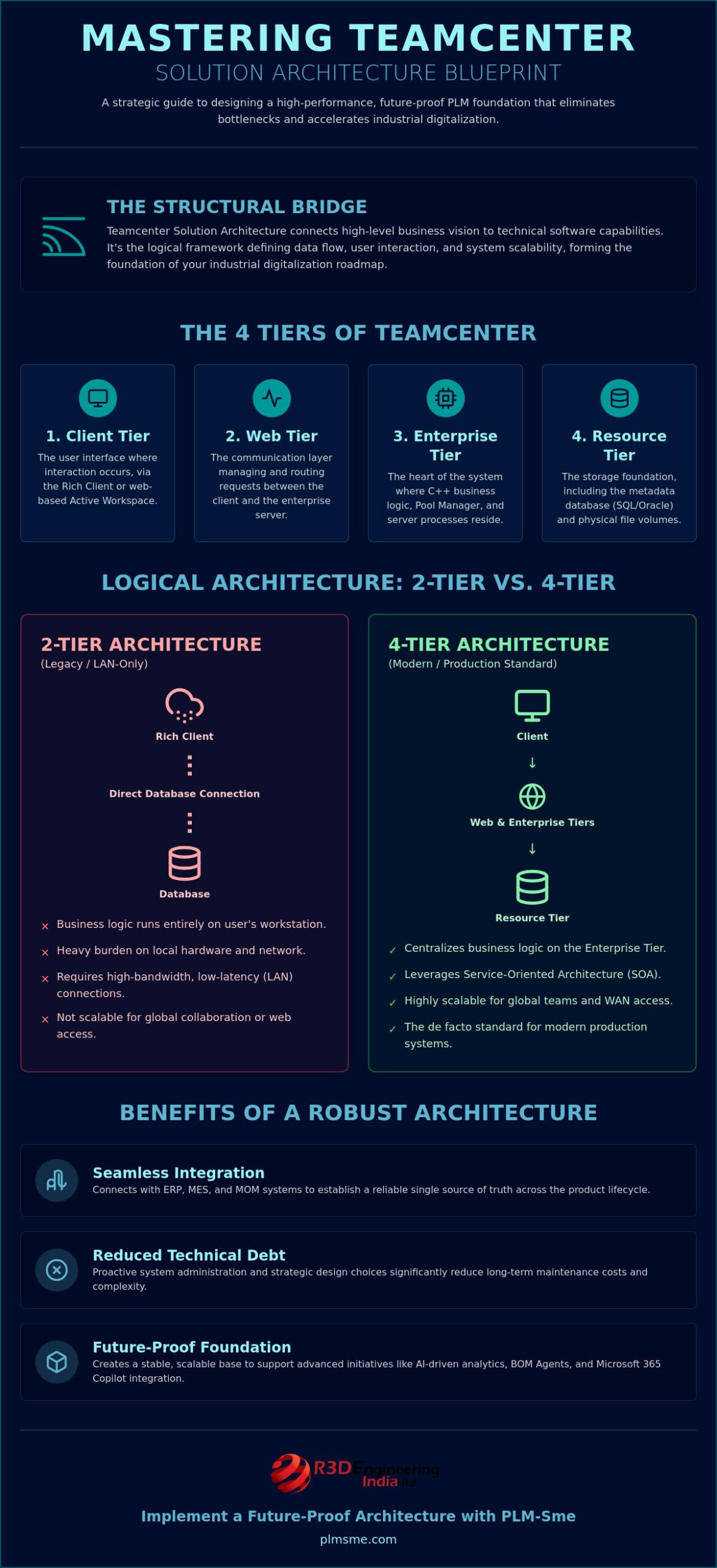
Effective Teamcenter solution architecture is the structural bridge that connects your strategic business requirements to the specific technical capabilities of the software. It’s not merely a diagram of server connections; it’s the logical framework that dictates how data flows, how users interact with information, and how the system scales as your organization grows. While technical infrastructure focuses on the physical or virtual hardware requirements, the solution architecture defines the business logic and rules that govern your Product Lifecycle Management (PLM) environment.
As the flagship PLM suite from Siemens Digital Industries Software, Teamcenter relies on a multi-tiered framework to manage complex product data across global networks. This logic is typically organized into four primary layers:
- Client Tier: The interface where users interact with the system, whether through the Rich Client or the web-based Active Workspace.
- Web Tier: The communication layer that manages requests between the client and the server, often utilizing web application servers to route traffic.
- Enterprise Tier: The heart of the system where the C++ business logic resides, managing the “Pool Manager” and server processes.
- Resource Tier: The storage foundation, consisting of the metadata database (typically SQL or Oracle) and the physical file volumes.
A robust architecture serves as the foundation for an industrial digitalisation roadmap UAE, ensuring that every software capability maps directly to a measurable business outcome and remains flexible enough to evolve with shifting market demands.
Aligning Architecture with Digital Maturity
A successful Teamcenter solution architecture must be rooted in reality. Before drafting a technical blueprint, a comprehensive digital maturity report manufacturing is essential to identify current workflow bottlenecks. If your engineering teams struggle with high latency or fragmented data across siloed instances, the architecture must prioritize centralized data management and optimized wide-area network (WAN) performance. This alignment ensures the system supports advanced initiatives like industrial automation and AI-driven analytics, rather than becoming a legacy burden that prevents innovation.
The Authority of the Solution Architect
Maintaining the health of a PLM environment requires a technical conscience. The Solution Architect acts as a neutral advisor who balances the desire for “out-of-the-box” functionality with the necessity of bespoke customizations that drive competitive advantage. They manage the tension between system integrators and internal stakeholders, ensuring that every modification is documented, sustainable, and cost-effective over the long term. The Solution Architect functions as the ultimate gatekeeper of system integrity, ensuring that every technical decision preserves the long-term viability of the PLM environment.
Evaluating 2-Tier vs. 4-Tier Logical Architectures
Choosing the right logical model is a pivotal decision in Teamcenter solution architecture. This choice dictates how the software processes business logic and how it interacts with the underlying database and file storage. The 2-tier and 4-tier models represent two distinct approaches to balancing performance, security, and administrative overhead in a modern industrial environment. While both have their place, the shift toward global collaboration and web-based interfaces has made the 4-tier model the de facto standard for production systems in 2026.
The 2-tier architecture features a direct connection between the Teamcenter Rich Client and the database. In this setup, the business logic runs entirely on the user’s local workstation. While this removes the “middleman” server, it places a heavy burden on the local hardware and the network. It requires high-bandwidth, low-latency connections, typically found only in local area networks (LAN). Conversely, the 4-tier model introduces a web application server and a pool manager. This centralizes the business logic on the Enterprise Tier, allowing the system to leverage a Service-Oriented Architecture (SOA) to communicate efficiently across wide-area networks (WAN).
When to Deploy a 2-Tier Environment
In contemporary industrial settings, 2-tier deployments are increasingly specialized. They’re ideal for administrative tasks, such as performing schema updates, running data migration scripts, or conducting bulk data imports where direct database access accelerates the process. However, the trade-off is significant. Each client requires its own database drivers and complex local configurations. This increases the maintenance burden for IT teams. Industry professionals generally recommend 2-tier setups only for testing, training, or specific administrative “thick client” use cases where network latency is negligible.
The Strategic Advantage of 4-Tier Architecture
The 4-tier architecture is the essential foundation for modern, collaborative engineering. It’s the only viable model for deploying Active Workspace, which allows users to access PLM data through a standard browser without a heavy local installation. This model simplifies software distribution and drastically reduces the client-side footprint. For large-scale industrial operations, the scalability of the 4-tier model is unmatched. It allows for load balancing across multiple web and enterprise servers, ensuring the system remains responsive as the user base expands.
Security is also significantly more robust in a 4-tier setup. Since the database and resource tiers aren’t directly exposed to the client machines, you can implement more stringent firewall rules and centralized authentication protocols. If you’re currently managing a fragmented environment, exploring PLM system architecture consulting can help you transition to a more secure, 4-tier environment that aligns with your long-term digital vision. This transition is critical for organizations aiming to eliminate the performance bottlenecks that plague global engineering teams.
Designing for Seamless Integration with ERP, MES, and MOM
A connected digital thread is the primary objective of modern Teamcenter solution architecture. Without robust integration, a PLM system remains an isolated silo of engineering data, disconnected from the realities of procurement, manufacturing, and customer feedback. Effective PLM system architecture consulting prioritizes interoperability from day one, ensuring that the transition from an engineering Bill of Materials (eBOM) to a manufacturing Bill of Materials (mBOM) is automated and error-free.
Synchronization between Teamcenter and Enterprise Resource Planning (ERP) systems, such as SAP or Oracle, is critical for maintaining a single source of truth. This integration ensures that when an engineer releases a part, the procurement team immediately sees the updated specifications and lead times. Similarly, connecting Teamcenter to Manufacturing Execution Systems (MES) and Manufacturing Operations Management (MOM) allows for real-time visibility into the shop floor. This connectivity ensures that work instructions are always current and that “as-built” data is fed back into the PLM system for quality tracking and regulatory compliance.
Beyond the factory walls, integrating PLM with Customer Relationship Management (CRM) platforms enhances the tracking of customer requirements. By linking specific product features to original client requests, organizations can ensure that the final delivery aligns perfectly with market needs. This holistic approach prevents data duplication and significantly reduces the risk of costly late-stage design changes.
Just as data must flow between software systems, team members must stay connected; specialized IT providers like SpaceCenter Systems offer the modern communication tools and managed services necessary to support a reliable, integrated business infrastructure.
The Enterprise Tier as an Integration Hub
The Enterprise Tier serves as the primary engine for external connectivity. Utilizing Service-Oriented Architecture (SOA), Teamcenter can make external system calls and respond to requests from third-party applications with high precision. For complex or time-consuming tasks, the Dispatcher plays a vital role. It manages asynchronous integration activities, such as bulk data transfers or CAD file translations, without impacting the performance of the end-user interface. Successful data mapping between Teamcenter and external databases requires a strict adherence to standardized data models to prevent “dirty data” from polluting the integrated ecosystem.
Future-Proofing with AI and Automation
Preparing your architecture for industrial AI requires more than just connectivity; it requires data readiness. As organizations move toward version 2606 and its expanded AI capabilities, the integration points must be robust enough to handle real-time automation feedback loops. A clean architecture facilitates AI-driven insights by providing structured, high-fidelity data that eliminates the “noise” typically found in legacy systems. This foundation allows for advanced predictive maintenance and automated design optimization, ensuring your technical infrastructure supports the next generation of industrial innovation.
Optimizing Performance and Reducing Technical Debt
Technical debt is the silent killer of industrial agility. When a Teamcenter solution architecture is designed without a long-term strategy, the result is often a rigid system that’s expensive to maintain and difficult to upgrade. Poor PLM architecture design leads to ballooning maintenance costs because every minor change requires extensive regression testing across a web of undocumented customizations. Over time, these inefficiencies compound, making the system a bottleneck rather than an accelerator for engineering workflows.
Proactive Teamcenter system administration is the only reliable way to preserve architectural health. It involves regular audits of existing modifications to identify where legacy code can be replaced by standard functionality. This prevents “version lock,” ensuring your organization can always leverage the latest performance enhancements and security patches. Managing CAD data volumes also requires a strategic approach to the File Management System (FMS). Without optimized volume management and automated cleanup scripts, storage costs rise while system responsiveness inevitably drops.
The Value of an Administration Retainer
Maintaining a complex PLM environment requires specialized knowledge that internal IT departments often lack. A PLM administration retainer ensures continuous optimization by providing access to experts who understand the nuances of the Teamcenter data model. This approach shifts the paradigm from reactive “firefighting” to a proactive system health model. Instead of waiting for a server crash, administrators monitor log files and database performance to resolve issues before users even notice a slowdown. It’s a cost-effective way to access high-level expertise for complex architectural adjustments without the overhead of full-time specialists.
Managing System Performance and Latency
Latency is the primary enemy of global engineering collaboration. To combat this, architects must optimize the Resource Tier for high-speed metadata retrieval. This often involves database tuning and index optimization specifically tailored to Teamcenter’s unique query patterns. For distributed teams, FMS cache server placement is a critical architectural decision. By placing cache servers at regional hubs, you can drastically reduce the time required to open large assemblies. Monitoring tools and specific KPIs are essential for validating the success of your Teamcenter solution architecture performance tuning, including:
- Average query response times for complex searches and BOM expansions.
- File upload and download speeds across different geographical sites.
- Database lock contention rates during peak usage hours.
If your environment is struggling with performance bottlenecks or legacy debt, our Teamcenter system administration retainer provides the expertise needed to restore your system to peak efficiency and ensure long-term stability.
Implementing a Future-Proof Architecture with PLM-Sme
Success in digital transformation isn’t accidental. It’s the result of a methodical approach that aligns technical infrastructure with business strategy. At PLM-Sme, we don’t just install software; we function as a thinking partner, engaging deeply with your long-term vision to build a Teamcenter solution architecture that scales. Our methodology begins with a comprehensive Digital Maturity Assessment. This ensures we understand your current state before moving into the System and Solution Architecture phase and eventually providing End-to-End PLM Implementation Support.
Choosing a vendor-independent consultant offers a distinct advantage. Unlike software resellers who might prioritize license sales, our objectivity allows us to focus entirely on what’s best for your operation. We provide neutral advice on architectural outcomes, ensuring your system is optimized for performance and cost-effectiveness rather than vendor convenience. For discrete manufacturing firms, this means a design tailored to specific product complexities and production cycles. We prioritize the practical execution of your digital thread, ensuring every technical decision serves a strategic purpose.
Bespoke Solution Design
We avoid one-size-fits-all templates. Every roadmap is customized to integrate your existing legacy systems into a modern PLM landscape. This approach ensures that your architecture supports industry-specific compliance and standards without sacrificing agility. By mapping out every integration point, we create a stable environment where data flows freely between engineering and the shop floor. Our designs focus on minimizing custom code, favoring sustainable configurations that remain easy to upgrade as the software evolves; you can find out more about how Sameh Zoaa applies full-stack engineering principles to maintain technical precision in complex systems.
Your Journey to Industrial Excellence
Our support doesn’t end at go-live. We manage the entire lifecycle of your platform, from initial architecture design to ongoing PLM System Administration Retainers. As you look toward the AI-enhanced features of Teamcenter 2606, we ensure your data structure is ready for the next wave of industrial automation. This continuous partnership helps you maintain a high-performance environment while keeping technical debt at a minimum. We provide the specialized expertise needed to navigate complex architectural adjustments, allowing your internal teams to focus on core innovation.
If you’re ready to build a foundation for the future, Partner with PLM-Sme for Expert Teamcenter Architecture to secure your digital thread and accelerate your industrial digitalization.
Securing Your Digital Thread for 2026
Designing a high-performance Teamcenter solution architecture is a strategic investment that pays dividends in long-term operational agility and reduced maintenance costs. By transitioning to a robust 4-tier model and prioritizing clean interoperability with ERP and MES systems, you transform your PLM environment into a dynamic engine for innovation. It’s about moving beyond basic technical infrastructure to create a logical framework that supports both current engineering workflows and future AI-driven automation.
As a Siemens Digital Industries Alliance Partner, PLM-Sme brings deep expertise in discrete industry digitalization and complex system integrations. We don’t just provide support; we act as your thinking partner to eliminate technical debt and ensure system stability. Request a Digital Maturity Assessment and Architecture Review today to validate your roadmap and optimize your digital thread. Your path toward a more efficient and scalable industrial future is within reach.
Frequently Asked Questions
What is the primary difference between a Solution Architect and a System Architect in Teamcenter?
How does Teamcenter architecture support cloud or hybrid deployments in 2026?
Teamcenter architecture supports cloud and hybrid models through the Service-Oriented Architecture (SOA) and web-tier components that facilitate secure communication outside local networks. Modern deployments often utilize Teamcenter X for a SaaS experience or private cloud hosting on platforms like Azure. This flexibility allows organizations to centralize the Resource Tier while distributing Web and Enterprise tiers to reduce latency for global teams.
Can we migrate from a 2-tier to a 4-tier architecture without data loss?
Yes, migrating from a 2-tier to a 4-tier architecture is a structural change to the application logic and communication layers that does not affect the integrity of the underlying metadata or file volumes. Since both models share the same Resource Tier, the migration involves reconfiguring the Enterprise and Web tiers. Proper validation ensures that existing business rules and customizations are correctly mapped to the new environment.
What are the most common architectural mistakes that lead to PLM project failure?
Over-customization of the data model and failing to account for network latency in global deployments are the most frequent causes of architectural failure. Excessive bespoke code creates technical debt that prevents upgrades. Additionally, neglecting to place FMS cache servers near remote engineering hubs results in poor performance, which often leads to low user adoption and eventual project abandonment.
How does the architecture impact the speed of CAD data loading for remote users?
The architecture impacts CAD loading speeds primarily through the configuration of the File Management System (FMS) and the placement of regional cache servers. By implementing a 4-tier Teamcenter solution architecture with localized caches, remote users download large assemblies from a nearby server instead of the central volume. This reduces the impact of high-latency connections on daily engineering productivity.
Is a dedicated database server always required for Teamcenter environments?
While not strictly required for small testing or training environments, a dedicated database server is a standard requirement for all production-grade Teamcenter deployments. Separating the database from the Enterprise Tier prevents resource contention. This ensures that heavy business logic processing doesn’t slow down metadata retrieval, which is essential for maintaining system stability and performance in enterprise-level organizations.
How often should we review our Teamcenter solution architecture for optimization?
Organizations should conduct a formal review of their Teamcenter solution architecture at least once a year or whenever a significant change in user headcount occurs. Regular audits help identify emerging technical debt and performance bottlenecks. These reviews ensure the system remains aligned with evolving business goals and is ready for major software updates or new AI integrations.
Does Active Workspace require a specific architectural tier for deployment?
Active Workspace requires a 4-tier architecture because it relies on the Web Tier and Gateway components to deliver a browser-based interface without local client installations. It cannot function in a traditional 2-tier environment. The 4-tier setup provides the necessary Service-Oriented Architecture (SOA) framework to handle the high-speed communication required for a modern, mobile-friendly user experience.