
Teamcenter Integration with Solid Edge: Building a Seamless Digital Thread in 2026
Is your engineering data a strategic asset or a fragmented liability? While CAD tools are excellent for creation, the real value lies in how that data flows through your organization. Many manufacturers struggle with data duplication and manual revision errors because their design and management systems don’t communicate effectively. Implementing a robust Teamcenter integration with Solid Edge is no longer just a technical upgrade; it’s a strategic necessity for building a seamless digital thread in 2026.
You likely feel the strain of disconnected teams and the complexity of managing multi-faceted system architectures. It’s exhausting to police manual release cycles when your competitors are moving toward automated, AI-ready foundations. This guide shows you how to bridge the gap between engineering and manufacturing by establishing a single source of truth. We’ll explore how to leverage Active Workspace for better visibility and outline a roadmap for a successful, end-to-end PLM implementation that scales with your industrial vision.
Key Takeaways
- Understand how the Solid Edge Embedded Client (SEEC) architecture maintains assembly integrity and prevents data loss during complex design cycles.
- Discover methods to eliminate manual revision errors and automate release cycles to ensure engineering and manufacturing teams remain perfectly synchronized.
- Identify the critical steps for establishing a scalable roadmap for your Teamcenter integration with Solid Edge, starting with a comprehensive digital maturity assessment.
- Explore why partnering with an independent Siemens Digital Industries Alliance Partner is essential for developing bespoke integrations that bridge CAD, ERP, and MES systems.
Bridging the Gap Between CAD and Product Lifecycle Management
Engineering efficiency depends on the seamless flow of data between design and management environments. A robust Teamcenter integration with Solid Edge creates a bidirectional highway where CAD data becomes a live component of the product lifecycle. This unified system ensures that every design change in Solid Edge is immediately reflected in the Teamcenter database, providing a level of visibility that isolated file folders cannot match. These solutions, developed by Siemens Digital Industries Software, are designed to turn raw design files into structured, actionable intelligence.
The cost of disconnected data is high for modern manufacturing firms. Relying on manual file management often results in data silos where engineering, procurement, and manufacturing operate on different versions of a part. This fragmentation leads to costly scrap, rework, and delayed production schedules. Establishing a single source of truth eliminates these risks by centralizing all engineering data. Navigating this architectural shift requires Strategic Siemens Teamcenter Consulting to ensure the digital foundation is scalable and aligned with long term business objectives.
Why UAE Manufacturers are Prioritizing CAD-PLM Connectivity
Industrial firms across the UAE are accelerating their digitalization efforts to meet 2026 national industrial goals. Synchronized engineering data is the primary driver for reducing time-to-market in a competitive global landscape. By implementing a Teamcenter integration with Solid Edge, companies can support multi-site manufacturing operations without creating local data bottlenecks. This connectivity allows teams in different locations to collaborate on the same assembly in real time, ensuring that local production always adheres to the central design intent.
Identifying the Core Components of the Integration
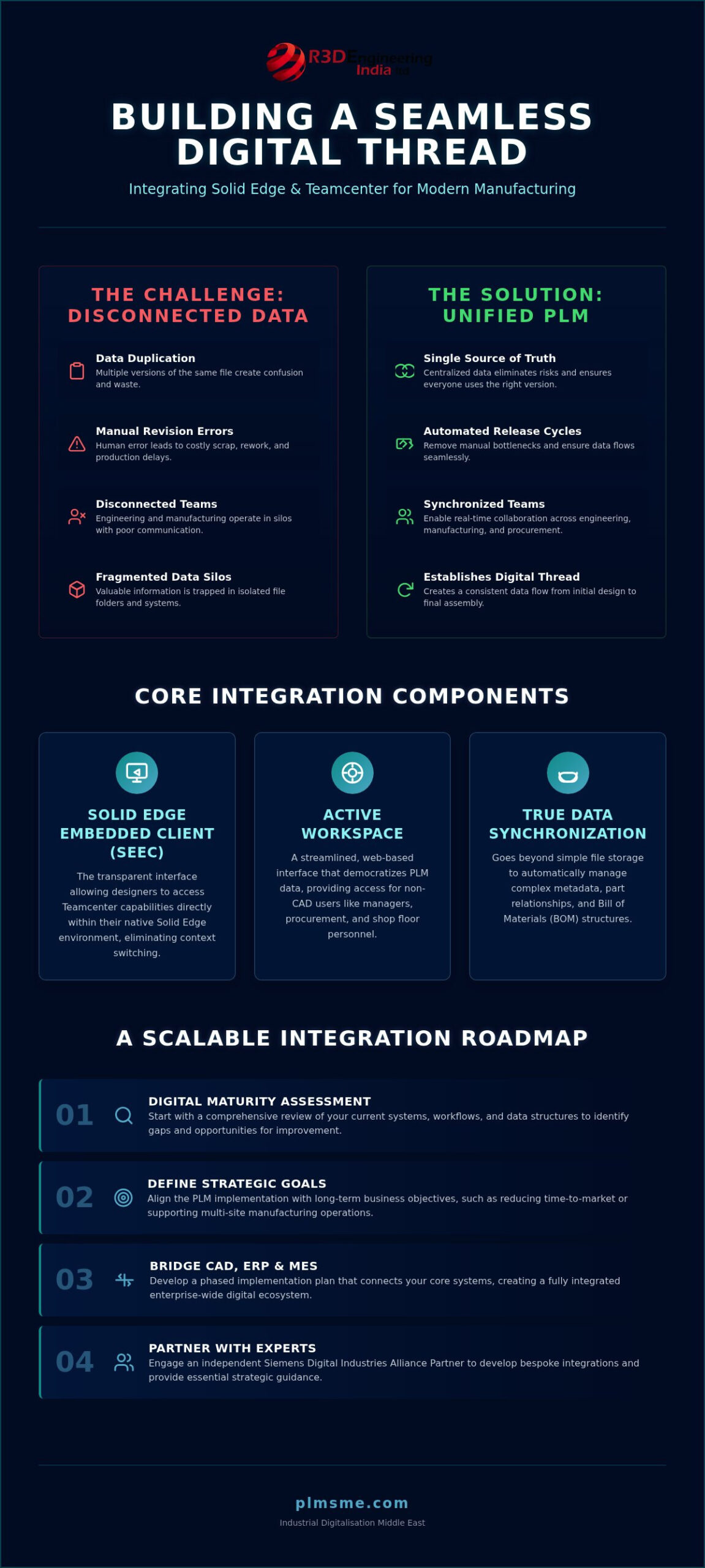
Successful integration relies on specific technical pillars that go beyond simple file storage. Understanding these components is essential for a smooth implementation:
- Solid Edge Embedded Client (SEEC): This is the transparent interface within the Solid Edge environment that allows designers to access Teamcenter capabilities without leaving their CAD workspace.
- Active Workspace: A streamlined, web-based interface that democratizes PLM data for non-CAD users, such as managers and shop floor personnel.
- Data Synchronization: Unlike basic storage, this process manages complex metadata, part relationships, and bill of materials (BOM) structures automatically.
Moving from simple file saving to true data synchronization allows for automated revision control. It ensures that the engineering team focuses on innovation rather than administrative file tracking.
Harnessing the Solid Edge Embedded Client (SEEC) Architecture
The Solid Edge Embedded Client (SEEC) serves as the specialized engine that drives the Teamcenter integration with Solid Edge. It isn’t merely a plugin or a simple interface. It’s a sophisticated data management layer that operates within the CAD environment to ensure every geometry change is captured within the context of the larger product lifecycle. By embedding PLM capabilities directly into the design workspace, SEEC allows engineers to focus on creation while the system handles the complexities of data integrity. This technical alignment is foundational for achieving a true Digital Thread for Smart Manufacturing, where data remains consistent from the first sketch to the final assembly.
Managing Assemblies and Inter-Part Relationships
Handling complex assembly structures is where SEEC demonstrates its true value. It manages inter-part relationships with precision, ensuring that “Where Used” and “Used In” queries are processed instantly without manual file searching. When a designer modifies a single part, the system automatically identifies every assembly that utilizes that component. This prevents the accidental use of outdated versions in downstream production. Property and attribute synchronization happens in the background, which means metadata like material specs or weight are always current. For massive assemblies, the integration utilizes lightweight visualization. This allows engineers to open and review huge models without exhausting local hardware resources or causing network lag.
Optimizing System Architecture for Performance
Stable connectivity across national networks requires a well-planned technical foundation. The performance of your Teamcenter integration with Solid Edge depends heavily on how you configure server-side and client-side processing. High-performance data transfer isn’t just about bandwidth; it’s about smart cache management. By storing frequently accessed data locally in a secure cache, SEEC reduces the need to constantly pull large files from the central server. This significantly speeds up daily engineering tasks. Successful deployment often hinges on professional PLM system architecture consulting to ensure that data security protocols don’t become performance bottlenecks. A balanced architecture maintains high speed while enforcing strict access controls. Assessing your current network capabilities and system readiness is a practical first step before scaling your integration. You might consider a digital maturity assessment to identify potential infrastructure gaps early in the process.
Optimizing Engineering Workflows Through Seamless Integration
Efficient engineering is built on the elimination of manual administrative tasks. When designers spend hours managing file naming conventions or searching for the latest part version, innovation suffers. A deep Teamcenter integration with Solid Edge removes these bottlenecks by automating the entire revision and release process. This shift replaces the error prone “Final_v2_Final” naming trap with a structured, system driven approach. By managing data at the object level rather than the file level, organizations ensure that every stakeholder works from a single, verified source of truth.
Engineering Change Management (ECM) becomes a fluid part of the design process rather than a disruptive hurdle. Within the Solid Edge environment, engineers can initiate, review, and track change requests without switching between applications. This integration aligns with broader strategic goals discussed by research institutions like the Center for Digital Transformation, which emphasizes the need for organizational agility through integrated digital systems. Achieving this level of workflow optimization requires a move toward concurrent engineering, where different departments contribute to the product lifecycle simultaneously.
Standardizing the Revision and Release Cycle
Consistency is the foundation of quality. The integration enforces company wide engineering standards by automating how parts move through their lifecycle. Once a part is released in Teamcenter, the system locks the Solid Edge file against unauthorized edits. This prevents accidental modifications that could lead to manufacturing defects. Digital sign offs replace paper based approvals, creating an audit trail that is both transparent and secure. These automated workflows ensure that nothing moves to production without the necessary technical clearances, reducing the risk of costly rework.
Achieving Design to Manufacturing Transparency
The value of engineering data extends far beyond the CAD workstation. Active Workspace provides non CAD users, such as procurement and shop floor managers, with real time access to design data. This visibility is critical for bridging the gap between the Engineering Bill of Materials (EBOM) and the Manufacturing Bill of Materials (MBOM). When engineering and manufacturing are synchronized, procurement can begin sourcing long lead items earlier in the design cycle. This transparency supports concurrent engineering practices, allowing manufacturing planning to occur while the final design details are being polished. A successful Teamcenter integration with Solid Edge ensures that the manufacturing team is never working from obsolete drawings, which is a common failure point in disconnected systems.
Establishing a Scalable Integration Roadmap
Successful digitalization doesn’t happen by accident. It requires a structured approach that views Teamcenter integration with Solid Edge as a strategic milestone rather than a final destination. Most organizations fail when they treat implementation as a simple software installation. Instead, a phased rollout ensures that each stage of connectivity delivers measurable value while building the technical foundation for future growth. Aligning this process with a strategic industrial digitalization roadmap allows UAE manufacturers to synchronize their engineering goals with national industrial objectives for 2026.
Assessing Digital Maturity for PLM Readiness
Before migrating data into a managed environment, you must evaluate your current digital maturity. This involves a cold, objective look at existing data quality and CAD methodologies. If your current file structures are disorganized, moving them into Teamcenter won’t fix the underlying issues; it will only formalize existing inefficiencies. Key performance indicators (KPIs) should be established early to track success. These might include reduction in engineering change cycle times or the percentage of parts reused across different projects. Identifying these gaps early prevents technical debt and ensures the system architecture remains stable as you scale.
Scaling Beyond CAD: ERP and MES Integration
A mature digital thread extends far beyond the engineering department. Once the Teamcenter integration with Solid Edge is stabilized, the next logical step is connecting PLM data to Enterprise Resource Planning (ERP) and Manufacturing Execution Systems (MES). This connectivity ensures that the bill of materials (BOM) created in engineering flows directly into procurement and shop floor scheduling without manual data entry. Preparing your data foundation now is critical for future AI and automation initiatives. Clean, structured data is the fuel for predictive maintenance and automated supply chain optimizations. To ensure your business is prepared for this level of connectivity, consider engaging in professional consulting for your digitalization roadmap to define a clear path forward.
Partnering with PLM-Sme for Enterprise-Grade Implementation
Implementing a high performance Teamcenter integration with Solid Edge requires more than just technical configuration. It demands a partner who understands the intricate balance between out of the box functionality and the bespoke requirements of discrete manufacturing. As a Siemens Digital Industries Alliance Partner, PLM-Sme FZC acts as an independent thinking partner. We provide specialized Teamcenter integration development that ensures your software environment reflects your actual engineering processes rather than forcing your team to adapt to rigid software defaults. This approach reduces technical debt from the outset by prioritizing a clean, scalable system and solution architecture.
The Value of Independent PLM Consulting
Generic software deployment often fails to account for the unique operational nuances of a specific business. Independent consulting provides an objective lens, helping you navigate the choice between standard system configurations and the need for custom development. Our focus remains on long term ROI and architectural stability. We help you identify where Siemens Teamcenter and Solid Edge synergy can be maximized without over complicating the user experience. By moving beyond simple deployment, we ensure that your PLM foundation is robust enough to support the future AI and industrial automation initiatives discussed in earlier sections.
National Support for UAE Manufacturers
Regional expertise is vital for ensuring that your digital thread complies with local standards and data regulations. We provide end to end PLM implementation support across the UAE, catering specifically to the needs of the national manufacturing sector. Our team develops custom connectors that bridge the gap between CAD data and existing ERP or MES systems, creating a unified ecosystem. This national level support ensures that your digitalization journey is backed by professionals who understand the local industrial environment and the specific challenges of UAE based discrete industries.
Maintaining a sophisticated PLM environment requires ongoing oversight to prevent performance degradation. Through our PLM system administration retainer, we provide the steady, reliable support needed to manage updates, optimize database performance, and refine workflows as your business evolves. This methodical approach ensures that your Teamcenter integration with Solid Edge continues to function as a strategic asset, providing a stable platform for your industrial digitalization journey well into 2026.
Securing Your Industrial Future Through Strategic Connectivity
Building a seamless digital thread requires moving beyond basic file management toward a unified data ecosystem. By leveraging the Solid Edge Embedded Client architecture and automating release cycles, you eliminate the manual errors that stall innovation. A robust Teamcenter integration with Solid Edge transforms your engineering data into a dynamic asset that fuels your entire enterprise. It creates a foundation where design, procurement, and manufacturing teams operate with total transparency.
As a vendor-independent PLM consultancy and Siemens Digital Industries Alliance Partner, we possess the expertise to navigate complex industrial digitalization roadmaps. We focus on bridging the technical gap between your CAD environment and broader ERP or MES systems with precision. Request a Digital Maturity Assessment for your Teamcenter Integration to identify your current readiness and establish a scalable path forward. Your transition to a high-performance digital thread starts with a clear vision and a reliable technical partner.
Frequently Asked Questions
Is Teamcenter integration compatible with all versions of Solid Edge?
Compatibility depends on the specific release cycle of both platforms. Usually, a Teamcenter integration with Solid Edge supports the current version and several preceding releases. It’s vital to check the compatibility matrix for your specific SEEC version to ensure all features are supported. Older versions may require patches or specific client updates to maintain full functionality within a modern PLM environment.
How does the Solid Edge Embedded Client (SEEC) improve engineer productivity?
SEEC allows designers to perform all PLM tasks without leaving their CAD interface. This eliminates the need to switch between applications to check out parts or manage revisions. By automating attribute synchronization and search functions, it reduces administrative overhead significantly. Engineers spend less time on file management and more time on actual design innovation, which accelerates the overall development cycle.
Can we integrate Solid Edge with Teamcenter if we already use another ERP system?
Yes, you can bridge these systems effectively. Teamcenter acts as the central hub for engineering data, which then feeds into your ERP through specialized connectors or gateways. This setup ensures that your manufacturing and procurement teams receive accurate, released design data regardless of which ERP platform your organization uses. It’s a standard practice for creating a unified digital thread across different departments.
What are the hardware requirements for a stable Teamcenter-Solid Edge integration?
Stable performance requires a robust architecture with dedicated application and database servers. Client workstations should have at least 32GB of RAM and high speed SSDs to handle large CAD files efficiently. Low latency network connectivity is the most critical factor for ensuring smooth data transfer between the client and the server. High performance graphics cards are also necessary for rendering complex assemblies without lag.
How does integration handle large assemblies and complex inter-part links?
The integration uses lightweight JT visualization to load massive assemblies without consuming excessive memory. It manages inter-part relationships at the database level, preventing the broken link issues common in file based systems. This ensures that “where used” queries remain accurate even as designs evolve. You can open and edit specific components within a massive assembly context without loading the entire dataset into local memory.
What is the typical timeline for a full Teamcenter-Solid Edge implementation?
A core Teamcenter integration with Solid Edge implementation typically spans three to six months. This timeline includes the initial digital maturity assessment, system configuration, and user training. More complex projects involving ERP integration or large scale data migration may extend to twelve months. The duration depends heavily on your organization’s data readiness and the complexity of your existing engineering workflows.
How do we manage legacy CAD data during the integration process?
Legacy data is managed through a structured migration and cleansing process. You don’t need to move everything at once. We recommend a “migrate on demand” strategy for active projects while using bulk upload tools for archived data. This ensures all files are validated and cleaned before they enter the managed PLM environment, preventing the transfer of existing errors into the new system.
Does the integration support multi-CAD environments alongside Solid Edge?
Teamcenter is designed to be CAD agnostic, supporting a wide range of formats including NX, CATIA, and Creo. This allows your team to manage diverse design data within a single PLM environment. Solid Edge remains fully synchronized with these other datasets, facilitating seamless collaboration in multi platform engineering departments. You can maintain a single source of truth even when different teams use different design tools.