
Optimizing Teamcenter CAD Data Management: Architecting a Closed-Loop Digital Thread
If your CAD data remains confined to the engineering department, it isn’t a strategic asset; it’s a structural bottleneck. For many UAE industrial leaders, the daily reality of Teamcenter CAD data management involves manual BOM transfers and disconnected silos that inevitably lead to costly production errors. You’ve likely experienced the friction when engineering intent doesn’t align with shop floor capabilities, resulting in rework that drains your margins. It’s a systemic hurdle that prevents many organizations from reaching their full digital maturity.
This article demonstrates how to transform these fragmented processes into a resilient, closed-loop digital thread that bridges the gap between design and production excellence. You’ll learn how to architect a data environment that reduces time-to-market and ensures your architecture is AI-ready for 2026. We’ll examine the technical methodologies for breaking down silos, automating the flow of information, and establishing a single source of truth. By shifting from simple data storage to strategic lifecycle management, your organization can achieve the operational stability required for complex industrial projects.
Key Takeaways
- Establish a single source of truth to eliminate the costly disconnect between engineering design and shop floor production.
- Centralize multi-CAD data from platforms like NX and SolidWorks to create a high-integrity Manufacturing Bill of Materials using advanced Teamcenter CAD data management.
- Evaluate the long-term benefits of middleware and Enterprise Service Bus architectures over fragile, script-heavy point-to-point integrations.
- Build a sustainable digitalization roadmap by prioritizing a digital maturity assessment before committing to complex system implementations.
- Transition to an AI-ready, closed-loop manufacturing process that leverages real-time feedback to reduce time-to-market and operational waste.
Bridging the Gap Between Engineering and Production Operations
In the competitive landscape of UAE discrete manufacturing, the gap between engineering vision and shop floor execution often represents a significant financial leak. Design intent frequently dissipates during the handoff to production because data remains trapped in isolated repositories. Implementing rigorous Teamcenter CAD data management provides the necessary infrastructure to maintain a single source of truth. When design files are managed centrally, the risk of production teams working from outdated revisions disappears, replacing manual, error-prone transfers with automated, high-integrity data flows.
Understanding the Silo Problem in Discrete Manufacturing
The cost of manual data transfer is visible in every scrapped part and delayed shipment. In many facilities, outdated BOMs lead to costly production rework because the latest engineering changes didn’t reach the assembly line in time. This communication lag is exacerbated by “Shadow IT” workarounds, where staff use unmanaged spreadsheets or local folders to store critical drawings. These practices compromise data integrity and make it nearly impossible to track the history of a component. For a regional industry aiming for global standards, these silos are no longer just an inconvenience; they’re a barrier to scaling operations effectively.
The Strategic Necessity of a Closed-Loop Digital Thread
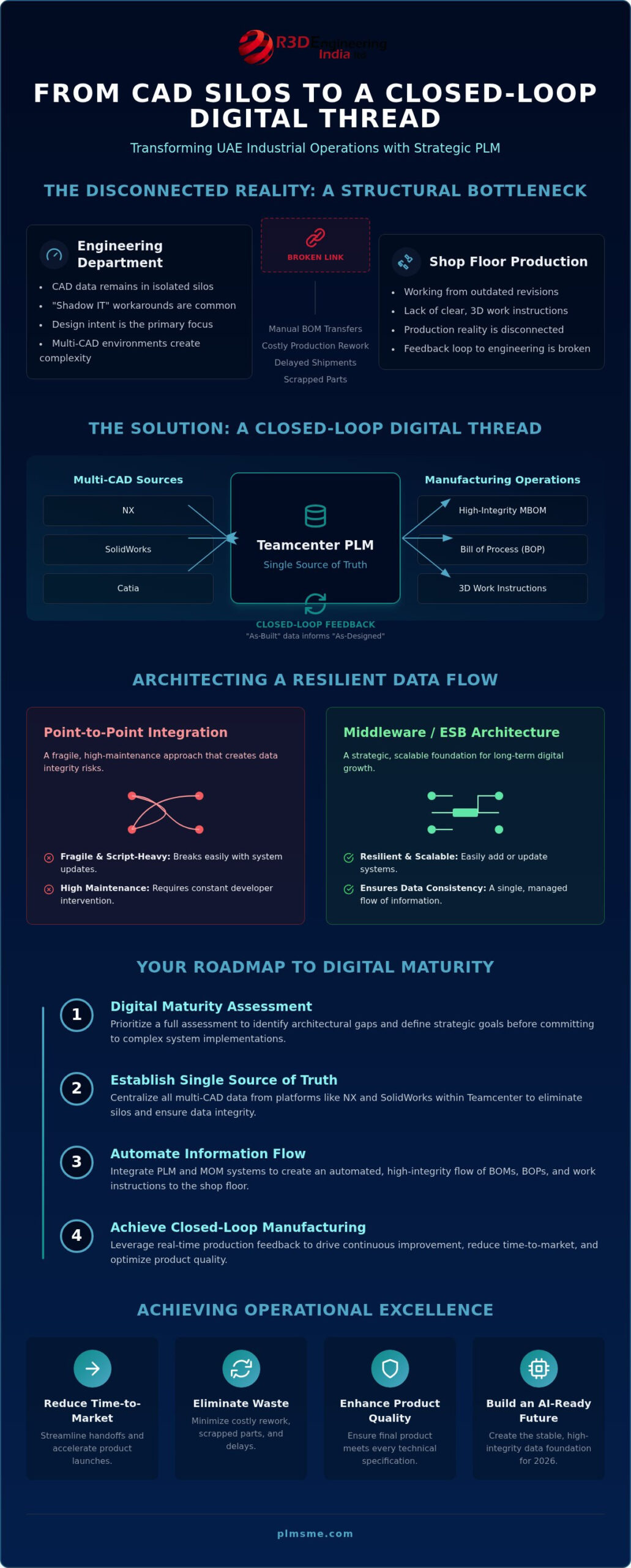
A strategic approach to Product Lifecycle Management (PLM) transforms CAD data from a static file into a dynamic participant in the manufacturing process. This creates a closed-loop digital thread, which is a feedback-driven model that connects the “As-Designed” state with the “As-Built” reality on the floor. In this environment, Teamcenter CAD data management ensures that real-time feedback from production reaches engineering, allowing for rapid iterations and improved product quality.
Looking toward 2026, maintaining this level of data consistency will be vital for regulatory compliance and the adoption of AI-driven manufacturing audits within the UAE industrial sector. It establishes a foundation where every decision is backed by verified, historical data rather than departmental assumptions. By reconciling what’s designed with what’s actually built, organizations can identify discrepancies early, reducing waste and ensuring that the final product meets every technical specification defined at the start of the lifecycle.
Architecting Teamcenter CAD Data Management for Multi-CAD Environments
Multi-CAD management is the systematic orchestration of diverse engineering data formats within a unified PLM environment to ensure cross-platform interoperability and data consistency. For UAE manufacturers, this often involves centralizing data from NX, SolidWorks, and Catia into a single, high-integrity backbone. Without this centralization, Teamcenter CAD data management becomes a series of disconnected tasks rather than a strategic advantage. The goal is to move beyond mere file storage and establish a robust framework where every design change propagates correctly across the entire value chain.
The transition from an Engineering Bill of Materials (EBOM) to a Manufacturing Bill of Materials (MBOM) serves as the primary bridge in this architecture. Mapping these data objects accurately between Teamcenter and Manufacturing Operations Management (MOM) platforms, such as Opcenter, is essential for maintaining the Digital Thread for Smart Manufacturing. This alignment ensures that the shop floor receives the exact geometry and metadata required for production, eliminating the ambiguity that often plagues multi-vendor software environments.
Key Integration Touchpoints: BOMs, BOPs, and Work Instructions
Synchronizing the Bill of Process (BOP) ensures that shop floor routing reflects the latest engineering intent. By delivering 3D work instructions directly from CAD models to the production line, you reduce the cognitive load on operators and minimize assembly errors. Effective management of Engineering Change Notices (ECN) across this integrated landscape prevents the “As-Built” product from drifting away from the “As-Designed” specifications. If your current processes lack this level of synchronization, a digital maturity assessment can help identify the specific architectural gaps in your lifecycle management.
Technical Frameworks: SOA and Data Mapping Best Practices
A resilient architecture relies on Service Oriented Architecture (SOA) to provide flexible, scalable system connectivity. This approach allows for high-frequency production updates without compromising data integrity. When choosing between middleware and direct Teamcenter integration development for MOM, you must consider long-term technical debt. Clean data is essential. Architecting for AI-readiness in 2026 requires structured data flows that aren’t hampered by rigid, hard-coded connections. Prioritizing a modular Teamcenter CAD data management strategy ensures that your digital thread remains adaptable as your manufacturing technologies evolve.
Evaluating Integration Strategies: Point-to-Point vs. Middleware
Choosing the right integration architecture is a critical decision in Teamcenter CAD data management. Many organizations fall into the “Point-to-Point” trap, relying on custom scripts to connect PLM to ERP or MOM systems. While these scripts might seem cost-effective initially, they create significant technical debt. Every time one system updates, the connection breaks. This leads to a brittle infrastructure that can’t support national-scale operations effectively. It’s a reactive approach that often results in higher long-term maintenance costs.
Utilizing an Enterprise Service Bus (ESB) or a dedicated middleware layer offers a more resilient alternative. This centralized hub manages data translations and routing, ensuring that a change in one system doesn’t trigger a cascade of failures across your architecture. Engaging in PLM system architecture consulting allows you to design these connections with long-term stability in mind. It’s a strategic shift from manual patching to proactive, scalable orchestration that aligns with your broader digitalization vision.
The Risks of Custom-Coded ‘Hard’ Integrations
Custom-coded integrations are notoriously difficult to maintain during Siemens Teamcenter version upgrades. When you move to a new release, hard-coded scripts often require complete rewrites because they rely on specific, outdated API calls. Scaling these scripts across multiple production sites introduces even more complexity. A vendor-independent consulting approach protects your interests here. It ensures your architecture isn’t locked into a specific vendor’s proprietary logic. This independence keeps your digital thread flexible and reduces the risk of software lock-in as your requirements evolve.
Standard-Based Integration: ISA-95 and AI Readiness
Standardized data models are the foundation for future-proofing your industrial operations. By applying the ISA-95 standard, you create a clear, structured hierarchy for enterprise-to-control system integration. This isn’t just about current efficiency; it’s about AI readiness for 2026. AI agents and machine learning models require clean, standardized data to provide meaningful production insights. In a multi-vendor manufacturing landscape, sticking to industry standards ensures that your Teamcenter CAD data management environment communicates seamlessly with diverse hardware and software, regardless of the manufacturer or the complexity of the shop floor.
Developing a Roadmap for Successful System Integration
Successful Teamcenter CAD data management implementation depends on a methodical sequence of execution rather than just software installation. Many UAE industrial leaders struggle with integration because they attempt to connect complex systems without a clear architectural strategy. A structured roadmap serves as a safeguard against technical debt and ensures that each phase of the project adds tangible value to the production line. This process begins with understanding your current capabilities and ends with a scalable, supported environment that grows with your business.
- Step 1: Digital Maturity Assessment. You must evaluate your existing IT and OT landscapes to identify gaps in data flow and infrastructure readiness.
- Step 2: Vision and Target Architecture. Define the “to-be” state where CAD data communicates seamlessly with your shop floor systems.
- Step 3: Data Cleansing and Harmonization. Legacy CAD models often require standardization to ensure they are compatible with automated BOM transfers.
- Step 4: Pilot Implementation. Validate the integration on a single product line to identify and resolve friction points before a full-scale rollout.
- Step 5: Enterprise Scaling. Deploy the solution across the organization and establish a support retainer to maintain system health.
Assessing Readiness with a Digital Maturity Report
Starting your journey with a digital maturity report in manufacturing is the most effective way to prevent project failure. This report provides an objective analysis of your IT/OT compatibility, specifically focusing on whether your Teamcenter CAD data management protocols can support real-time MOM integration. It also uncovers organizational barriers, such as departmental silos or lack of standardized documentation, that could hinder the adoption of a closed-loop digital thread. Without this baseline, you risk investing in technology that your current infrastructure cannot fully utilize.
Phasing the Rollout: From Pilot to Enterprise Scale
Attempting a “big bang” implementation often leads to operational disruption. Instead, select a high-impact product line for a proof-of-concept integration. This pilot phase allows you to refine data mapping and train the workforce on how to utilize integrated CAD data effectively. Success should be measured through specific KPIs, such as a reduction in engineering change cycle times or a decrease in shop floor rework caused by data errors. Once the pilot proves successful, you can scale the architecture across the national enterprise with confidence.
If you are ready to identify the gaps in your current architecture and build a resilient roadmap for the future, book your digital maturity assessment with our specialist team today.
Optimizing Your Digital Thread with PLM-Sme Expertise
As a Siemens Digital Industries Alliance Partner, PLM-Sme FZC provides the technical depth required to manage complex industrial transformations without the bias of a software vendor. We don’t just install tools; we architect solutions that bridge the gap between high-level vision and the reality of the shop floor. For national industrial leaders, this means access to specialized expertise in end-to-end PLM implementation and integration development for sophisticated MOM environments. Our approach prioritizes strategic roadmaps that ensure your technology stack remains a competitive asset rather than a maintenance burden. We function as a thinking partner, engaging deeply with your long-term vision to deliver quality that mass-market solutions cannot match.
Strategic Consulting for Industrial Digitalization
Crafting a strategic industrial digitalization roadmap for 2026 is essential for organizations aiming to lead in the next wave of smart manufacturing. We align your system architecture with long-term business goals, ensuring that every integration point supports a broader vision of operational excellence. By leveraging AI-ready architectures, we prepare your data environment to handle the predictive analytics and autonomous workflows that will define the industry in the coming years. This forward-looking strategy ensures that your digital thread isn’t just functional today but resilient enough to incorporate emerging technologies tomorrow. Our specialized approach to Teamcenter CAD data management eliminates the data silos that typically hinder UAE production facilities, creating a foundation for scalable growth.
Managed Services and Implementation Support
Maintaining a high-performance PLM environment requires more than just an initial setup. Our managed services and implementation support provide the ongoing oversight necessary to reduce technical debt and ensure seamless version upgrades. Through our PLM System Administration Retainer, we offer professional support that keeps your systems optimized and secure. Expert Teamcenter CAD data management is at the core of this service, driving production efficiency by ensuring that engineering data is always accurate and accessible. We focus on continuous system optimization, preventing the gradual decay of data integrity that often occurs in complex manufacturing environments. If you’re ready to stabilize your digital processes and eliminate the friction in your manufacturing lifecycle, contact PLM-Sme FZC for a consultation on your specific integration needs. Our team is prepared to help you transition from fragmented data management to a fully realized, closed-loop digital thread.
Securing Your Competitive Advantage Through Digital Integration
Transitioning from fragmented data silos to a closed-loop digital thread is a strategic necessity for UAE manufacturers seeking to maintain a competitive edge. As we move toward 2026, the success of your smart manufacturing initiatives depends on the integrity of your underlying data structures. By prioritizing strategic system architecture over brittle, custom-coded connections, you ensure your facility is ready for the next wave of AI-driven production insights. Optimizing Teamcenter CAD data management serves as the critical foundation for this transformation, bridging the gap between engineering intent and shop floor execution.
As a Siemens Digital Industries Alliance Partner, PLM-Sme specializes in national industrial transformation through expert Teamcenter integration development. We provide the objective guidance needed to navigate complex digitalization roadmaps without the bias of software vendors. Our team is ready to help you identify architectural gaps and implement a resilient, scalable digital thread tailored to your unique operational requirements. Take the first step toward production excellence today. Request a Digital Maturity Assessment for Your Manufacturing Facility and begin building a more stable, efficient future for your organization.
Frequently Asked Questions
What is the primary difference between PLM and MOM integration?
PLM manages the virtual product definition while MOM oversees the physical production environment. Integration bridges these by ensuring the ‘as-designed’ data from engineering correctly informs the ‘as-built’ processes on the shop floor. This connection allows for real-time synchronization between design changes and production schedules. Without it, companies face a disconnect where engineering intent doesn’t match manufacturing reality, leading to scrap and rework.
How does Siemens Teamcenter facilitate MOM connectivity?
Teamcenter utilizes Service Oriented Architecture (SOA) and standardized data protocols to export the Manufacturing Bill of Materials (MBOM) and Bill of Process (BOP). It functions as the central hub that pushes validated data to MOM systems like Opcenter. This connectivity ensures that every production order is backed by the latest engineering data. It replaces manual file handling with automated, high-integrity data streams that reduce latency between design and execution.
Can Teamcenter CAD data management work with legacy manufacturing equipment?
Yes, it’s possible to integrate Teamcenter CAD data management with legacy shop floor equipment by utilizing middleware and IoT gateways. These layers translate complex CAD metadata into simplified work instructions or machine-readable code that older controllers can process. This approach effectively wraps legacy hardware in a digital thread. It allows manufacturers to extend the life of existing assets while still benefiting from centralized design control and improved visibility.
What are the common challenges when integrating CAD data with MOM?
The most frequent challenges include managing inconsistent data across multi-CAD environments and overcoming the ‘Point-to-Point’ integration trap. Many firms rely on fragile, custom-coded scripts that break during system upgrades, creating immense technical debt. Additionally, organizational silos often prevent engineering and production teams from agreeing on a unified data mapping strategy. Resolving these requires a robust architectural roadmap that prioritizes standardized data models over quick, hard-coded fixes.
How long does a typical PLM-MOM integration project take?
A typical integration project’s duration depends heavily on the scope and existing digital maturity of the organization. A focused pilot implementation usually takes 3 to 6 months to validate the core data flows. However, a full enterprise-scale rollout across multiple production sites can take 12 to 18 months. These timelines include essential phases like data cleansing, system architecture design, and workforce training to ensure long-term operational stability.
Is a Digital Maturity Assessment necessary before starting integration?
Conducting a Digital Maturity Assessment is a critical prerequisite that prevents costly implementation failures. This assessment identifies your current IT/OT infrastructure gaps and evaluates whether your data is clean enough for integration. It provides an objective baseline that helps you prioritize investments and define a realistic digitalization vision. Skipping this step often leads to deploying technology that the organization isn’t yet ready to support or manage effectively.
How does CAD data management improve production quality in discrete manufacturing?
Quality is improved by establishing a single source of truth that eliminates the use of outdated drawings or incorrect BOM revisions. When Teamcenter CAD data management is optimized, every operator has immediate access to the latest 3D work instructions and specifications. This precision reduces human error during assembly and ensures that the final ‘as-built’ product matches the original engineering intent, significantly lowering scrap rates.
What role does AI play in modern Teamcenter CAD data management roadmaps?
AI is increasingly used to automate data classification and optimize design-for-manufacturability through predictive analytics. In the context of 2026 roadmaps, AI-ready architectures will support agentic workflows that can automatically route approvals and suggest production adjustments based on real-time feedback. This evolution moves data management from a passive storage role to an active, intelligent participant in the product lifecycle, accelerating innovation and reducing time-to-market.