
PLM Data Security Best Practices: A Practical Guide for 2026
A PLM environment can be secure at its core and still expose product data through an overlooked integration, an outdated account, or an external collaborator with excessive access. Effective PLM data security best practices protect information wherever it moves, not just where it is stored.
Engineering teams need strong safeguards, but controls that obstruct legitimate work can encourage workarounds. Clear ownership of access decisions, carefully scoped integrations, and security requirements built into PLM architecture and implementation help reduce exposure while keeping product development moving.
This guide explains how to identify risks across PLM users, data, integrations, and environments, then prioritise practical controls. You’ll learn how to map data flows, manage permissions, strengthen external collaboration, and establish a review process that keeps pace with changing teams and systems.
From initial design decisions to ongoing administration, the principle is consistent: protect product data throughout its lifecycle. A structured approach makes security part of PLM governance rather than a barrier to engineering work.
Key Takeaways
- Map product data from creation through archival to identify where information moves and where trust boundaries need attention.
- Apply PLM data security best practices by matching access, data protection, monitoring, and resilience controls to the risks they address.
- Use least privilege and role-based access as adaptable principles that protect sensitive information without unnecessarily slowing engineering work.
- Prioritise security actions based on data sensitivity, business impact, exposure, and operational feasibility.
- Make access reviews, configuration changes, vulnerability handling, and lifecycle events part of ongoing PLM governance.
Why PLM data security requires lifecycle thinking
PLM data security protects the confidentiality, integrity, and availability of product information as it is created, changed, shared, released, and retained. General application security focuses on protecting an application and its infrastructure. PLM security must also follow engineering data through its workflows, users, and connected systems.
Product information changes form and context throughout its lifecycle. A CAD model may become a released drawing, a bill of materials, a manufacturing instruction, or an export shared with a supplier. Each transition can create new copies, permissions, and transfer points. Product Lifecycle Management (PLM) on Wikipedia provides useful context on how PLM connects product information and activities across these stages.
Which product data needs protection?
Start by identifying the records held in PLM or connected to it: CAD files, specifications, bills of materials, revisions, engineering change requests and orders, and manufacturing data. These may reveal design intent, material choices, product performance, or production methods. Depending on the organisation and project, records may also include intellectual property, export-sensitive information, or commercially confidential supplier and customer details.
Distinguish authoritative records from working copies. A released revision in PLM may be the controlled source, while downloaded files, email attachments, local working folders, and exports can persist outside its workflow. Security decisions should account for both the authoritative record and the copies users and systems create from it.
Where do PLM security risks emerge?
Exposure can arise at routine workflow points: permissions that remain after a role change, accounts that are no longer managed, or an export sent to the wrong recipient. Weak review processes can leave these issues unnoticed. Integration interfaces, supplier collaboration, remote access, and administrative activity also deserve attention because they can extend access beyond the core PLM user base.
The right controls depend on context. A released model shared with an approved supplier presents different considerations from an unreleased design available to a broad internal group. Assess each case by the information’s sensitivity, who or what can access it, how it moves, and the business impact of unauthorised disclosure, alteration, or loss of availability.
Effective PLM data security best practices begin with lifecycle visibility, not a single setting. Map information to its users and workflow stages, then include the connected applications and external parties involved. This gives teams a practical basis for selecting controls that protect product data while supporting legitimate engineering work.
How to map PLM data flows, users, and trust boundaries
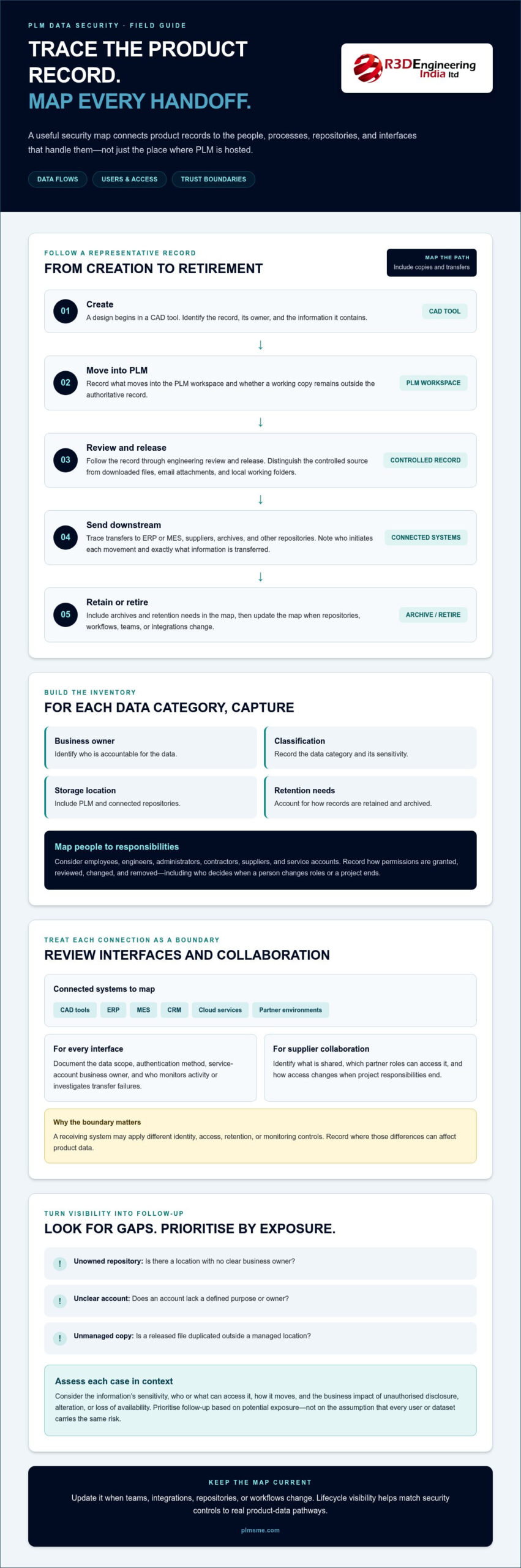
A useful security map shows more than where PLM is hosted. It connects product records to the people, processes, repositories, and interfaces that handle them. A PLM security assessment begins with data-flow visibility because controls can only protect information and pathways the organisation understands.
Trace representative product data from creation to retirement. For example, follow a design from a CAD tool into a PLM workspace, through engineering review and release, then to ERP or MES for downstream use. Record transfers to suppliers, archives, and other repositories as well. At each step, note who initiates the movement, what information is transferred, and whether a working copy remains outside the authoritative PLM record.
Building a product-data and access inventory
Inventory PLM environments and connected repositories. For each data category, document its business owner, classification, storage location, and retention needs. Map users to their responsibilities: employees, engineers, administrators, contractors, suppliers, and service accounts may need different scopes of access. Record how permissions are granted, reviewed, changed, and removed, including who makes decisions when a person changes roles or a project ends.
A practical inventory makes gaps visible. Look for an unowned repository, an account with no clear purpose, or a released file duplicated in an unmanaged location. Prioritise follow-up based on the potential exposure rather than assuming every user or dataset carries the same risk.
Reviewing PLM integrations and external collaboration
Map interfaces between PLM and CAD tools, ERP, MES, CRM, cloud services, and partner environments. Treat each connection as a trust boundary: the receiving system may apply different identity, access, retention, or monitoring controls. Document the data scope of each interface, its authentication method, the business owner of any service account, and who monitors activity or investigates transfer failures.
For supplier collaboration, identify what is shared, which partner roles can access it, and how access changes when project responsibilities end. Architecture decisions shape these pathways. A PLM system architecture consulting guide offers context for assessing how systems and interfaces fit together.
Keep the map current rather than treating it as a one-time diagram. Update it when teams, integrations, repositories, or workflows change. This visibility helps teams apply PLM data security best practices proportionately instead of treating every connection as equally risky. PLM-Sme provides PLM architecture and integration support to help align these decisions across connected systems. Explore PLM architecture and integration support.
Which PLM security controls best reduce practical exposure?
Choose controls based on risks in your PLM workflows, not by applying identical settings everywhere. Least privilege and role-based access are design principles: users should receive the access their responsibilities require, and roles should reflect real engineering and business processes. A design engineer, release approver, administrator, and supplier may need different permissions. Those needs can change over time.
The table connects common controls to PLM use cases and the exposure they can reduce. Design and test each control against the specific environment, architecture, and operational requirements.
| Control | PLM use case | Risk reduced | Operational consideration |
|---|---|---|---|
| Role-based access and least privilege | Limit access to design data, product structures, and release actions by responsibility | Excessive access, unauthorised changes, or disclosure | Review roles against actual workflows and update them when responsibilities change |
| Stronger authentication | Protect sensitive user, administrator, or remote access | Account misuse following credential compromise | Apply controls supported by the environment and test their effect on legitimate workflows |
| Encryption in transit and at rest | Protect data moving between PLM, connected systems, and storage | Unauthorised access to intercepted or stored information | Assess coverage, key management, and compatibility across the architecture |
| Interface authentication and scoped access | Constrain integrations and service accounts to required data and actions | Overbroad access or misuse of an integration | Assign service-account ownership and monitor interface activity |
| Logging and audit trails | Record access, administrative actions, and significant data changes | Unnoticed or difficult-to-investigate activity | Define what to capture, who reviews it, and how records are protected |
| Protected backups and recovery testing | Restore PLM data and configuration after disruption or loss | Prolonged unavailability or inability to recover usable information | Restrict backup access and test restoration, not just backup creation |
Managing identity, permissions, and privileged access
Keep routine user permissions separate from privileged administration and service-account access. Review access on a defined schedule, remove accounts promptly when they’re no longer needed, and make account and role changes traceable. Where the environment supports it, apply stronger authentication to sensitive access, then confirm it works for the intended users and operating conditions.
Protecting data, integrations, and recovery paths
Assess encryption in transit and at rest against the system architecture and information requirements. For integrations, check authentication, data scope, audit trails, and how exported files are handled after transfer. Treat backups as sensitive assets: control who can access them and test recovery to confirm product data and required configuration can be restored. These controls make PLM data security best practices actionable while keeping safeguards aligned with engineering operations.
How to implement PLM data security best practices step by step
Turn the risk map into a controlled implementation sequence. Effective PLM data security best practices connect technical safeguards to product workflows, with engineering, IT, security, and business owners agreeing on requirements and acceptance criteria. Prioritise each action by information sensitivity, potential business impact, exposure, and operational feasibility. Address high-impact, exposed data first, then plan lower-risk improvements as part of the wider PLM roadmap.
- Assess data and risks. Confirm what information is handled, where it flows, who can access it, and what could happen if it is disclosed, changed, or unavailable.
- Define requirements. Translate business and workflow needs into clear access, audit, retention, and recovery expectations.
- Design controls. Select safeguards that fit the PLM architecture, integrations, user roles, and operating model.
- Implement deliberately. Configure controls in manageable stages and communicate workflow changes to affected teams.
- Test and resolve findings. Verify the controls against representative use cases, then assign and track corrective actions.
- Review and adapt. Revisit requirements as product workflows, connected systems, and business priorities change.
Security work should also fit the organisation’s broader transformation priorities. Connecting PLM requirements to an industrial digitalisation roadmap can help sequence architecture and implementation decisions alongside other operational changes.
Turning the risk assessment into requirements
Make each requirement specific enough to verify. For example, a restricted engineering record may require access limited to designated roles, an audit trail for key actions, retention aligned with its business purpose, and a defined recovery approach. Assign accountable owners for product data, integrations, approvals, and control operation. If an exception is necessary, document its business rationale, compensating controls, approver, and review date so it remains visible instead of becoming permanent by default.
Involve engineering, IT, security, and business stakeholders in acceptance decisions. Engineering can identify workflow constraints. IT and architecture teams can assess configuration and integration impacts. Business owners can confirm that the protection level matches the information’s use and sensitivity.
Testing controls before and after deployment
Test representative user roles, restricted records, integration paths, and administrative actions. Confirm that intended users can complete legitimate tasks and that access beyond those tasks is constrained. Test backup restoration and incident procedures against documented business priorities, not just technical assumptions. Track findings to resolution, record acceptance decisions, and communicate workflow impacts clearly.
PLM-Sme’s architecture and implementation support can help align PLM design decisions with your requirements. Discuss PLM implementation and architecture support.
How to sustain PLM data security through governance and administration
Security controls need ongoing ownership to remain effective as teams, workflows, and connected systems change. PLM governance should define who reviews access, approves configuration changes, monitors integrations, tracks vulnerabilities, maintains audit evidence, and coordinates incident handling. Without clear accountability, a sound control can weaken as roles shift or exceptions accumulate.
Set scheduled reviews and event-based triggers in line with organisational risk and policy. Reassess access or configuration after:
- Organisational changes, such as role changes or departures
- A new integration, repository, or external collaboration arrangement
- A supplier or contractor change that affects data access
- A major PLM update or change to system architecture
- An incident, access exception, or recovery exercise that reveals a gap
Establishing repeatable PLM security operations
Assign operational owners for account reviews, interface monitoring, change control, vulnerability tracking, and audit evidence. Document review schedules, decision records, and escalation paths so responsibilities don’t depend on informal knowledge. After an incident or recovery exercise, record what happened, what worked, and which corrective actions remain open. Use these findings to update procedures, configurations, and review priorities.
Aligning PLM architecture and administration
Architecture decisions influence whether controls remain consistent across PLM and connected systems. A change to an interface or data workflow can affect permissions, monitoring, and recovery assumptions, so assess security implications as part of configuration and change management. Ongoing PLM system administration helps maintain visibility of these changes and supports continuity as the environment evolves.
For a broader view of how Teamcenter strategy and industrial digitalisation fit together, explore PLM-Sme’s Teamcenter consulting and digitalisation services. This can help align PLM decisions with wider operational direction.
Make the next step concrete: assign an owner to each recurring review, document when it must happen, and record how findings will be closed. These PLM data security best practices work best as part of normal system governance, not as a one-off project. Revisit the review plan whenever a material change affects product data, users, integrations, or system configuration.
Make PLM security part of every lifecycle decision
Strong PLM data security best practices protect more than files in a repository. They account for how product information moves across workflows, users, integrations, and external relationships. Start by making data flows visible, then match access and protection controls to risk. Keep controls effective through clear ownership, regular reviews, and testing whenever systems or responsibilities change.
Security works best when architecture, implementation, and administration stay aligned. PLM-Sme provides Siemens Teamcenter implementation and architecture services, develops integrations across PLM and connected enterprise systems, and offers ongoing PLM system administration. These services help organisations account for security requirements in how their PLM environment is designed and operated.
Discuss a PLM security-focused architecture and implementation approach with PLM-Sme to identify practical next steps for your environment. With clear governance and controls suited to your engineering workflows, your team can strengthen protection while keeping product development moving.
Frequently Asked Questions
What is PLM data security?
PLM data security protects product information’s confidentiality, integrity, and availability throughout its lifecycle. It covers more than the PLM application itself: it includes engineering files, product structures, change records, manufacturing information, and copies moving between people and systems. Controls should account for how data is created, reviewed, released, shared, retained, and retired so access and protection remain appropriate at each stage.
What are the most important PLM data security best practices?
The most important PLM data security best practices are to understand where product data flows, limit access to business needs, and govern connected systems and external collaboration. Assign owners for access decisions and integrations, review accounts and permissions, protect data transfers, and maintain useful logs. Test backups and recovery procedures as well. The right mix depends on information sensitivity, operational impact, system architecture, and how engineering teams work.
How do you secure product data in a PLM system?
Secure product data by classifying it, identifying its authoritative location, and applying controls suited to its sensitivity and workflow. Use role-based permissions and least privilege, separate routine user access from administrative privileges, and manage accounts through role changes and departures. Assess encryption for stored and transferred data, monitor important activity, and control exports and copies. Test safeguards with representative users and workflows to catch gaps without blocking legitimate work.
Can PLM systems be integrated securely with ERP and MES?
Yes. PLM can exchange information with ERP and MES securely when each interface has defined ownership, authentication, and a limited data scope. Map what each connection sends and receives, identify its service accounts, and monitor relevant transfer activity. Don’t assume connected systems have identical access or protection controls. Test interface changes and confirm the integration supports required business workflows without exposing unrelated product records.
How often should PLM user access be reviewed?
Set an access-review cadence based on organisational risk, business policy, and data sensitivity, then review access sooner when circumstances change. Triggers can include a person changing roles, leaving the organisation, a project ending, or supplier responsibilities shifting. Reviews should confirm that users still need their permissions and that privileged and service accounts have clear owners. Record decisions and follow up on access that should be changed or removed.
What security risks can arise from PLM supplier access?
Supplier access can expose product information if permissions are broader or longer-lasting than the work requires. Risks include access to unrelated designs, retained accounts after a project ends, shared credentials, and exports that persist outside controlled PLM workflows. Define which records each supplier role can use, assign access an owner and purpose, and review it when project or supplier arrangements change. Monitor relevant activity and remove access when it’s no longer needed.
Does encryption alone protect PLM data?
No. Encryption can help protect data in transit or at rest, but it doesn’t determine who is authorised to access it or prevent misuse by an account with excessive permissions. It also doesn’t replace interface controls, audit logging, secure export handling, or tested recovery procedures. Assess encryption as part of the overall PLM architecture, including key management and connected systems, and combine it with access governance and operational monitoring.