
Teamcenter Database Performance Tuning Services: A Practical Guide
What if the database isn’t the reason your Teamcenter searches, transactions, or workflows are slow? Database symptoms can resemble application, infrastructure, network, or data-model problems. Tuning the wrong layer may leave users waiting while putting established workflows at risk. Effective Teamcenter database performance tuning services start with evidence from the full system, not assumptions about the database.
When performance slips, it’s understandable to look first at database configuration. This guide explains how to assess that possibility alongside other bottlenecks, use evidence from relevant system layers, and prioritise practical changes without destabilising the environment.
You’ll learn how to establish a baseline, distinguish database constraints from wider system issues, and check whether targeted changes address the underlying cause. We’ll also cover how ongoing Teamcenter administration, maintenance, and solution architecture can support a measured approach tailored to your system.
Key Takeaways
- Slow searches or workflows don’t prove the database is at fault. Trace the operation across the wider Teamcenter environment.
- Use repeatable scenarios and baseline observations to make performance comparisons more reliable.
- Match symptoms and evidence to the right investigation layer, from database activity to data model, servers, clients, and network.
- Teamcenter database performance tuning services are most effective when the scope is evidence-based and prioritised before changes are made.
- Connect investigation findings with ongoing Teamcenter administration, maintenance, and solution architecture support.
Teamcenter database performance tuning: what it addresses and what it does not
Database performance tuning is the evidence-led process of identifying and addressing bottlenecks linked to database activity. In Teamcenter, that may involve investigating how data is retrieved or how transactions behave under specific conditions. It doesn’t mean changing database settings whenever users report a delay. A slow screen or workflow is a symptom to investigate, not proof of a database fault.
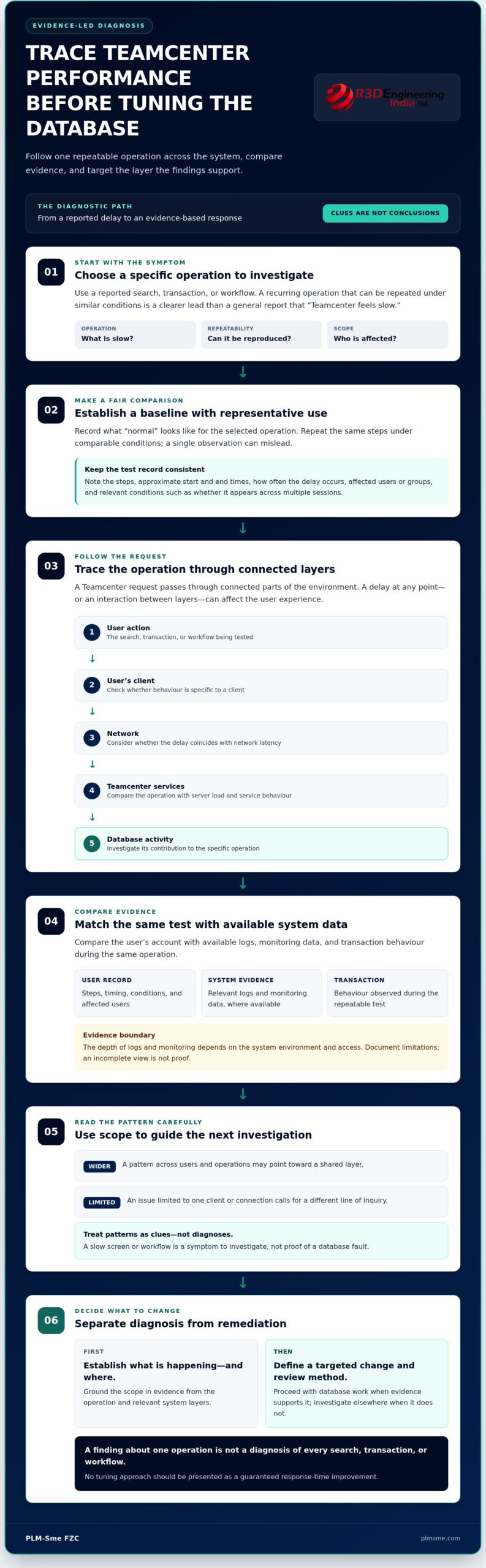
Teamcenter performance depends on interactions across system layers. A request can pass through the user’s client, network, Teamcenter services, and database before the result appears. A delay at any point, or an interaction between layers, can affect the experience. Since Teamcenter supports Product Lifecycle Management (PLM), interpret performance symptoms in the context of how people access product data and complete lifecycle processes.
Which Teamcenter symptoms can justify a database investigation?
Slow data retrieval, delayed transactions, and sluggish operations that depend on database access can justify closer investigation. They are signals, not diagnoses. For example, a particular search that repeatedly takes longer with the same criteria, while other activities remain responsive, is a more useful lead than a single report of a slow screen.
Separate recurring, reproducible delays from isolated complaints that may coincide with a user’s connection or device. Record the affected operation, when it occurs, which users or groups experience it, and whether it can be repeated under similar conditions. This context helps technical teams compare observations and trace the operation through the system instead of guessing at the cause.
What database tuning can and cannot establish
Teamcenter database performance tuning services should target bottlenecks supported by evidence, not every performance concern attributed to the database. An investigation can help determine whether database activity contributes to a specific delay or whether attention belongs elsewhere in the architecture. A finding about one operation also shouldn’t be treated as a diagnosis of every search, transaction, or workflow.
Diagnosis and remediation are separate stages. First establish what is happening and where. Then define a change that addresses the identified cause and a suitable way to review its effect. If evidence points to another layer, database changes may be unnecessary or distract from the real issue. No tuning approach should be presented as a guaranteed response-time improvement.
A useful initial record might include:
- The operation and steps that reproduce the delay.
- The time and conditions under which it occurs.
- Whether it affects one user, a group, or a wider set of activities.
- Any relevant change in system behaviour noticed around the same time.
These details don’t identify the root cause on their own. They give the investigation a consistent starting point and help distinguish a repeatable pattern from an intermittent experience. That distinction keeps the scope grounded: database work proceeds when evidence supports it, while broader Teamcenter administration or solution architecture can inform an investigation when symptoms cross system boundaries.
Diagnosing Teamcenter performance across database and architecture layers
A useful diagnosis follows a slow operation from the user’s action through the connected parts of the Teamcenter environment. Start with what the user did, then examine the client experience, network conditions, Teamcenter services, and database activity. This sequence helps locate where a delay appears without assuming that the layer showing a symptom is causing it. Architectural context matters: PLM system architecture consulting considers how components and integrations work together.
Before recommending a change, establish a baseline for representative use cases. Record what “normal” looks like for a selected search, transaction, or workflow, then repeat the same steps under comparable conditions. A single observation can mislead. Consistent comparisons give teams a firmer basis for deciding what to investigate.
Building an evidence trail from user action to database activity
Choose operations that reflect reported problems and can be repeated, such as opening a particular type of record, completing a transaction, or running a commonly used search. For each test, note the steps, approximate start and end times, how often the delay occurs, affected users or groups, and relevant conditions, such as whether the issue appears across multiple sessions. Keep the record consistent so observations can be compared.
Then compare that account with available logs, monitoring data, and transaction behaviour. A search that is consistently slow for several users, for example, gives a clearer investigation target than a general report that “Teamcenter feels slow.” The depth of available log and monitoring evidence depends on the system environment and access. Where evidence is limited, document that boundary rather than treating an incomplete view as proof.
Separating database, server, client, and network signals
Compare what happens at adjacent layers during the same operation. If the user experiences a delay, check whether it coincides with Teamcenter server load, client-specific behaviour, network latency, or database activity. A pattern occurring across users and operations may point towards a shared layer. An issue limited to one client or connection calls for a different line of inquiry. These are clues, not conclusions.
Check a database symptom against the layers that feed it and depend on it. A database event occurring at the same time as a slow transaction doesn’t, by itself, prove that it caused the delay. Look for repeatable timing relationships and supporting observations across the operation’s path. This helps prevent correlation from being mistaken for cause and keeps proposed changes within the scope the evidence supports.
Teamcenter database performance tuning services are most useful when diagnosis connects user-reported impact with technical observations, then sets clear boundaries for investigation. PLM-Sme FZC provides independent Teamcenter administration and system architecture support to help frame that work in the context of the wider environment. Its Teamcenter architecture and administration support can form part of a performance-focused review.
Database tuning or wider Teamcenter optimisation: how to identify the right scope
Once the investigation has gathered evidence, decide on the scope. A database-focused review may fit when repeated delays align with database activity for a specific operation. If symptoms vary by user, workflow, system component, or connection, the investigation may need to include wider Teamcenter architecture and administration. The aim is to match the work to the evidence, not label every issue too quickly.
Use this comparison to frame the next questions. These are investigation paths, not definitive diagnoses:
- Repeated delay during a specific transaction: Compare transaction behaviour with database monitoring for the same use case. Investigate database activity alongside the Teamcenter services involved.
- Slow searches or data retrieval: Record the search pattern and affected data. Consider database access, metadata, data-model design, and how the use case retrieves information.
- Delay limited to particular users or sessions: Compare client behaviour and network conditions with server and database observations. A database-only scope may be too narrow if the pattern follows a device or connection.
- Slowness across several operations: Review Teamcenter server load and shared infrastructure signals alongside database activity. Broad impact can warrant a wider administration or architecture investigation.
- Delay during a connected workflow: Examine workflow steps and any integrations involved, as well as the Teamcenter and database activity they trigger. For CRM-related dependencies, understanding how systems exchange product information helps assess Teamcenter CRM integration.
When evidence points toward database-level investigation
Database-specific work becomes more plausible when the same operation repeatedly shows a delay alongside relevant database or transaction evidence. Connect that evidence to the affected Teamcenter use case: what data is accessed, which operation is slow, and whether the observed database behaviour corresponds to the user impact. This supports a focused scope without assuming a particular configuration change in advance.
Assess query behaviour and data access in context, not in isolation. A query that appears slow may be affected by the data model or the application path that initiates it. Remediation should follow diagnosis in the specific environment, then be reviewed against the original use case.
When the investigation should extend beyond the database
Extend the scope when evidence varies by client, connection, server conditions, workflow stage, or integration. Data-model and metadata growth may also merit review, but neither automatically proves the cause. Investigate them in relation to the specific operation and its history.
An architecture review can clarify dependencies between Teamcenter services, databases, clients, networks, and connected systems. That context helps define a proportionate scope: database-focused work where evidence supports it, or broader solution architecture and administration when the performance pattern crosses layers. Teamcenter database performance tuning services should reflect that distinction rather than apply one prescription to different symptoms.
Planning a Teamcenter performance tuning engagement step by step
A well-scoped performance engagement turns user impact into a sequence of decisions, not a predetermined list of database changes. Agree on what needs investigation, what evidence will guide the scope, and how any action will be assessed. This makes the work easier to coordinate with system owners and helps protect established operations while changes are considered.
- Define the symptoms. Describe the affected searches, transactions, or workflows, who experiences them, how often they occur, and their operational impact. Keep reports factual. “This operation is delayed under these conditions” is more useful than assuming the database is responsible.
- Establish a baseline. Select repeatable use cases and record current observations under consistent conditions. Note relevant timing, user context, and system behaviour so later comparisons use the same reference point.
- Investigate relevant layers. Review available monitoring, logs, transaction behaviour, system architecture, and recent changes. Decide whether the evidence supports a database-focused investigation or calls for a broader review of Teamcenter, client, network, workflow, or integration factors.
- Prioritise proposed work. Rank actions by strength of evidence, operational relevance, dependencies, and the risk of disrupting established processes. Separate diagnostic questions from changes that are ready to plan.
- Review and validate. Compare the original use cases against the baseline after agreed actions, then document what changed and what remains uncertain. Set appropriate follow-up monitoring to assess whether the observed behaviour persists.
Preparing system context and representative use cases
Before work begins, bring together the affected operations, user groups, frequency, and business impact. Gather available monitoring and logs, an outline of the system architecture, and context about relevant changes. Agree what stakeholders need from the assessment, such as identifying the likely investigation layer or producing a prioritised action plan. Clear questions keep the scope focused without turning early assumptions into findings.
Turning findings into prioritised, maintainable actions
Keep observations distinct from interpretations and recommendations. A useful finding records what happened, the evidence supporting a likely cause, dependencies that could affect a change, and the proposed next action. Prioritise work that addresses a well-supported issue and fits operational needs. Defer changes that depend on unresolved investigation. This creates a plan administrators can review and maintain, rather than a set of disconnected adjustments.
For Teamcenter database performance tuning services, validation is part of the work, not an afterthought. Retest the same representative operations against the initial baseline and consider whether the outcome matches the intended change. Record the result and plan follow-up monitoring appropriate to the system. This doesn’t promise a fixed response time. It provides a disciplined way to judge whether an action addressed the observed concern and whether further investigation is warranted.
PLM-Sme FZC’s Teamcenter administration, maintenance, and solution architecture support can connect investigation priorities with ongoing system needs. More information is available through Teamcenter performance support.
How PLM-Sme FZC supports Teamcenter performance and administration
Performance findings are most useful when they connect to how a Teamcenter environment is configured, maintained, and used. PLM-Sme FZC provides Teamcenter administration and maintenance, together with system and solution architecture support. This helps frame an investigation around the evidence and the wider system context, rather than applying a standard set of tuning changes to every environment.
An assessment may identify a likely bottleneck and recommend next steps, while implementation work is planned around the finding, its dependencies, and operational priorities. If an issue appears to involve integrations or architectural relationships, Siemens Teamcenter consulting can provide context for considering the system as a whole.
Connecting performance findings with Teamcenter administration
Teamcenter administration and maintenance support ongoing system needs after an investigation. Architecture expertise can help clarify where a symptom occurs and what other components may be affected. The work is shaped by customer-specific observations, such as which operations are affected and what the evidence indicates, rather than a universal tuning package. Keeping findings separate from implementation actions helps stakeholders understand the diagnosis before agreeing on changes.
Building a maintainable PLM foundation
A performance review can also inform longer-term decisions about how a PLM environment is supported and developed. PLM-Sme FZC follows the SISW-supported START-EXTEND-TRANSFORM methodology. Its TeamCenter FOUNDATION deployment includes a pre-configured PLM Start deployment with 15 years of configuration knowledge. These are elements of the broader PLM foundation, not claims of a particular performance outcome.
For organisations assessing Teamcenter database performance tuning services, independent support can connect technical investigation with administration, maintenance, and solution architecture. The next step depends on the evidence and the system’s priorities. It may be a focused investigation, broader architectural input, or ongoing administration aligned with the findings.
For information about independent Teamcenter support from PLM-Sme FZC, see Teamcenter support.
Make your next performance decision with confidence
Use performance investigation findings as a starting point for a more maintainable Teamcenter environment. The next decision may be to address a specific issue, strengthen ongoing administration, or review how system architecture supports your workflows. A clear scope keeps action aligned with operational priorities instead of defaulting to changes that may not address the cause.
PLM-Sme FZC provides independent, customer-centric industrial digitalisation support, including Teamcenter administration, maintenance, and system architecture. TeamCenter FOUNDATION incorporates 15 years of configuration knowledge. This perspective connects Teamcenter database performance tuning services with the wider needs of your PLM environment, while keeping recommendations grounded in evidence and your system context.
Bring your performance concern, affected operations, and investigation findings to PLM-Sme FZC for a focused discussion about a practical next step. Discuss your Teamcenter performance support needs.
With the right evidence and support, you can make progress without losing sight of the workflows your teams rely on.
Frequently Asked Questions
Can Teamcenter performance problems always be fixed by tuning the database?
No. Database tuning can address an evidenced database bottleneck, but Teamcenter delays may originate in other system conditions. For example, if one workflow slows only for users on a particular client setup while other operations remain responsive, that symptom alone is weak evidence for database changes. Compare the same task across users and conditions, then define remediation once the contributing layer is better understood.
How do you know whether a slow Teamcenter search is caused by the database?
A slow search alone can’t identify the cause. Compare the same search criteria and steps across relevant users or sessions, and review what was happening in Teamcenter services and the database at the time. Note whether results differ by user, connection, or data queried. If database observations don’t align with the delay, broaden the investigation rather than treating search slowness as a reason to change database settings.
What information should we prepare before a Teamcenter performance assessment?
Prepare a short record of the affected operation, the steps users take, when the delay occurs, and how it affects their work. Include whether the issue is limited to a particular group or task, plus relevant system changes noticed around the same period. Available architecture notes, logs, or monitoring observations can provide context. Keep user reports separate from technical conclusions so the assessment can test, rather than inherit, an assumed cause.
Does Teamcenter database performance tuning include query and data-model analysis?
It can, when the evidence and environment make those areas relevant. Teamcenter database performance tuning services should relate query behaviour or data-model questions to a defined use case, such as a particular search or transaction, rather than assume either is the cause. An assessment can distinguish observed behaviour from hypotheses and determine whether further database analysis is appropriate or whether architecture and administration context should shape the next step.
How can a Teamcenter team validate whether performance changes worked?
Retest the operation the change was meant to address, using the same steps and comparable conditions as before. If a commonly used transaction was the focus, for example, record its behaviour after the change and check whether related activities were affected. Keep the observations alongside the change record, including any differences in system conditions. This gives administrators a practical basis for deciding whether to retain the action or investigate further.
Can ongoing Teamcenter administration help maintain performance after tuning?
Yes. Ongoing administration and maintenance can help teams keep performance concerns connected to day-to-day system oversight. For instance, administrators can record when a recurring issue reappears and whether it coincides with an operational or system change. The support scope depends on the environment and findings, and may include system architecture input. A PLM System Administration Retainer provides a structured basis for ongoing administration aligned with wider PLM needs.