
Teamcenter Classification System Implementation: A Practical Guide
What if the biggest barrier to finding reusable engineering data isn’t Teamcenter, but the way classification is designed and maintained? Inconsistent legacy parts, duplicate records, and uneven attributes can make even a well-configured system difficult to search. Teamcenter classification system implementation works best when taxonomy, data, and governance are planned together around the decisions engineers need to make.
It’s understandable to wonder how much of the classification model to define before configuration and how to improve search without disrupting established workflows. This guide lays out a phased approach to planning, configuring, populating, and validating classification against engineering search and reuse needs. It also explains how to set attribute standards, assign ownership, manage change, and support user adoption as the model evolves.
You’ll learn how to prepare legacy data, test the model with real users and use cases, and establish governance that keeps classification useful after go-live. The guide also provides a practical basis for deciding whether your team has the capacity to deliver internally or would benefit from specialist implementation support.
Key Takeaways
- Anchor classification design in the engineering search questions and reuse scenarios it needs to support.
- Separate stable classification attributes from information that belongs to an item, revision, or controlled process.
- Profile legacy records, then document whether each value should be retained, normalized, merged, mapped, or excluded.
- Plan Teamcenter classification system implementation as a sequence of approved design, configuration, data migration, validation, and rollout decisions.
- Set clear ownership for taxonomy and attribute changes, then monitor measures that show whether classification remains useful after go-live.
Why implement a Teamcenter classification system for engineering data?
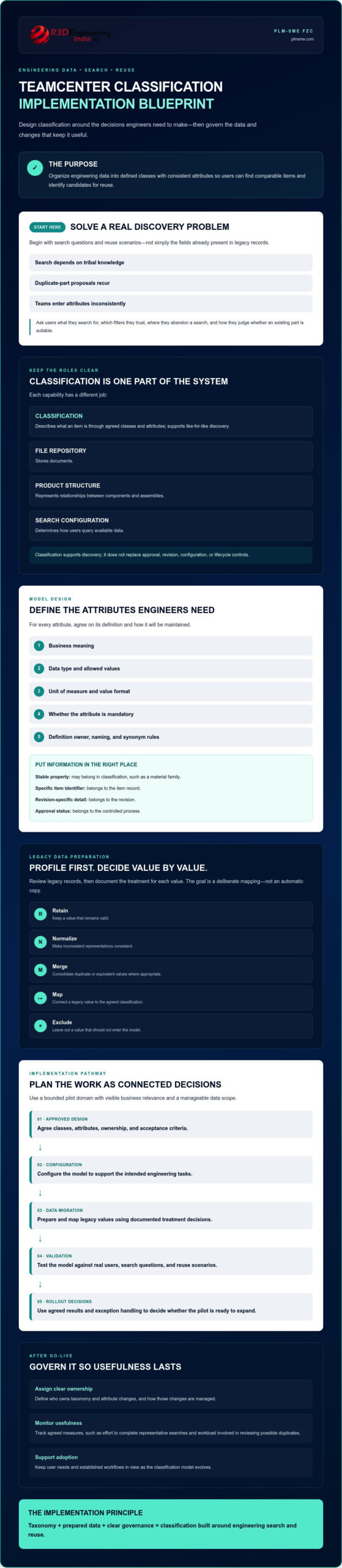
Teamcenter classification organizes engineering data into defined classes with consistent attributes, helping users find comparable items and identify candidates for reuse. Its value comes from solving specific discovery and data-management problems, not simply adding another layer of structure to the system.
Classification supports the wider purpose of Product data management: keeping product information organized and available across engineering workflows. It has a different role from file storage, product structure management, or search configuration. A file repository stores documents; a product structure represents relationships between components and assemblies; search configuration determines how users query available data. Classification describes what an item is through agreed classes and attributes, making like-for-like discovery more consistent.
For example, an engineer looking for an approved fastener may need to filter by thread, material, and size, then confirm its approval status in the relevant process. Classification can make the technical characteristics easier to compare, while approval remains governed by the appropriate Teamcenter workflow. This distinction helps teams avoid treating classification as a replacement for lifecycle controls.
Which engineering problems should classification solve first?
Start with problems users can describe and the business can observe: searches that rely on tribal knowledge, recurring duplicate-part proposals, or attributes entered differently across teams. Interview engineering, configuration, and data-management stakeholders. Ask what they search for, which filters they trust, where they abandon a search, and how they decide whether an existing part is suitable.
Then choose a bounded pilot domain with visible business relevance and a manageable data scope. A focused set of related components can show whether the proposed attributes support real decisions without requiring the team to model every engineering domain at once.
What should an implementation deliver?
A practical Teamcenter classification system implementation should deliver searchable classes, governed attributes, and repeatable workflows that fit existing engineering processes. Define the intended user task, such as finding an approved component, and specify how classification contributes without replacing approval, revision, or configuration controls.
Agree on how success will be assessed before making impact claims. Establish a baseline for measures such as the effort required to complete representative searches or the workload involved in reviewing possible duplicates. Process owners, data owners, and Teamcenter administrators should set acceptance criteria together, including who validates results and how exceptions are handled. This gives the team a clear basis for deciding whether the pilot is ready to expand.
How to design a Teamcenter classification model before configuring it
Design the model around decisions engineers need to make, not simply the fields already available in legacy records. Start by capturing representative search questions and reuse scenarios, such as how a designer distinguishes a compatible component from a similar but unsuitable one. Those questions help determine which classes users need and which attributes meaningfully distinguish one item from another.
Define each attribute before configuration: its business meaning, data type, allowed values, unit of measure, whether it’s mandatory, and who owns its definition. For example, a dimension used to filter parts needs a consistent unit and value format. Agree on naming conventions and rules for synonyms so different teams don’t encode the same concept in conflicting ways. Established work on product data exchange also highlights the role of a product data classification system in making product information more consistently understood and exchanged.
Keep classification focused. A material family may be a stable property, while a specific item identifier belongs to the item record, revision-specific details belong to the revision, and approval status belongs to a controlled process. These distinctions matter because classification should support discovery without duplicating or bypassing Teamcenter’s existing data and workflow controls. Reviewing dependencies with the PLM system architecture consulting guide can help teams assess how the model fits connected processes and system design.
How should teams structure classes and attributes?
Give each class a clear definition and boundary. If two neighbouring classes differ only by an unclear naming convention, users may classify comparable parts inconsistently. Choose attributes because they improve filtering, identification, or reuse, not simply because a legacy field exists. Maintain a controlled model that records each definition, valid values, units, owner, and an example of correct use. This becomes the reference for configuration and data preparation.
Should the implementation use Basic or Advanced Classification?
Compare the current Teamcenter configuration with the model’s requirements, standards needs, and intended evolution. Siemens describes Basic and Advanced Classification as approaches that can coexist in some environments, allowing teams to assess a mixed model rather than assume an immediate replacement. That doesn’t determine the right choice for every installation. Before a transition, confirm current release capabilities, licensing implications, and migration conditions against Siemens documentation and the organization’s own configuration.
These decisions shape the scope of Teamcenter classification system implementation and its dependencies on existing processes. If requirements or architecture remain unclear, reviewing Teamcenter implementation support can help inform the delivery approach.
How to prepare and map legacy data for Teamcenter classification
Legacy records rarely arrive ready for a new classification model. Profile a representative sample before migration, checking for missing values, inconsistent units, duplicate entries, obsolete terminology, and attributes used differently across teams. Include active and older records where relevant so the proposed rules reflect the data users will actually encounter.
Map each source class and attribute to the approved target model, recording the transformation rule, decision owner, and rationale. A practical disposition log makes ambiguous cases visible instead of letting undocumented assumptions enter Teamcenter. This preparation is central to Teamcenter classification system implementation and aligns with the real-world process considerations explored in this PDM system implementation case study.
| Decision | Use when | Owner and rationale to record |
|---|---|---|
| Retain | The source value is valid and matches the target definition. | Data owner confirms its meaning and continued relevance. |
| Normalize | Equivalent names, formats, or units need a consistent representation. | Engineering or data owner approves the conversion rule. |
| Merge | Records are confirmed duplicates or values represent the same concept. | Designated owner validates equivalence and identifies the surviving record or value. |
| Map | A legacy class or value has a clear target equivalent. | Model owner documents the source-to-target relationship. |
| Exclude | Data is obsolete, out of scope, or unsuitable for classification. | Process owner records the reason and confirms the exclusion is acceptable. |
How should teams clean and map source records?
Create explicit transformation rules for names, units, controlled values, and deprecated categories. For example, specify how legacy unit variants convert to the target unit rather than relying on manual interpretation. Route conflicting or unclear records to named engineering or data owners. Keep source identifiers, target values, rule versions, and exceptions together so each mapping can be reviewed and repeated.
What should a classification migration test prove?
Run a controlled pilot before expanding scope. Check representative records for correct class assignment and attribute values, then ask users to test whether expected items can be found through realistic searches. Reconcile migrated counts and documented exceptions against the agreed source-data scope. Record defects, approvals, and rollback criteria before proceeding. The purpose is to expose and manage issues, not to promise zero data loss.
If mapping scope or data readiness remains uncertain, consider whether Teamcenter implementation support could help assess the delivery approach before migration expands.
How to implement and validate Teamcenter classification step by step
A controlled sequence makes classification easier to test before it affects a wider engineering population. For Teamcenter classification system implementation, agree on scope, decision rights, and acceptance criteria first. Then configure and validate in stages, with explicit approval gates before expanding the rollout.
- 1. Confirm the use case and scope. Identify the engineering tasks the pilot must support, the source systems and data in scope, intended user roles, and dependencies on existing processes. Set baseline measures and acceptance criteria with the process owners.
- 2. Approve the target model. Engineering and data governance confirm class definitions, attribute rules, allowed values, and ownership. Resolve design decisions before they become configuration assumptions.
- 3. Configure a representative pilot. PLM administrators and implementation delivery configure the agreed model in the appropriate environment. Include realistic classes, attributes, permissions, and representative records rather than testing with an empty structure.
- 4. Migrate pilot data and test. Apply approved mappings, reconcile results against the pilot source scope, and record exceptions. Test attribute rules, access by user role, and relevant integration or lifecycle dependencies with their system owners.
- 5. Review findings and approve rollout. Engineering users complete common search and reuse tasks. Fix defects, confirm acceptance criteria, and obtain owner approval before expanding migration or deployment. If criteria aren’t met, keep the scope contained and repeat the relevant test.
Make decision rights explicit. Engineering validates whether classes and attributes reflect real product distinctions; data governance approves definitions and exceptions; PLM administration owns configuration and access-related checks; implementation delivery coordinates the sequence, technical changes, and evidence. Process and integration owners review impacts beyond classification itself. This structure prevents unresolved design questions from being mistaken for technical defects.
Validating adoption and technical fit
Use realistic records and role-based scenarios to check that intended users can find suitable items, interpret attribute values, and follow established approval and revision controls. Include unsuccessful searches in testing: they can reveal missing values, confusing labels, or permission gaps. Ask users to complete tasks without project-team guidance, then capture where they hesitate or choose inconsistent terms.
Before rollout, document test results, open defects, owners, acceptance decisions, and rollback criteria. Train users with practical search and reuse scenarios, and establish a defined channel for questions and feedback so issues can be triaged after release. For broader delivery considerations, consult the Teamcenter consulting guide. If you need help planning implementation and validation, explore Teamcenter implementation support.
How to sustain classification after Teamcenter implementation
A classification model needs active ownership after go-live. Without it, new classes and values can accumulate without clear definitions, while old terms remain available long after engineering practices change. Treat governance as part of Teamcenter classification system implementation, with named decision-makers, documented change control, and regular checks on data quality and user outcomes.
Which governance controls keep the model usable?
Assign approval rights by change type. For example, engineering owners can assess whether a proposed class reflects a genuine product distinction, data governance can approve definitions and value standards, and PLM administrators can assess configuration impacts. Record decisions and maintain versioned definitions, ownership details, and change-impact assessments so users and administrators can understand what changed and why.
Give users a controlled route to request a class, attribute, value, or exception. Require each request to explain the business need, affected records, proposed owner, and likely process or integration impacts. Review requests on an agreed cadence, and keep temporary exceptions visible with an owner and review point rather than letting them become permanent by default.
Monitor measures that indicate whether the model remains useful. Agree on how to assess search success, attribute completeness, duplicate-review workload, and unresolved exceptions. Review trends with engineering and data owners, then investigate causes before changing the taxonomy. A drop in search success, for instance, may point to unclear terminology or incomplete values, not necessarily a need for more classes.
Schedule model reviews around meaningful triggers: engineering changes that introduce new product characteristics, entry into a new product domain, or evolving standards requirements. Review stale values and unused classes as part of this process. Retire or revise them through controlled decisions that account for existing records and downstream dependencies.
When should a manufacturer bring in implementation support?
Specialist input may be useful when taxonomy changes affect multiple engineering processes, integrations, or connected systems, or when internal teams lack capacity for configuration, migration, testing, and ongoing administration. First clarify the business need and where delivery is constrained. Then determine whether support is most relevant for architecture, implementation, integration development, or post-go-live PLM administration.
For a scoped discussion based on those needs, review the Teamcenter implementation and consulting specialists page. PLM-Sme FZC provides end-to-end PLM implementation support and ongoing PLM system administration, which can help organizations assess delivery requirements and sustain governance after launch.
Build a classification model engineers can rely on
Effective Teamcenter classification system implementation is more than configuring classes and attributes. It connects engineering search and reuse needs with consistent data, practical validation, and clear ownership after go-live. A phased approach helps teams test the model against real workflows before expanding it across product domains.
Start with focused use cases, define attributes and decision rights before configuration, and assess legacy data through documented mapping rules. Then validate search tasks, permissions, migration results, and downstream dependencies with intended users. Once live, monitor agreed measures and review model changes through a controlled governance process. These steps give teams a practical basis for improving discoverability while respecting existing engineering processes.
If requirements, data readiness, or delivery capacity remain uncertain, a discussion with an experienced implementation partner can help clarify the next steps. PLM-Sme FZC provides end-to-end PLM implementation support, system and solution architecture, Teamcenter integration development, and ongoing PLM administration. Discuss your Teamcenter classification requirements with PLM-Sme FZC and move forward with a model built to support your engineering work over time.
Frequently Asked Questions
What is Teamcenter classification used for?
Teamcenter classification organizes engineering items into defined classes with consistent attributes, helping users find and compare relevant data. An engineer searching for a reusable component, for example, can filter by technical properties such as material or size. Classification supports discovery and reuse, but it doesn’t replace document storage, product structures, revision control, or approval workflows. Those functions remain part of the wider Teamcenter environment and its established processes.
How do you implement classification in Siemens Teamcenter?
Begin with engineering search and reuse needs, then define the target classes, attribute rules, allowed values, and ownership. Profile source data, map it to the model, and configure a bounded pilot before expanding migration. Test realistic searches, access permissions, attribute behaviour, migration results, and relevant process dependencies with intended users. Teamcenter classification system implementation should include agreed acceptance criteria and decision rights, followed by controlled rollout and ongoing governance.
What is the difference between Teamcenter Basic and Advanced Classification?
Basic Classification is the traditional Teamcenter classification approach, while Advanced Classification provides capabilities that include support for the ECLASS standard, according to Siemens product information. The appropriate option depends on the current Teamcenter setup, required modelling capabilities, standards needs, and future plans. Siemens describes environments where Basic and Advanced approaches can coexist. Confirm current release capabilities and licensing implications against Siemens documentation before choosing or changing an approach.
Can existing Teamcenter classification data be migrated to Advanced Classification?
Existing classification data may be eligible for migration, but the available path depends on the source configuration, target Teamcenter release, and migration requirements. Don’t assume a direct conversion will preserve every class, attribute, value, or relationship unchanged. Inventory and map the existing model, document exceptions, and test representative records in a controlled environment. Confirm supported migration methods, release compatibility, and any licensing implications in current Siemens documentation before approving the transition.
How should engineering teams prepare data for Teamcenter classification?
Profile representative records to find missing values, inconsistent units, duplicate entries, and outdated terms. Map each source class and attribute to the approved target model, and define explicit rules for normalization, merging, mapping, or exclusion. Assign ambiguous cases to accountable engineering or data owners instead of relying on assumptions. Pilot the transformations, reconcile results against the agreed source scope, and have users verify classification and search behaviour before broadening migration.
Does Teamcenter classification support the ECLASS standard?
Yes. Siemens product information states that Teamcenter Advanced Classification supports the ECLASS standard for data classification. ECLASS may be relevant when an organization needs a standardized structure for describing product properties or exchanging classification data. Confirm the required ECLASS content, applicable Teamcenter release capabilities, and configuration approach for your environment before designing around it. Validate representative classes and attributes with engineering and data owners to ensure the model fits actual search and reuse needs.
How do you govern a Teamcenter classification system after implementation?
Assign clear owners to approve taxonomy changes, attribute definitions, new values, and exceptions. Maintain versioned definitions, decision records, and change-impact assessments, with a controlled route for users to request updates. Review measures such as search success, attribute completeness, duplicate-review workload, and unresolved exceptions with accountable owners. Reassess the model when engineering changes, new product domains, or standards needs arise, and use PLM administration to support controlled configuration and ongoing governance.