
Risks of Using Spreadsheets for BOM Management
What if the spreadsheet that keeps your bill of materials moving also makes it harder to know which version production should trust? Spreadsheets are accessible and flexible, so they can work well for early-stage or relatively simple product records. But the risks of using spreadsheets for BOM management increase as more people update shared data, product changes accumulate, and engineering, procurement, and manufacturing rely on the same information. A copied file or manual edit can leave teams working from different part numbers, quantities, or revisions.
The answer isn’t that every spreadsheet is unsafe or that every manufacturer needs PLM immediately. It’s to recognise where informal controls stop being dependable. This article explains common failure points, from unclear ownership and weak change tracking to limited cross-functional visibility, and sets out practical controls to reduce risk. It also identifies signs that spreadsheet processes are becoming difficult to govern, so you can assess whether a structured PLM approach fits your product complexity, workflow, and data needs. The goal is a clear decision, not a technology upgrade for its own sake.
Key Takeaways
- The risks of using spreadsheets for BOM management depend on how often product data changes, how many teams share it, and how clearly ownership is defined.
- Version ambiguity, conflicting edits, and manual data entry can weaken BOM accuracy and traceability.
- Compare spreadsheet and PLM controls across ownership, revision management, collaboration, auditability, and system integration.
- Use practical interim controls, including a designated master file, named owners, and clear approval responsibilities.
- Assess process, data, architecture, and integration needs to decide whether a tailored PLM and Teamcenter approach fits your operation.
Why spreadsheet-based BOM management becomes risky as products and teams grow
A spreadsheet can be a useful working list for recording components, quantities, and notes. The risks increase when teams treat a workbook as the authoritative product record: the approved structure others use to design, source, build, or maintain a product. A Bill of Materials (BOM) describes the components that make up a product, often in a hierarchy of parent assemblies and child parts.
Risk isn’t determined by the file format alone. It grows with the number of contributors, the frequency of engineering changes, the number of product variants, and the level of traceability and approval control the business needs. A small, stable BOM maintained by one owner may remain manageable in a spreadsheet. A changing structure shared across functions needs clearer controls to establish what is current and approved.
What information does a BOM control?
A BOM records how parts and assemblies relate, typically including part numbers, quantities, and revision identifiers. When products or changes apply only at particular times, configurations, or production ranges, effectivity helps define when a particular structure is valid.
Different teams may use distinct but related views. An engineering BOM describes the designed product structure; a manufacturing BOM represents how it is organised for production; procurement uses information relevant to sourcing and purchasing. These views need to stay aligned, but they aren’t interchangeable. If an engineer changes a component quantity, procurement may need to adjust an order, while manufacturing may need to revise its assembly plan.
When does a spreadsheet stop being a reliable source?
Pressure builds when multiple people edit the same BOM, revisions arrive frequently, or several product variants share parts. Risk also rises when engineering data is reused by procurement and manufacturing, both of which depend on accurate, timely information. A workbook can hold the rows, but it doesn’t establish by itself who approved a change or which downstream teams have acted on it.
Copied files and email attachments make that uncertainty harder to resolve. One person may update a local copy while another continues using an older attachment. A filename such as “final” doesn’t reliably show approval status. Teams can then act on different part numbers, quantities, or revisions without realising their records conflict.
Spreadsheet BOM risk is the chance that teams make product decisions from inconsistent, outdated, or unapproved structure data because ownership and change status aren’t clear. This definition focuses on control, not on spreadsheets as inherently unsuitable. If one accountable owner maintains a stable BOM and users know which controlled file to use, a spreadsheet can be proportionate. As collaboration and change increase, the process needs stronger ways to establish the approved record.
Five spreadsheet risks that can undermine BOM accuracy and traceability
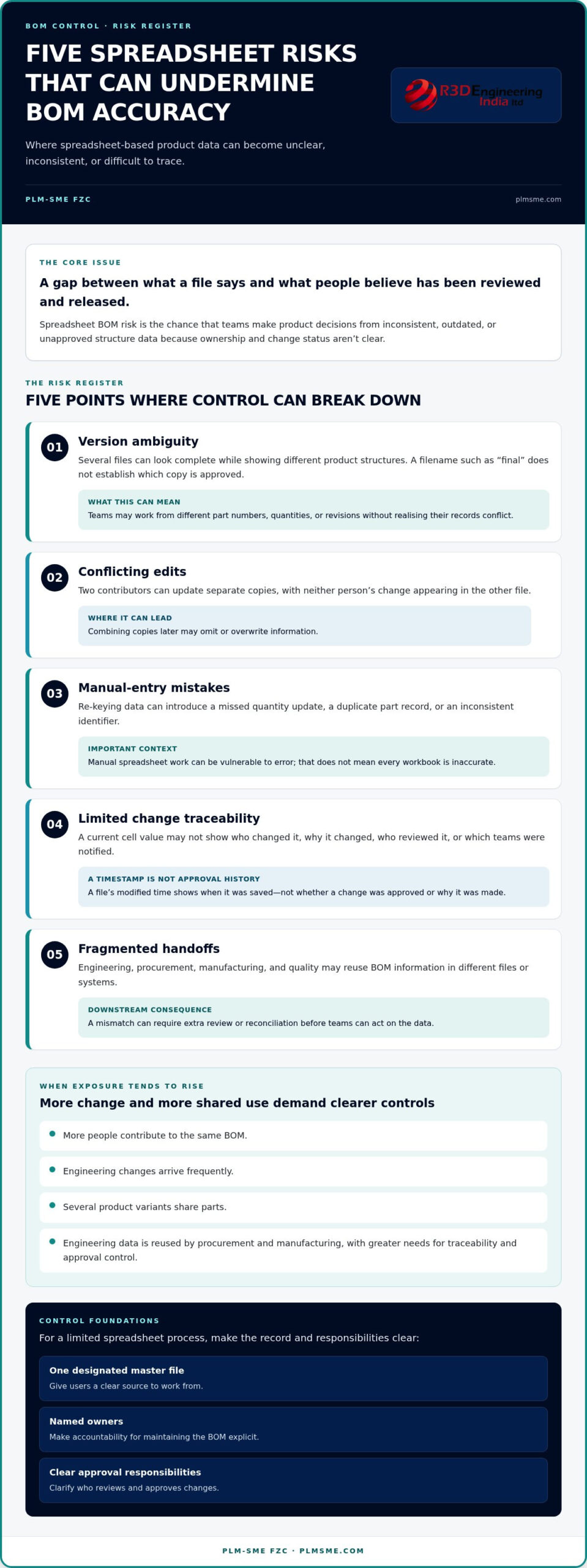
The risks of using spreadsheets for BOM management aren’t inevitable. A controlled workbook can serve a limited process, but risk increases when teams rely on separate files to record changes, approve revisions, and pass product data between functions. The main exposure is a gap between what a file says and what people believe has been reviewed and released.
- Version ambiguity: Several files may look complete while showing different product structures. “Final” in a filename doesn’t establish which copy is approved.
- Conflicting edits: Two contributors can update separate copies, with neither change appearing in the other. Combining them later may omit or overwrite information.
- Manual-entry mistakes: Re-keying data can introduce a missed quantity update, duplicate part record, or inconsistent identifier. Research summaries on the inherent risks of spreadsheets discuss why manual spreadsheet work can be vulnerable to error, but that doesn’t mean every workbook is inaccurate.
- Limited change traceability: A current cell value may not reveal who changed it, why, who reviewed it, or which teams were notified. Without a clear record, reconstructing the decision later can be difficult.
- Fragmented handoffs: Engineering, procurement, manufacturing, and quality may each reuse BOM information in different files or systems. A mismatch can prompt extra review or reconciliation before teams can act.
How version and change-control gaps create confusion
Suppose engineering changes a component revision. The change needs review, and the approved information must reach the functions that rely on it. If one person updates a shared workbook while another sends an attachment to procurement, the records can diverge even though each appears complete. A file’s modified timestamp shows when it was saved, not whether the change was approved or why it was made. That distinction matters when teams need an accountable revision history.
How data inconsistency affects downstream decisions
A part number that differs between the BOM and a purchasing or manufacturing record may require manual comparison before an order, build, or quality review can proceed. A quantity mismatch can leave teams unsure which requirement to follow. Reconciliation takes attention away from planned work and can delay a decision while stakeholders establish the correct data.
Traceable BOM changes give engineering, procurement, manufacturing, and quality a clearer basis for deciding what to review, source, build, and verify. A digital maturity assessment can help map current processes and data dependencies.
Spreadsheets versus PLM: matching BOM controls to operational complexity
The right choice depends on how much coordination a BOM must support. A spreadsheet can be proportionate for a small, stable structure with one accountable owner and limited downstream use. As concurrent engineering changes, product variants, and cross-team dependencies increase, managing ownership and approvals through files alone becomes harder. The financial impact of spreadsheet errors is a reminder that data-control decisions can have operational consequences, though the scale of risk varies by process.
| Control area | Controlled spreadsheet | PLM-governed process |
|---|---|---|
| Ownership | Named owner, with responsibility often managed through team practice. | Product records and responsibilities can be governed through defined roles. |
| Revision control | Relies on disciplined file naming, storage, and approval steps. | Can associate product data with structured revision and change processes. |
| Collaboration | Works best when editing is limited and coordinated. | Can support controlled collaboration across product lifecycle roles. |
| Traceability | Depends on users documenting decisions and maintaining history. | Can provide lifecycle context and change records, when configured and used appropriately. |
| Integration | Information may need to be transferred or reconciled manually. | Architecture can connect product data with CAD, ERP, MES, and other existing flows. |
When spreadsheet controls may be proportionate
For a low-change BOM maintained by one owner and reused by few downstream teams, use a single controlled location, restrict editing to designated people, and document who approves updates. Reassess the approach when contributors, revisions, variants, or handoffs increase. These are practical signals that the process may need stronger governance, not proof that a spreadsheet has already failed.
What PLM governance can add to BOM management
PLM can provide a controlled product record, structured change processes, and lifecycle context for related product information. Those capabilities depend on sound data, clear responsibilities, and workflows that reflect how the business operates. Moving information into PLM alone doesn’t guarantee clean records or consistent compliance; migration and adoption need planning.
Architecture matters too. A BOM process should account for how engineering data from CAD relates to downstream ERP and MES use, as well as existing systems and handoffs. PLM system architecture consulting can help frame those dependencies before technology decisions are made. Judge spreadsheet BOM risk against operational complexity, rather than assuming every team must adopt PLM.
Reducing spreadsheet BOM risk before and during a transition
Reducing the risks of using spreadsheets for BOM management starts with understanding how product data moves today, not with copying every workbook into a new system. Use a staged review to identify which records need attention first and what a future process must support.
- Map current files. Record file locations, owners, users, versions, product families, and downstream consumers. Note where teams store working copies and which records support active products.
- Assign ownership. Name the person or role responsible for each BOM’s accuracy, release status, and change coordination. Establish clear approval responsibilities.
- Assess data quality. Sample high-impact and actively changing BOMs for missing fields, duplicate identifiers, obsolete parts, and inconsistent revisions. Resolve priority issues before migration.
- Define interim controls. Set one controlled master location, limit editing rights, define naming conventions, and document how changes are reviewed and approved.
- Plan the transition. Sequence migration according to data condition, system dependencies, and operational priorities. Include validation, integrations, and user adoption in the plan.
What to audit in existing BOM spreadsheets
Build an inventory that connects each workbook to an accountable owner, its users, product family, current version, and the teams or systems that rely on it. Sample records rather than assuming every row is consistent. Check part identifiers, quantities, and revision fields; look for obsolete entries; then record where procurement or manufacturing teams re-enter data manually. Capture recurring reconciliation steps too. This shows where handoffs need attention without assuming a particular time or cost saving.
Prioritise BOMs tied to active engineering changes or important operational dependencies. If a record is already inconsistent, migrating it without review can carry ambiguity into the new process. Agree which source is authoritative for each record before extraction begins.
How to prepare a governed transition
Define data ownership, approval roles, naming conventions, and change-management responsibilities before configuring a destination system. Plan how teams will validate migrated records against approved source information and how users will learn the new workflow. Integration design should reflect existing systems and actual data flows, rather than treating migration as a file-transfer exercise.
Migration scope and sequencing should follow the condition of the data, the systems involved, and operational priorities. End-to-end PLM implementation guidance can help frame the work as a coordinated process and technology change. PLM implementation support can help you assess current BOM processes and plan a governed next step.
Building a controlled BOM process with PLM and Teamcenter
A governed PLM process can give product data clearer ownership, change context, and links to related lifecycle information. But technology alone won’t resolve unclear responsibilities or inconsistent records. Before implementation, assess how BOMs are created, reviewed, released, and used, then define the process and data requirements the system needs to support.
This assessment should consider current data quality, product complexity, approval practices, and system architecture. It helps distinguish the controls the business needs from features that would add unnecessary complexity. The risks of using spreadsheets for BOM management can be a reason to evaluate a more structured approach, but the right scope depends on actual workflows and operational priorities.
Connecting BOM governance with existing systems
Start by identifying which system is authoritative for each type of information and how data moves between them. Engineering may manage product definition, while ERP supports business and planning processes and MES supports manufacturing execution. CRM or MOM connections may matter in some environments, but no organisation needs the same set of integrations by default.
Architecture planning should define what information is exchanged, which system owns it, and how changes are handled at each handoff. This helps avoid creating a new data silo or duplicating records without clear responsibility. Explore Teamcenter and CRM integration benefits in the context of your product workflows and existing systems.
Planning implementation around business needs
A practical implementation connects several workstreams: process and data assessment, target architecture, migration, system configuration, integration, validation, and ongoing support. The sequence and scope should reflect the condition of source data and the needs of the business. For example, a migration plan can prioritise active product records and define how teams will validate them before relying on the new process.
Engineering, manufacturing, procurement, and IT stakeholders each bring different requirements. Involving them early helps clarify who owns product data, who approves changes, and how downstream users will work with released information. User adoption and administration also need attention after implementation, as workflows and system needs can evolve.
Teamcenter implementation can provide a tailored route to structured product lifecycle and BOM management, including data migration and relevant integrations. PLM-Sme FZC supports implementation and system architecture aligned to existing processes, with ongoing PLM administration to help maintain the environment as requirements change. To take a considered next step, discuss a structured PLM direction based on your product data, systems, and governance priorities.
Move from spreadsheet dependence to governed BOM decisions
The risks of using spreadsheets for BOM management grow when product changes, contributors, and downstream dependencies outpace the controls around the data. A spreadsheet can remain practical for a small, stable BOM with clear ownership, but teams should regularly reassess whether its approval, revision, and handoff practices still fit. A controlled master location and defined responsibilities can reduce risk while you evaluate what comes next.
Where stronger governance is appropriate, start with process and data assessment. A PLM approach should reflect your product workflows and existing systems, with migration, architecture, integrations, and user adoption planned as connected work. PLM-Sme FZC is an independent PLM consultancy and Siemens Digital Industries Alliance Partner, with services spanning Teamcenter implementation, data migration, system architecture, integration, and administration.
Take a measured next step: discuss a structured PLM approach for your BOM processes. A clear view of current risks and practical priorities can help your team build a more controlled product data process at a pace that fits the business.
Frequently Asked Questions
What are the main risks of using spreadsheets for BOM management?
The main risks of using spreadsheets for BOM management are unclear ownership, conflicting file versions, manual-entry mistakes, and limited change traceability. A missed quantity or revision update can create inconsistencies between engineering data and information used by procurement or manufacturing. These issues aren’t inevitable: exposure depends on how many people maintain the data, how often it changes, and whether clear approval and access controls are in place.
Can spreadsheets be used effectively to manage a BOM?
Yes, spreadsheets can work for a small, stable BOM when one accountable owner maintains it and downstream use is limited. Keep the authoritative file in one controlled location, define who can edit it, and document approval practices. Review the approach if product variants, frequent revisions, additional users, or cross-functional handoffs emerge. These changes may require stronger controls than a workbook-based process can reliably support.
How do spreadsheet BOMs cause version-control problems?
Version problems arise when users create copies, email attachments, or local working files and then update them separately. Each copy may appear complete, yet contain different part numbers, quantities, or revisions. File names and modified timestamps can show when a document changed, but they don’t necessarily show whether the change was approved, who authorised it, or which version downstream teams should use.
What happens if a manufacturing team uses an outdated BOM?
An outdated BOM may lead a manufacturing team to plan or build against superseded parts, quantities, or revisions. Procurement may also source components that no longer match the intended product structure, while quality teams may have difficulty confirming which configuration was built. The actual impact depends on the change and the controls in place. Clear release communication helps teams identify the approved information before acting on it.
When should a company move from spreadsheet BOMs to PLM?
Consider PLM when frequent changes, multiple editors, product variants, or downstream dependencies make it difficult to establish a single approved BOM and reconstruct its change history. Other signals include repeated reconciliation between engineering and business systems, or the need for more formal review and release workflows. Assess current processes, data quality, and integration needs first; the goal is to match governance to operational complexity, not adopt technology by default.
How can a company reduce errors in spreadsheet-managed BOMs?
Reduce risk by maintaining one controlled master file, assigning an accountable owner, and limiting editing rights. Standardise fields such as part numbers, quantities, and revisions, and use data validation where appropriate to flag missing or inconsistent entries. Document who reviews and approves changes, and communicate releases to affected teams. Periodically sample BOMs for duplicate identifiers, obsolete items, and mismatches with downstream records.
How does PLM improve BOM traceability?
PLM can associate product records with structured revisions, change processes, and lifecycle context, making it easier to understand how a BOM changed and how that information relates to other product data. It can also support defined responsibilities and connections to relevant business systems. Traceability depends on how the environment is designed, configured, and used, so clean data, clear governance, and user adoption remain essential.