
Teamcenter Access Control and Security Consulting: A Practical Guide
How can tighter Teamcenter permissions protect sensitive product data without slowing engineering work? That balance is the real challenge behind Teamcenter access control and security consulting. Teams need to limit access to information users don’t need while keeping essential collaboration and release workflows moving.
Permissions can become difficult to govern as roles, projects, and responsibilities change. Controls that are too restrictive can also create friction when teams need to share and progress product data. Effective security aligns access with how people work, rather than relying on a static list of users.
This guide explains key Teamcenter access-control decisions and how to align permissions with roles, projects, workflows, and data sensitivity. You’ll also learn how to plan a controlled improvement effort, establish clear ownership, and keep administration manageable over time. Specialist consulting can assess your Teamcenter environment and shape an approach that fits its architecture and operational needs, with implementation and ongoing administration support.
Key Takeaways
- Base access decisions on the product information users need to see, change, share, or release.
- Use roles, groups, project context, and data sensitivity as complementary inputs when shaping permissions.
- Test representative users, objects, and engineering workflows to uncover access gaps without adding avoidable friction.
- Plan improvements as a controlled sequence, with clear ownership for remediation and ongoing reviews.
- Teamcenter access control and security consulting can connect permission design with system architecture, implementation, and administration.
Why Teamcenter access control is an engineering and business concern
Teamcenter access control determines who can see, change, share, or release product information. Those decisions affect more than confidentiality. They shape how engineers collaborate, how intellectual property is handled, and whether routine work can continue when teams, projects, or responsibilities change. Because Teamcenter supports product information across its lifecycle, its controls are part of the wider Product Lifecycle Management (PLM) approach, not an isolated IT setting.
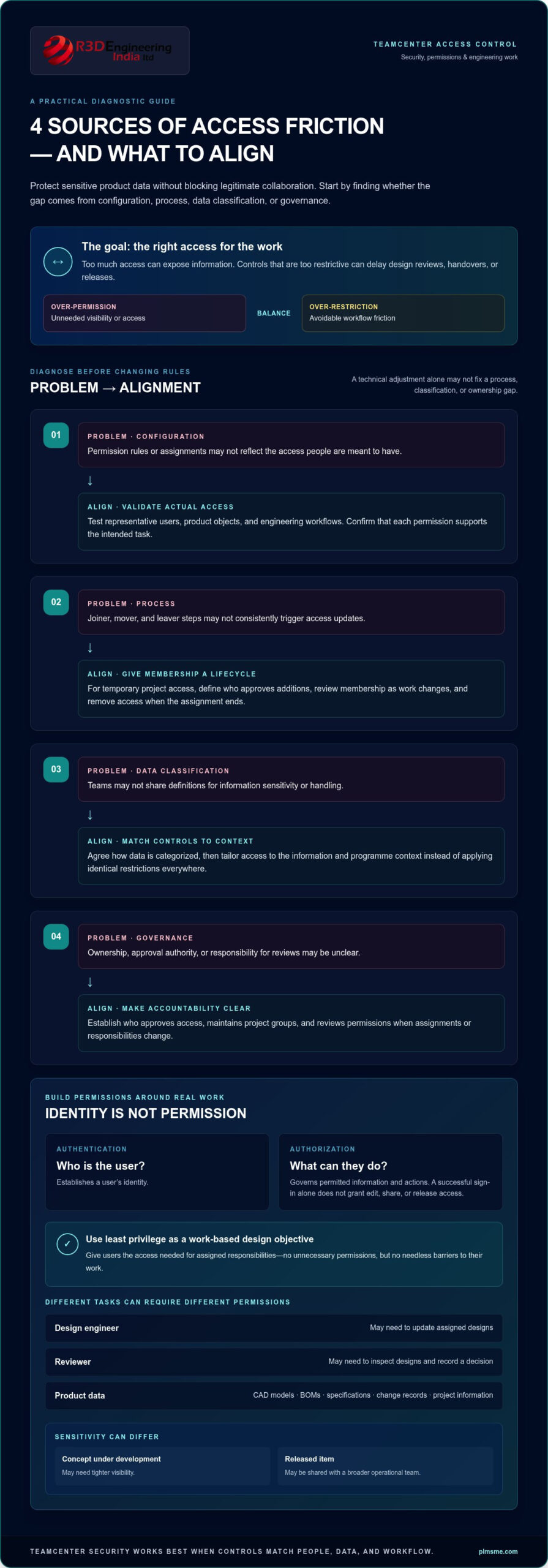
Two related security concepts are worth distinguishing. Authentication establishes a user’s identity. Authorization governs what that identity is permitted to do with particular information or actions. A successful sign-in doesn’t, by itself, mean a user should be able to edit a design, share a document, or release a change.
Effective access control protects product data while enabling the right people to collaborate and move work forward. That balance is the practical objective of Teamcenter access control and security consulting.
Which product lifecycle data needs deliberate protection?
Consider the information teams manage: CAD models, bills of materials (BOMs), specifications and other documents, change records, and project information. Each can reveal different aspects of a product or programme. A model may expose design intent; a BOM may show product structure and sourcing choices; a change record can document decisions and approvals.
Sensitivity isn’t uniform. A concept under development may need tighter visibility than a released item shared with a broader operational team. Access needs can also differ between programmes and business functions. A design engineer, manufacturing planner, and project manager may all need product information, but not necessarily the same ability to edit, approve, or distribute it. Match controls to actual work and data context instead of applying identical restrictions to every engineering object.
What can go wrong when permissions are poorly aligned?
Excessive access can expose information to users who don’t need it for their role. At the other extreme, permissions that block legitimate work can delay design reviews, handovers, or releases. Unclear ownership makes both problems harder to resolve. Teams may not know who should approve access, maintain a project group, or review permissions when assignments change.
These symptoms can have different causes, so diagnosis matters:
- Configuration issues: Permission rules or assignments may not reflect intended access.
- Process issues: Joiner, mover, and leaver steps may not consistently trigger access updates.
- Data-classification issues: Teams may lack shared definitions for sensitivity or handling.
- Governance issues: Ownership, approval authority, and review responsibilities may be unclear.
A technical adjustment alone won’t resolve missing ownership or an ambiguous classification scheme. A sound review considers configuration alongside how work is assigned, how data is categorized, and who is accountable for decisions. This broader view helps improve protection without making routine collaboration unnecessarily difficult.
How Teamcenter access controls connect roles, users, and product data
Access decisions connect a person’s identity to the information and actions needed for their work. In a Teamcenter environment, administrators may use user accounts, group or role assignments, ownership, and permissions associated with particular objects or workflows to define access. Exact terminology and behaviour depend on the deployed Teamcenter version and configuration. Treat these as design concepts to validate in the actual system, not as a universal preset.
The principle of least privilege offers a useful design objective: give each user the access needed for assigned responsibilities while avoiding unnecessary permissions. It doesn’t mean reducing access to the minimum possible regardless of context. An engineer may need to update assigned designs, while a reviewer may need to inspect them and record a decision. The right permissions support those distinct tasks without creating needless barriers.
How should roles and groups reflect real engineering responsibilities?
Start with stable job functions and project responsibilities rather than building permissions around named individuals. A role can represent recurring duties; group membership can reflect team or programme context where the deployed configuration supports that model. This approach makes access easier to administer as people move between assignments and keeps responsibility for approving changes clear.
Temporary project membership needs a defined lifecycle: an accountable owner approves the addition, access is reviewed as work changes, and membership is removed when the assignment ends. Without these steps, permissions can persist after the business need has passed.
How do permissions apply to product objects and workflows?
Access isn’t simply “in” or “out.” A person might be allowed to view a CAD model but not modify it, or edit a document without being authorized to release it. Sharing or approval actions may also be governed differently from routine access. Map each permission to a real task, then confirm how the relevant objects and workflow stages behave in the configured environment.
Object relationships and workflow states can affect intended access patterns. For example, a change process may involve a design, related documents, and review records. Test whether intended participants can access the necessary information at each step and whether actions remain appropriately limited. Don’t assume that a permission on one object automatically produces the same result for every related item.
Illustrative role-to-data-to-action example: A project design engineer is assigned to a programme group, can view and edit the CAD model and associated design document, and can submit a change for review. A designated reviewer can view those items and record a review decision, while release authority remains with the assigned approver. This example is conceptual. Validate actual permissions and workflow behaviour against the deployed configuration.
Document the tested result, not just the intended rule. A focused Teamcenter access control and security consulting review can connect role design with object and workflow behaviour, then support architecture or administration improvements. For broader system decisions, Teamcenter architecture and administration support can help align access arrangements with operational needs.
Choosing an access-control approach without slowing engineering teams
No single access model fits every Teamcenter environment. Role-based, project-based, and data-sensitivity-led approaches answer different questions: what work does someone do, which programme are they supporting, and how sensitive is the information? These approaches can be combined, provided each layer addresses a clear access need and remains practical to administer.
Tighter permissions don’t inevitably create more engineering friction. Friction often appears when rules don’t reflect actual tasks, exceptions are hard to obtain, or permissions are difficult to maintain. Start with common workflows, then apply the least complex combination of controls that addresses the organisation’s needs. The table compares the three approaches.
| Control objective | Operational benefit | Trade-off | Suitable context |
|---|---|---|---|
| Role-based: align access with job functions and responsibilities | Supports repeatable assignments and reduces individual permission decisions | Roles may not capture project boundaries or differences in data sensitivity | Stable responsibilities shared across teams |
| Project-based: limit access by programme or project membership | Helps coordinate collaboration within defined work groups | Membership needs active ownership, review, and removal when assignments change | Work organised around distinct projects or programmes |
| Data-sensitivity-led: apply criteria based on information classification | Allows controls to reflect the handling needs of different information | Categories and access criteria need consistent definition and application | Information types vary in sensitivity across functions or lifecycle stages |
When does role-based access provide a maintainable foundation?
Roles work well as a starting point when they reflect stable functions, such as design, review, or change coordination. They help teams assign permissions consistently without creating a separate rule for every person. Refine the model where project participation or data context changes what a role should do. Avoid multiplying roles for minor exceptions: an expanding role catalogue can become difficult to understand, review, and maintain.
When do project and data-sensitivity rules add useful precision?
Project boundaries add precision when engineering teams need controlled collaboration across programmes. Sensitivity categories can distinguish information handling needs, but only if owners define them consistently and users can apply clear criteria. A blended model might combine a stable role with project membership and specific data rules. Test it against real workflows, including handovers and reviews, and confirm the administration effort is manageable.
Before broad rollout, walk through representative engineering tasks with users and administrators. Check whether the model supports required access at each step, how exceptions are handled, and who maintains membership or classification decisions. Adjust rules that create unnecessary work while preserving the intended control objective. Practical testing turns an access design into an operating model rather than just a permissions diagram.
For broader implementation context, explore Siemens Teamcenter consulting. A structured Teamcenter access control and security consulting effort can connect the selected model to system architecture, engineering workflows, and ongoing administration.
Planning a Teamcenter security review and controlled improvements
A useful security review turns the current permission setup into a manageable improvement plan. Rather than changing rules broadly, establish what exists, compare it with how people work, test important scenarios, and address gaps with clear ownership. Teamcenter access control and security consulting can connect the findings to the system’s architecture and administration model.
Use a staged review so each decision has evidence behind it:
- Inventory access: Document relevant users, groups, roles, permission patterns, and ownership arrangements. Note where information or workflows depend on custom configuration.
- Map roles: Compare assigned access with actual engineering and project responsibilities. Identify outdated memberships, unclear approval routes, and permissions that lack a business owner.
- Test scenarios: Select representative users, objects, and workflows, including cross-functional collaboration. Check intended access and actions that should be denied.
- Remediate gaps: Prioritize changes by operational importance and data sensitivity. Test proposed adjustments before applying them to live work.
- Assign review ownership: Record who approves, implements, and periodically reviews access changes, and how exceptions are handled.
Architecture dependencies matter. Permission behaviour may be affected by how Teamcenter is configured and how connected processes use product data. Review those dependencies alongside access rules to avoid treating an isolated setting as the whole solution. For related considerations, PLM system architecture consulting can provide broader context for system design decisions.
How can teams test whether permissions work as intended?
Build scenarios around ordinary work: an engineer updating an assigned design, a reviewer accessing material for a decision, an authorized person completing a release step, and colleagues collaborating across a project boundary. Use appropriate test accounts and controlled data. Validate both permitted and denied actions, since checking only successful access can miss over-permissioning. Record the scenario, expected result, observed result, exception, owner, and remediation decision so the review can be repeated.
How should access changes remain governed over time?
Define who requests, approves, implements, and reviews each type of change. Keep a record of the reason, decision, affected access, and any required follow-up. Tie removal or reassessment to user lifecycle changes, role moves, and project completion rather than relying on informal reminders. Periodic reviews can then check whether permissions still match responsibilities and whether temporary access has been removed as intended.
Documentation and change control make administration more consistent, but recurring exceptions are also useful signals. If teams repeatedly request the same adjustment, revisit the underlying role structure, workflow, or architecture instead of accumulating one-off permissions. A Teamcenter access review can connect current configuration, engineering scenarios, and ongoing ownership.
How PLM-Sme supports Teamcenter access-control and security consulting
Access controls work best when they’re designed as part of the Teamcenter environment, not treated as a standalone set of permissions. PLM-Sme FZC connects access-control decisions with Teamcenter architecture, implementation, integration development, and ongoing administration. This approach accounts for how product data moves through engineering workflows and how system configuration supports operational governance.
An engagement is shaped around the current environment: its configuration, engineering processes, user responsibilities, and governance needs. The aim is to understand how access works in practice, identify where the design diverges from business intent, and develop improvements that fit the way teams collaborate. Recommendations can address configuration changes, process ownership, or broader architecture considerations rather than assuming every issue has the same technical cause.
What should a focused consulting engagement deliver?
A focused review should create a usable picture of users, groups, product data, workflows, and operating processes. From that baseline, recommendations can distinguish configuration adjustments from architecture decisions and governance actions. Each proposed change should include a rationale, an owner, and a way to validate its effect, so implementation remains traceable and administrators know how to maintain the result.
Prioritize improvements according to operational need and the intended protection of product information. A practical delivery plan can distinguish:
- Configuration actions: Changes to access assignments or permission behaviour, validated in the deployed environment.
- Architecture actions: Dependencies that need attention across the Teamcenter environment or connected processes.
- Governance actions: Decisions about approval authority, ownership, review, and exception handling.
Testing and documentation are part of implementation, not optional wrap-up tasks. Check each change against representative engineering scenarios, record its rationale, and hand it over with clear administration responsibilities. This gives system owners a reference for future updates and helps teams understand how the intended controls support their work.
How does access governance fit into long-term Teamcenter operations?
Access structures change as projects start and finish, people take on new responsibilities, and processes evolve. Ongoing administration can keep permissions aligned by incorporating access updates into relevant operational changes, maintaining decision records, and reviewing recurring exceptions. Connecting these activities to wider system architecture and change governance helps prevent local permission fixes from becoming difficult-to-manage patterns.
PLM-Sme’s Teamcenter access control and security consulting supports assessment of the current environment, a tailored improvement approach, and implementation or administration activities suited to the organisation’s needs. Discuss your Teamcenter access-control requirements to align access design with your Teamcenter workflows and long-term governance.
Make access governance part of your next Teamcenter improvement
Access governance is most effective when it develops alongside your engineering environment. As programmes, responsibilities, and connected processes evolve, treat permission review as an ongoing operational practice, not a one-time configuration task. Identify where access decisions are hardest to maintain, then define an improvement that can be tested, owned, and sustained.
Teamcenter access control and security consulting can translate that priority into practical system and governance changes. PLM-Sme is a Siemens Digital Industries Alliance Partner, supporting Teamcenter architecture, implementation, integration, and administration. This breadth connects access decisions with the wider environment they need to serve.
Start with a focused discussion about your current configuration, engineering workflows, and governance priorities. Discuss your Teamcenter access-control requirements with PLM-Sme and take a clear, workable next step toward controls that support both protection and productive engineering.
Frequently Asked Questions
What is access control in Siemens Teamcenter?
Access control determines which actions people can perform on product information in Teamcenter. For example, a user may be able to open a design record but not alter it, while another may be authorized to make changes as part of an assigned task. Authentication confirms who has signed in; authorization governs what they can do. Since deployed versions and configurations differ, validate specific rules and terminology in your own environment.
Can Teamcenter access be controlled by project or role?
Yes. Access can reflect recurring responsibilities, project participation, data context, or a combination. For instance, a design engineer might retain the same core permissions across assignments, while access to a particular programme’s information depends on approved project membership. This can separate stable job duties from temporary collaboration needs. Before changing the model, test a typical assignment change, such as moving an engineer from one project to another, in a controlled environment.
How do you audit Teamcenter user permissions?
Begin with a defined review scope, such as a programme, workflow, or group of related data, and identify who is responsible for validating the business need for access. Compare intended responsibilities with observed permissions, then capture evidence of the review and the decision for each exception. A useful audit record also shows when a change was made and who approved it, helping administrators trace why access differs from the standard pattern.
What is the principle of least privilege in PLM?
Least privilege means giving each person the access needed for assigned work without adding unrelated permissions. For example, someone who needs to consult a released design may not need the same editing rights as its active designer. The appropriate boundary depends on how the organisation handles its data and workflows. Treat least privilege as a target to test, since restricting access too far can prevent legitimate engineering tasks from being completed.
Can Teamcenter security controls restrict engineering collaboration?
They can if access rules prevent someone from completing a legitimate task or make ordinary collaboration depend on repeated exceptions. To spot this, follow a cross-functional task from handover through review and identify where users encounter access blocks. Use those findings to refine the model while retaining the intended controls. Test changes with representative work before applying them broadly, so the solution supports actual engineering activity.
When should a company seek Teamcenter access-control consulting?
Consider specialist support if administrators struggle to explain why access is granted, project changes leave permissions out of step with responsibilities, or routine work repeatedly encounters access problems. Teamcenter access control and security consulting can relate those symptoms to configuration, architecture, and governance. PLM-Sme FZC tailors its assessment and recommendations to the deployed environment, then connects agreed improvements with implementation or ongoing administration needs.