
Teamcenter Multi-CAD Collaboration Consulting: From Disconnected Designs to Controlled Product Data
What if the challenge isn’t that engineering teams use different CAD tools, but that shared product data has no clear owner? When revisions pass between teams without consistent controls, design decisions are harder to trace and cross-functional changes become more difficult to manage. Teamcenter multi-CAD collaboration consulting helps connect engineering environments through clear data ownership and governed workflows.
Teamcenter can support collaboration across different CAD environments, but technology alone won’t prevent conflicting revisions or uncontrolled changes. The architecture, data model, and change processes need to reflect how your teams design and work. A structured approach makes shared product information more reliable without requiring every team to use the same CAD system.
This article explains how to define ownership for CAD data, align change workflows with Teamcenter architecture, and plan a manageable consulting and implementation path. It also covers how architecture, integration development, migration, implementation, and ongoing administration can work together to support your engineering environment.
Key Takeaways
- Map how product data moves from CAD authoring to review, release, and downstream use to identify gaps at hand-offs.
- Set clear rules for data ownership, revision control, access, and lifecycle status before configuring workflows.
- Compare file exchange, managed product-data relationships, and lifecycle coordination to choose an approach suited to your engineering needs.
- Use Teamcenter multi-CAD collaboration consulting to translate stakeholder requirements into a scoped architecture and practical implementation plan.
- Plan discovery, design, implementation, validation, migration, and ongoing administration as connected stages tailored to the project.
Teamcenter multi-CAD collaboration consulting: what problem does it solve?
Engineering teams may use different CAD environments while contributing to the same product. A design group creates components, a supplier provides related data, and manufacturing or service teams depend on the resulting product information. The challenge isn’t simply moving files between systems. Teams need to know which information is authoritative, how it relates to the product, and what happens when a change affects other groups.
Teamcenter multi-CAD collaboration coordinates product data, ownership, and change workflows across engineering environments while teams continue authoring designs in their respective CAD systems. Unlike basic file sharing, this approach connects design information to product context and lifecycle processes. A shared workspace can make files accessible, but access alone doesn’t establish revision rules, approval responsibilities, or how a change should be reflected in downstream work.
For example, a component revision might affect an assembly, a supplier hand-off, and manufacturing documentation. If each group relies on separate naming conventions or informal notifications, it can be difficult to determine which revision is current and who must approve the next step. Teamcenter multi-CAD collaboration consulting shapes governance and architecture around these real hand-offs, improving traceability and reducing avoidable ambiguity.
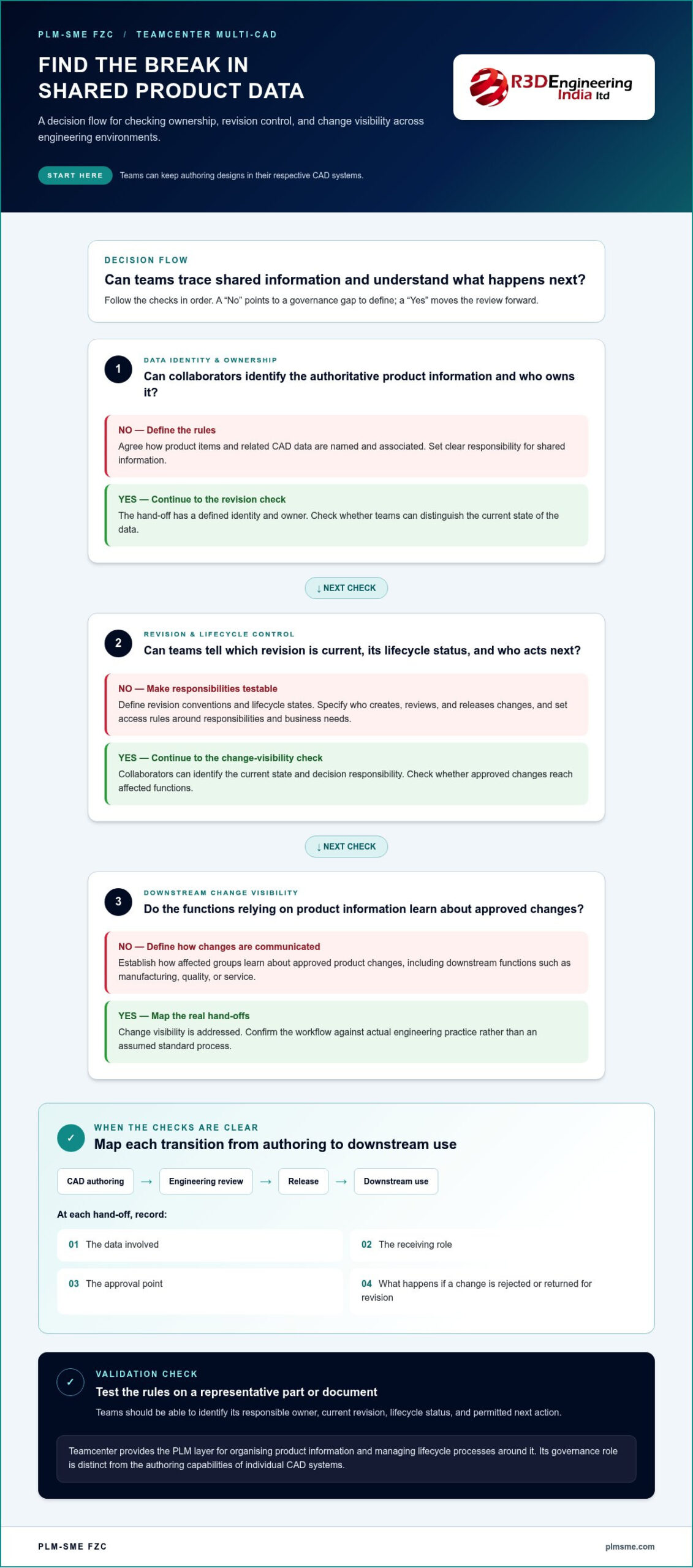
- Data identity: agree how product items and related CAD data are named and associated.
- Revision responsibility: define who creates, reviews, and releases changes.
- Downstream visibility: establish how affected functions learn about approved product changes.
When do multiple CAD environments create collaboration friction?
Friction often appears at organisational boundaries: when a design team hands work to another engineering group, a supplier contributes design information, or released data moves to manufacturing, quality, or service. Each hand-off can create uncertainty if teams use different naming conventions, revision practices, or assumptions about who owns shared information.
The question isn’t whether every organisation needs multiple CAD systems or whether every team must adopt one standard. Instead, assess whether the current tools and processes support the product-development responsibilities teams share. Look for recurring issues such as duplicate records, uncertainty about the latest revision, or changes that don’t reach the functions relying on them.
What role does Teamcenter play in a multi-CAD environment?
Teamcenter provides the PLM layer for organising product information and managing lifecycle processes around it. Product lifecycle management (PLM) offers broader context for this role: PLM connects product information and processes across stages of a product’s life. In a multi-CAD setting, Teamcenter’s governance role is distinct from the authoring capabilities of individual CAD systems.
The right architecture depends on your systems, data relationships, and workflows. It should define how product information is controlled and how lifecycle decisions are handled without assuming every design activity must move into one authoring tool. This distinction helps teams evaluate collaboration based on product-data control, not simply whether files can be opened or exchanged.
Designing Teamcenter workflows for shared product data and controlled change
A reliable workflow makes each hand-off understandable: teams can see where information came from, who is responsible for it, and what decision is needed next. Start by mapping the path from CAD authoring through engineering review and release to downstream use. For each transition, record the data involved, the receiving role, the approval point, and what should happen if a change is rejected or returned for revision.
Base this map on actual engineering practice, not an assumed standard process. One organisation may require formal approval before design information is shared with manufacturing. Another may allow earlier access, provided work-in-progress information is clearly identified. Teamcenter architecture and workflows should support these deliberate choices. Siemens describes its product-data and lifecycle scope on the Siemens Teamcenter official page; the workflow design should reflect your organisation’s processes.
Establishing ownership, revisions, and lifecycle states
Assign responsibility by data category rather than treating “engineering” as one owner. A team may author a design, a designated role may approve it, and a separate authority may release it for downstream use. Define revision conventions and lifecycle states so collaborators can distinguish working information from reviewed or released data. Set access rules according to responsibilities and business needs rather than relying on a universal configuration recipe.
Agree on ownership and revision rules before automating workflows. Otherwise, automation will move unclear decisions faster without making them clearer.
Make the rules testable. For a representative part or document, teams should be able to identify its responsible owner, current revision, lifecycle status, and permitted next action. This gives implementation teams a concrete basis for configuring and validating the process.
Connecting CAD collaboration with engineering change
A controlled change process links a proposed modification to its review, decision, and communication. Define who can initiate a change, which affected roles assess it, who approves it, and how the approved decision reaches teams using the affected information. The sequence depends on your governance, but each decision should leave a traceable relationship between the change and the product data it affects.
Those relationships matter. If a change record, design, and supporting document are managed as unrelated items, collaborators may have to reconstruct the context manually. A governed workflow should make the reason for a change and its disposition understandable alongside the relevant product information. This is different from sending a revised file: the exchange provides a representation, while the lifecycle process records the decision and its status.
Keep the governed product record distinct from exchanged representations or neutral-format files. These files can support viewing or transfer, but they shouldn’t replace the controlled source or obscure which revision they represent. Teamcenter multi-CAD collaboration consulting translates governance requirements into practical architecture and change workflows. For a broader view of strategic Siemens Teamcenter consulting, connect workflow decisions to the wider implementation approach.
Evaluating multi-CAD collaboration approaches for your Teamcenter environment
Different collaboration patterns call for different levels of control. A supplier sending a design package occasionally has different needs from engineering groups developing a product together through repeated reviews and changes. Compare approaches by how often information changes, who owns it, how closely its history needs to be traced, and which teams depend on it. The goal is a proportionate model, not maximum process complexity.
The options generally progress from transferring files, to managing relationships between product data, to coordinating lifecycle workflows across teams and connected systems.
| Approach | Governance | Traceability | Workflow impact | Operational complexity |
|---|---|---|---|---|
| File-based exchange | Rules are often defined around the hand-off | Depends on naming, records, and manual tracking | Supports discrete transfers with limited process change | Lower to establish, but repeat exchanges need discipline |
| Managed product-data relationships | Ownership and product context are managed centrally | Relationships between product information can be followed | Requires teams to work with agreed data structures | Moderate, depending on data scope and governance |
| Lifecycle workflow coordination | Roles, reviews, and decisions follow defined processes | Change and approval history can be connected to product context | Aligns cross-functional work and downstream communication | Higher, because more roles and process dependencies are involved |
Which collaboration model fits each engineering use case?
For an occasional supplier exchange, a controlled package with clear identification, revision context, and a defined recipient process may be proportionate. Recurring product development across teams calls for stronger management of product-data relationships and change decisions, particularly when downstream functions rely on current information.
Assess data sensitivity, update frequency, design responsibility, and the consequences of downstream use. If a receiving team needs only a reference representation, a broader workflow may add unnecessary overhead. If teams make interdependent design decisions or use the information to plan manufacturing, traceable relationships and coordinated change handling become more valuable.
How to assess architecture and integration trade-offs
Before selecting an approach, map system boundaries and identify which application owns each data category. Include existing information that may need migration, process dependencies, and the points where data moves between Teamcenter and other systems. CAD authoring requirements differ from downstream consumption: ERP may need released product structures, while MES or manufacturing engineering may rely on production-relevant information. Define each requirement separately rather than assuming one exchange serves every purpose.
Then assess how Teamcenter should relate to ERP, MES, CRM, or MOM systems, including which system governs each decision and how updates are managed. Teamcenter multi-CAD collaboration consulting connects these use cases to an architecture suited to current workflows and planned scope. Evaluate integration and migration together: a model that works for design teams alone may create friction for downstream processes.
Planning a Teamcenter multi-CAD consulting engagement from discovery to adoption
A practical engagement turns engineering pain points into decisions that can be designed, implemented, and maintained. Teamcenter multi-CAD collaboration consulting should connect business priorities with current systems and workflows rather than begin with configuration assumptions. A structured sequence keeps scope visible and gives stakeholders clear opportunities to validate the approach.
- Discover workflows: Document how teams create, review, release, exchange, and use product information, including hand-offs and recurring friction.
- Define requirements: Use stakeholder workshops to turn observations into specific use cases, ownership expectations, access needs, and change scenarios.
- Design architecture: Set out how Teamcenter, authoring environments, and connected systems should support the agreed use cases. Record decisions and assumptions.
- Plan implementation and migration: Identify required configuration, integration development, data migration, and dependencies. Scope migration around the information and relationships needed for the intended workflows.
- Implement and validate: Configure and develop the solution, then test representative data and processes with the roles who will use them.
- Support adoption: Prepare process guidance, clarify operational responsibilities, and plan administration and ongoing improvement.
Turning current-state findings into an implementation scope
Discovery should capture more than a list of CAD environments. Map data flows, lifecycle processes, system dependencies, and the teams involved at each hand-off. In workshops, invite engineering, manufacturing, IT, and other relevant stakeholders to describe specific problems and the decisions they need to make. A recurring revision mismatch, for example, becomes a scoped use case when the affected roles, information, and expected handling are clear.
Prioritise use cases by business relevance and technical dependency. Some may require architecture decisions or integration work before others can proceed. Translate findings into an implementation scope that identifies deliverables, dependencies, assumptions, and decisions still to be resolved. This makes trade-offs explicit and helps prevent migration or technical work from expanding beyond the agreed need.
Validating workflows and sustaining the environment
Validation should test realistic scenarios, not just whether a workflow can be launched. Check that product-data relationships are understandable, revisions follow the intended rules, permissions support defined responsibilities, and change processes route decisions appropriately. Where migration is in scope, check whether selected data retains the relationships required for the target use cases. Use the findings to refine the solution before wider adoption.
Adoption also requires clear role guidance: users should understand which actions they own, how to follow the process, and where operational responsibility sits. Plan who handles administration, issue resolution, and future solution development so the environment remains manageable after implementation. These activities form part of end-to-end PLM implementation, linking technical delivery to operational handover.
For a project-specific path from discovery through adoption, discuss your Teamcenter environment with PLM-Sme.
Working with PLM-Sme on Teamcenter multi-CAD collaboration consulting
Choosing a collaboration model is only the starting point. The next step is translating that choice into Teamcenter architecture, implementation decisions, and operating practices that fit how your organisation develops products. PLM-Sme FZC brings these elements together, connecting engineering objectives with practical workflows and a solution scope shaped around your systems and priorities.
PLM-Sme is an independent industrial digitalisation consultancy and Siemens Digital Industries Alliance Partner, working with Teamcenter architecture and implementation. Its independent consultancy model supports a collaborative approach to understanding your engineering environment and defining a practical path. The solution should align with your requirements, not assume every organisation needs the same configuration or process.
Bringing strategy, architecture, and implementation together
A project can bring discovery, solution architecture, implementation, and integration development together as connected activities. Workshops clarify which teams share product information, where hand-offs create friction, and what control is needed over revisions and changes. Those findings inform architecture decisions, including how data relationships and lifecycle processes should support agreed use cases. The implementation scope can then reflect business priorities and technical dependencies.
Project scope may also include data migration, CAD/CAM/CAE extensions, or integration development where these support defined requirements. Migration planning considers which existing information and relationships are needed in the target environment. Extensions and integrations are tied to specific workflows and system boundaries rather than treated as automatic additions. This keeps delivery focused on the collaboration problems your organisation has prioritised.
PLM-Sme’s Teamcenter consulting services connect architecture and implementation work with the wider PLM context. The approach can be tailored to your processes, system landscape, and delivery priorities, with decisions made alongside the stakeholders responsible for using and governing product data.
Defining a practical next step for your organisation
To frame an initial discussion, outline the CAD environments involved, the teams and suppliers that exchange product information, and the hand-offs or change processes that are difficult to manage. Identify intended outcomes too, such as clearer data responsibility, more traceable changes, or better-defined downstream use. You don’t need a complete technical specification; a concise view of current challenges can help focus discovery.
Project scope should follow discovery and agreed requirements. Depending on the needs identified, delivery can connect Teamcenter architecture and implementation with migration, integration development, and ongoing PLM system administration. Administration supports the managed environment and its operational needs after implementation.
Share your collaboration goals and project context to begin a focused discussion about a practical path forward: Discuss your Teamcenter collaboration requirements.
Set a clear direction for your next collaboration decision
The next step doesn’t need to be a full-scale transformation. Start by identifying one recurring collaboration challenge that matters to your engineering teams, then define what a better process should make possible. That might mean clearer responsibility for a shared design, more dependable visibility into a change, or a smoother hand-off to a downstream function.
Use that priority to frame a focused conversation about your current environment, business objectives, and constraints. Teamcenter multi-CAD collaboration consulting is most useful when it turns those specifics into practical decisions rather than applying a template that overlooks how your teams work. A well-defined starting point can help stakeholders align on the problem before committing to a solution scope.
PLM-Sme brings an independent specialist perspective to that discussion, grounded in its Teamcenter work and Siemens Digital Industries Alliance Partner status. Together, you can identify a practical path that reflects your organisation’s priorities and provides a sound basis for the work ahead.
Discuss your Teamcenter collaboration requirements and take the next step toward more controlled product data.
Frequently Asked Questions
What is Teamcenter multi-CAD collaboration?
It’s a way to coordinate product information when engineering work spans multiple CAD environments. The goal isn’t to make every team author designs in the same tool. Instead, Teamcenter multi-CAD collaboration consulting helps define how teams identify, relate, review, and use engineering data across shared product work. For instance, a project can establish how an assembly reference connects to its associated product record and design responsibility.
How does Teamcenter support collaboration across different CAD systems?
Teamcenter can provide a PLM context for organising product information and associated lifecycle processes, while individual CAD systems remain the design authoring environments. Teams decide what information to manage, how it relates to product structures, and which actions require review or approval. The technical approach depends on the systems and workflows involved, so compatibility, data behaviour, and exchange requirements should be validated for the project.
Can Teamcenter manage product data created in more than one CAD environment?
Yes, Teamcenter can manage product information originating in more than one CAD environment when the solution architecture accounts for the relevant data and process requirements. A practical assessment might examine whether teams need to manage design files, associated documents, product structures, or references between them. The scope should distinguish information that needs lifecycle control from files retained or exchanged for a specific downstream purpose.
What is the difference between multi-CAD collaboration and CAD file exchange?
CAD file exchange transfers design information from one participant or system to another. Multi-CAD collaboration also addresses the context around that transfer: which product the data belongs to, how teams work with it, and how decisions affect related work. For a one-off reference, a controlled exchange may be sufficient. Repeated joint development usually calls for clearer links between exchanged information and ongoing product processes.
How do you choose a multi-CAD collaboration approach for an engineering team?
Start with the work pattern, not a preferred technology. Consider how often teams exchange or update data, who is responsible for design decisions, how sensitive the information is, and whether manufacturing or other functions rely on it. A supplier sending a reference package occasionally may need a simpler process than teams jointly revising interdependent product components. Compare approaches against these needs, operational effort, and system dependencies.
What information is needed to plan a Teamcenter multi-CAD consulting project?
Bring a working picture of the current environment: the CAD applications involved, participating teams, common hand-offs, and the product information exchanged. Note recurring issues, such as uncertainty about which package a downstream team should use, and identify the intended improvement. Existing data sources, connected business systems, migration concerns, and key stakeholders also help shape discovery. Detailed technical specifications can follow as requirements and project boundaries become clearer.
How does PLM system architecture affect multi-CAD collaboration?
Architecture determines how Teamcenter fits with authoring environments, existing data sources, and downstream systems. It influences where product information is governed, how dependencies are handled, and how changes reach other processes. For example, if manufacturing planning uses released product information from another system, the design should clarify which system owns that information and how the hand-off is controlled. Architecture decisions should reflect actual system responsibilities, not assumed capabilities.