
Teamcenter electronic signature workflow for design sign-off
A design approval is only as traceable as the workflow that records it. A Teamcenter electronic signature and compliance workflow routes design files and bills of materials through defined review and approval steps, with role-based permissions and recorded sign-off. For FDA-regulated industries, 21 CFR Part 11 calls for controls over electronic-record integrity, audit trails and signature authentication; a configured workflow can support these controls, but it doesn’t establish compliance on its own.
Keeping approvals, revisions and access rules aligned can be challenging, especially when several roles must review the same design. This guide explains how Teamcenter supports sign-off, what its audit trail and permissions can capture, and how to approach Part 11 requirements without treating software configuration as a substitute for system validation. You’ll also see the practical decisions that shape an effective workflow, from approval routing to the records teams need to retain.
Key Takeaways
- Map design and bill-of-materials approvals to clear workflow steps, reviewers, and release states so teams can see what needs action.
- Use role-based permissions to control who can view, edit, or approve product data, and align access with each person’s responsibilities.
- Keep revisions, review feedback, and approval records connected to the relevant design so decisions have a traceable context.
- For 21 CFR Part 11 use, treat workflow configuration as one part of the compliance approach; system validation and controls for record integrity and signature authentication also matter.
- Identify gaps in your current approval process before planning changes; a digital maturity assessment can help clarify priorities and shape a practical roadmap.
Bill of materials and design document sign-off
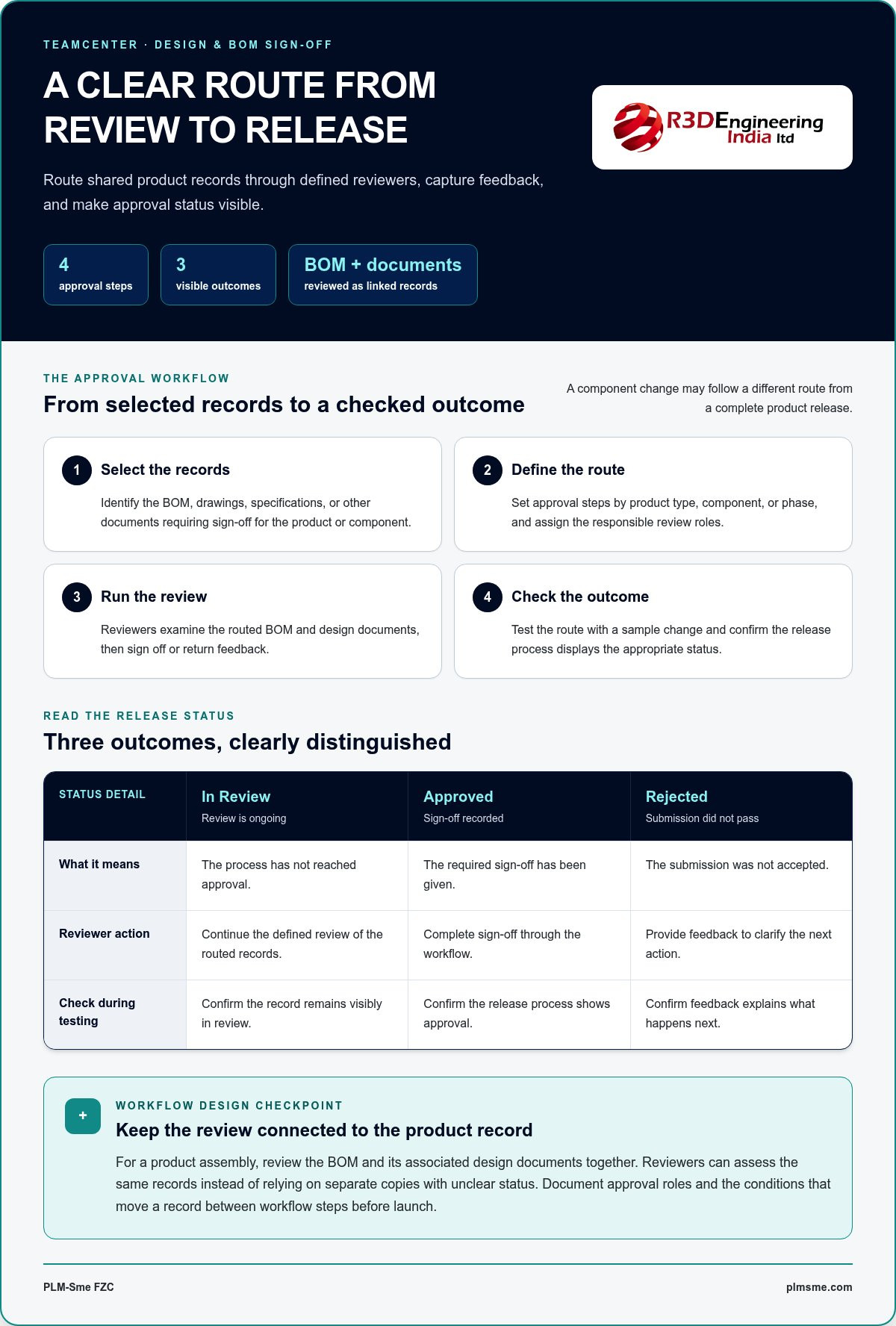
To configure electronic signatures and approval workflows in Teamcenter, define the approval sequence, assign reviewers, and link each workflow to the relevant design documents or bill of materials (BOM). Test the route with a sample change, confirming reviewers can approve it or return it with feedback. This clarifies the sign-off path before teams use it for active product records.
Siemens Teamcenter can route documents and designs through predefined workflow steps. Approval sequences can vary by product type, component, or phase, so a component change need not follow the same review path as a complete product release. This allows manufacturing and engineering teams to use a process suited to the decision under review.
Start by identifying which records need sign-off and what triggers each review. For a product assembly, review the BOM and its associated design documents together. Reviewers can assess the same records instead of relying on separate copies with unclear status. Before launch, document approval roles and the conditions that move a record between workflow steps.
- Select the records. Identify the BOM, drawings, specifications, or other documents that the workflow must route for the relevant product or component.
- Define the route. Set the required approval steps according to product type, component, or phase, and assign the responsible review roles.
- Run a review. Have assigned reviewers examine the routed BOM and design documents, then sign off or provide feedback.
- Check the outcome. Confirm that the release process displays the appropriate status, such as In Review, Approved, or Rejected.
These steps make approval progress visible. “In Review” means the process has not reached approval; “Approved” indicates sign-off, while “Rejected” means the submission did not pass. Reviewers can provide feedback to clarify the next action, rather than leaving rejection as an unexplained endpoint. Include each outcome in workflow testing.
For example, a UAE manufacturer reviewing a component substitution can route the affected BOM and design documents to the responsible reviewers. They can assess the same records, provide feedback, and sign off through the defined process. This illustrates how a shared review can work; each organization’s approval route should reflect its product structure and responsibilities.
For UAE manufacturing teams, consider how a proposed change affects both the BOM and its linked documents. Reviewers can evaluate the related product records together, supporting a consistent hand-off to manufacturing after approval. Teamcenter Integration Development can support connections between Teamcenter and manufacturing systems where approved product information must flow into related processes.
Teamcenter allows wheel.me staff to review the same bill of materials and design documents, then sign off or provide feedback. Teamcenter also allows approval sequences to be defined according to product type, component, or phase. Together, these options let a review use a sequence suited to the item under consideration while keeping reviewers focused on the same records. For UAE manufacturing teams, this can help connect a proposed change with its relevant materials and the reviewers expected to assess them, with feedback available when sign-off is not given.
Regulatory compliance and accountability
Siemens Teamcenter can support accountability by linking product changes to formal initiation, review, and approval processes. For each change, teams can record its reason, assess affected parts or documents, and preserve the decision in the product lifecycle record. This gives reviewers a defined process to follow instead of relying solely on a manual hand-off.
How does Teamcenter compare with Windchill and other PLM systems for compliant e-signatures? Compare whether each configured system meets your approval, access, record-integrity, and validation needs. Teamcenter supports formal change processes, but a product name alone does not establish regulatory compliance.
For medical-device manufacturers, the design process must connect decisions to the records that support product development. ISO 13485, according to the International Organization for Standardization, is the quality management standard for medical device manufacturers and includes design and development requirements centred on the Design History File. A Teamcenter workflow can help organize associated reviews and approvals, while the company’s procedures define what evidence each record must contain.
Accountability is clearer when each change has an identifiable purpose and scope. Teamcenter change requests let users propose changes and document their reasons. Once a change is approved, change orders formalize it and outline its scope, impact, and affected parts or documents. Teams can then link the decision to the relevant product records.
- Initiate: Record the proposed change and its reason in a change request.
- Assess: Identify affected components and documents, then route the change for appropriate review.
- Approve: Document the decision and formalize accepted scope through a change order.
- Follow through: Connect approved changes with release and manufacturing processes, using feedback to trigger further changes when needed.
For FDA-regulated work, 21 CFR Part 11 requires controls for electronic-record integrity, audit trails, and signature authentication. Those controls need to operate alongside documented procedures and system validation. Teamcenter can support the process, but configuration alone doesn’t demonstrate that a system performs as intended.
Before an FDA audit, a validation team should compare a sample execution report with its internal Design History File template. This tests whether recorded workflow evidence fits the organization’s documentation structure. If reviewers find missing approvals or unclear change rationale, teams can address those gaps in the process and its configuration.
Accountability also depends on fit between system architecture and business controls. A Teamcenter system architecture review can help organizations assess how change processes, integrations, and records align with their operational requirements.
Teamcenter PLM processes can integrate review workflows, e-signatures, and approvals for simulation results. Teamcenter data management includes CMII-certified, closed-loop processes for handling changes. Together, these capabilities can help connect review and change processes, provided the organization defines how each record is used and maintains its validation approach.
To support accountability, make the applicable review path explicit, retain approval context with the change, and check that the resulting records support the intended decision. This keeps responsibility focused on the configured process and its evidence, rather than treating a digital signature or workflow as proof of compliance by itself.
Security, compliance and role-based access control
How do Teamcenter compliance workflows meet UAE electronic signature and data protection requirements? Teamcenter can support controlled access and documented approvals, but configuration alone does not establish compliance with UAE requirements. Organizations must align workflow settings, identity controls, and records with the rules that apply to their operations.
Role-based permissions let administrators control who can view, edit, or approve specific data. For example, a design engineer might edit a CAD record, while a quality reviewer can inspect it and submit an approval. Separating these abilities helps align access with assigned responsibilities across an enterprise.
Begin implementation by mapping business roles to Teamcenter actions. Identify who needs to read product data, modify records, or approve a workflow step. Apply permissions to the relevant data structures and workflow tasks, then test each role using representative records. Confirm that the test includes both permitted and blocked actions.
- Engineering: Give design personnel access to the records and editing tasks needed for their work.
- Quality: Assign review and approval abilities according to internal responsibilities.
- Manufacturing: Provide access to released product information required for production processes.
- Administration: Limit permission management to authorized administrators.
Identity integration is another control point. Teamcenter users can authenticate through company Azure Entra ID using SAML-based single sign-on. This connects application access to the organization’s identity process. Map user identities and groups to Teamcenter roles, then test login and authorization paths for each intended user group.
Keep authentication separate from authorization. A successful sign-in establishes a user’s identity through the configured method; Teamcenter permissions determine what that user can access or approve. For example, a reviewer may authenticate successfully but lack permission to approve a particular product record. This distinction helps administrators diagnose access issues without broadening permissions unnecessarily.
For your operations, document how electronic approvals handle identity, authority, access, and retained records. Define which approval actions require an authenticated user, which roles may perform them, and how the organization preserves evidence of decisions. Align these controls with applicable legal obligations and internal procedures, rather than assuming one global template fits every operation.
Review access when responsibilities change. A practical administration cycle checks role assignments, workflow ownership, and integration mappings against current job functions. For instance, when an employee moves from engineering to quality, revise their Teamcenter abilities to match the new role. This reduces unnecessary access while keeping review tasks available to the right people.
System and Solution Architecture can structure the relationship between Teamcenter, enterprise identity, and connected systems. During End-to-End PLM Implementation Support, access scenarios can be tested across roles and integration points before workflows enter production.
Tamper-evident records and audit trails
For regulated teams, an approval record must remain connected to the product decision it documents. In FDA-regulated industries, 21 CFR Part 11 requires controls for electronic-record integrity, audit trails, and signature authentication. A Teamcenter audit trail should therefore be assessed as part of the organization’s complete recordkeeping and control process.
Teamcenter tracks document and design revisions and versions, allowing users to access earlier versions and review change history. This helps engineering teams understand which version was reviewed and how a design changed. For example, a reviewer assessing a drawing can compare its current revision with an earlier version instead of relying on an untracked file copy.
A useful audit review follows the record’s lifecycle. Start with the affected product record, then inspect its revision history, review activity, and linked change information. Check whether the approval record identifies the design version under review and whether feedback relates to that version. This makes the evidence easier to interpret during an internal review or audit.
- Identify the record: Locate the relevant BOM, design document, or product record in Teamcenter.
- Review its history: Compare the current version with earlier versions and examine the recorded change history.
- Connect the decision: Trace the review or approval to the relevant design record and documented change.
- Investigate exceptions: Use the workflow status and change history to identify incomplete or rejected work.
Change requests add context by letting users propose changes and document their reasons. Change orders formalize approved changes, outlining their scope, impact, and affected parts or documents. Together, these records help explain why a product record changed and which items the decision involved.
Review feedback also contributes to traceability. Teamcenter provides markup and annotation tools for commenting on documents and CAD models during reviews. For instance, an engineering reviewer can identify an area of a drawing that needs revision. The comment gives the next reviewer context, while version history distinguishes the updated design from the one first reviewed.
Automated notifications can alert users to pending tasks, approvals, and changes to assigned documents. These prompts support workflow follow-through, but they do not replace a record of the decision. Teams should examine the product lifecycle records and workflow evidence, rather than treating an email or interface notification as the approval record.
“Tamper-evident” should mean that unauthorized or unexplained changes can be detected and investigated, not that records can never be altered. For FDA-regulated work, validate that the configured system supports accurate, reliable records and can detect invalid or altered records, as required by applicable controls. Test representative review and change scenarios, then compare the resulting records with internal procedures.
21 CFR Part 11 electronic records and signatures
For regulated work, configured software must support reliable electronic records and controlled signatures. Teamcenter workflows provide a structure for routing approval decisions, while validation tests whether the implementation performs as intended.
Electronic Records and Signatures
Teamcenter can route product records through review and approval workflows, linking an approval decision to the record under review. To assess the setup, examine which records enter the workflow, which steps capture approval, and how the resulting records remain accessible for review.
Implementation costs and licensing prices depend on the deployment, required integrations, workflow scope, and applicable software entitlements; pricing is provided after a quote request. For licenses or modules, map the required signature and compliance capabilities to the specific Teamcenter configuration and licensing terms rather than assuming one universal package.
In practice, a user receives an assigned approval task, reviews the relevant record, and records a decision through the configured workflow. The process should preserve the decision’s link to the record and its review context.
Signer Identity and Signature Meaning
Signer identity links an approval action to an authenticated user, while signature meaning explains what that action represents, such as review or approval. Define the meaning of each workflow step, then verify that assigned users authenticate and have authority for that action.
Teamcenter users can authenticate through company Azure Entra ID using SAML-based single sign-on. This supports identity integration, while Teamcenter permissions govern access to records and approval tasks. Test an actual approval path to ensure the workflow distinguishes an authorized approval from a user who can only view the record.
For each signature step, document the intended decision and its place in the process. A review acknowledgment and a release approval are different actions; the workflow should make that distinction clear to users and reviewers.
Deployment Risks and Validation Requirements
Common deployment risks include unclear workflow requirements, incorrect role assignments, broken identity integration, and records that fail to capture the intended process. A test plan should cover representative users, records, approval outcomes, and exceptions, such as a rejected submission returned for revision.
According to the Office of the Federal Register, National Archives and Records Administration, FDA regulations require system validation to ensure accuracy, reliability, consistent intended performance, and the ability to detect invalid or altered records. Validation should test configured workflows in practice, not only demonstrate that users can sign in.
Review test evidence against internal procedures and the organization’s record templates. Confirm that approval outcomes, user permissions, and associated records match the intended use. Re-test affected workflows when configurations or integrations change, keeping the evidence aligned with the live implementation.
For structured deployment planning, explore end-to-end PLM implementation support to align Teamcenter configuration, integrations, and validation activities with operational requirements.
PLM-Sme FZC: Digital maturity assessments and reports
PLM-Sme FZC helps organizations assess their digital maturity and identify practical priorities for PLM improvement. A digital maturity assessment and report can clarify where approval processes, data structures, or integrations need attention before teams plan workflow changes.
Turn to PLM-Sme FZC when you need to connect Teamcenter requirements with a wider transformation plan. Digitalisation Vision & Roadmap Consulting can frame the next steps, while System and Solution Architecture addresses how systems and integrations should support them. For organizations exploring wider operational opportunities, industrial automation and AI solutions may also form part of the roadmap.
To discuss your Teamcenter priorities and digital maturity, contact PLM-Sme FZC or visit plmsme.com.
Shape the next step in your design governance
Use your next design sign-off initiative to define success across teams: which decisions need formal approval, what evidence supports accountability, and where integration or governance changes are needed. A well-scoped Teamcenter electronic signature and compliance workflow starts with these operational priorities, giving technical and quality teams a shared basis for planning. It also helps separate immediate process improvements from changes belonging in a broader digitalisation roadmap.
PLM-Sme FZC supports this planning through Digital maturity assessments and reports and Digitalisation Vision & Roadmap Consulting. If transformation priorities extend into production processes, its Industrial automation and AI solutions can also inform the wider direction. Assessing current workflows helps teams set practical priorities without treating software configuration as the whole compliance strategy.
For a focused discussion about your Teamcenter priorities, contact PLM-Sme FZC about Teamcenter workflows. Move forward with a plan that connects design governance to your organization’s digital goals.
Frequently Asked Questions
What problem does this solve?
A Teamcenter electronic signature and compliance workflow addresses fragmented design approvals and unclear decision ownership. For example, when engineering, quality, and manufacturing rely on separate email threads, teams can lose track of which submission is ready for release. A defined workflow gives each role a clear next action and keeps sign-off linked to product records. Start by identifying where hand-offs stall, then decide which decisions need structured routing.