
Teamcenter CAD Integration Services: Optimizing Engineering Data for UAE Industry
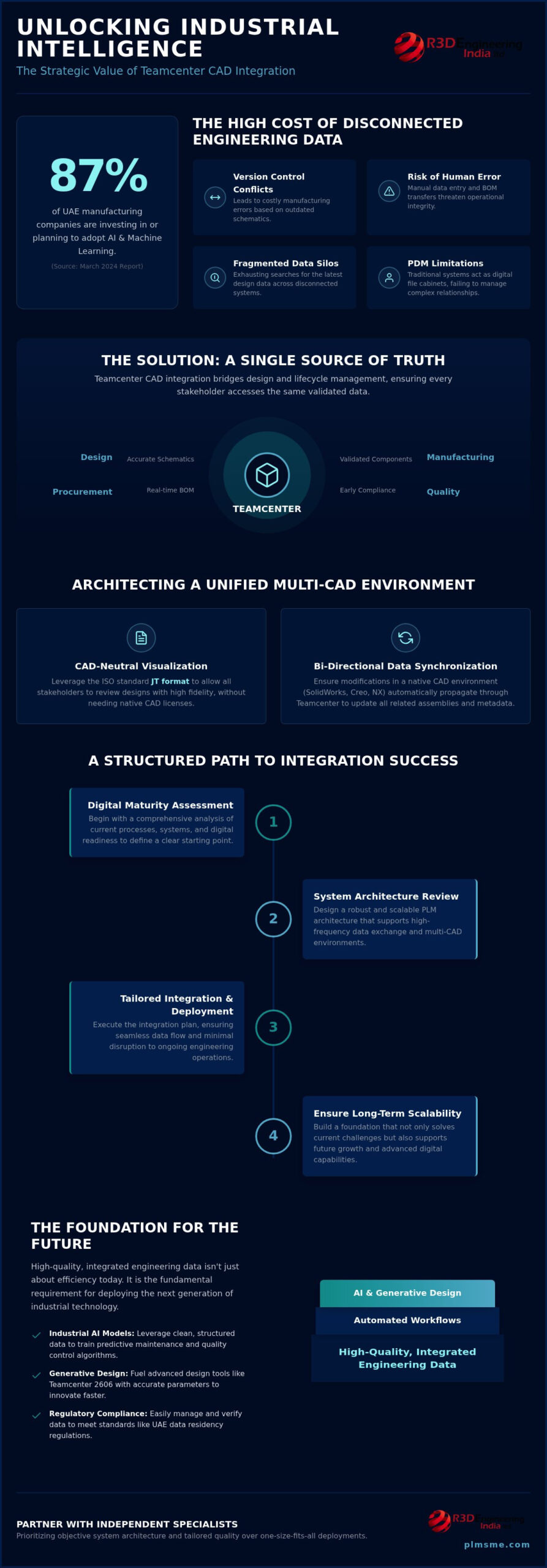
According to a March 2024 report, 87% of manufacturing companies in the UAE have already invested in or plan to adopt AI and machine learning within the year. However, the path to industrial intelligence often hits a wall when engineering data remains trapped in fragmented silos. You likely recognize the friction of version control conflicts that lead to costly manufacturing errors or the exhaustion of searching for the latest design data across disconnected systems. Manual BOM transfers between CAD and PLM are more than a nuisance; they’re a risk to your operational integrity.
By leveraging expert Teamcenter CAD integration services, your organization can move beyond these manual bottlenecks to establish a definitive single source of truth. We’ll examine how streamlining multi-CAD workflows and securing engineering data creates the necessary architecture for the next generation of digital transformation. This article explores the transition to automated BOM management and the implementation of scalable systems that support the advanced AI capabilities found in Teamcenter 2606, ensuring your data remains compliant with UAE residency regulations while driving industrial excellence.
Key Takeaways
- Learn how to eliminate costly revision errors and manufacturing delays by bridging the gap between design tools and lifecycle management.
- Understand the technical methodology for managing diverse toolsets like SolidWorks and Creo within a single environment using the ISO standard JT format.
- Discover a structured approach to Teamcenter CAD integration services that begins with a comprehensive digital maturity assessment to ensure long-term scalability.
- Identify why high-quality, integrated engineering data is the fundamental requirement for deploying industrial AI models and generative design.
- Evaluate the benefits of partnering with independent specialists who prioritize objective system architecture and tailored quality over one-size-fits-all software deployments.
Eliminating Engineering Silos through Teamcenter CAD Integration Services
Teamcenter CAD integration services act as the vital bridge between the creative design phase and the rigorous demands of product lifecycle management. In many UAE industrial environments, engineering data often exists in isolation, disconnected from the broader manufacturing and procurement cycles. This fragmentation leads to a cascade of inefficiencies. When design intent isn’t synchronized with the PLM system, organizations face significant revision errors and manufacturing delays that erode profitability. It’s not just about file management; it’s about ensuring that every downstream process relies on accurate, up-to-date engineering intelligence.
By establishing a single source of truth, discrete manufacturers ensure that every stakeholder, from the shop floor to the executive suite, accesses the same validated data. This environment is built on the robust framework provided by Siemens Digital Industries Software, where Teamcenter serves as the central nervous system for engineering intelligence. It facilitates cross-departmental transparency, allowing procurement teams to see real-time BOM changes and quality teams to verify compliance long before a physical prototype exists. This visibility transforms the engineering department from a siloed cost center into a collaborative driver of value.
The Critical Need for Seamless Engineering Data Flow
Manual data entry remains a primary bottleneck in product development. Every time an engineer manually re-keys information from a CAD tool into a spreadsheet or a standalone database, the risk of human error increases. These micro-delays accumulate, directly impacting product launch timelines. Version control serves as the absolute foundation of modern industrial quality standards; without it, manufacturing teams might build components based on outdated schematics. Effective integration connects design intent directly to a strategic industrial digitalisation roadmap, ensuring that every design iteration moves the company closer to its long-term automation goals.
Overcoming Traditional PDM Limitations
Traditional Product Data Management (PDM) often functions as little more than a digital filing cabinet. While it stores files, it frequently fails to manage the complex metadata and inter-part relationships that define modern machinery. Advanced Teamcenter CAD integration services move beyond simple storage. They ensure data integrity across globally distributed engineering teams, where a change made in one time zone is instantly reflected across the entire architecture. By addressing these structural gaps, businesses reduce technical debt. Investing in professional PLM system architecture consulting ensures that the integration isn’t just a technical patch but a scalable foundation for future growth.
Architecting Multi-CAD Environments for Enhanced Engineering Control
Operating a modern industrial facility in the UAE often involves a heterogeneous software stack. Managing diverse toolsets like NX, SolidWorks, Creo, and AutoCAD within a single environment is no longer optional; it’s a strategic necessity for maintaining a competitive edge. Expert Teamcenter CAD integration services provide the technical framework to consolidate these disparate files into a unified repository. By leveraging the ISO standard JT format, teams achieve CAD-neutral visualization, allowing stakeholders who don’t have access to native CAD tools to review designs with high fidelity.
Maintaining complex assembly structures and component relationships is a technical hurdle that simple PDM systems cannot clear. Bi-directional data synchronization ensures that when an engineer modifies a part in their native CAD environment, the change propagates through Teamcenter to update all related assemblies. This prevents the “broken link” syndrome common in manual workflows. Organizations aiming for this level of control should consider a system and solution architecture review to ensure their infrastructure supports such high-frequency data exchanges.
Standardizing Multi-CAD Management Strategies
Handling conflicting data formats without losing design intelligence is essential for distributed design teams. Without a standardized approach, metadata like material properties or custom attributes often gets lost during translation. Implementing strategic Siemens Teamcenter consulting allows for tool consolidation that respects the unique strengths of each CAD application. This results in a governed environment where design intent is preserved from the initial sketch to the final release, reducing the risk of downstream manufacturing errors caused by data corruption.
Optimizing Bill of Materials (BOM) Synchronization
Transitioning from an Engineering Bill of Materials (EBOM) to a Manufacturing Bill of Materials (MBOM) is significantly more efficient through integrated workflows. This process reduces reconciliation errors during the release cycle, which often lead to manufacturing delays and cost overruns. Teamcenter CAD integration services automate the flow of data, ensuring that procurement and production teams always work from the latest validated design. BOM synchronization is the automated alignment of engineering design with manufacturing requirements. This precision is vital for maintaining the integrity of the digital twin throughout the entire product lifecycle, from initial concept to final assembly.
Executing a Structured Teamcenter CAD Integration Process
Successful implementation of Teamcenter CAD integration services depends more on a rigorous methodology than on the software itself. A “plug-and-play” mindset often leads to architectural bottlenecks that stifle future growth. Instead, the process must begin with a comprehensive digital maturity assessment. This evaluation identifies current technical debt and ensures the subsequent implementation aligns with the organization’s strategic vision. By designing a scalable solution architecture tailored to specific industrial needs, companies avoid the common pitfall of outgrowing their PLM environment within a few years.
Executing data migration and environment configuration with minimal downtime is the hallmark of a professional deployment. It’s not enough to simply move files; the migration must preserve complex relationships and metadata that define the engineering intent. Once the system is live, providing ongoing support through a dedicated PLM system administration retainer ensures the environment remains optimized. This proactive oversight prevents the gradual degradation of system performance and ensures that the platform evolves alongside new engineering requirements.
Phase 1: Discovery and Architecture Design
Mapping existing design workflows to Teamcenter standard processes is the first technical milestone. This stage often reveals where standard out-of-the-box features suffice and where custom API requirements emerge for unique business use cases. Developing a digital maturity report provides a data-driven baseline for this journey. It guides the solution architecture to ensure it remains flexible enough to accommodate multi-CAD data without losing the granular control required by engineering leads.
Phase 2: Development, Testing, and Validation
Configuring the Teamcenter environment specifically for complex CAD datasets requires technical precision. Engineers shouldn’t experience performance lags when saving massive assemblies or checking out components. Rigorous User Acceptance Testing (UAT) for design workflows ensures that the system handles real-world scenarios before the final go-live. Ensuring seamless Teamcenter CRM integration further extends this visibility, allowing downstream teams to access validated engineering data for more accurate quoting and service planning. This validation phase is critical to building user trust and ensuring high adoption rates across the engineering department.
Enabling Industrial AI through Integrated Engineering Data
UAE manufacturing is rapidly pivoting toward machine learning and autonomous operations. With 87% of companies in the region investing in or planning to adopt AI by 2026, the demand for structured, high-fidelity data is unprecedented. High-quality CAD data serves as the essential fuel for these models. Without the foundation laid by professional Teamcenter CAD integration services, AI initiatives often fail because they lack the context provided by managed metadata. Integrated data allows for predictive maintenance by correlating design tolerances with real-world wear patterns. It also powers generative design, where algorithms suggest optimized geometries based on validated engineering constraints. This builds a comprehensive Digital Twin strategy that remains accurate throughout the product lifecycle.
Preparing for the next wave of industrial automation solutions in the GCC requires more than just new hardware. It demands a digital environment where engineering intelligence is accessible and machine-readable. Organizations that successfully integrate their CAD environments with Teamcenter are better positioned to leverage the AI BOM agents and advanced analytics found in the latest software releases. This strategic alignment ensures that your engineering data isn’t just a record of the past but a predictive tool for the future.
Data Readiness for Manufacturing AI
Legacy CAD data often contains inconsistencies that confuse machine learning algorithms. Cleaning and structuring this data is a prerequisite for any advanced automation project. Automating metadata extraction through Teamcenter ensures that AI models receive accurate inputs regarding material properties, weight, and assembly relationships. AI readiness in manufacturing depends entirely on the cleanliness and accessibility of integrated PLM data. By refining these datasets through Teamcenter CAD integration services, organizations ensure their AI models produce reliable, actionable insights rather than errors based on fragmented information.
Strategic AI Roadmaps for Discrete Industry
A strategic roadmap integrates AI insights directly back into the design cycle for continuous improvement. This creates a loop where shop floor performance data informs the next generation of engineering designs. Using integrated PLM data to drive autonomous shop floor operations requires a robust architecture that can handle real-time data exchanges. This approach aligns with national industrial digitalization standards, ensuring compliance with UAE data residency laws while maximizing operational efficiency. For organizations ready to transition from manual workflows to intelligent systems, exploring industrial automation and AI solutions is the logical next step in their digital evolution.
Partnering with Independent Specialists for PLM Success
Choosing the right partner for Teamcenter CAD integration services is a strategic decision that extends far beyond the initial software configuration. In the UAE’s evolving industrial sector, organizations need more than a technical vendor; they require an objective advisor who prioritizes long-term architectural integrity over software license quotas. Independent specialists offer results-oriented advice that remains neutral and focused on your specific operational goals. Because these consultants don’t sell hardware or licenses, their recommendations are rooted in what actually works for your engineering environment rather than what meets a sales target. This transparency builds the trust necessary for a successful digital transformation.
A “thinking partner” engages deeply with your long-term vision, moving beyond simple task execution to offer bespoke advice that anticipates future challenges. Utilizing an ongoing PLM system administration retainer ensures that your environment stays optimized as your product complexity grows. This continuous oversight prevents the technical debt that often accumulates when systems are left unmanaged. By focusing on tailored quality, independent experts ensure that your integration remains agile, cost-effective, and fully aligned with the technical standards required for modern discrete manufacturing.
Boutique Expertise vs. Large-Scale Vendors
Agility and specialized knowledge often lead to a faster ROI in complex PLM projects. While large-scale global vendors might offer broad reach, they frequently lack the focused attention required to navigate the nuances of the national industrial landscape. Boutique specialists provide a high level of professional literacy and can pivot quickly to address unique engineering bottlenecks. This specialized approach ensures long-term system performance without the need for significant internal overhead. You gain access to seasoned professionals who have navigated the specific data residency and compliance requirements of the region, ensuring your architecture is both robust and legally sound.
Securing Your Digital Future
Establishing a roadmap that evolves with your business growth is essential for maintaining a competitive edge. As you scale, you might require specialized Teamcenter integration development to handle unique workflows or proprietary data structures. A structured roadmap ensures that every technical milestone brings you closer to full digital maturity. To begin this journey with a clear understanding of your current state, contact PLM-Sme for a comprehensive digital maturity assessment. This report provides the data-driven insights needed to build a scalable foundation for your engineering data, ensuring your organization is ready for the next wave of industrial innovation.
Advancing Your Industrial Digitalization Strategy
Building a robust engineering foundation requires moving beyond fragmented data toward a unified, multi-CAD environment. By implementing structured Teamcenter CAD integration services, your organization secures a single source of truth that reduces manufacturing delays and prepares your data for the next wave of industrial AI. This architectural clarity is essential for maintaining compliance with UAE data residency laws while driving the efficiency required in modern discrete manufacturing.
As an independent Siemens Digital Industries Alliance Partner, PLM-Sme provides the objective expertise needed to navigate these complex digital transitions. We specialize in providing authoritative digital maturity reporting and specialized system architecture consulting tailored to the unique needs of the region. The transition to a fully integrated PLM environment is a strategic investment in your company’s future scalability and operational excellence.
Request a Digital Maturity Assessment from PLM-SME to establish your roadmap for long-term transformation. Your journey toward a more automated, intelligent future starts with a clear understanding of your current technical landscape and a commitment to data integrity.
Frequently Asked Questions
What are the primary benefits of Teamcenter CAD integration for engineering teams?
Teamcenter CAD integration services provide a single source of truth that eliminates manual data entry and version control conflicts. Teams benefit from automated Bill of Materials (BOM) management and seamless data sharing across departments. This connectivity reduces manufacturing errors by ensuring every stakeholder works from validated, up-to-date design data. It also streamlines change management processes, allowing engineers to focus on innovation rather than administrative tasks or searching for lost files in disconnected folders.
Which CAD tools can be integrated with Siemens Teamcenter?
Siemens Teamcenter features a robust architecture that integrates with a wide range of industry-standard design tools. Beyond Siemens’ own NX and Solid Edge, it supports SolidWorks, Creo, AutoCAD, CATIA, and Autodesk Inventor. This flexibility is vital for UAE manufacturers who often manage diverse software stacks across their supply chains. These integrations ensure that native CAD intelligence, including complex assembly relationships and metadata, remains intact when saved or checked out from the PLM environment.
How does Teamcenter handle multi-CAD environments and data formats?
Teamcenter utilizes the ISO standard JT format to facilitate CAD-neutral visualization and collaboration within multi-CAD environments. This allows stakeholders to review and mark up designs without needing the original authoring software. The system manages diverse data formats by synchronizing bi-directional data between CAD tools and the central repository. It preserves the integrity of complex assembly structures, ensuring that components from different CAD systems can coexist and interact within a single high-level product structure.
What is the typical timeline for a professional Teamcenter CAD integration project?
The timeline for a professional integration project varies based on system complexity and data volume; it typically spans several months. A structured process involves initial discovery, architecture design, and rigorous User Acceptance Testing (UAT). We prioritize minimal downtime during the environment configuration and data migration phases. Each project starts with a digital maturity assessment to establish a realistic schedule that accounts for legacy data cleaning and custom API development requirements tailored to your specific needs.
Is it possible to integrate legacy CAD data into a new Teamcenter environment?
It’s entirely possible to migrate legacy CAD data into a new Teamcenter environment through a structured migration process. This involves cleaning and re-structuring old datasets to ensure they meet modern PLM standards. We focus on preserving the metadata and inter-part relationships that define your engineering intent. Successful migration ensures that historical design intelligence isn’t lost, providing a stable foundation for future projects while maintaining compliance with national data residency and security regulations.
How does integrated CAD data support industrial AI and Digital Twin strategies?
Integrated CAD data serves as the essential fuel for industrial AI models and the foundation for a comprehensive Digital Twin strategy. High-quality, structured data allows machine learning algorithms to perform predictive maintenance and generative design with high accuracy. By establishing a digital thread from design to the shop floor, organizations can leverage AI BOM agents and advanced analytics. This readiness depends on the cleanliness of the data managed through professional Teamcenter CAD integration services.
Why should we choose an independent consultant over a software vendor for integration?
Independent consultants offer objective, results-oriented advice because they don’t have software license quotas or hardware sales targets to meet. This independence allows them to function as a “thinking partner” focused on your long-term transformation rather than a one-size-fits-all deployment. They prioritize system and solution architecture that aligns with your specific engineering challenges. You receive bespoke advice that balances high-level strategic vision with grounded, practical execution to ensure a higher return on investment.
What ongoing support is required after a Teamcenter integration go-live?
Post-integration success requires a proactive approach to system maintenance and performance optimization. Ongoing support often takes the form of a PLM system administration retainer, which ensures the environment evolves alongside your business growth. This includes managing system updates, supporting new engineering workflows, and refining integration points with ERP or CRM systems. Constant oversight prevents technical debt and ensures the platform remains a reliable, high-performing asset for your engineering and manufacturing teams.