
Teamcenter Active Workspace Deployment Services: From Readiness to Adoption
What if an Active Workspace rollout creates a new interface without improving how people work in Teamcenter? Teamcenter Active Workspace deployment services should address more than installation. They should align architecture, configuration, and validation with the processes your teams rely on every day.
It makes sense to assess prerequisites and technical fit early. Configuration decisions can affect future maintenance, while gaps in testing or user preparation can make adoption harder. A governed deployment connects these concerns, giving technical teams a clear plan and users an experience that supports established workflows.
This article explains how to plan, deploy, and validate Active Workspace within a well-governed Teamcenter environment. It covers readiness and architecture, configuration choices, testing and rollout, and the ongoing administration that helps sustain the deployment. The goal is a controlled transition that meets operational requirements and gives your team a practical foundation for adoption.
Key Takeaways
- Define deployment as coordinated work to make Active Workspace usable within Teamcenter, distinct from licensing or a broader PLM transformation.
- Use a readiness sequence to clarify business goals, users, technical dependencies, architecture, and acceptance criteria before making deployment decisions.
- Choose a phased or wider rollout based on change impact, dependencies, validation effort, and operational readiness.
- Assess configuration choices against user value and long-term maintainability, then validate workflows, permissions, data visibility, performance expectations, and connected systems.
- Teamcenter Active Workspace deployment services can connect planning, architecture, configuration, validation, and handover with ongoing Teamcenter administration.
What Teamcenter Active Workspace deployment services should deliver
Teamcenter Active Workspace deployment services coordinate the work needed to make Active Workspace usable within an existing Teamcenter environment. This means connecting user needs to the architecture, configuration, testing, release decisions, and operational ownership required to support those needs. Deployment is not simply software installation, a software licence purchase, or a broad PLM transformation programme. Its scope should reflect the organization’s goals, current environment, and readiness for change.
Active Workspace deployment is the governed process of aligning a user-facing Teamcenter workspace with defined business workflows, technical architecture, and support responsibilities. This definition keeps the focus on an operational outcome rather than treating a new interface as the result in itself. It also gives the project team a practical basis for setting scope and assessing release readiness.
Where Active Workspace fits in a Teamcenter environment
Active Workspace is Teamcenter’s user-facing workspace. Deployment planning should account for how people use Teamcenter today, including their roles, established processes, and the system architecture that supports them. A user experience change may make existing work more accessible, but it does not automatically redesign Teamcenter’s data model or connections to other systems. Keeping these workstreams distinct clarifies dependencies and prevents interface decisions from quietly expanding into larger technical changes. For background, see Product Lifecycle Management (PLM).
What a deployment engagement typically needs to address
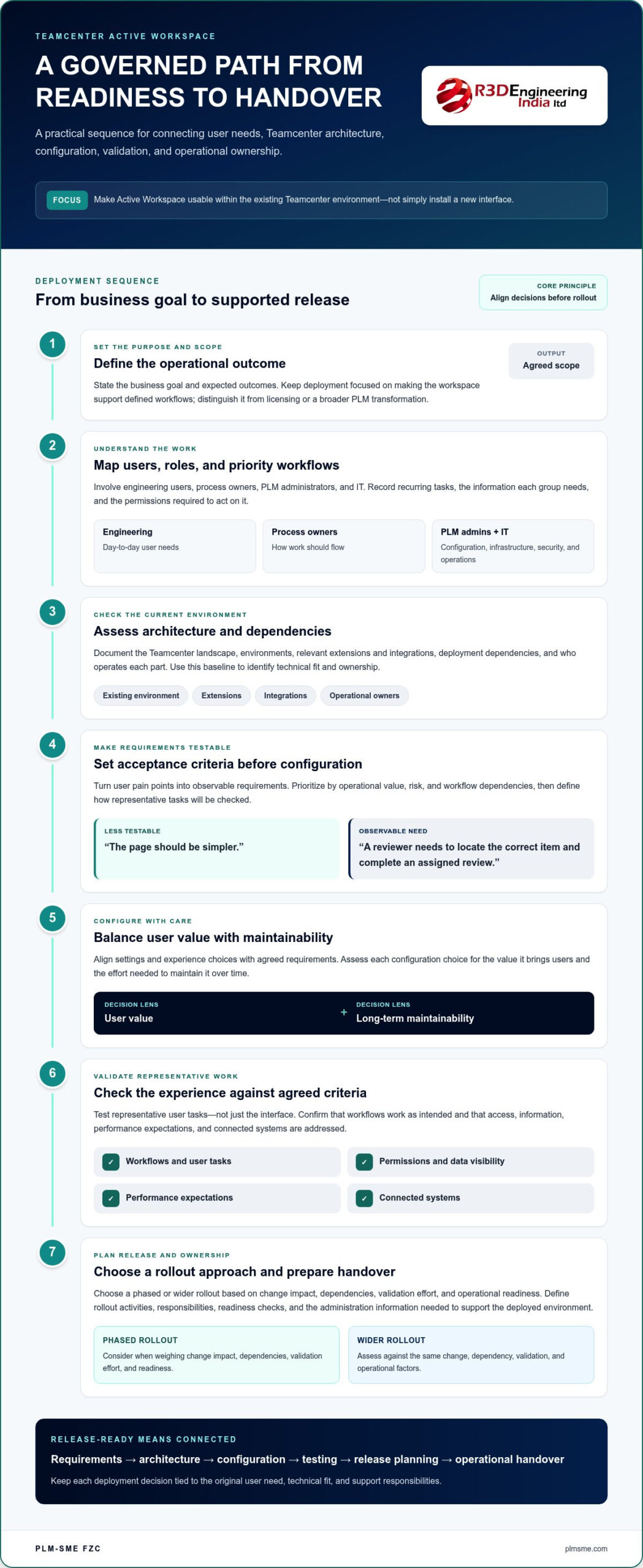
A complete engagement connects business requirements to technical decisions, then carries those decisions through testing and operational handover. The precise scope depends on the organization’s goals and existing Teamcenter environment. Treating these activities as connected work makes it easier to identify who owns each decision and what evidence is needed before release.
- Requirements: Identify user groups, priority workflows, and expected outcomes.
- Architecture: Assess the existing environment, dependencies, and deployment design.
- Configuration: Align settings and experience choices with agreed requirements, while considering future maintenance.
- Testing: Validate representative user tasks against clear acceptance criteria.
- Release planning: Define rollout activities, responsibilities, and readiness checks.
- Operational handover: Document administration responsibilities and the information needed to support the deployed environment.
This is professional implementation and architecture work, separate from acquiring a software licence. It may include Teamcenter configuration or related implementation tasks, but not every deployment requires a data-model redesign, integration project, or enterprise-wide PLM change. Treat larger changes as separate scope unless requirements and technical assessment show they are necessary.
For example, if the goal is to support an established engineering review process through Active Workspace, first map the users and actions involved. Then assess the environment and configuration needed to support that workflow. Testing can establish whether users complete the agreed tasks and have the expected access to information. This ties validation to the original business need instead of relying on a generic checklist.
PLM-Sme connects Teamcenter architecture, implementation, and ongoing administration to project requirements. Defining the scope at the outset helps balance user value with technical fit and maintainability, while clarifying deployment expectations and the operational ownership that follows.
Preparing Teamcenter architecture, users, and requirements for deployment
Readiness starts by turning a broad goal, such as making common Teamcenter tasks easier to complete, into decisions the project team can test and own. Teamcenter Active Workspace deployment services work best when business requirements and technical prerequisites are documented separately. Process owners define outcomes and workflows, while PLM administrators and IT assess the environment and technical conditions. Engineering users help validate whether the planned experience reflects real work.
Involve the right stakeholders early. Engineering represents day-to-day user needs; process owners clarify how work should flow; PLM administrators understand the current configuration and support responsibilities; and IT brings infrastructure, security, and operations expertise. Shared ownership helps surface conflicts before they become late-stage changes.
Mapping user needs to Teamcenter workflows
Start with user groups and recurring tasks. For each group, record the information users need and the permissions required to act on it. Turn reported pain points into observable requirements, not assumed interface changes. For example, “a reviewer needs to locate the correct item and complete an assigned review” is more testable than “the page should be simpler.” Prioritize requirements by operational value, risk, and dependencies between workflows.
Reviewing architecture and deployment dependencies
Document the current Teamcenter landscape, environments, relevant extensions and integrations, and who operates each part. This baseline helps identify dependencies that could affect deployment planning without presuming that connected systems need redesign. Architecture preparation should link the user-facing scope to the broader environment. PLM system architecture consulting can help assess those relationships.
Use this ordered readiness sequence to turn discovery into a project baseline:
- Set goals. Define the operational outcomes the deployment should support.
- Identify users. Map user groups, process owners, and decision-makers.
- Review the current environment. Record the Teamcenter landscape and its operating responsibilities.
- Assess architecture. Document relevant environments, configuration, and system boundaries.
- Trace dependencies. Identify connected systems, extensions, and organizational handoffs that may affect scope.
- Define acceptance criteria. Specify evidence that will demonstrate each requirement has been met.
Keep business requirements distinct from technical prerequisites in the project record. A business requirement might describe a user completing a defined task. A technical prerequisite might identify an environment, access, or dependency that the delivery team must account for. Assign an owner to each and record decisions, assumptions, and unresolved items. Documented requirements reduce avoidable rework by giving configuration, testing, and release decisions a shared reference point.
PLM-Sme’s Teamcenter architecture and implementation services can help shape this baseline around your organization’s context, including ongoing operational ownership. A project-specific readiness plan gives stakeholders a practical starting point for aligning user needs, technical dependencies, and acceptance expectations. Explore PLM-Sme’s Teamcenter implementation support as part of that planning.
Choosing a Teamcenter Active Workspace deployment approach
No single rollout pattern or configuration level suits every Teamcenter environment. Choose an approach by weighing the scale of change against dependencies, the effort required to validate workflows, and the organization’s capacity to support users after release. Teamcenter Active Workspace deployment services should make these trade-offs visible, so decisions follow operational needs rather than a preference for the largest rollout or the most customized interface.
A useful decision record compares each option by benefits, risks, dependencies, and decision owner. Include who approves the scope, which teams need to be ready, and what evidence will demonstrate readiness. This gives engineering, PLM administration, IT, and process owners a common basis for assessing alternatives. Broader Siemens Teamcenter consulting can also frame Active Workspace decisions within the wider implementation context.
Phased rollout or wider release: matching scope to risk
A phased rollout can suit environments where workflows differ by role, dependencies need progressive testing, or teams want to apply lessons from an initial user group before expanding. A wider release may fit when workflows are well understood, dependencies are coordinated, validation is complete, and support teams are prepared across the affected groups. Neither approach is inherently safer. The right choice depends on readiness and the impact of change.
Compare the options against the same practical factors:
- Phased rollout: Can contain the impact of change and support learning from early validation. It may require repeated communications, coordinated releases, and careful management of dependencies across phases.
- Wider release: Can align rollout activity across user groups and avoid staggered transition points. It requires broader testing, clear stakeholder alignment, and operational support prepared for the full release scope.
Record the rationale, including how the approach affects change management, testing effort, dependencies, and support needs. A staged rollout is not automatically lower risk if workflows are tightly connected. A wider release is not automatically efficient if users or administrators are not ready.
Configuration or tailored changes: protecting maintainability
Standard configuration can keep the experience aligned with established processes and simpler to administer. Tailored changes may be justified when a documented workflow need cannot be met effectively through the agreed configuration. Assess each request for user value, business necessity, upgrade implications, and support ownership. A more customized interface does not automatically create a better user experience. Unnecessary changes can add complexity without solving a meaningful problem.
Separate essential workflow needs from cosmetic preferences and low-impact requests. For each proposed change, record the need it addresses, alternatives considered, expected benefit, and who will maintain it. This gives future administrators useful context and helps teams revisit decisions as processes evolve. PLM-Sme connects Teamcenter architecture and implementation experience with project-specific requirements, helping organizations weigh usability against maintainability. For broader implementation planning, PLM-Sme’s Teamcenter implementation support brings these considerations together.
Validating, launching, and adopting Active Workspace
A deployment is ready for release when agreed workflows work for their intended users, access is appropriate, and support responsibilities are clear. Teamcenter Active Workspace deployment services should connect validation to the requirements established during planning, rather than treating testing as a final technical formality. This makes launch decisions evidence-based and helps teams address gaps before they affect daily work.
Testing workflows before release
Build scenarios around representative roles and high-value tasks. For each scenario, record the expected outcome, test result, defects, owner, and retest evidence. Include permissions and data visibility, relevant connected systems, and performance expectations defined for the project. Keep version-specific checks and technical thresholds aligned with the current Siemens environment and documentation.
Acceptance criteria should map directly to documented requirements. If a requirement says that a reviewer must access the information needed to complete an assigned task, the test should confirm that the intended role can find and use that information, while access remains appropriate for other roles. This traceability helps distinguish a genuine release blocker from a preference that can be addressed later.
Workflow-based testing turns documented requirements into evidence for a controlled release decision. Before launch, review results with relevant process owners, PLM administrators, and IT stakeholders. Resolve critical defects, document accepted limitations and decisions, and confirm that retesting supports readiness. Test the agreed scope without assuming that every Teamcenter process or connected system has been redesigned.
- User workflows: Confirm that representative roles can complete the agreed tasks.
- Permissions and visibility: Check that users can access the information and actions appropriate to their roles.
- Connected systems: Validate the integrations included in the deployment scope.
- Performance expectations: Assess the agreed user scenarios against project-defined expectations.
- Defect management: Record issues, owners, decisions, and retest evidence before approving release.
Supporting users through launch and adoption
Prepare concise guidance for each user group, using familiar process language as well as interface terminology. Explain what changes in established tasks, where to find relevant information, and how to get help. Clear release communications should identify affected roles, the planned transition, and the support route, so users know what to expect and where to raise issues.
Adoption continues after launch. Assign operational ownership for incoming questions and issue triage, and capture feedback through agreed channels. Review recurring support themes alongside practical adoption signals, such as whether users can complete priority workflows and where they encounter friction. Use these findings to distinguish a training need from a configuration or process concern, then prioritize follow-up work.
PLM-Sme connects Teamcenter implementation with ongoing PLM administration, helping organizations carry deployment decisions into operational support. Plan Active Workspace validation and rollout with PLM-Sme.
Delivering Active Workspace deployment with PLM-Sme
Successful deployment connects architecture decisions to how Teamcenter is implemented, administered, and supported after launch. PLM-Sme FZC brings these areas together as an independent industrial digitalisation consultancy and Siemens Digital Industries Alliance Partner. The company supports organizations with Teamcenter implementation, system and solution architecture, and ongoing PLM administration. Each engagement is shaped around the existing environment and agreed outcomes, rather than a fixed deployment template.
Coordinating deployment with architecture and implementation
PLM-Sme works with client stakeholders across engineering, IT, and PLM operations to align user requirements with the technical context. This collaboration clarifies what Active Workspace deployment should address, which architecture decisions affect delivery, and where responsibilities sit within the client team. The work stays focused on the agreed scope, whether the immediate need is deployment planning, configuration, validation, or coordinated implementation support.
A project engagement can connect work across the delivery lifecycle:
- Requirements and scope: Translate deployment objectives into defined activities, responsibilities, and outcomes.
- Architecture and planning: Relate deployment decisions to the current Teamcenter environment and operational context.
- Configuration and implementation: Carry agreed choices into practical delivery, considering user needs and future administration.
- Validation and handover: Support testing against project requirements and document responsibilities for ongoing operations.
This joined-up approach helps avoid a gap between design and day-to-day ownership. For example, administrators responsible for maintaining a configuration should understand the decisions behind it. The appropriate depth of support depends on the environment, dependencies, internal capacity, and intended outcomes. Broader Teamcenter consulting can also help place a focused deployment within longer-term implementation priorities.
Planning for administration after launch
Go-live marks a transition into operational ownership, not the end of deployment work. Ongoing PLM administration can support system continuity through planned maintenance, controlled updates, and clear handling of configuration changes. For this to work, responsibilities need to be explicit. Administrators need access to relevant architecture and handover documentation, while process owners should understand how proposed changes are reviewed and validated.
Connecting implementation with administration gives teams a consistent basis for managing change. Documented decisions help administrators understand why the environment was configured as it was and what to consider as processes evolve. PLM-Sme’s PLM system administration retainer supports ongoing administration alongside Teamcenter implementation and architecture work, shaped around the organization’s needs.
Discuss your Active Workspace deployment objectives and project context with PLM-Sme to shape an engagement around your Teamcenter environment and operational priorities. Discuss a Teamcenter deployment.
Move from deployment planning to sustained adoption
Active Workspace can become a durable part of how your teams work when deployment decisions account for immediate user needs and the people responsible for the Teamcenter environment over time. Start by identifying the workflows you want to support, the constraints of your existing architecture, and the operational ownership you need after launch.
PLM-Sme brings Teamcenter implementation and architecture expertise together with ongoing PLM system administration support. As a Siemens Digital Industries Alliance Partner, the team can connect deployment planning with the broader technical and operational context. Teamcenter Active Workspace deployment services should be shaped around your environment and intended outcomes, giving stakeholders a clear basis for moving forward without treating adoption as an afterthought.
Discuss your Teamcenter Active Workspace deployment with PLM-Sme and explore an approach aligned with your project context. With clear priorities and ownership in place, your organization can take the next step toward a usable, well-supported Teamcenter experience.
Frequently Asked Questions
Is Active Workspace a separate PLM system?
No. Active Workspace is associated with the Siemens Teamcenter environment and serves a user-facing role rather than replacing the underlying PLM platform. Think of deployment as planning how users interact with Teamcenter, not moving product data into a separate PLM system. Product descriptions and commercial arrangements can vary, so version-specific details should be understood in the context of the current Siemens documentation.
Can Active Workspace deployment be phased?
Yes. A phased rollout can work when user groups, workflows, dependencies, and validation needs support a staged release. For example, a team might release to a defined group first, collect feedback, and use it to inform the next stage. This requires clear boundaries between releases, including which workflows and users are included. Teamcenter Active Workspace deployment services should account for the organization’s objectives and operational readiness when shaping a rollout.
How does Active Workspace deployment fit into Teamcenter architecture?
Plan it as part of the wider Teamcenter architecture, not as an isolated interface activity. The existing environment, user roles, relevant extensions, and connected systems can all affect project decisions and ongoing administration. For instance, a change to how one role performs a task may need review against existing access and process requirements. Specific architecture and compatibility decisions depend on the environment and current Siemens documentation.
What should be tested before an Active Workspace release?
Test representative workflows against requirements agreed before validation begins. A reviewer’s scenario, for example, could check whether the intended role can access the expected information and complete the release-critical task. Include relevant permissions, connected workflows, and project-defined performance expectations. Record results and defects consistently so owners can decide what needs correction or retesting. Establish technical thresholds and version-specific checks for the project environment.
Does Active Workspace deployment require changes to existing Teamcenter integrations?
Not necessarily. Integration changes depend on the current architecture, user requirements, and agreed deployment scope. First identify which connected workflows users rely on, then determine whether the Active Workspace work affects them. If a workflow depends on information exchanged with another system, include the relevant scenario in validation. This avoids treating every integration as a change candidate while still checking the connections that matter to the release.
How can a business support user adoption after deployment?
Give users practical, role-specific guidance and explain changes through familiar tasks. Set a clear route for questions and issue reporting, with named ownership for triage. After release, review user feedback alongside recurring support topics to see where people get stuck. Repeated questions about the same task may point to a guidance gap, while an access issue may need technical investigation. Use these findings to prioritize improvements.
What ongoing support can follow an Active Workspace deployment?
Follow-on support can include Teamcenter system administration, solution architecture, and specialist integration development. Documenting ownership and key deployment decisions helps administrators manage changes with the original design intent in view. Periodic reviews can also identify evolving operational needs before they become urgent project work. The support scope should reflect the organization’s responsibilities and environment, without assuming a particular response time or service level.