
PLM Requirements Management Services for Workflow Alignment
Automating a requirement notification is easy; ensuring the right change reaches the right people and product data is the real challenge. PLM requirements management implementation services align requirements with engineering workflows, define how information moves between PLM and connected systems, and automate updates and notifications for controlled changes. When replacing legacy tools, the goal is to migrate the necessary data and relationships while limiting disruption to active engineering work.
It’s easy to focus on replacing old tools or capturing requirements in one system. But lasting alignment depends on clear ownership, traceability, and change processes that connect requirements to downstream work. This article explains how to prepare for legacy replacement, assess workflows and governance, and design requirement updates and notifications around real roles and decisions. It also covers the factors that shape implementation scope and timing, so you can identify what a practical PLM approach needs to address.
Key Takeaways
- Define which system owns each type of product information before replacing legacy tools, then plan migration around data profiling, mapping, validation, and controlled loading.
- Align workflows with priority use cases, process ownership, decision rights, and the handoffs between engineering and downstream teams.
- Structure requirement updates and notifications around controlled changes, clear responsibilities, and traceability so affected teams can respond with relevant information.
- Assess scope, data complexity, integrations, process maturity, customization, user count, and rollout strategy to understand what shapes project cost and timeline.
Implementation preparation and legacy system replacement
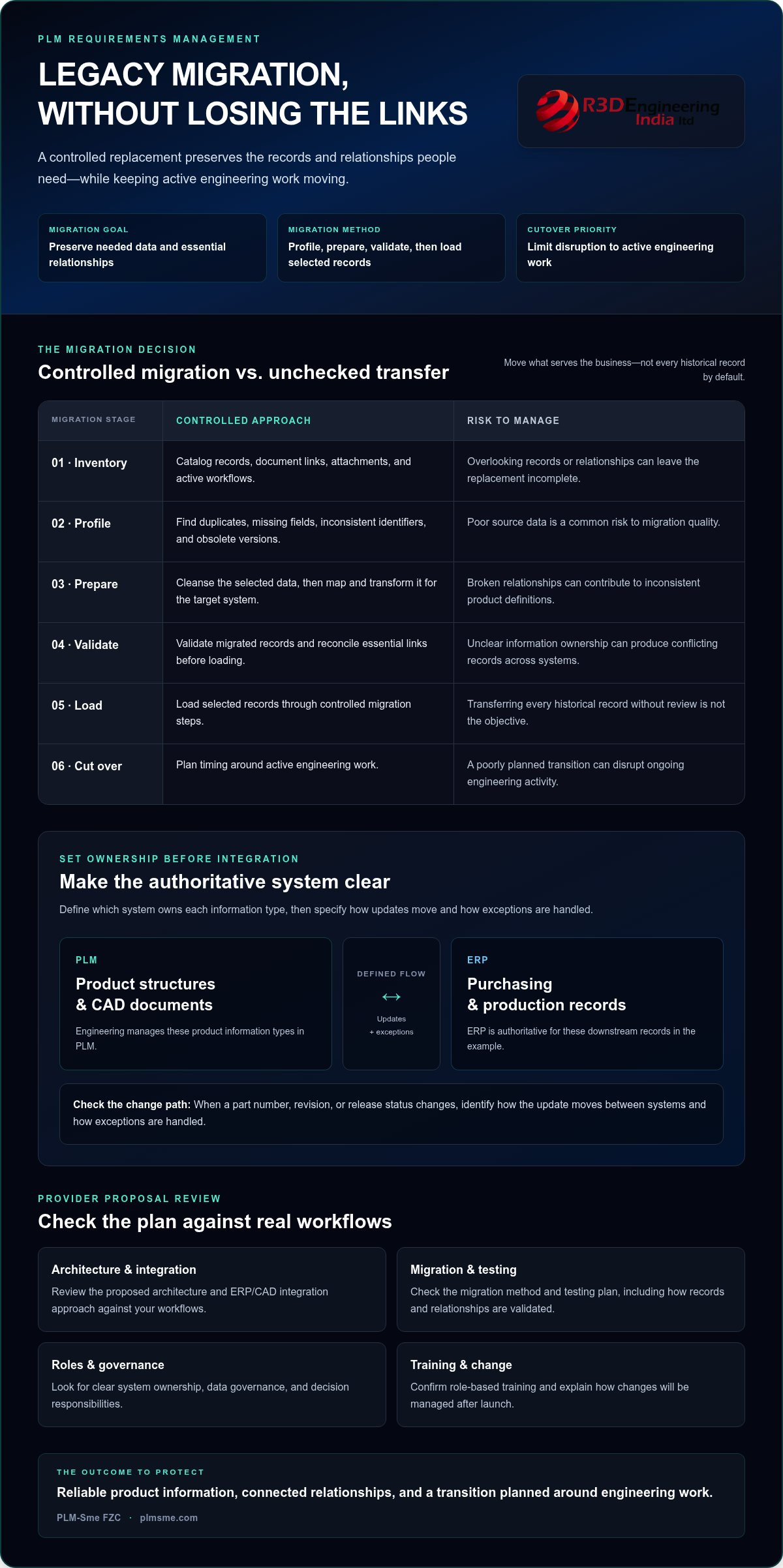
Before replacing a legacy requirements tool, inventory its records, document links, attachments, and active workflows. Profile the data to find duplicates, missing fields, inconsistent identifiers, and obsolete versions. Then cleanse, map, transform, validate, reconcile, and load selected records through controlled migration steps. The goal is to preserve information needed for business purposes and essential relationships, not to transfer every historical record without review. Plan cutover around active engineering work to limit disruption.
How should businesses evaluate and select a PLM implementation services provider? Compare the proposed architecture, migration method, ERP and CAD integration approach, testing plan, and role-based training against your workflows. A useful proposal explains system ownership, data governance, decision responsibilities, and how changes will be managed after launch.
Integration design matters before configuration begins. For example, an engineering team may manage product structures and CAD documents in PLM, while ERP owns purchasing and production records. Define the authoritative system for each information type, then specify how updates move between systems and how exceptions are handled. This helps prevent conflicting records when a part number, revision, or release status changes. Map each connection to a business process, not just a technical interface.
Common risks include poor source data, unclear ownership, broken relationships, and gaps between PLM, ERP, and CAD integrations. These can lead to incomplete migration, inconsistent product definitions, or workflows that teams bypass.
After launch, PLM system administration and support can help manage user access, configuration, workflows, and issue resolution. Define responsibilities for role changes, process updates, and system changes, then document how requests are assessed and approved. For example, an administrator can review a proposed workflow change with engineering and downstream manufacturing before deployment. A clear operating model helps keep system behaviour aligned with business processes as requirements and integrations evolve.
PLM implementation planning and workflow alignment
Start planning with stakeholder-defined outcomes, priority use cases, and process ownership. Assess design reviews, change management, configuration control, bill of materials (BOM) development, release management, and manufacturing handoffs. This reveals where teams need consistent workflows and where local practices differ. A roadmap should connect those findings with organizational and technical maturity, dependencies, risks, governance, investment priorities, and expected business outcomes. A standard phase-one deployment typically takes 3 to 6 months, including core workflows, migration, and initial training.
For operations in the UAE, assess data residency and compliance needs against data classification, contractual commitments, customer requirements, and applicable sector obligations. Document hosting decisions, access controls, and data flows so governance reflects the organisation’s operating context. Account for integration, performance, administration, scalability, security, and business continuity rather than treating deployment architecture as a standalone choice.
What data migration, traceability, and change management capabilities should an implementation provide? It should validate migrated records and preserve necessary relationships, then connect requirements to designs, configurations, BOMs, and releases. Change workflows should record ownership, approvals, affected items, and downstream actions. For example, revising a requirement can trigger a review of linked product structures before release. Requirements reporting should show status, ownership, dependencies, overdue reviews, and the impact of proposed changes, giving project leads a practical view of progress.
AI assistance and workflow automation work best when rules and data are governed. Automate routing, reminders, and status updates around defined events, such as a requirement entering review or a BOM change affecting a release. AI may help identify patterns or support analysis, but useful outputs depend on data quality, permissions, integration, and business context. Keep human review for decisions that affect product definition. A role-based training plan can connect each workflow to engineering, management, and downstream responsibilities. For a structured view of PLM workflow planning, align these decisions before configuring system behaviour.
Automated requirement updates and notifications
Automation turns a controlled requirement change into a traceable workflow event. Start by defining which edits trigger action, such as a change to a performance threshold, verification method, or acceptance criterion. The system can route the revised item for review and flag linked designs, simulations, test cases, or configurations for impact assessment. This gives affected teams a defined response instead of relying on informal messages.
Useful notifications give recipients enough context to act. Include the requirement identifier, revision, changed fields, rationale, assigned reviewer, and affected product objects. For example, if an updated operating limit changes a simulation assumption, the notification should direct the analysis team to the relevant model and review task. Role-based routing distinguishes accountable approvers from users who only need visibility.
- Trigger: Define a change event, such as a revised acceptance criterion.
- Route: Assign review tasks to named roles or process owners.
- Assess: Identify affected product records and required follow-up.
- Record: Preserve decisions, comments, and resulting status changes.
These rules also need exception handling. A rejected change should return to its owner with the decision recorded, while an approved change can move linked work to the next review state. If an affected team has not responded, escalation rules can notify a responsible lead. Clear ownership prevents broad alert lists from obscuring who needs to act.
Reporting should show more than notification volume. Teams can monitor open reviews, overdue actions, change causes, affected objects, and decision status. Comparing these views across projects can reveal recurring bottlenecks, such as requirements repeatedly returned for clarification. Workflow analytics can also help administrators refine routing rules when assignments regularly reach the wrong role.
Automation should support, not replace, engineering judgment. Keep approval authority explicit for changes affecting product performance, verification evidence, or released configurations. Test each rule with representative scenarios before rollout, including rejected changes, multiple affected teams, and incomplete data. Documented rules make automated updates predictable and keep requirement history useful for future design reviews and lifecycle decisions.
What factors affect the cost and timeline of a PLM requirements management project?
Project scope is a major driver. Supporting requirements for one product line differs from coordinating engineering, quality, and manufacturing workflows across multiple product families. List the priority use cases, stakeholder groups, approval paths, and connected systems. Each additional workflow can add configuration, testing, training, and change coordination. A phased rollout can control the initial scope while defining later capabilities and dependencies.
Data complexity also shapes the work. Legacy records with inconsistent identifiers, missing attributes, or tangled relationships need more profiling and remediation before migration. A clean, well-structured dataset requires less transformation than records needing extensive reconciliation. Migration planning should identify which requirements, revisions, and links must move, then define validation criteria. This clarifies the work needed to protect traceability without carrying forward unnecessary records.
Integration scope affects both architecture and testing. Connecting PLM with CAD, ERP, MES, or other systems means mapping data ownership, interfaces, error handling, and update rules. For example, an engineering revision change may affect downstream planning information. The number and complexity of integrations influence design effort, test scenarios, and coordination with system owners. Custom workflows or interfaces can extend the work beyond standard configuration.
Process maturity and decision speed matter. If engineering teams use different change procedures, stakeholders need to agree on common ownership and approval rules before configuration stabilises. User numbers and role diversity also shape training and rollout planning. A staged deployment by team or product line can reduce simultaneous change, but requires clear transition criteria and support for parallel processes.
Project pricing depends on scope and is provided after a quote request; key cost drivers include data complexity, integrations, customization, user count, process maturity, and rollout strategy. The schedule reflects these same dependencies, plus stakeholder availability and the time needed for testing and decisions. To define a practical scope and delivery roadmap, request a PLM project assessment based on your workflows and system landscape.
PLM-Sme FZC: Digital maturity assessments and reports
PLM-Sme FZC helps organisations assess their digital maturity and set a practical direction for PLM workflow improvement. A digital maturity assessment and report can clarify process and technology gaps before legacy replacement or broader implementation planning. It is a useful starting point when teams need to prioritise use cases, identify dependencies, and connect requirements management with wider transformation goals.
Digitalisation Vision & Roadmap Consulting turns those priorities into a structured direction for investment and change. System and Solution Architecture can inform decisions about how PLM fits with connected business systems, while industrial automation and AI solutions address opportunities to use process data and workflow automation in support of operational goals. The right approach depends on your organisation’s maturity, target workflows, and integration landscape.
If you’re preparing a PLM initiative and need to clarify priorities or architecture, contact PLM-Sme FZC to discuss your requirements.
Build the next phase around clear decisions
The next step is to turn implementation intent into decisions your teams can own. Identify who governs requirements, how engineering changes affect downstream work, and what evidence shows that a workflow is functioning as designed. These choices give the initiative a practical basis for prioritising improvements and refining processes as teams use them.
The value of PLM requirements management implementation services lies in connecting system design with how people make and act on product decisions. PLM-Sme FZC can help organisations shape that direction around their business and technical context, rather than treating requirements management as an isolated configuration task. A focused conversation can clarify where architecture, governance, or workflow alignment needs attention first.
Contact PLM-Sme FZC about your PLM initiative to discuss a considered path forward. A clear starting point can help your teams move ahead with purpose.
Frequently Asked Questions
What services are included in PLM requirements management implementation?
PLM requirements management implementation services can cover process discovery, requirements model design, configuration, migration, integration, validation, and user enablement. For a Teamcenter programme, PLM-Sme FZC provides End-to-End PLM Implementation Support and Teamcenter Integration Development. The scope can include defining fields such as requirement owner, rationale, verification method, and approval state, giving teams consistent information for reviews and downstream use.
What are the steps to implement requirements management in a PLM system?
Implement in a controlled sequence: define requirement types and owners, agree on attributes and lifecycle states, configure permissions, load a representative pilot set, test trace links and approvals, then roll out by team. For example, a product safety requirement needs an accountable owner, verification evidence, and a clear approval state. Use pilot findings to refine templates and role guidance before expanding to other product groups.
How can PLM requirements management integrate with CAD, ERP, ALM, and MBSE systems?
Integration connects mapped information while preserving the relationships teams need. CAD links requirements to models and drawings; ERP can receive approved product structures or release information. ALM can relate software requirements to work items, while MBSE connects system-level needs with model elements and interfaces. Define data ownership, identifiers, and update direction for each connection, then test how a change in one system appears in the others.