
PLM-MES Integration in Manufacturing: From Product Data to Shop-Floor Execution
What happens when an approved engineering change reaches the factory late, or arrives without the process context production needs? That’s where PLM MES integration manufacturing can create a dependable link between engineering and execution, or add another source of confusion. PLM governs product definition, while MES uses manufacturing instructions, routings, and related data to guide production. Connecting them takes more than moving files between systems.
Teams need changes to reach the shop floor promptly and consistently. They also need to know which system owns each record, how updates are approved, and how production feedback can return to engineering. Without those rules, integration can create duplicate records, manual work, and uncertainty about which information is current.
This article explains how PLM and MES can divide responsibilities and exchange governed product and process data. You’ll learn which data and events commonly move between systems, how to manage engineering changes, and what to consider when planning an integration that can be maintained and extended. We’ll also look at how standards-based architecture can help manufacturers connect existing systems while keeping shop-floor execution in view.
Key Takeaways
- Effective PLM MES integration manufacturing turns approved product changes into clear, usable shop-floor context.
- Map the handoff from product definition to manufacturing preparation and execution feedback, distinguishing controlled revisions from production results.
- Assign an owner for each data type and change event before choosing interfaces, so teams know which system is authoritative.
- Compare integration patterns against your architecture, maintenance capacity, monitoring, and error-handling needs rather than assuming one approach fits every plant.
- Reduce risk by checking data quality and revision discipline, then testing a focused use case before expanding the integration.
Why PLM-MES integration matters for manufacturing execution
Manufacturing depends on a reliable handoff between the product as engineering defines it and the process used to build it. PLM-MES integration is a governed exchange of relevant product and manufacturing information, including approved revisions and production context. A practical PLM MES integration manufacturing strategy specifies what moves, when it moves, and which system remains authoritative for each record.
PLM and MES have distinct responsibilities. PLM manages product definition and lifecycle changes. MES manages production execution, using manufacturing instructions and process information to guide shop-floor work. Integration connects those responsibilities; it doesn’t replace either system or make one the owner of every data type. Manufacturing execution systems provide an execution layer that can use relevant product and process information to support production activity.
What does PLM-MES integration mean in a factory?
Consider an approved engineering change that alters a component or its specification. A governed integration can notify the relevant manufacturing process of the released revision. Teams can then review and update affected work instructions or production records through defined controls. The exact handoff depends on the systems and the change process.
This differs from emailing files or asking staff to enter the same revision in multiple places. Manual steps can leave teams unsure whether information is current. Integration should preserve identifiers, revision status, and relationships between records, while handling updates according to agreed rules.
Which manufacturing problems can integration address?
Without a dependable handoff, released product information may reach production late or inconsistently. Teams may need to check separate records to confirm which revision applies, creating avoidable investigation and coordination. Connecting approved product definitions with manufacturing context can help planners and production teams work from aligned information, provided the data is accurate and the workflow is adopted.
Traceable links can also help teams investigate a production issue by relating the product revision and applicable process information to relevant execution records. If an engineering change is involved, those relationships can help show what changed and where to review its manufacturing impact. Integration alone doesn’t guarantee better quality, throughput, or compliance. Results depend on scope, data quality, clear ownership, change control, and consistent use of connected workflows.
The objective isn’t simply to move more data. It’s to make approved information usable at the right point in manufacturing while retaining clear system responsibilities and a reviewable history.
Map the PLM-MES data handoff from product definition to production
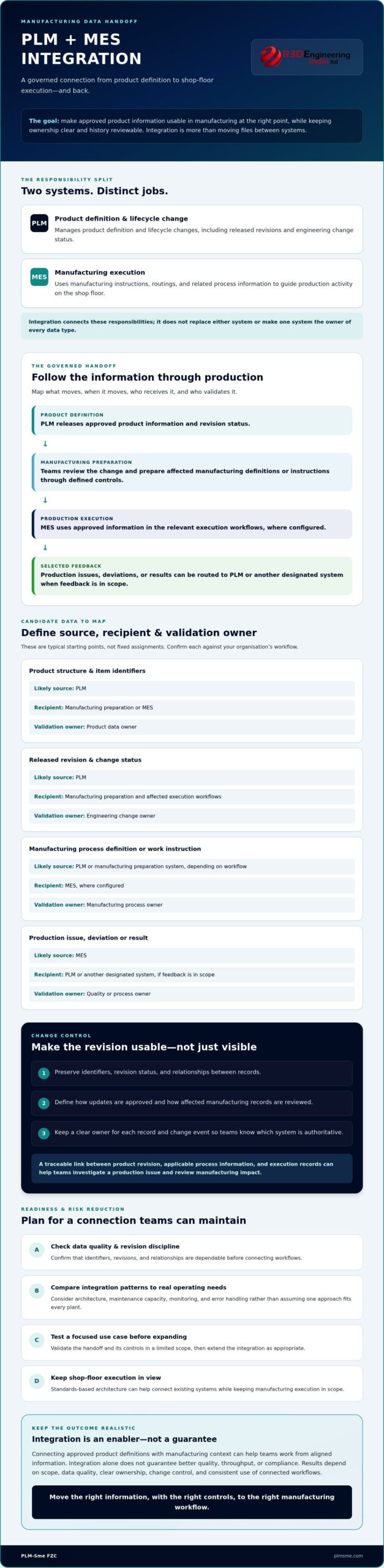
A useful handoff follows a controlled sequence: PLM releases product information, manufacturing teams prepare the production definition, MES uses approved information during execution, and selected production feedback is routed to the relevant teams. Mapping this flow means specifying what moves and who owns it, not copying every record between systems. The right scope depends on product complexity, operating model, and system configuration.
For PLM MES integration manufacturing, document each data object’s source, recipient, and validation owner. The roles below are typical starting points, not fixed assignments. Confirm them against your organisation’s processes.
| Candidate data | Likely source | Recipient | Validation owner |
|---|---|---|---|
| Product structure and item identifiers | PLM | Manufacturing preparation or MES | Product data owner |
| Released revision and change status | PLM | Manufacturing preparation and affected execution workflows | Engineering change owner |
| Manufacturing process definition or work instruction | PLM or manufacturing preparation system, depending on workflow | MES, where configured | Manufacturing process owner |
| Production issue, deviation, or result | MES | PLM or another designated system, if feedback is in scope | Quality or process owner |
Which product and process data may cross the boundary?
Start with the minimum information needed to create a reliable production context. This may include product structures, identifiers, released revisions, and manufacturing information. Transfer work instructions or process definitions only if the systems support them and the workflow specifies who creates, approves, and maintains them. A useful integration reference can be considered alongside system documentation when teams document assumptions.
Where should engineering changes and production feedback go?
Change status and effective dates can help downstream teams determine whether a revision is approved and when it applies. Define how superseded data is handled, which products or orders are affected, and what action MES should take when an update arrives. Don’t assume production feedback automatically flows back to PLM. Treat issues, deviations, or performance information as a separate use case, with clear validation and approval rules before any record changes engineering data.
Agree on ownership before designing interfaces. For support with system boundaries and Teamcenter integration planning, explore PLM integration architecture planning from PLM-Sme FZC.
Choose PLM-MES integration patterns around ownership and change control
Start architecture planning with governance, not a preferred connector. Before deciding how PLM and MES will exchange information, identify the authoritative system for each critical object and define who approves changes. Otherwise, even a technically reliable connection can distribute conflicting revisions or leave teams unsure which record to trust.
How do you decide which system owns each data object?
Ownership should follow the business process. PLM may be authoritative for product structures and engineering revisions, while manufacturing process definitions may be owned in PLM or a manufacturing preparation system. MES is typically authoritative for execution records. Document who validates each object, who approves changes, and which system publishes its approved state. For broader architecture considerations, see this PLM system architecture consulting guide.
Then assess integration patterns against your existing systems and support capacity:
- Point-to-point interfaces can suit a narrow exchange between two systems, but direct dependencies may become harder to manage as interfaces multiply or either system changes.
- Middleware-led integration can provide a shared layer for routing and monitoring exchanges. It also adds a component that must be configured, maintained, and supported.
- API-based integration can use supported interfaces to exchange data, but API availability, version handling, limits, and error behaviour vary by system. An API may also be used through middleware, so these patterns aren’t always alternatives.
Which integration pattern fits the operating environment?
Match exchange timing to the operational need. A scheduled transfer may be sufficient for information production doesn’t need immediately. Event-driven exchange can respond to a defined change, while real-time interaction may be appropriate only when the process requires it and both systems can support it reliably. Faster isn’t automatically better if it creates unnecessary dependency or operational risk.
For each approach, check how teams will detect failures, retry or reconcile incomplete messages, identify outdated revisions, and investigate an exchange. Confirm who owns monitoring and support, including how changes to either system will be tested. These operational details matter as much as the interface itself.
ANSI/ISA-95.00.01-2025 provides common terminology and models for enterprise and manufacturing operations interfaces. Use it as a reference where it fits your system landscape, not as a substitute for checking actual data models, workflows, and existing architecture. A sound PLM MES integration manufacturing design makes ownership, timing, and failure handling explicit before implementation begins.
Assess readiness and reduce PLM-MES integration risks
Begin with a bounded manufacturing use case, not a decision to connect every system and data object at once. Define the operational need, inspect the relevant data, confirm ownership, design the exchange, and test normal and failure scenarios. Then expand based on what the evidence shows. For PLM MES integration manufacturing, this sequence helps teams expose process and data issues before they affect a broader rollout.
What should teams assess before implementation?
Build an inventory of PLM, MES, ERP, and related interfaces. Record existing customisations, dependencies, data flows, and support owners. Then review representative product structures, revision histories, and manufacturing workflows. Check whether identifiers are consistent, released data is distinguishable from work in progress, and revision practices are followed in day-to-day operations.
Readiness also depends on process consistency and the capacity to support the integration after release. Identify who investigates failed exchanges, resolves rejected records, and approves changes to mappings or workflows. If the review points to broader capability gaps, a digital maturity report for manufacturing can help frame readiness and roadmap priorities.
How can a phased rollout limit avoidable risk?
Choose a contained initial scope, such as a product family, workflow, or plant process with clear owners and manageable data dependencies. Test more than the expected success path. Include routine revisions, urgent or conflicting changes, incomplete or rejected data, duplicate records, and recovery after an interface failure. Confirm that stale information can be identified and unresolved exceptions reach a responsible person.
Before rollout, establish a baseline and define measurable project indicators. These might include exchange success and failure rates, time to identify an exception, or the number of records requiring manual correction. Use indicators to assess whether the integration is operating as designed. They aren’t promises of improved quality, throughput, or other business outcomes, which depend on broader factors as well as system connection.
Assign business and technical responsibilities for release and ongoing operation. Business owners should validate the meaning and approval status of exchanged data; technical owners should monitor interfaces and manage recovery. Expand only after the initial scope has passed agreed checks and teams can support it reliably.
For support assessing readiness and planning Teamcenter integration development, discuss your PLM integration requirements.
Plan PLM-MES integration as a governed manufacturing capability
Manage reliable integration as part of the manufacturing operating model, not as a one-off technical connection. The plan should link business outcomes to data ownership, interface design, validation, and change governance. This gives engineering, manufacturing, and IT a shared basis for deciding what the integration must support and how it will be maintained as systems and processes evolve.
What should a practical integration plan contain?
Document the systems in scope, priority use cases, authoritative owner for each data object, planned interfaces, validation rules, and the route for handling exceptions. Set phased acceptance criteria before implementation begins. These can cover whether exchanged data matches approved source records, whether the intended workflow completes, and whether teams can monitor and support the connection in operation.
Keep the integration plan connected to wider digital priorities rather than treating it as an isolated project. Where appropriate, align it with an industrial digitalisation roadmap so dependencies on PLM, MES, ERP, and other enterprise systems are visible alongside future initiatives.
When can an independent Teamcenter integration partner help?
Independent architecture input can clarify requirements before the organisation commits to a specific implementation design. It can be useful when system responsibilities are unclear, existing customisations complicate the interface, or stakeholders need to assess how a proposed integration fits the wider architecture. The goal is to make assumptions, dependencies, and operational responsibilities explicit.
PLM-Sme FZC supports system and solution architecture, end-to-end PLM implementation, Teamcenter integration development, and ongoing PLM administration. The appropriate support depends on the need: architecture work can shape the integration approach, development can implement agreed Teamcenter connections, and administration can support the ongoing management of PLM. PLM-Sme FZC is a consulting and implementation partner, not a seller of MES software or off-the-shelf software licences.
For organisations planning PLM MES integration manufacturing, the next step is a focused discussion about the intended use case, current system landscape, data responsibilities, and support requirements. Discuss your PLM-MES integration requirements.
Turn integration planning into a practical next step
Reliable PLM-MES integration depends on clear ownership, controlled data exchange, and workflows that teams can support over time. Start with the manufacturing outcome you need, map which system owns each data object, then select and test an approach that fits your existing architecture. A phased rollout can help surface data and process issues before the integration expands.
For PLM MES integration manufacturing, the goal isn’t simply to connect software. It’s to make approved product and process information usable in execution, with defined controls for change, validation, and ongoing support.
PLM-Sme FZC, founded in 2017 and a Siemens Digital Industries Alliance Partner, provides Teamcenter integration development and end-to-end PLM implementation support. If you’re evaluating an integration’s architecture, scope, or readiness, discuss your PLM-MES integration requirements.
With clear decisions and a practical implementation plan, your teams can build a more dependable connection from product definition to shop-floor execution.
Frequently Asked Questions
What is PLM-MES integration?
PLM-MES integration connects product lifecycle management (PLM) with manufacturing execution systems (MES) so selected information can support production. In PLM MES integration manufacturing, this may coordinate approved product structures, revisions, process definitions, and production information across system boundaries. The exact exchange depends on the manufacturing workflow and system configuration. PLM and MES retain distinct responsibilities; integration links them but doesn’t make either system interchangeable.
What data should flow from PLM to MES?
Candidate data includes approved product structures, released revisions, and manufacturing definitions relevant to the production use case. Not every organisation needs to transfer every type of information, and some process definitions may be managed in another system. Before designing interfaces, identify the authoritative source and intended recipient for each object. Define its release status, validation rules, and owner so downstream teams can distinguish approved information from data that isn’t ready for production.
Can PLM and MES be integrated with ERP as well?
Yes. PLM, MES, and ERP can participate in a connected architecture, but their roles and information flows need deliberate design. ERP may coordinate business and resource processes, while PLM manages product lifecycle information and MES supports production execution. Some data may need to pass between all three systems. Map ownership, dependencies, and the purpose of each exchange before selecting interfaces, rather than assuming one integration pattern fits every manufacturer.
How does PLM-MES integration handle engineering changes?
An approved engineering change can trigger a controlled update or notification to downstream manufacturing processes. The organisation must define revision status, approvals, effective dates, and when the change applies to production. For example, teams may need rules for handling open work orders alongside a newly released revision. Integration can distribute change information, but it can’t decide whether a change is safe to apply. Business approval and validation rules remain essential.
What are the main risks of integrating PLM and MES?
Common risks include unclear data ownership, inconsistent revisions, poor source data, duplicate records, unhandled interface errors, and weak change governance. A bounded pilot with representative test cases can help reveal these issues before a broader rollout. Include normal updates, rejected data, and recovery scenarios, and assign people to monitor and resolve exceptions. No architecture removes every project risk, so teams should assess operational needs and support responsibilities as part of planning.
How long does a PLM-MES integration project take?
There isn’t a reliable duration that applies to every project. Timing depends on system configuration, data condition, the number of workflows and interfaces, existing customisations, and testing requirements. Start by defining scope, dependencies, decision owners, and acceptance criteria. With that information, ask the implementation team for a project-specific estimate and phased delivery plan. Avoid relying on a generic timeline that may not reflect your systems or readiness.
Does a manufacturer need Siemens Teamcenter for PLM-MES integration?
No. PLM-MES integration is an architectural requirement, not one that inherently depends on a specific PLM product. Siemens Teamcenter is relevant when it’s already part of the organisation’s system landscape or selected for implementation. The appropriate design depends on compatibility, supported interfaces, data models, and delivery requirements. PLM-Sme provides Teamcenter integration development and PLM implementation support; it doesn’t sell off-the-shelf software licences.