
PLM Integration With Warehouse Management for Inventory Accuracy
Inventory accuracy depends on more than counting stock. Warehouse records must reflect the correct product definition and approved changes. PLM integration with warehouse management systems connects released product data and bills of materials (BOMs) with downstream inventory workflows. Clear data ownership and revision control help keep updates aligned.
This matters because a design or component change can affect what warehouse and manufacturing teams need to identify, receive, store, or issue. Moving data without its product context can leave teams working from inconsistent records. A planned integration helps preserve the connection between engineering decisions and operational data.
This article explains how product designs and BOMs are synchronized, how inventory records can be updated, and what to consider when planning a secure integration. It also covers change management and digital thread continuity, showing how information flows from engineering into warehouse and manufacturing processes, and why clear governance matters.
Key Takeaways
- Define which system owns each product attribute and revision before synchronizing designs and bills of materials.
- Plan the integration around clear business objectives, data quality, security requirements, and thorough testing.
- Identify which approved product events should update warehouse records, and how exceptions will be handled.
- Coordinate change control across engineering and operations so teams can trace updates and respond consistently.
- Preserve the link between design decisions and manufacturing feedback to help teams spot downstream issues earlier.
Data synchronization for product designs and BOMs
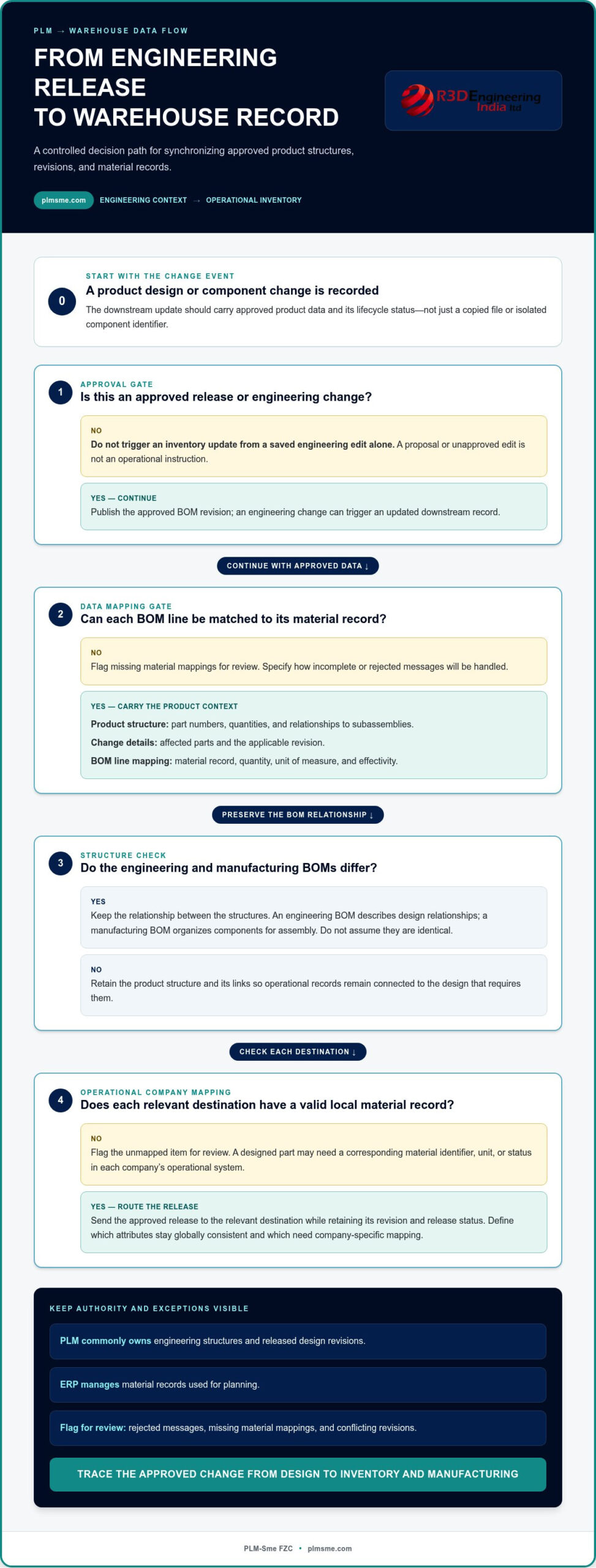
Synchronizing product designs means preserving their engineering context, not simply copying files between PLM and warehouse applications. A released assembly, for example, includes part numbers, quantities, revision, and relationships to subassemblies. If a warehouse record receives a component identifier without the approved product structure, teams can’t reliably connect stock to the design that requires it. Product lifecycle management should therefore carry both product data and its lifecycle status downstream.
PLM-to-ERP integration can transfer bills of materials and engineering change order data from PLM to ERP. This creates a defined route for manufacturing and inventory processes to receive released engineering information. A practical exchange maps each BOM line to the corresponding material record, quantity, unit of measure, and effectivity. An engineering change order should also identify affected parts and the applicable revision, helping downstream teams distinguish an approved change from a proposal.
Revision control starts with assigning authority for each product definition. PLM commonly owns engineering structures and released design revisions, while ERP manages material records used for planning. These structures may differ: an engineering BOM describes design relationships, while a manufacturing BOM organizes components for assembly. Integration must preserve the relationship between them rather than assume their structures are identical. For example, a revised component should not silently overwrite a released warehouse reference before the change takes effect.
Releasing a product across operational companies adds another mapping requirement. The same designed part may need a corresponding material identifier, unit, or status in each company’s operational system. Define which product attributes remain globally consistent and which require company-specific mapping. Then route the approved release to each relevant destination, retaining its revision and release status. This helps warehouse teams distinguish a valid local record from an outdated or unmapped item.
AI can help interpret connected product information, but it cannot turn disconnected records into engineering intelligence. A model analysing component alternatives, for instance, needs linked design context, lifecycle data, and sourcing information. Without those relationships, an apparent match may overlook a revision or product variant. Establish authoritative records and traceable links first to give AI-supported analysis a meaningful foundation, rather than asking it to infer engineering intent from isolated files.
For PLM integration with warehouse management systems, define the synchronization event as carefully as the data fields. A release event might publish an approved BOM revision, while a later engineering change triggers an updated downstream record. Specify how rejected messages, missing material mappings, and conflicting revisions are flagged for review. This preserves traceability from design through inventory and manufacturing, helping teams act on product changes without treating every saved engineering edit as an operational instruction.
Integration planning, data quality, and security
Plan the connection around operational objectives, data ownership, and workflows that depend on accurate product records. For UAE organizations, the design should also account for the systems and supply chain relationships used across their operations.
Data Accuracy and Workflow Automation
Data accuracy means automated workflows use complete, correctly mapped records from an authoritative source. It matters because an incorrect unit, component status, or supplier detail can quickly flow into warehouse and planning processes. For example, matching a component’s lifecycle status and approved alternatives to its BOM helps teams assess sourcing risk before a purchase or production decision. Automation reduces repetitive entry, but makes data validation and exception handling essential.
PLM traceability connects product definitions and changes with associated records, including supplier information. Maintain clear links between a BOM component, its manufacturer details, sourcing status, and relevant product documentation. This gives supply chain teams greater visibility into why a material appears in a product structure. When supplier data changes, clear ownership and review workflows help prevent outdated information from flowing automatically into downstream processes.
Integration Options, Costs, and Performance
Built-in integration options vary by the specific PLM and WMS platforms, product versions, and supported interfaces. Some systems provide native connectors or APIs, while other combinations need configured or custom integration. Integration price depends on the case and is provided after a quote request; key factors include system complexity, data volume, mapping rules, security needs, and testing scope. Assess performance through measures such as record accuracy, exception rates, processing delays, and reduced manual reconciliation, then compare operational gains with implementation and maintenance costs to evaluate ROI.
Integration Methods and Tradeoffs
APIs let systems exchange data directly, while middleware can apply business rules or handle larger data flows. ERP can also act as an intermediary when PLM and warehouse processes already exchange operational records through it. Each method has tradeoffs: direct connections can simplify a defined exchange, while middleware adds a layer to configure and maintain. ERP-based flows can align with existing processes, but may not suit every data relationship.
Benefits include fewer duplicate entries, better handovers, and improved inventory and supply chain visibility. Limitations include mismatched data models, poor source data, and workflows that fail when systems change. Set clear objectives and scope before selecting a method, then test realistic scenarios, including a missing supplier mapping or rejected update. Recheck integrations after software releases that change interface behaviour or data structures. These controls help identify errors, protect data integrity, and assess whether the connection supports the intended operational outcomes.
Automatic inventory record updates
Automatic updates connect an approved product or engineering event to the inventory records that depend on it. For example, releasing a changed component can trigger updates to its material reference, revision, or status in downstream systems. The trigger must distinguish an approved release from a draft change. Otherwise, warehouse and manufacturing teams may act on product information that engineering hasn’t released.
Automating manual updates between PLM and ERP can eliminate 100% of the manual effort involved in those tasks. That figure applies to the tasks being automated, not every inventory activity. Teams still need to define which system owns each field, what event initiates an update, and what happens when a record fails validation. A missing material mapping, for instance, should create an exception for review rather than a misleading inventory record.
Automated workflows can route changes for approval before they reach operational systems. A practical sequence is to submit the engineering change, review affected parts, approve the release, and then send the approved data downstream. Each stage should retain its status and a record of the handoff. This helps teams separate proposed changes from effective ones and gives operations a clearer basis for receiving, issuing, or planning affected materials.
- Use an approved release or change event as the update trigger.
- Map part identifiers, quantities, units, and statuses to destination fields.
- Flag rejected messages and missing mappings for resolution.
- Retain the event status and resulting record for traceability.
These controls matter when a product change affects stock already held in a warehouse. If an engineering change replaces a component, inventory staff need to distinguish usable existing stock from material associated with the new revision. The integration should pass the relevant change and product references, while business rules determine how teams handle remaining stock. Automatic transmission moves the information; defined decisions govern its operational use.
Automotive manufacturers have used PLM-to-ERP integration to unify product and production data, helping reduce inventory carrying costs and time to market. The same principle applies to inventory workflows: align released product information with records used for planning and operations. For example, a manufacturing BOM may organize components differently from an engineering BOM, so mappings must preserve the intended relationship rather than copy fields blindly.
Measure the update process using record accuracy, failed transactions, unresolved exceptions, and manual corrections. Review these indicators after a process or system change, such as adding a new material status. A clear exception queue also shows where data ownership or approval rules need refinement. With appropriate triggers and controls, automatic updates can streamline repeated handoffs while keeping people involved in decisions that require operational judgment.
Change management between systems
Engineering changes affect more than a drawing or component record. A revised fastener, for example, can alter a product structure, sourcing decision, manufacturing instruction, and warehouse requirement. Change management between PLM and operational software defines how those effects move between systems. It connects an engineering change order (ECO) to downstream records while preserving approval status, revision, and effective date.
Importing an ECO should carry enough information for receiving systems to identify the change and its impact. Useful fields include the ECO identifier, affected part numbers, previous and new revisions, change status, and effectivity. A warehouse or ERP process can then distinguish an approved change from a draft. If an imported ECO refers to a component without a matching material record, the integration should flag the exception instead of silently creating an incomplete link.
Engineering change management also needs clear ownership. PLM typically controls engineering approval and product definition; operational systems use released information for planning and execution. A workflow can route an ECO for review, publish it after release, and record each system’s response. For example, replacing a component may require a warehouse status update and a manufacturing BOM adjustment. Those actions should follow approved change rules, not an unreviewed design edit.
- Map each ECO field to its destination and define its authoritative source.
- Set rules for draft, approved, rejected, and superseded changes.
- Record affected parts, revisions, and effective dates in downstream messages.
- Route missing mappings or conflicting revisions to a named review queue.
During implementation, test complete change scenarios rather than isolated data transfers. A useful test starts with an ECO in PLM, follows its approval, imports it into ERP or warehouse software, and checks the resulting component records. Include a rejected change and a missing part mapping. These cases show whether systems preserve status and prevent unapproved updates from reaching operations.
After deployment, monitor failed imports, delayed acknowledgements, and changes requiring manual correction. A component replacement that appears in PLM but not in warehouse records signals a broken handoff. Assign responsibility for reviewing exceptions and resolving the underlying mapping or workflow issue. When software releases alter interfaces or data structures, retest the ECO path before relying on it for live changes.
Consistent change control keeps engineering decisions connected to their operational effects. It also gives teams a traceable record of what changed, who approved it, and which systems received it. For products with multiple variants, include variant applicability in ECO rules so a component update reaches the intended configurations without changing unrelated product records.
Digital thread continuity from engineering to manufacturing
A digital thread preserves relationships between product decisions and the information used downstream. For example, a design requirement can link to a component, its released revision, a manufacturing instruction, and a quality record. That context helps production teams understand not only what to build, but why a specification or material choice applies.
Continuity also depends on sending manufacturing requirements upstream during product development. If assembly access, tooling, or process constraints emerge only at final inspection, engineers may need to revisit earlier decisions. A connected workflow lets manufacturing teams comment while designs are still under review. Engineering can then assess manufacturability before a proposed design becomes a released instruction.
Keep links between records visible across systems, rather than relying on manual re-entry or isolated attachments. A product structure, change record, work instruction, and inspection result should point to the applicable item and revision. When a technician reports a fit problem, for instance, engineers can trace the relevant production record back to the design information and change history.
PLM-to-MES integration can collect real-time data about events on the factory floor. With product context, production events can help teams relate an issue to the product configuration, process, or released information in use. The integration should preserve those relationships as data moves between systems, so a production event remains useful beyond the workstation where it originated.
- Connect manufacturing feedback to the relevant product and revision.
- Link production and quality records to applicable product structures.
- Route recurring process issues to engineering for review.
- Keep supplier and component risk visible while alternatives remain practical.
That feedback loop supports collaboration across engineering, manufacturing, and supply chain teams. If a component becomes difficult to source, teams can review its role in the design and assess alternatives before production is disrupted. If inspection data identifies a quality issue, engineers can examine related product records and determine where investigation or corrective action belongs.
A continuous thread can also support product quality by tracking product data across lifecycle stages and helping teams identify issues earlier. It doesn’t replace engineering judgment or production controls. Instead, it gives teams connected evidence for decisions, such as whether a recurring defect relates to a design definition, a specific configuration, or a manufacturing process.
For UAE manufacturers pursuing competitive operations, define which production events should flow back to engineering and who reviews them. Map each event to a product, revision, and process context, then test whether the receiving team can act on it. To assess where digital thread gaps affect development and manufacturing, review your digital maturity and identify the integration priorities that support stronger continuity.
PLM-Sme FZC: Digital maturity assessments and reports
PLM-Sme FZC can help organizations assess whether their product data, systems, and workflows are ready for integration. Its digital maturity assessments and reports help identify gaps in data governance, system connectivity, and process ownership that can affect inventory accuracy.
Turn to this work when you need to prioritize integration needs before implementation or clarify how PLM, warehouse, and operational systems should fit together. Digitalisation Vision & Roadmap Consulting can shape those priorities into a practical direction, while System and Solution Architecture can define how connected systems and information flows should be structured. Industrial automation and AI solutions can support broader digital initiatives where they fit the operational need.
For a clearer view of your integration priorities, contact PLM-Sme FZC.
Build the Next Stage of Connected Operations
As product portfolios evolve, integration should evolve with them. Treat PLM integration with warehouse management systems as part of a broader digital direction, not a one-time data connection. Future product changes, new operational workflows, and automation initiatives all depend on clear priorities and a connected information foundation.
PLM-Sme FZC offers digital maturity assessments and reports to help organizations understand their current capabilities and identify areas for development. Digitalisation Vision & Roadmap Consulting can turn those priorities into a structured direction, while industrial automation and AI solutions can support relevant operational initiatives. The appropriate next step depends on the systems, processes, and objectives your organization needs to address.
When you’re ready to discuss how these priorities fit your operations, contact PLM-Sme FZC for PLM advice. A considered next step can help your teams build toward connected, adaptable operations with greater clarity.
Frequently Asked Questions
What is PLM integration with a warehouse management system (WMS)?
It is a controlled connection that makes relevant product lifecycle management data available to warehouse workflows. The WMS can use released product records to support activities such as identifying materials for a production order. It doesn’t replace warehouse software or make it the authority for engineering definitions. For example, a warehouse operator can reference an approved item record while the engineering team retains control of design decisions.
What data is exchanged between PLM and WMS?
Typical exchanges include item identifiers, descriptions, released BOM data, revision status, and effective dates. The WMS may also provide operational information, such as receipt or stock discrepancies, for review in connected planning processes. For a configurable product, include the applicable variant or configuration identifier so warehouse staff can distinguish similar components. Define each field’s owner and purpose; otherwise, systems may store conflicting values for the same item.
What are the steps to implement a PLM-WMS integration?
Use a staged approach that defines the operational boundary before development begins:
- Document the warehouse use cases and data owners.
- Map fields, identifiers, statuses, and error responses.
- Design the interface and access controls.
- Test representative products, variants, and exceptions.
- Deploy in a controlled scope, then monitor results.
For example, test a released product with a substituted component before expanding to other product families.
What data governance, security, and compliance rules apply to PLM-WMS integration in the UAE?
In the UAE, governance should identify data owners, permitted users, retention needs, and applicable data protection or sector obligations. Classify records before transfer: engineering files may need tighter access than warehouse item descriptions. Apply role-based permissions, secure system credentials, and audit trails for data changes. Document where information moves and who can view it, including external or cross-border connections, so controls reflect the organization’s actual data flows.
What are common PLM-WMS integration risks and how can they be mitigated?
Common risks include stale records, duplicate messages, mismatched units, and failed updates that go unnoticed. Use unique transaction identifiers to detect duplicate messages, validation rules to catch invalid units, and monitoring to surface rejected transactions. Reconcile selected records between systems after deployment, then investigate mismatches by source and event. For example, a receipt tied to an obsolete item code should enter an exception process, not silently update another component’s stock record.