
PLM Infrastructure Capacity Planning Consulting for IT Teams
Infrastructure capacity is only one part of a reliable PLM environment. PLM infrastructure capacity planning consulting assesses how the PLM architecture, connected systems, data flows and expected workloads fit together, then turns that picture into practical infrastructure recommendations. The goal is to support performance and growth without planning capacity in isolation.
It’s easy to focus on server or storage requirements, especially when teams face slowdowns or prepare for a rollout. A sound plan also accounts for how engineering data moves between PLM and systems such as ERP, MES, and CRM, and how changes propagate across the planning environment.
This article explains what a capacity planning engagement should examine, how system landscape and architecture shape recommendations, and what affects the scope and cost of the work in the United Arab Emirates. It also covers the consulting experience and organizational input that help turn infrastructure advice into a workable plan, so IT and engineering teams can make decisions with a clearer view of technical dependencies and business priorities.
Key Takeaways
- Assess PLM capacity as part of the wider system landscape, including integrations and data flows, rather than sizing infrastructure in isolation.
- Use implementation experience to connect technical recommendations with business priorities and the organization’s ability to act on them.
- Estimate user, storage, compute and network needs from actual workloads and growth plans, not a single generic sizing assumption.
- Treat benchmarks as planning references, then adapt them to the PLM architecture and operating context before making infrastructure decisions.
PLM IT architecture and system landscape
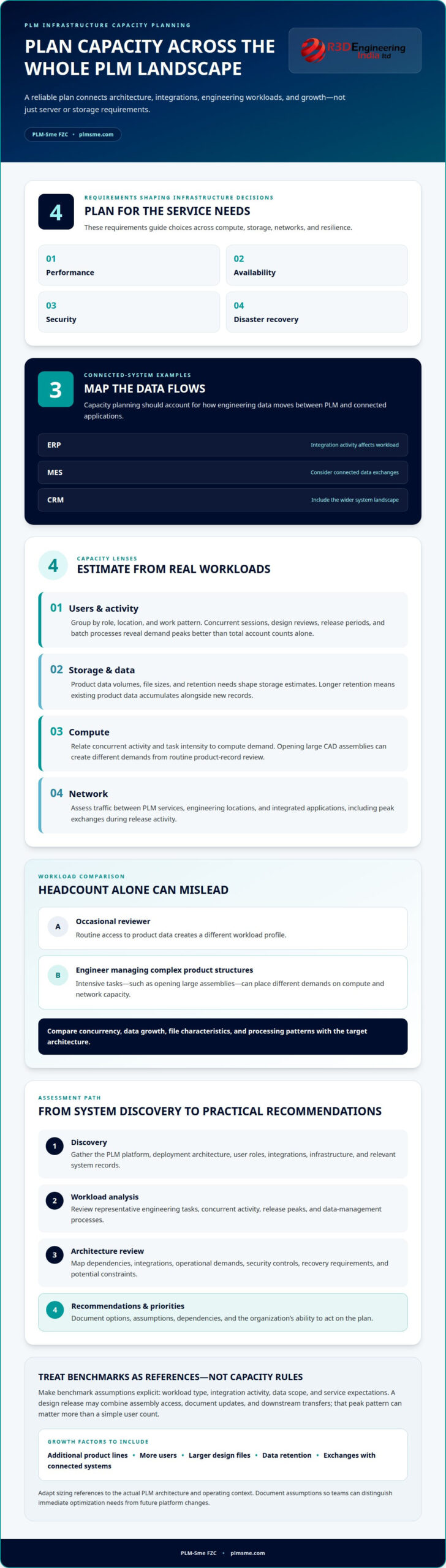
Capacity planning begins by mapping the PLM architecture and connected systems, such as ERP, MES, and CRM. Requirements for performance, availability, security, and disaster recovery guide decisions about compute, storage, networks, and resilience.
Estimating user and infrastructure demand
Consultants group users by role and workload, distinguishing routine product data access from intensive engineering tasks such as opening large assemblies. They relate concurrent activity to compute demand, while product data volumes, file sizes, and retention needs inform storage estimates. Network analysis considers traffic between PLM services, engineering locations, and integrated applications.
For each layer, estimates should reflect its purpose and dependencies. A CAD-heavy engineering workload, for example, can put different demands on compute and network capacity than document review. Mapping the architecture helps identify where infrastructure constraints could affect product development, system availability, or the flow of product lifecycle management data.
Benchmarking users, data, and workloads
PLM sizing benchmarks are reference points, not universal capacity rules. User counts alone can mislead: an occasional reviewer and an engineer managing complex product structures create different workloads. Consultants compare expected concurrency, data growth, file characteristics, and processing patterns with the target environment’s actual architecture.
A useful benchmark discussion names its assumptions: workload type, integration activity, data scope, and service expectations. For example, a design release period may combine assembly access, document updates, and downstream transfers. That peak pattern matters more than a simple headcount when assessing compute, storage, and network needs for lifecycle management.
Accounting for growth and engineering workloads
Capacity plans should connect growth forecasts with engineering workloads, integrations, and data retention. Consultants model how additional product lines, users, or larger design files could affect infrastructure, then account for exchanges with ERP, MES, and other systems. The European Union identifies a Change Propagation System as supporting consistent propagation of data changes across the planning environment, making change flows relevant to integration planning.
Retention choices also affect storage demand: product data kept for longer periods accumulates alongside new development records. Consultants align retention assumptions with the organization’s product lifecycle and operational needs. They also assess recovery requirements and security controls, so planned growth supports service needs without overlooking dependencies across the integrated system landscape.
PLM consulting team experience and capacity
In the UAE, look for consultancies with PLM platform, system architecture, and implementation experience. Teams familiar with manufacturing processes can connect infrastructure decisions to engineering operations, not just software specifications.
To begin an assessment, consultants need an overview of the PLM platform, deployment architecture, user roles, integrations, and current infrastructure. Relevant system documentation and workload or performance records help distinguish observed constraints from assumptions. A product development example, such as a complex assembly release, can clarify which engineering activities need attention.
A typical assessment moves from discovery to workload analysis, architecture review, and recommendations. Consultants map the current solution, examine operational demands, identify capacity constraints, then document options and priorities. The schedule depends on system complexity, stakeholder access, and the quality of available records. A connected digital twin or manufacturing integration may require additional analysis because it introduces data flows and dependencies.
Common risks include sizing from total user counts, overlooking integration peaks, and underestimating retained product data. Consultants address these risks by reviewing concurrent activity, representative engineering tasks, and data-management processes together. Documenting assumptions and dependencies also helps teams distinguish immediate optimization needs from future platform changes.
Experience matters because recommendations must be implementable. PLM consultants can configure and deploy systems by applying lessons from multiple implementations, while assessing whether the organization has the resources to act. The right team balances software and infrastructure expertise with process awareness, translating a technical challenge into a practical solution for efficiency and operations. For a structured view of architecture decisions, consider a PLM system architecture review.
Organizations considering a PLM consultant should assess both the quality of the advice and their ability to act on it, ensuring recommendations are actionable.
How do consultants estimate PLM user, storage, compute, and network capacity requirements?
Consultants begin with a workload inventory that links user roles to real PLM activities. Engineers editing CAD assemblies, for example, create different demands from managers reviewing product records. This makes concurrent activity and task intensity more useful measures than total account numbers alone.
- Profile user activity. Consultants group users by role, location, and work pattern. They examine simultaneous sessions, design reviews, release periods, and batch processes to identify demand peaks that a simple headcount would conceal.
- Estimate storage needs. The assessment considers existing product data, file sizes, revisions, and retention practices. A large CAD assembly with associated drawings may consume storage differently from a text-based specification. Growth assumptions should reflect the organization’s product development plans.
- Assess compute demand. Consultants connect processor and memory needs to PLM services and engineering tasks. For example, opening complex assemblies, generating visualisations, and running scheduled data processes place different loads on the platform. They distinguish steady usage from peak workloads.
- Trace network flows. The analysis maps data movement between PLM, engineering locations, and connected applications such as ERP or MES. Large file transfers and integration activity can influence network capacity, especially when several processes coincide during product release.
Next, consultants compare these demand patterns with current infrastructure performance and architecture. They review monitoring records, configuration details, and reported slowdowns, then link each constraint to the workload it affects. A Teamcenter deployment, for instance, should be assessed alongside its connected services, not as an isolated application.
The resulting estimate documents assumptions, dependencies, and capacity priorities. It distinguishes immediate constraints from planned demand, helping IT teams sequence infrastructure changes around product development milestones. Consultants also consider availability and recovery requirements, since adding capacity alone cannot address every service continuity need.
What PLM infrastructure sizing benchmarks are available for users, data, and workloads?
PLM sizing benchmarks are comparison points, not fixed capacity prescriptions. Their value depends on how closely the reference environment matches the organization’s platform, deployment model, and engineering activity. A Teamcenter environment supporting large assemblies, for example, needs a different comparison from one focused on document review.
For user demand, consultants distinguish account totals from concurrent activity and role-specific workloads. Useful comparisons separate engineers opening or updating product structures from occasional reviewers and administrators. A benchmark based only on registered users can misrepresent peak load, especially when design reviews, release work, and scheduled processes overlap.
Data benchmarks need context too. Consultants compare product data volumes, file types, revision patterns, and retention assumptions. A CAD-heavy product environment differs from one that stores mostly specifications and records. Rather than applying a generic storage-per-user figure, the assessment relates expected data growth to the organization’s product lifecycle management practices.
Workload comparisons should identify the task being measured and the conditions around it. Assembly retrieval, visualisation generation, searches, and bulk transfers, for example, place different demands on a platform. Consultants use available performance records and representative scenarios to compare response patterns, processing demand, and infrastructure utilization. Results are meaningful only when the task resembles actual engineering operations.
To use a benchmark responsibly, consultants record its assumptions and compare them with the target environment. They account for system configuration, integrations, user concurrency, data characteristics, and service expectations. A reference from a different deployment or workload can guide discussion, but should not become a sizing rule without adjustment. The final recommendation should explain the evidence behind each capacity decision, where conditions differ, and how those differences affect users, data, and workloads.
PLM-Sme FZC: Digitalisation Vision & Roadmap Consulting
PLM-Sme FZC connects infrastructure decisions with broader digitalisation priorities through Digitalisation Vision & Roadmap Consulting. This is a useful next step when capacity findings need to inform a transformation plan rather than remain a technical sizing exercise.
Digital maturity assessments and reports can help identify gaps across existing processes and systems. System and Solution Architecture supports decisions about how PLM fits into the wider technology landscape. Where priorities include automation or AI, industrial automation and AI solutions can also form part of the roadmap.
Bring assessment findings, the current architecture, and planned business changes into the discussion. These inputs help align recommendations with product development needs and operational priorities. Contact PLM-Sme FZC to discuss your PLM infrastructure planning needs.
Turn capacity decisions into a practical roadmap
Infrastructure recommendations create value when they inform investment and implementation decisions. Use the assessment to align IT priorities with engineering plans, operational needs, and the organization’s wider digital direction. Effective PLM infrastructure capacity planning consulting should give teams a clear path from architectural decisions to coordinated action, not just a sizing document.
PLM-Sme FZC supports this next step through Digitalisation Vision & Roadmap Consulting, informed by digital maturity assessments and reports. Where the roadmap calls for broader operational change, its industrial automation and AI solutions can also support transformation planning. The focus is on connecting technical decisions with business priorities and a sequence the organization can act on.
Bring your capacity planning priorities into a focused discussion and identify how they fit the wider roadmap. Contact PLM-Sme FZC about PLM consulting to consider the next step for your PLM environment.
Frequently Asked Questions
What does PLM infrastructure capacity planning consulting include?
PLM infrastructure capacity planning consulting connects a PLM environment’s technical requirements with its operational demands. The work can include reviewing system architecture, user activity, data patterns, integration dependencies, and infrastructure constraints. A planned CAD migration, for example, may require evaluating how file access and connected services affect capacity. The outcome is an evidence-based set of recommendations to guide infrastructure decisions.
Which PLM platforms and deployment models do capacity planning consultants support?
PLM-Sme FZC’s platform expertise includes Siemens Teamcenter. Capacity planning also considers the deployment model in scope, since hosting arrangements affect infrastructure responsibilities, system boundaries, and integration paths. An assessment of an existing Teamcenter environment, for example, should map its actual services and connected applications before sizing changes. Platform and deployment details should shape the assessment rather than a generic PLM template.
How do cloud and on-premises PLM infrastructure capacity planning compare?
Cloud and on-premises planning differ mainly in how infrastructure is provisioned, operated, and connected. For an on-premises environment, planning examines the organization’s own compute, storage, network, and recovery arrangements. Cloud planning considers the selected hosting architecture, service boundaries, data movement, and operational responsibilities. In either model, engineering workloads and integrations remain central. The useful comparison is how each approach meets the organization’s performance, availability, security, and growth needs.