
PLM Disaster Recovery and Backup Architecture: A Practical Planning Guide
What if your PLM backup completes successfully, but a restore leaves CAD files, database records, or integrations out of sync? That is the risk a sound PLM disaster recovery and backup architecture must address. The question is not only whether data was copied, but whether connected services can be restored together and trusted.
PLM teams know backups matter. The harder questions are how quickly critical services must return, how much change the business can tolerate losing, and whether recovery expectations match the way the environment is hosted and operated. Without clear recovery time objectives (RTOs), recovery point objectives (RPOs), and tested procedures, a backup plan can look complete while leaving operational gaps.
This guide explains how to set measurable recovery objectives for PLM services and data, map dependencies across the application, database, file vault, and enterprise integrations, and compare on-premises, cloud, and hybrid patterns against operational needs. It also covers restore testing, runbooks, and governance. For Siemens Teamcenter environments, verify recovery capabilities against the deployed version and vendor documentation so planning reflects the system you actually run.
Key Takeaways
- Distinguish backups, replication, high availability, disaster recovery, and business continuity so each capability has a clear role.
- Design PLM disaster recovery and backup architecture around consistent recovery of application services, databases, managed files, identity, and integrations.
- Compare on-premises, cloud, and hybrid patterns by control, operational responsibility, dependency coverage, and how recovery can be tested.
- Build a runbook that assigns decision authority, communication steps, recovery order, validation, and evidence collection.
- Turn business impact and approved RTO/RPO targets into documented requirements, then prioritise gaps with clear ownership.
PLM Disaster Recovery and Backup Architecture: Define What Must Be Recoverable
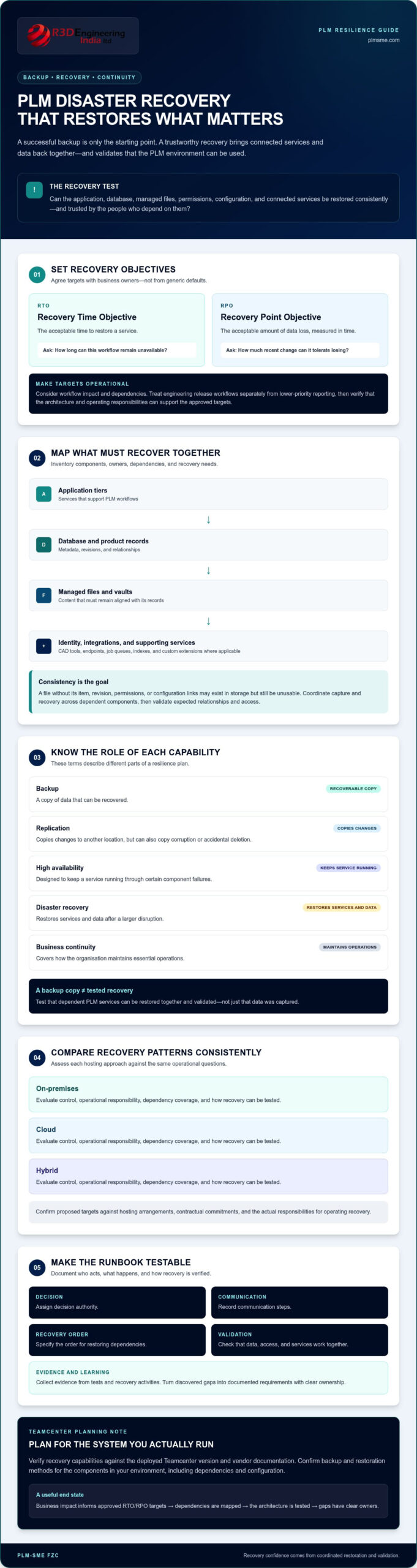
PLM disaster recovery architecture is the coordinated set of measures for restoring product lifecycle services, data, and dependencies after a disruption. The goal is not simply to retrieve files. Teams need a usable environment in which product records, managed files, revisions, permissions, and configuration context still agree.
Related terms describe different capabilities. A backup is a recoverable copy of data. Replication copies changes to another location, but may also copy corruption or accidental deletion. High availability is designed to keep a service running through certain component failures. Disaster recovery restores services and data after a larger disruption, while business continuity covers how the organisation maintains essential operations. The overview of IT disaster recovery places recovery in the wider continuity context.
A backup copy shows that data was captured; a tested recovery capability shows that dependent PLM services can be restored and validated. This distinction matters because product data is relational. A CAD file without its item, revision, access permissions, or configuration links may exist in storage but still be untrustworthy or unusable for engineering teams.
Which PLM workloads and data need protection?
Start by inventorying the components that support PLM workflows. Record each component’s owner, dependencies, and recovery needs. For a Teamcenter environment, this may include the database, file management and vaults, application tiers, search indexes, and configuration data. Also map connected CAD tools, identity services, integration endpoints, job queues, and custom extensions where applicable. Confirm platform-specific backup and restoration methods against the deployed version and vendor documentation.
Classify each component by business criticality, rate of change, retention needs, and dependencies. For example, a database and managed files may need coordinated recovery to preserve links between metadata and content. An index may be rebuildable, but only if the services and source data required to rebuild it are available. Document these assumptions rather than treating every component as equally urgent.
How do RTO and RPO shape PLM recovery?
The recovery time objective (RTO) is the acceptable time to restore a service. The recovery point objective (RPO) is the acceptable amount of data loss, measured in time. Set both with business owners according to workflow impact, dependencies, and approved operational requirements, not generic industry defaults.
Consider engineering release workflows separately from lower-priority reporting. Ask how long each can remain unavailable and how much recent change it can tolerate losing. Then check whether the proposed architecture and operating responsibilities can support those targets, including any hosting or contractual commitments. PLM-Sme FZC’s Teamcenter architecture and administration services can support an assessment of recovery dependencies and gaps before a recovery pattern is selected.
Designing PLM Backup Architecture Around Consistency and Dependencies
A dependable backup design starts with a dependency map, not a storage destination. For Teamcenter, identify how the application tier, database, file management, identity services, and integrations rely on one another. Record which component holds each type of state, which services must be available during restoration, and what order recovery requires. A copy of managed files, for example, may be unusable if the corresponding database records or access configuration are missing.
Recoverability depends on restoring consistent data and configuration, not simply collecting copies of each component. Metadata and managed files can change at different times. A recovery point that captures them inconsistently may leave references to files that are absent or mismatched. Coordinate capture procedures across dependent components, then test whether the restored environment preserves expected relationships and access.
Comparing full, incremental, and application-aware backups
A full backup captures a complete selected dataset, while incremental backups capture changes since an earlier backup point. Incrementals can reduce the amount of data captured each time, but restoration may require a valid sequence of earlier backups. Application-aware procedures are designed to account for application state and supported consistency mechanisms. No method is universally best. Compare backup windows, change volumes, restore complexity, and operational requirements. Verify Teamcenter-specific procedures against documentation for the deployed version and infrastructure.
Set cadence and retention according to approved RPOs, change rates, and the need to recover from different incident types. Consider separating copies from the primary environment, including off-site storage where appropriate, and using immutable copies as a control against alteration or deletion. These controls do not replace access governance, monitoring, or restore testing. NIST’s NIST Contingency Planning Guide offers a structured reference for relating contingency plans to system recovery and resilience.
Protecting integrations and configuration alongside PLM data
Map interfaces with ERP, CRM, MES, and MOM systems, including middleware, scheduled jobs, queues, credentials, and the direction of data flows. Identify which system is authoritative for each exchanged record. PLM recovery may require restoring its own integration state while coordinating with external systems that have separate data and recovery responsibilities.
Include the configuration needed to rebuild a working service: customisations, deployment packages, certificates, connection settings, and documented dependencies. Protect sensitive credentials through approved access controls rather than treating them as ordinary files. Assign an owner to each component and clarify what is backed up by the PLM team, infrastructure provider, and connected-system owners. A focused PLM architecture review can help identify dependency and configuration gaps before a recovery pattern is selected.
Comparing On-Premises, Cloud, and Hybrid PLM Recovery Patterns
Hosting location does not establish recovery capability on its own. A secondary site, cloud environment, or provider-hosted service still needs documented dependencies, assigned responsibilities, and a way to test restoration. Compare patterns using the same criteria: control over recovery, infrastructure ownership, integration coverage, and access to a representative test environment.
Pattern
Control and responsibility
Key evaluation points
On-premises
The organisation generally manages more of the infrastructure and recovery process, subject to provider agreements.
Secondary-site readiness, staffing, network capacity, software compatibility, and maintenance effort.
Cloud or provider-hosted
Duties are divided between the organisation and hosting or PLM providers. Confirm the boundary in service terms.
Supported workloads, data movement, licensing, restore access, integrations, and the provider’s stated recovery scope.
Hybrid
Responsibilities span environments and teams, so recovery coordination must be explicit.
Cross-environment dependencies, restoration sequence, identity, connectivity, and end-to-end testability.
Keep three capabilities distinct in the comparison: availability helps maintain service during defined failures, replication copies changes between locations, and backup preserves recovery copies. One does not automatically provide the others. For each proposed pattern, establish what is included, who operates it, and how the full PLM workflow will be validated after recovery.
When an on-premises recovery site may fit
An on-premises site may suit an organisation with suitable infrastructure, operational ownership, and staff able to maintain and test a secondary environment. Assess network throughput and the time and process required to transfer data, as well as compatibility among the application, database, and supporting components. Document which tasks sit with internal teams and which depend on service providers. A site that exists but is not maintained or accessible may not support the intended recovery plan.
Evaluating cloud and hybrid recovery designs
For cloud or hybrid options, verify that the required PLM workloads, data movement, licensing arrangements, and integrations are supported. Map who restores each component, how identity and connectivity return, and what access is available for recovery exercises. A hybrid design can span multiple operational boundaries, making ownership and restoration sequence especially important.
The preferred PLM disaster recovery and backup architecture is the one that meets validated business and technical requirements and can be demonstrated in a test. Assess the current environment before choosing a pattern, then confirm Teamcenter-specific capabilities against the deployed version and vendor documentation.
Building and Testing a PLM Disaster Recovery Runbook
A runbook turns recovery objectives and architecture decisions into coordinated actions people can follow under pressure. It should identify who can declare an incident, who approves recovery decisions, which teams own each system, and how technical and business stakeholders receive updates. Assign escalation paths in advance, including how unresolved decisions are raised and recorded.
A backup is not proven until restoration has been tested. A runbook should capture what was restored, what was validated, how long each step took, and what needs correction. This evidence helps distinguish a documented procedure from a demonstrated recovery capability.
Sequencing restoration of PLM services
Write the workflow in the order the environment needs services, not the order teams happen to manage them. For example, identity and network access may be prerequisites for database, file, and application restoration. Confirm the sequence against the actual architecture and approved RTO/RPO targets. Keep production integrations disconnected until their endpoints and data state have been checked.
- Declare and assess: The authorised lead records the incident, scope, affected services, and decision to invoke recovery.
- Coordinate: Notify technical owners, business representatives, and relevant providers. Set an update channel and escalation route.
- Prepare prerequisites: Confirm recovery access, network and identity services, software compatibility, and the selected recovery point.
- Restore in dependency order: Recover the database, file services, application tiers, and required configuration using documented, supported procedures.
- Validate before release: Check startup, user permissions, representative records and files, and key workflows. Test integrations in a controlled manner before reconnecting production traffic.
- Resume and document: Obtain business approval for controlled user access, communicate service status, and record decisions, results, and outstanding risks.
Testing recovery without overstating readiness
Use tabletop exercises to rehearse roles, escalation, and decision-making, then conduct technical restore tests to check the procedure against the environment. Set intervals according to risk, and repeat tests after material changes to architecture, integrations, or operational ownership. A tabletop discussion alone does not demonstrate that backups restore successfully.
Record actual recovery duration against the approved objective, the age and consistency of recovered data, test outcomes, access-control checks, integration results, failures, and corrective actions. Assign each action an owner and retest material fixes. For Teamcenter, verify product-specific restoration steps against documentation for the deployed version. Assess your Teamcenter architecture to identify runbook dependencies and readiness gaps.
Moving from PLM Recovery Requirements to an Operable Architecture
Recovery objectives become useful when they shape documented design decisions. Translate business impact and approved RTO/RPO targets into requirements for each PLM workload: what must be restored, in what order, by whom, and with what validation evidence. The result should connect the chosen recovery pattern to real workflows rather than treating infrastructure restoration as the finish line.
Prioritise gaps using four criteria: data criticality, dependency exposure, recovery evidence, and accountable ownership. For example, a high-impact service with multiple dependencies and no recent restore evidence warrants earlier attention than a lower-impact component with a documented, tested recovery path. Assign each gap an owner, next action, and review point so the assessment can guide operational work.
Creating a recovery design review checklist
Use a consistent checklist to make design reviews repeatable and expose unresolved assumptions:
- Confirm the workload inventory, data owners, system dependencies, retention needs, and approved recovery objectives.
- Check that procedures are documented, access is controlled, backup activity is monitored, and restoration evidence is retained.
- Verify responsibilities across PLM, infrastructure, security, and connected-system teams, including escalation and approval authority.
- Assign owners and review triggers for changes to architecture, integrations, customisations, or business processes.
Use findings to maintain a prioritised action register, not just a static assessment. A gap without an accountable owner or a defined way to verify closure remains an operational risk.
Maintaining recovery readiness as PLM evolves
PLM environments change through upgrades, migrations, new integrations, and custom development. Each change can alter dependencies, restore steps, or access requirements. Include recovery review in change planning, and reassess the relevant runbook and test scope before treating a modified environment as covered. For Teamcenter, verify backup and restoration procedures against the deployed version and applicable vendor documentation.
Ongoing administration can help keep system configuration, ownership, and operational procedures under review, while architecture assessment can identify design dependencies that affect recovery. For a structured evaluation, explore PLM system architecture consulting and the operational context of Teamcenter system administration. Reviewing the current environment is a measured next step before selecting or revising a PLM disaster recovery and backup architecture.
Make PLM Recovery a Maintained Capability
A dependable PLM disaster recovery and backup architecture begins with business-approved recovery objectives and a clear view of what must return together. Protecting data consistency means accounting for services, configurations, and connected systems, not just storing copies. Choosing an on-premises, cloud, or hybrid pattern is only part of the work. Documented ownership and tested restoration provide evidence that the design can support real operations.
Recovery readiness also needs attention as PLM environments change. Architecture reviews can surface dependency gaps, while administration and integration support help keep operational knowledge aligned with the system. PLM-Sme FZC provides specialised Siemens Teamcenter architecture and implementation expertise, alongside PLM system administration and integration support. These capabilities can help assess an environment and its recovery requirements without assuming a particular pattern is right for every organisation.
Take a measured next step by clarifying the current design, objectives, and responsibilities before making recovery decisions. Discuss your PLM architecture and recovery requirements with PLM-Sme FZC. With a clear plan and regular review, your team can build greater confidence in its ability to restore critical PLM services.
Frequently Asked Questions
What is PLM disaster recovery and backup architecture?
PLM disaster recovery and backup architecture is the coordinated design for restoring PLM services, data, and dependencies after a disruption. It defines what must be protected, how recovery copies are created, who is responsible, and how restoration is validated against approved business objectives. The scope can include databases, managed files, application services, identity, configuration, and integrations. A backup is one part of this design, not proof that the complete PLM environment can be recovered.
How do you set RTO and RPO for a PLM system?
Set the recovery time objective (RTO) and recovery point objective (RPO) by assessing workflow impact with the business owners responsible for those processes. RTO is the acceptable time to restore a service; RPO is the acceptable amount of data loss measured in time. For example, a product release workflow may have different tolerances from a reporting function. Document approved targets for each critical service, then verify that architecture, staffing, and provider commitments can support them.
What should a Teamcenter backup include?
A Teamcenter backup plan should account for the database, managed files and file management, application components, and the configuration needed to restore the environment. Include dependent services such as identity, integrations, job queues, and custom extensions where applicable. Identify ownership and recovery order for each component. The precise procedures depend on the deployed Teamcenter version and infrastructure, so verify backup and restoration methods against current Siemens and platform documentation before relying on them.
Can PLM backups restore relationships between product data and CAD files?
They can support restoration of those relationships if the relevant metadata and managed files are captured consistently and the recovery process is validated. Restoring a CAD file alone may not restore its item, revision, permissions, or configuration links. Coordinate recovery points for dependent components, then test representative records and files in the restored environment. Confirm that expected relationships and access controls are intact before reconnecting production integrations or returning the service to users.
What is the difference between PLM backup, replication, and high availability?
A backup preserves a recovery copy; replication copies data or changes to another location; high availability is designed to maintain service through defined failures. These capabilities address different risks and are not interchangeable. Replication may also copy unwanted changes, while high availability may not protect against data corruption or a broader outage. Evaluate each against recovery objectives, dependency coverage, and restoration tests to determine how it contributes to the overall plan.
How often should a PLM disaster recovery plan be tested?
Set a testing schedule based on business risk, system complexity, and approved recovery objectives rather than assuming one interval suits every environment. Combine tabletop exercises, which rehearse roles and decisions, with technical restore tests that check backup validity, application startup, permissions, integrations, and representative workflows. Record achieved recovery times, data currency, failures, and corrective actions. Repeat relevant tests after significant changes to architecture, integrations, or operational ownership.
Does cloud hosting automatically provide PLM disaster recovery?
No. Cloud hosting alone does not confirm that PLM data, application services, and integrations can be recovered to your required objectives. Clarify which duties belong to the provider and which remain with your organisation, including backup scope, restoration access, testing, and connected-system dependencies. Review applicable service commitments and validate the recovery process for your actual configuration. The same principle applies to hybrid and on-premises environments: hosting location is not a substitute for tested recovery capability.