
Teamcenter Visualization and Mockup Deployment Services for Cost Planning
A successful Teamcenter visualization rollout depends on more than installing software. Teamcenter visualization and mockup deployment services align the environment with engineering data, review workflows, user needs, and digital mock-up validation.
It’s understandable to focus first on configuration and deployment, since both affect how teams access and use product information. But the value also depends on whether stakeholders can review designs together and assess assembly or service operations in a realistic 3D environment. Teamcenter Visualization Mockup supports real-time, multi-user 3D visualization and simulation of service or assembly operations.
This article explains what deployment and configuration involve, how implementation decisions shape total cost of ownership, and where digital mock-up validation fits. It also outlines the project factors that influence scope and delivery, so engineering and IT teams in the UAE can plan a deployment around their processes rather than treat visualization as a standalone installation.
Key Takeaways
- Plan deployment around your engineering data, user roles, and review workflows to align configuration with how teams need to work.
- Assess total cost of ownership across implementation, ongoing maintenance, integrations, and organisational adoption, not just initial deployment.
- Use digital mock-ups to review design changes collaboratively and evaluate assembly or service operations before they reach the physical environment.
- Connect visualization planning with wider PLM and integration needs to define a practical next step for your digital roadmap.
Deployment, installation, and configuration
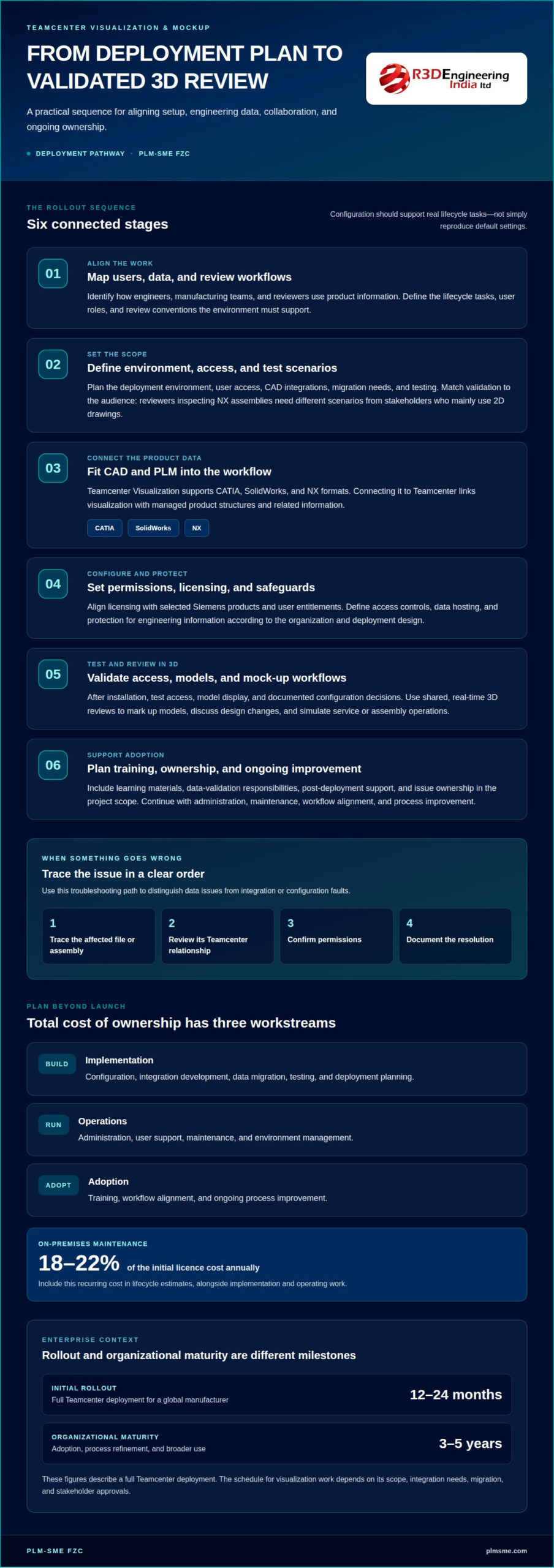
Teamcenter visualization and mockup deployment services align software setup with engineering data, user roles, and review workflows. Configuration should support the lifecycle tasks people need to perform, not simply reproduce default settings.
Deployment Planning and Installation
Planning maps how engineers, manufacturing teams, and reviewers use product data. The deployment scope then defines the environment, user access, CAD integrations, migration needs, and test scenarios. For example, reviewers inspecting NX assemblies need different validation scenarios from stakeholders who mainly use 2D drawings. After installation, professionals test access, model display, and documented configuration decisions.
Teamcenter Visualization supports CAD formats including CATIA, SolidWorks, and NX. Connecting it to Teamcenter links visualization with managed product structures and related information. Configuration should reflect real workflows, such as review conventions and user roles, with changes documented for administration. To assess whether a visualization or digital mock-up tool is suitable, compare its fit with your CAD data, PLM lifecycle processes, and collaboration needs.
For UAE deployments, licensing must align with the Siemens products and user entitlements selected. Security planning defines access controls, data hosting, and protection of engineering information. The requirements depend on the organisation and deployment design. When selecting a deployment partner, assess relevant Teamcenter and CAD integration capability, and consider how the proposed work fits existing processes.
Deployment duration depends on scope, integration complexity, migration, testing, and approval cycles. Define training, migration, and post-deployment support in the project scope, including learning materials, data validation responsibilities, and issue ownership. A focused visualization rollout requires a different plan from a broader enterprise implementation.
Deployment Risks and Troubleshooting
Common risks include mismatched CAD data, incomplete product structures, incorrect access permissions, and configuration changes that disrupt established workflows. Teamcenter visualization and mockup deployment services should include a clear troubleshooting process: trace the affected file or assembly, review its Teamcenter relationship, confirm permissions, and document the resolution. This helps teams distinguish data issues from integration or configuration faults.
Implementation and total cost of ownership
Teamcenter implementation costs extend beyond visualization setup. Total cost of ownership includes software entitlements, infrastructure, integration development, data migration, testing, training, administration, and ongoing maintenance. A visualization-focused deployment differs from an enterprise programme connecting engineering with manufacturing and business systems. Scope Teamcenter visualization and mockup deployment services around the intended workflows and operating model.
For planning, map costs to how teams will use the environment. A company sharing product assemblies between engineering and manufacturing needs clear access roles, dependable product data, and defined review processes. ERP or MES integration adds development and testing work, while legacy data migration requires validation. Each decision affects implementation effort and ongoing administration.
For a global manufacturer, a full Teamcenter deployment takes 12-24 months for initial rollout and 3-5 years to reach organisational maturity. Initial rollout establishes the system; maturity develops through adoption, process refinement, and broader use. The schedule for visualization work depends on its own scope, integration needs, migration, and stakeholder approvals.
- Implementation: configuration, integration, migration, testing, and deployment planning.
- Operations: administration, user support, maintenance, and environment management.
- Adoption: training, workflow alignment, and ongoing process improvement.
Assess these categories across the operating lifecycle rather than treating launch as the finish line. A controlled change process lets teams evaluate configuration updates before applying them. Clear ownership of integration development and system administration also reduces handover gaps. In enterprise programmes, collaboration across engineering, IT, and manufacturing helps coordinate priorities and validation.
To build a practical cost model, document assumptions for each workstream: connected systems, data movement, access administration, and post-launch support. Relate the proposed scope to intended outcomes, such as more effective design reviews or improved reuse of product information. This makes trade-offs visible. A defined scope for Teamcenter visualization and mockup deployment services helps decision-makers understand which work drives the investment.
For an on-premises deployment, annual maintenance costs 18-22% of the initial licence cost. This recurring charge should be included in lifecycle estimates alongside implementation and operating work, rather than treated as a launch-only expense.
For a 100-seat named-user Teamcenter deployment, the approximate implementation-services range is 500K-500K-500K-2M, and the approximate initial licence-fee range is 500K-500K-500K-1.5M. These estimates help frame investment planning; actual scope and operating requirements still shape the total cost.
Digital mock-up and validation
Digital mock-ups let engineering and manufacturing teams examine product designs before physical assembly. Teamcenter Visualization supports shared 3D reviews, where participants can mark up models, discuss design changes, and record issues in context. This helps teams assess whether a model supports the intended assembly or service workflow before committing further effort.
The available modules address different review needs. Teamcenter Visualization Base displays JT files and 2D drawings, while Standard adds review and comparison tools. Mockup supports interactive product evaluation, and Lifecycle Visualization Illustrate supports technical illustration workflows. The appropriate Siemens configuration depends on the tasks, data, and participants involved.
- Standard: markup, annotation, 3D sectioning, revision comparison, and snapshot creation support structured reviews.
- Mockup: teams can position and manipulate parts, then simulate assembly or service operations in 3D.
- Illustrate: captured 3D geometry assets link to the original JT file, supporting traceability to source geometry.
For example, reviewers can compare revisions, section an assembly to inspect internal relationships, and capture a snapshot for discussion. Mockup supports real-time, multi-user visualization, including immersive virtual and augmented reality environments. These capabilities help teams assess part access, positioning, and operation sequences. They do not replace engineering approval; they provide a shared visual basis for examining design decisions.
Use a repeatable validation sequence: select the relevant assembly and revision, review key interfaces, simulate the target operation, and record findings with markup or snapshots. Clear review criteria help participants distinguish geometry concerns from process questions. Teams can then route findings through their established change process and keep decisions connected to the product model.
Choose a format and module based on who needs to review the design and what decisions they must make. A team that mainly inspects JT assemblies may need a different setup from one validating service access through immersive visualization. Matching capabilities to workflows directs investment toward practical review needs, not unused features.
What are Teamcenter Visualization and Mockup deployment services?
Teamcenter Visualization deployment services configure and connect visualization capabilities to product data and review workflows. The scope can include selecting suitable modules, aligning user access, and integrating visualization with Teamcenter and CAD processes. The goal is a usable engineering review environment, not simply an installed application.
Teamcenter Visualization is commonly part of the Siemens Teamcenter PLM suite, though it may also be available as a standalone tool in some cases. Base lets users view JT files and 2D drawings without CAD software. Users can explore assemblies, bills of materials, and metadata, then take basic distance and angle measurements.
That access can help manufacturing or service stakeholders inspect product information without opening the originating CAD application. For example, a reviewer can examine an assembly structure and its metadata alongside a 2D drawing. Deployment work aligns these views with the intended data access and review process.
Lifecycle Visualization portfolios collect technical illustrations in structured documents with shared headers, footers, and tables of contents. Portfolios can also be printed or exported to Visio, HTML, and other formats. This helps teams prepare product information for different review and communication needs.
Visualization can also support training: assembly processes can be animated, and 3D product models can be presented to learners. A deployment plan therefore considers whether the primary use is design review, product communication, or process learning. That choice affects module selection, user access, and how product data is organised for each audience.
For organisations connecting visualization with managed product information, integration planning should account for existing Teamcenter structures and related systems. Explore Teamcenter integration development to connect visualization workflows with the wider PLM environment.
PLM-Sme FZC: Teamcenter Integration Development
PLM-Sme FZC provides Teamcenter integration development to connect visualization workflows with wider PLM and business systems. This can align product information across engineering and systems such as ERP, CRM, MES, and MOM, supporting consistent data exchange across the product lifecycle.
Consider this work when disconnected processes, manual handoffs, or expanding digital mock-up requirements create integration challenges. System and solution architecture can define how components fit together, while digital maturity assessments and reports help identify priorities. Digitalisation Vision & Roadmap Consulting supports planning when the next step involves broader transformation goals.
For organisations connecting visualization to a wider industrial programme, PLM-Sme FZC also provides industrial automation and AI solutions. The right starting point depends on the systems involved, the information that must flow between them, and the desired operational outcomes. Contact PLM-Sme FZC to discuss your Teamcenter integration requirements.
Set a Clear Direction for Your Next Deployment
Before choosing a deployment path, define the business decision it needs to support. Identify the teams that will use visualization, the product information they need, and how review outcomes should connect with wider PLM processes. This gives engineering and IT a shared basis for prioritising scope and assessing trade-offs.
Plan Teamcenter visualization and mockup deployment services as part of a broader digital direction, not as an isolated software rollout. PLM-Sme FZC supports organisations through digital maturity assessments and reports, Digitalisation Vision & Roadmap Consulting, and industrial automation and AI solutions. These services can connect deployment planning with wider transformation priorities.
A focused discussion can clarify the integration context, target workflows, and decisions that need to be made before implementation. Contact PLM-Sme FZC about deployment to discuss a practical next step for your Teamcenter environment.
Frequently Asked Questions
What steps do professionals take to install and configure Teamcenter Visualization and Mockup?
A deployment typically involves preparing a controlled environment, confirming access roles, installing selected components, and validating representative engineering workflows. Test scenarios such as opening a released assembly, reviewing a revision, and recording feedback before rollout. The handover should document configuration decisions, known dependencies, and support ownership, giving administrators a practical reference when workflows or connected systems change.
What is the cost of Teamcenter Visualization and Mockup deployment services in the UAE?
The price depends on the case and is given after a quote request. For a UAE project, the scope and cost factors include selected modules and user entitlements, infrastructure, CAD or enterprise integrations, data migration, configuration, testing, training, and post-deployment support. A useful estimate separates implementation work from ongoing operating needs, so decision-makers can understand what drives the proposed scope without relying on an unsuitable generic figure.
How do Teamcenter Visualization and Mockup compare with competing visualization and digital mockup tools?
Suitability depends on how well the tools fit your existing CAD data, PLM lifecycle processes, and collaboration needs. Teamcenter Visualization supports CATIA, SolidWorks, and NX formats, and connects to managed product structures through Teamcenter.