
Manufacturing Bill of Process in Teamcenter: Manage BOMs and Changes
A manufacturing bill of process is the planned production approach for a product, linking its parts and subassemblies to the operations and resources needed to build it. Implementing a manufacturing bill of process in Teamcenter connects that plan with manufacturing BOM versions and engineering changes, helping teams keep the production definition aligned as the product evolves.
A manufacturing bill of process is more than a list of assembly steps. It connects what must be made with how, where, and using which resources, giving manufacturing and engineering teams a shared view of relevant changes.
This article explains how a bill of process differs from the manufacturing BOM, how parts are assigned to assembly operations, and how process plans can be managed in Teamcenter. It also covers implementation choices that shape traceability, change control, and alignment with factory operations, so you can understand what a robust setup needs to support.
Key Takeaways
- Understand how a manufacturing bill of process connects the production approach with product structures, resources and operations.
- See how linking BOM versions with engineering changes can help keep manufacturing definitions aligned and traceable.
- Learn how parts and assemblies can be assigned to specific operations to clarify what each stage of production requires.
- Explore how process templates, plant-specific plans and PLM implementation support can help connect planning with manufacturing operations.
BOM version and engineering change management
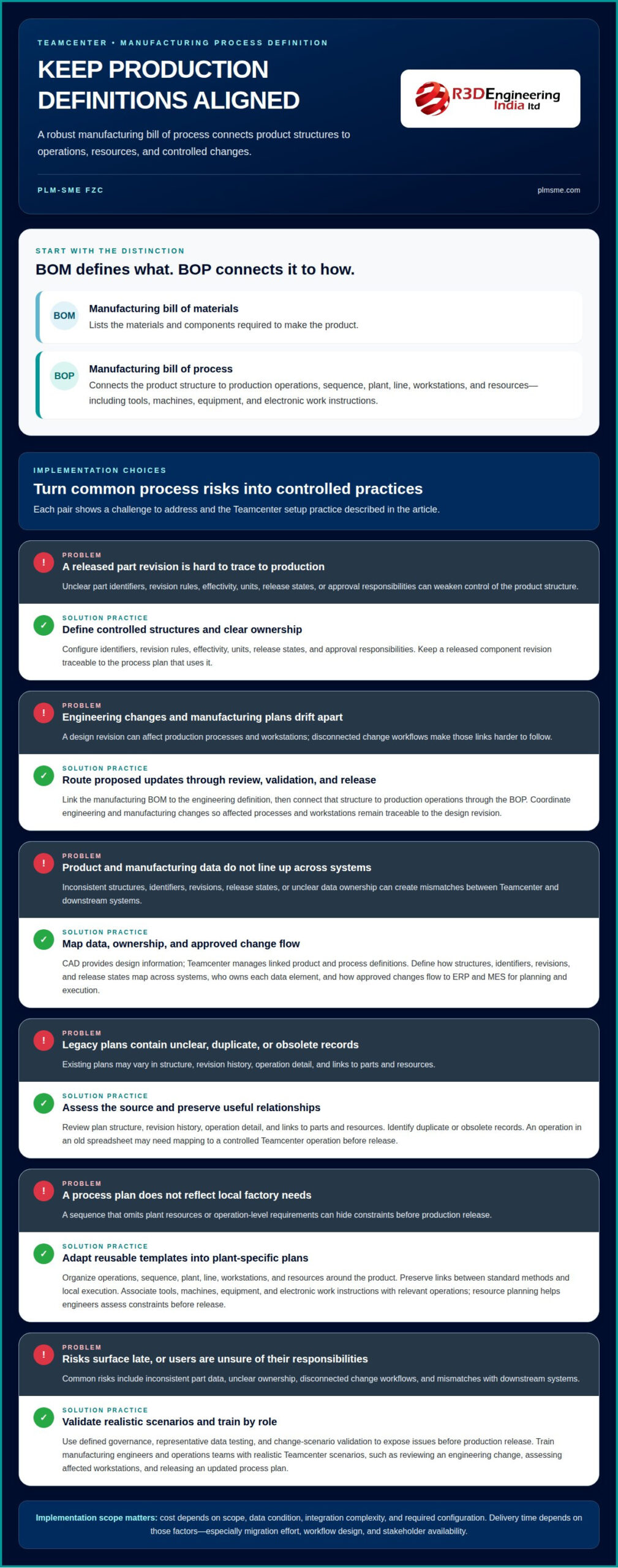
A Teamcenter bill of process should be configured around controlled product structures and clear data ownership. A manufacturing Bill of Process implementation in Teamcenter should define part identifiers, revision rules, effectivity, units, release states, and approval responsibilities. For example, a released component revision should remain traceable to the process plan that uses it.
In PLM, the manufacturing BOM can link directly to the engineering definition, while the bill of process connects that structure to production operations. A change workflow routes proposed updates through review, validation, and release. A manufacturing Bill of Process implementation in Teamcenter should coordinate engineering and manufacturing changes, preserving traceability from a design revision to affected processes and workstations.
For BOM, ERP, MES, and CAD integration, map structures, identifiers, revisions, and release states across systems. CAD provides design information, while Teamcenter manages linked product and process definitions. ERP and MES can receive manufacturing data for planning and execution. Integration design should specify ownership of each data element and how approved changes flow downstream.
Implementation cost in the UAE depends on scope, data condition, integration complexity, and required configuration; pricing is provided after a quote request. Delivery time depends on those factors, especially migration effort, workflow design, and stakeholder availability.
When migrating existing manufacturing plans, assess their structure, revision history, operation detail, and links to parts and resources. The migration approach should preserve useful relationships and identify duplicate or obsolete records. For example, an operation in an old spreadsheet may need to be mapped to a controlled Teamcenter operation before release.
Common risks include inconsistent part data, unclear ownership, disconnected change workflows, and mismatches between Teamcenter and downstream systems. Defined governance, representative data testing, and validation of change scenarios can expose issues before production release.
User adoption calls for role-based training for manufacturing engineers and operations teams. Use realistic Teamcenter scenarios, such as reviewing an engineering change, assessing affected workstations, and releasing an updated process plan. Clear responsibilities help users understand how their actions affect manufacturing data.
Manufacturing process planning software
Teamcenter manufacturing process planning connects product structures with a planned production approach. A manufacturing bill of process implementation in Teamcenter can organize operations, sequence, plant, line, workstations, and resources around a product. A generic process template can then be adapted into plant-specific plans while preserving links between standard methods and local execution.
For example, a plan can identify operations, stations, tools, machines, equipment, and electronic work instructions. A cell using torque equipment can link that resource to an operation and its relevant instruction. If the sequence or equipment changes, controlled plan updates help manufacturing teams identify which production definitions need review.
Teamcenter, SAP Digital Manufacturing, and DELMIA can be assessed against the existing architecture, data ownership, and shop-floor execution needs. Teamcenter connects product structures with process planning in PLM. The right selection depends on an organization’s integration requirements and operational workflows.
Required Teamcenter modules and license entitlements depend on the functions, integrations, and user roles in scope. Map intended planning workflows to the required capabilities, then align the configuration with the organization’s licensing arrangements. This keeps the implementation grounded in actual process needs.
Resource planning clarifies whether a proposed sequence can use available plant equipment and workstations. A manufacturing bill of process implementation in Teamcenter can reveal resource dependencies early, helping engineers assess constraints before production release. Reusable templates support process reuse across plants, while plant-specific plans reflect local equipment and supply strategies.
This structure supports production planning by making the sequence, resource requirements, and work instructions visible together. For instance, a machine assignment change can prompt review of the affected operation and instruction. Teamcenter integration planning can help align process definitions with surrounding systems and shop-floor needs.
A bill of process lists the production line configurations, tools, machines, equipment, and electronic work instructions needed to make a product. It complements the manufacturing bill of materials, which lists the materials and components required. Before PLM software, changes to a product or its manufacturing process required manual updates to the bill of process, manufacturing bill of materials, and electronic work instructions.
PLM software can update the product bill of process to reflect design changes. Modern PLM systems can create a bill of process using integrated manufacturing process planning software and communicate changes to the shop floor. Manufacturing process planning software can help manufacturers share workflows across departments, capture shop-floor feedback, and manage changes.
Assembly operations and parts assignment
In a plant bill of process, stations and cells define where work happens, while operations define the tasks performed there. Linking each operation to its required parts turns an assembly sequence into a manufacturing definition. For a pump assembly, a plan could associate the casing, shaft, and seal with separate fitting and inspection operations. Each assignment clarifies which material enters a task and where it belongs.
Part assignment connects the manufacturing BOM to the process plan. It can identify the quantity required and the operation where each component is used. For example, a fastener may be assigned to a joining operation, while a subassembly enters a later installation step. This relationship helps manufacturing teams trace material needs through the planned sequence instead of relying on separate lists.
Operations can also describe what happens to assigned parts. A component may be consumed during assembly, destroyed during a process, produced as an output, or disassembled during rework. Recording these relationships makes the process definition more complete. If a finished subassembly becomes an input to a later operation, its production and subsequent use remain connected in the plan.
For complex assemblies, logical part assignment can automatically assign parts consumed across different operations. The implementation still needs consistent product structures, operation definitions, and assignment rules. Map those rules to the manufacturing workflow, then validate representative assemblies for missing or duplicate assignments. This is especially important when similar parts appear at multiple stations or one operation consumes several components together.
Clear assignments also support review when the assembly sequence changes. If a component moves from one station to another, its operation link and material requirement must stay aligned. A plant-specific process plan can show which cell performs each task and which parts it requires. Manufacturing engineers can then review the complete assembly flow, including inputs, outputs, and disassembly steps, before releasing the plan for production.
Manufacturing and assembly planning tools can assign parts and assemblies from the manufacturing bill of materials to specific operations. A manufacturing BOM can specify material quantities and the sequence of assembly operations.
Manufacturing process plans
A manufacturing process plan defines how a product moves through production, from planned operations to plant execution. In Teamcenter, a product bill of process can serve as a reusable template and inform plant-specific plans. Traceability between the generic plan and each plant version helps teams understand where local methods differ.
That distinction matters when facilities use different equipment or fabrication strategies. A shared product plan can preserve the intended manufacturing logic, while each plant plan identifies relevant local resources and operations. Reusable templates also help maintain consistent process knowledge across sites without forcing every factory into the same configuration.
Validation should confirm that the sequence and resources work as intended before release. Manufacturing process plans can be validated using simulation solutions. For example, simulation can help assess a proposed operation sequence and reveal potential resource or flow conflicts for review. The findings can then inform adjustments before manufacturing teams rely on the plan.
A released plan also needs a clear route to execution. A bill of process communicates the production plan to manufacturing operations management systems, particularly the manufacturing execution system, to guide implementation. Connecting Teamcenter with ERP, MES, and shop-floor systems helps align planned product and process data with downstream execution. Defined ownership and change pathways keep these connections manageable as plans evolve.
Electronic work instructions can draw on linked parts, resources, and visual aids to explain specific tasks. For instance, a station-level instruction can show the relevant component and equipment alongside the operation. Shop-floor feedback can also inform process plan maintenance, giving manufacturing teams a structured way to capture issues and update working methods.
The practical takeaway is to treat each process plan as a governed manufacturing asset, not a static document. Clear templates, plant-specific traceability, validation, and execution-system connections make the plan useful beyond initial planning. Get support aligning Teamcenter process plans with plant workflows and downstream systems.
PLM-Sme FZC: End‑to‑End PLM Implementation Support
PLM-Sme FZC supports manufacturers implementing Teamcenter workflows that connect product structures, process plans, and downstream systems. Its End-to-End PLM Implementation Support aligns implementation scope with manufacturing needs, from system architecture and configuration through integration planning.
Turn to this support when existing process plans need migration, engineering and manufacturing workflows need alignment, or Teamcenter must connect with ERP or MES. Teamcenter Integration Development addresses system connections, while Digital maturity assessments and reports can help identify capability gaps. Digitalisation Vision & Roadmap Consulting can guide broader planning when implementation choices need to support a wider transformation direction.
The right starting point depends on your current PLM environment, data quality, plant processes, and integration requirements. Contact PLM-Sme FZC to discuss your Teamcenter implementation needs.
Shape the next stage of your manufacturing process
A well-scoped manufacturing bill of process implementation in Teamcenter can provide a foundation for structuring and applying manufacturing knowledge. The next step is to connect implementation decisions with your operational priorities, including where process consistency, system integration, or digital capability needs attention.
PLM-Sme FZC offers Digital maturity assessments and reports to help identify capability gaps, alongside Digitalisation Vision & Roadmap Consulting to plan transformation priorities. Where production technology is part of that direction, its Industrial automation and AI solutions can support relevant initiatives. The focus is on aligning the work with your manufacturing context, not applying a standard template without regard to your needs.
Bring your process-planning objectives and key integration needs into a focused discussion, then identify a practical path forward. Explore your next Teamcenter process step with PLM-Sme FZC and move ahead with a clearer implementation direction.
Frequently Asked Questions
What is bill of process?
A bill of process is a structured description of how a product will be manufactured, including its operations and production resources. It helps translate a product design into a manufacturing plan. For a configurable product, separate process variants can clarify which operations apply to each approved configuration, helping planners connect the intended build with the appropriate production route.
What Teamcenter modules and licenses are required for BOP implementation?
Required modules and license entitlements depend on the functions, integrations, and user roles in scope. Map intended planning workflows to the required capabilities and align the configuration with the organization’s licensing arrangements.