
Teamcenter ITK server-side customization services
Server-side customization in Teamcenter can use ITK or Java, depending on the business logic and integration requirements. Teamcenter ITK server-side customization services can extend application behaviour through business logic and event handlers, while BMIDE and Teamcenter Services support related data-model and integration needs. Choose the approach based on the requirement, not simply the programming language.
ITK is a natural focus when a requirement involves server-side changes: it provides native C and C++ APIs and deep access to Teamcenter objects. But customization involves more than code. The data model, service interfaces, event handling, and upgrade impact all shape how an extension should be designed.
This article explains how application extensions, BMIDE, Teamcenter Services, ITK, and Java fit together, and when each is useful for business logic and integrations. It also outlines practical trade-offs in performance, maintainability, and deployment, helping you frame a customization around the outcome your Teamcenter environment needs.
Key Takeaways
- Define the business outcome first, then map it to the appropriate application extension or customization point.
- Distinguish BMIDE data-model work from Teamcenter Services and native ITK customization to keep the implementation aligned with its purpose.
- Design business logic and event handlers around efficient object and database access to avoid unnecessary performance overhead.
- Weigh ITK and Java against integration needs, maintainability, and upgrade impact before settling on a server-side approach.
Application extensions
ITK consultants build server-side extensions, operation logic, runtime properties, and workflow handlers in Teamcenter. BMIDE defines objects, rules, and LOVs. Common applications include release checks, BOM automation, and system integrations.
ITK Server-Side Extensions
ITK server-side extensions use native C and C++ APIs to change Teamcenter application behaviour. A customization can add an operation extension, expose a runtime property, or define a handler that runs during workflow processing. For example, a runtime property can display a calculated value alongside an object, while an operation extension adds logic to a selected action. Before implementation, define the object type, triggering operation, required data, and expected result. This makes the extension’s purpose and relationship to the application clear.
Operations and Workflow Handlers
Operation extensions attach custom logic to Teamcenter operations, while workflow handlers run logic at specific workflow steps. For example, a release process can use a handler to check required object data before a task proceeds. Specify the trigger, inputs, decision rules, and resulting action, then map each rule to BMIDE business objects and properties. Keep the handler focused on its check, and account for database calls and object loads that may affect execution time. This makes its behaviour easier to assess within the workflow.
Customization Use Cases and Integrations
Common use cases include enforcing business rules, automating parent-child relationships in a multi-level BOM, and connecting external applications. ITK can create BOM relationships programmatically for migration or automation, while server-side tools can integrate third-party or internally developed applications with Teamcenter. For an integration, define which system owns each data element, what event starts an exchange, and how errors are surfaced. These decisions help determine whether an extension, workflow handler, or integration logic is the right fit, and clarify the data and behaviour the customization must address.
BMIDE, Teamcenter Services and ITK customization approaches
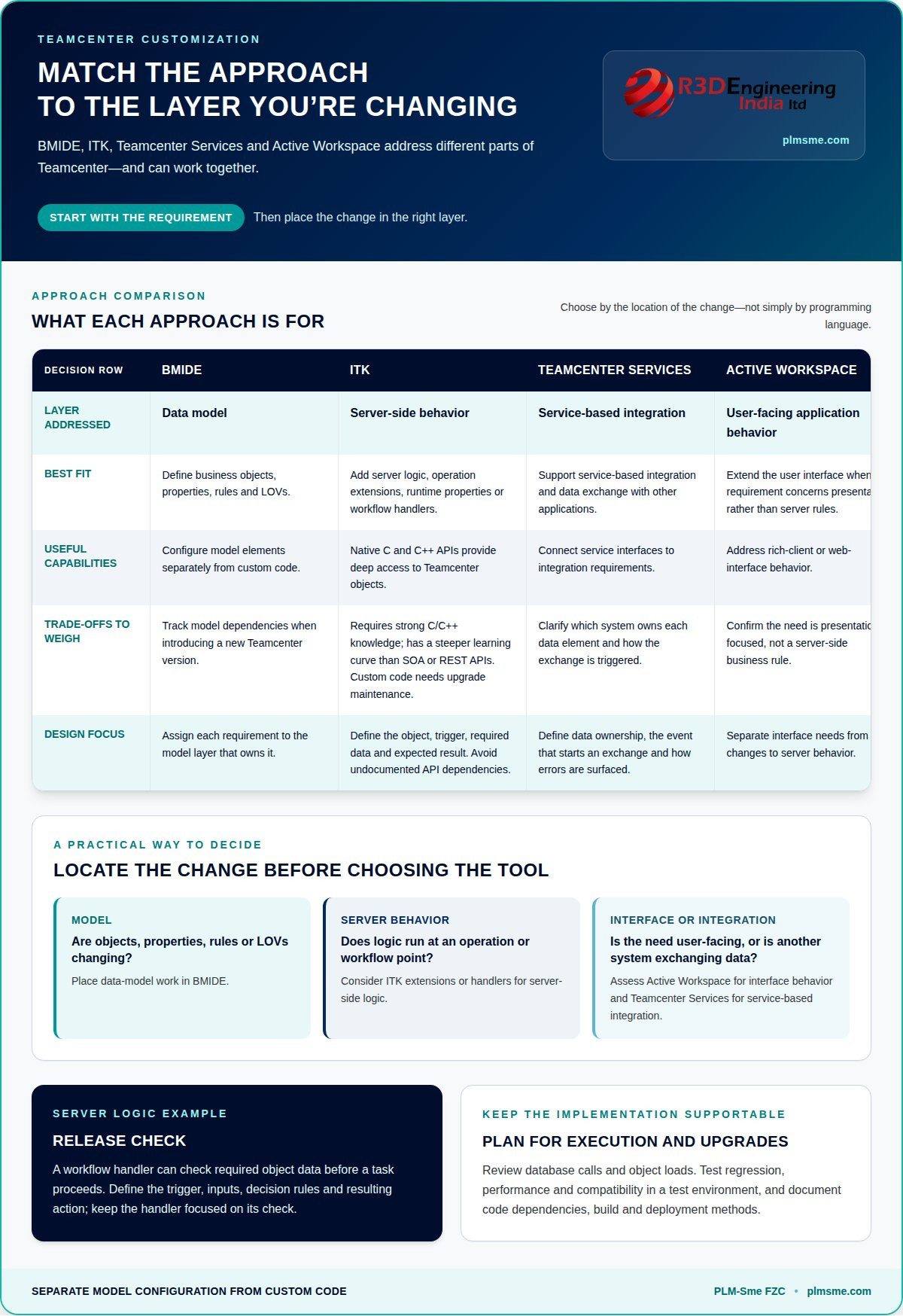
Choose an approach by locating the change: in the data model, server logic, or application interface. BMIDE, Teamcenter Services, and ITK address different layers and can work together.
ITK, SOA, and Active Workspace Approaches
ITK provides native C and C++ APIs for server-side logic and deep access to Teamcenter objects. It requires strong C/C++ knowledge and has a steeper learning curve than SOA or REST APIs. Teamcenter Services support service-based integration, while Active Workspace extensions address user-facing application behaviour. For a rich-client or web-interface requirement, determine whether the change concerns presentation or server-side rules before choosing a method.
BMIDE is suited to data-model changes, including business objects, properties, rules, and LOVs. Separate model configuration from custom code, then assign each requirement to the layer that owns it. This clarifies dependencies when introducing a new Teamcenter version. Custom code requires upgrade maintenance, so test regression, performance, and compatibility in a test environment. Avoid undocumented API dependencies that can make future support harder.
Provider Skills and Experience
A capable provider needs practical C/C++ knowledge, familiarity with Teamcenter objects, and experience designing BMIDE data-model changes. They should also understand service interfaces and how integrations exchange data. Ask for an implementation plan that identifies the supported Teamcenter version, code dependencies, build and deployment method, and regression tests. These details show how the work will be maintained, not just how it will be coded.
For projects in the United Arab Emirates, look for PLM implementation and integration specialists able to explain their Teamcenter approach across these layers. A sound plan defines business goals, scopes the customization, and tracks its dependencies. Where integration is the core requirement, Teamcenter Integration Development can connect the customization decision to the wider implementation. The right technical choice depends on whether the requirement changes the model, server behavior, or user interface.
Custom business logic and event handlers
Teamcenter business logic translates engineering rules into consistent application behaviour. Start by identifying the object, its lifecycle state, and the decision the software must enforce. For example, a release rule can evaluate required metadata before allowing a transition. That requirement then informs the extension architecture: define the inputs, conditions, outputs, and Teamcenter action that invokes the logic.
Handlers are useful when logic belongs at a defined workflow or operation point. A workflow handler can evaluate a release condition, return a result, and direct the process accordingly. Keep each handler focused on a specific rule, such as checking required properties, rather than combining unrelated approvals and notifications. Document the triggering event and expected outcome so administrators can trace behaviour through the process.
Performance depends partly on how custom logic accesses Teamcenter data. Excessive database calls or object loads can create bottlenecks, especially when a handler processes multiple related objects. Review each lookup and load in the execution path, and avoid repeating retrievals when results can be reused. Test representative workflows and object volumes to identify slow operations before deployment.
Visual feedback should match the server-side decision. If Teamcenter blocks a transition because a property is missing, provide a clear error that identifies the required data and affected object. During implementation, keep source code modular, record dependencies, and track the supported Teamcenter version. Validate changes in a test environment for regression, performance, and compatibility. Automated tests can exercise business rules and handler outcomes, making later updates easier to assess.
Teamcenter custom logic can create performance bottlenecks when database calls or object loads are excessive. Treat data access as part of rule design, not an afterthought. Before adding a lookup, check whether the required property is already available in the handler’s context, and reuse retrieved data where appropriate. Keep the work proportionate to the decision being made: a release check should not load unrelated objects or retrieve the same information repeatedly.
When reviewing a slow execution path, trace how each condition leads to a query or load, remove unnecessary access, and retest the behaviour. Pay particular attention to handlers that examine related objects, since repeated retrieval can magnify the cost of a small rule. Compare results across representative workflows and object volumes, and confirm that optimization has not changed the decision or its user-facing explanation. This keeps responsiveness aligned with the business rule the handler must enforce.
Teamcenter server-side customization with ITK and Java
Teamcenter server-side customization uses ITK or Java to implement application logic and integrations. The choice depends on the access required, programming language, and system responsibilities.
Customization Risks and Best Practices
ITK custom code requires upgrade maintenance, particularly when it relies on deprecated APIs or undocumented behaviour. Store source code in version control and record the supported Teamcenter version for each customization. Before deployment, validate regression, performance, and compatibility in a test environment. Modular code, documented dependencies, automated builds, and automated tests make packaging and future updates easier to manage.
ITK Server-Side Service Scope
Teamcenter ITK server-side customization services scope requirements, implement server logic, and prepare integrations or automation for deployment. ITK is a C and C++ toolkit, while server-side customizations can also use Java. Choose between them based on the Teamcenter access required, integration design, and the skills available to maintain the software.
A disciplined delivery starts with business goals and well-scoped requirements. Map dependencies, then divide work into phases: establish the standard implementation and minimal configuration, add high-impact customizations, and address integrations and interface personalization. For an ITK program, initialize the session, handle returned error codes, and package the code for its target environment. Keep configurations consistent across deployment environments.
ITK supports enterprise-grade automation and integrations, including programmatic parent-child relationships in multi-level BOMs. It can also support migration, reporting, and database maintenance. Before deployment, test the specific use case and check performance implications, including object loads and database calls. For requirements involving connected systems, plan your Teamcenter integration around data ownership, dependencies, and deployment needs.
Java and ITK offer alternative routes for server-side customization, with ITK identified as a C/C++ toolkit. ITK is described as suitable for enterprise-grade customizations and as a foundation for advanced Teamcenter customization. It is relevant when application logic calls for substantial Teamcenter-specific work, while Java remains another implementation option.
An ITK program uses ITK_init_module to initialize and log into POM. Teamcenter ITK functions mostly return an integer error code; an unsuccessful function call typically returns a non-zero ifail value with an error code. Handling those return values is therefore part of implementing ITK logic. Keeping initialization and function results in view helps developers understand the program’s interaction with Teamcenter and respond to unsuccessful calls.
PLM-Sme FZC: Digital maturity assessments and reports
PLM-Sme FZC helps organisations assess their digital maturity and turn findings into practical next steps. If your Teamcenter environment needs clearer priorities before further customization, a digital maturity assessment and report can help identify capability gaps and areas for improvement.
For teams shaping a broader PLM direction, Digitalisation Vision & Roadmap Consulting connects business objectives with a structured transformation plan. System and Solution Architecture supports decisions about how platforms and integrations should fit together, while industrial automation and AI solutions address wider operational needs.
These services are especially relevant when customization decisions depend on business priorities, system dependencies, or a longer-term digital roadmap. Contact PLM-Sme FZC to discuss the assessment or planning support that fits your Teamcenter objectives.
Set the direction for your next Teamcenter change
A customization decision is also a planning decision: it shapes how your Teamcenter environment can support future processes and integrations. Before implementation, align the technical scope with the business outcome, system dependencies, and the work your team can maintain. A focused plan makes the next step purposeful.
For a broader view, PLM-Sme FZC offers Digital maturity assessments and reports, Digitalisation Vision & Roadmap Consulting, and Industrial automation and AI solutions. These services can connect a specific Teamcenter requirement with wider digital priorities. The right starting point depends on whether you need to assess readiness, define a roadmap, or address an operational challenge.
If you’re ready to discuss how Teamcenter ITK server-side customization services fit your objectives, contact PLM-Sme FZC about your needs. A clear conversation about the business goal can set your next step in motion.