
How to Plan Remote Teamcenter BMIDE Configuration Consulting
Yes, Teamcenter BMIDE configuration consulting can be delivered remotely when requirements are clear, access to the right environments is arranged, and deployments are controlled. BMIDE and workflow changes should move through a versioned deployment pipeline, not be edited directly in production. Remote delivery can also support ITK development when development, testing, review, and release responsibilities are defined.
It’s reasonable to ask whether complex configuration work can be handled effectively without everyone in the same room. The key is not physical proximity, but a shared understanding of the data model, business rules, and how each change will be validated.
This guide explains how to plan a remote engagement, manage configuration choices that affect BOMs and legacy data, and work with dynamic lists of values (LOVs) in BMIDE. It also outlines practical steps for coordinating requirements, testing changes, and preparing deployments, so your team can keep governance in-house while bringing in focused execution support where it helps.
Key Takeaways
- Structure remote consulting around clear requirements, access to the right environments, and defined development, testing, review, and release responsibilities.
- Assess how configuration changes affect BOMs and legacy records; choose an approach to mandatory attributes based on data volume, timeline, and tolerance for server-side customization.
- Match the delivery model to your project’s scope and internal capacity, while keeping PLM governance within your organisation.
- Plan dynamic LOVs to draw from current database values, and move BMIDE and workflow changes through a versioned deployment pipeline rather than editing production live.
BMIDE consulting
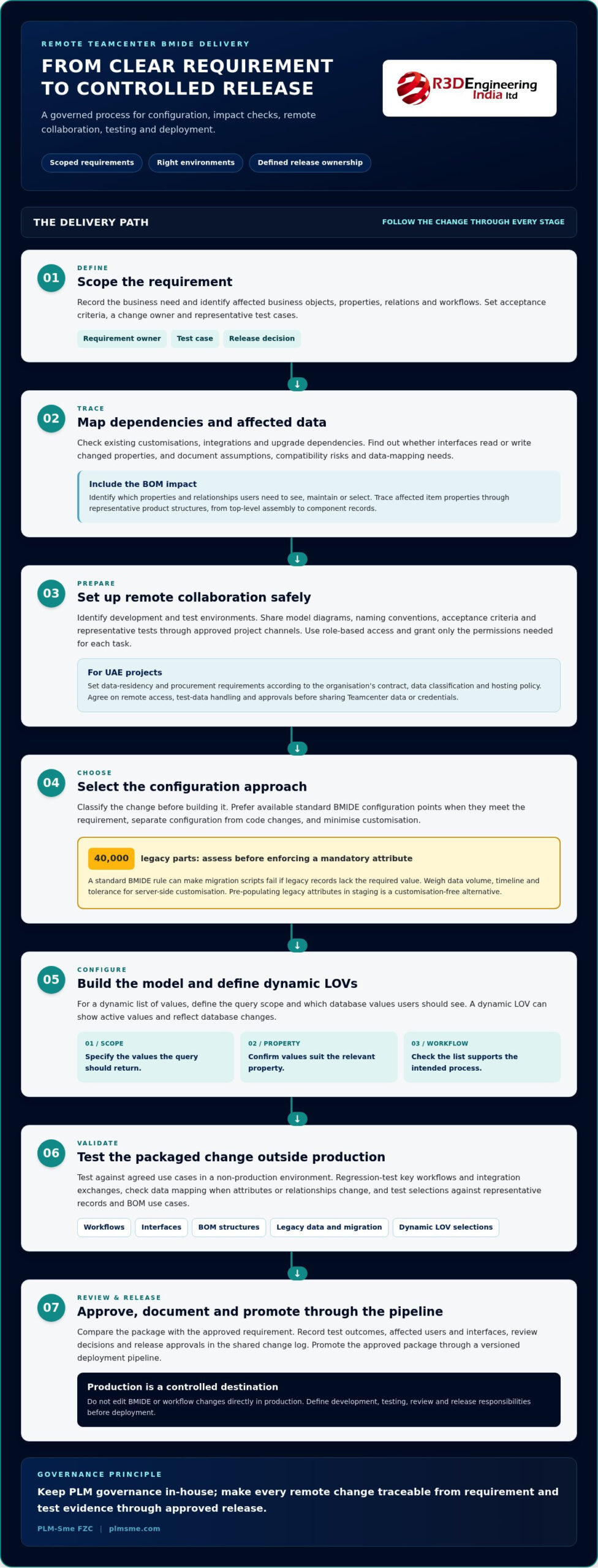
Plan remote BMIDE work around scoped requirements, controlled access, and a repeatable path from development to deployment. Give each change an owner, a test case, and a documented release decision.
For UAE projects, set data residency and procurement requirements according to the organisation’s contract, data classification, and hosting policy. Agree on remote access, test-data handling, and approval responsibilities before sharing Teamcenter data or credentials.
Teamcenter BMIDE configuration consulting can affect upgrades, integrations, and existing customisations because model changes may alter data structures and behaviour. Map dependencies and test affected workflows and interfaces before release.
-
Plan Customization and Deployment Steps
Define the requirement first, then record the affected business objects, properties, relations, and workflows. Separate configuration from code changes, and identify the development and test environments for remote contributors. Keep BMIDE and workflow changes in a versioned deployment pipeline, never edit production directly. Assign review and release approvals, then test the packaged change against agreed use cases before deployment.
-
Assess Impacts on Upgrades and Integrations
Before implementation, map each proposed BMIDE change to existing customisations, integrations, and upgrade dependencies. Check whether an interface reads or writes changed properties, and test data mapping when attributes or object relationships change. Record assumptions and compatibility risks in the change package. Regression-test key workflows and integration exchanges in a non-production environment, then document any necessary updates alongside the BMIDE deployment.
- Prepare remote collaboration around specific deliverables. Share model diagrams, naming conventions, acceptance criteria, and representative test cases through approved project channels. Use role-based access and give contributors only the environment permissions their tasks require. Record decisions in a shared change log, including who approved the requirement and which test results support release. This keeps technical reviews traceable across locations.
- Treat each change as a governed release, not an isolated model edit. Compare the package with the approved requirement, confirm affected users and interfaces, and record test outcomes before promoting it. For a dynamic list of values, define which database values users should see and how the list should respond when records change. This makes the configuration intent clear to maintainers.
Configuration and BOM management
- Classify each requested change before configuring the model. Use available BMIDE configuration points, and minimise customisation when standard options meet the requirement. Changes involving server-side code or mandatory attributes need closer analysis of migration and upgrade impacts. For BOM management, document which object properties and relationships users need to see, maintain, or select.
- Trace the change through representative product structures. Identify how affected item properties appear in BOM views, how users maintain them, and whether integrations consume them. Test a realistic structure from top-level assembly through component records. This can reveal mismatches between the configured data model and the information engineering teams expect in a BOM.
- Plan mandatory attributes around existing records, not only new data. A standard BMIDE rule requiring an attribute can cause migration scripts to fail when legacy records lack its value. In a Teamcenter implementation with 40,000 legacy parts, assess data volume, timeline, and tolerance for server-side customisation before choosing a migration approach. Pre-populating legacy attributes in staging is a customisation-free alternative.
- Design dynamic LOVs around the values users need to select. A dynamic list can query the PLM database, show active values, and reflect database changes. Define the query scope and confirm that returned values suit the relevant property and workflow. Then test selections against representative records, including BOM use cases, to ensure each available value supports the intended business process.
- Separate low-risk configuration from changes that require broader validation. Standard configuration points are generally preferable when they satisfy the requirement; custom server-side behaviour and migration-sensitive mandatory rules warrant testing against existing customisations and upgrade plans. For teams coordinating model, migration, and BOM rollout, End-to-End PLM Implementation Support can connect these decisions to implementation planning.
How to choose between a Teamcenter implementation partner and an independent BMIDE consultant?
- Define the work package before choosing a delivery model. List the BMIDE objects, workflows, integrations, and migration tasks involved. A focused property or LOV change may need specialist configuration capacity. A rollout spanning process design, data migration, integrations, and deployment requires coordinated ownership across workstreams.
- Match the provider’s role to your project scope. A Teamcenter implementation partner may suit work that combines configuration with broader implementation activities. An independent BMIDE consultant can fit a tightly scoped modelling task when your internal team retains architecture, testing, and release control. Compare responsibilities, not just job titles.
- Keep governance within your organisation. Name an internal owner for the data model, approval decisions, and production release. Then define which execution tasks an external specialist handles, such as preparing a BMIDE change or supporting integration development. This division preserves internal control while adding capacity for a specific technical workload.
- Assess dependencies before assigning delivery. For example, a new property may affect forms, workflows, reports, and an integration that reads the same object. Ask each delivery model to explain how it will map those dependencies, test affected processes, document changes, and hand over maintainable artefacts. Even a narrow scope needs a clear dependency boundary.
- Choose the arrangement that fits your internal capability and risk profile. If your team can own requirements, architecture, and release approvals, specialist execution may fill a specific skills gap. If those responsibilities also need coordination, a broader implementation structure may be more suitable. Before work begins, record the decision, named owners, acceptance criteria, and escalation path.
Keep PLM governance within your organisation while assigning execution to an external partner. This places oversight with your team and delivery capacity externally, keeping governance and execution responsibilities distinct.
What are the steps in a Teamcenter BMIDE customization and deployment project?
- Translate the request into a documented requirement. Name the affected Teamcenter object, property, workflow, or integration, then define the expected behaviour with an example. For instance, specify which item types need a new property and which users should see it. Record acceptance criteria and an internal decision owner before changing the BMIDE model.
- Inspect the current model and its dependencies. Review existing object definitions, property rules, workflows, and interfaces that read or write the affected data. Capture a baseline so reviewers can distinguish the proposed change from current behaviour. Include migration and upgrade considerations, especially if existing records may not meet new property requirements.
- Design the smallest configuration that meets the requirement. Prefer available BMIDE configuration points to custom code. Document the intended model changes and any dependent workflow or integration updates. For a dynamic list of values, define the database values users need and test how the list responds when those records change.
- Build and validate the change outside production. Store BMIDE and workflow changes in a versioned deployment pipeline, never as live production edits. Test agreed scenarios, including affected item types, BOM structures, and integration exchanges. Record results, defects, and approvals with the change package so reviewers can trace each release decision.
- Treat deployment and handover as controlled project activities. Confirm the approved package, release owner, rollback approach, and communication to affected users. After deployment, compare production behaviour with the acceptance criteria and log any issues for resolution. Hand over model documentation, test evidence, and integration notes to the administrators who maintain Teamcenter.
Plan your Teamcenter BMIDE configuration consulting work around these controlled steps.
Industry best practices recommend minimizing Teamcenter customization and using out-of-the-box configuration points where possible. Training can support handover; targeted educational programs are available to help administrators master server-side customization and deployment tasks effectively.
PLM-Sme FZC: Digital maturity assessments and reports
PLM-Sme FZC helps organisations assess digital maturity and reports findings that can inform PLM priorities. Turn to this work when BMIDE changes raise broader questions about process readiness, system architecture, or how configuration fits a digitalisation plan.
A digital maturity assessment can help frame these questions and identify areas for improvement. Digitalisation Vision & Roadmap Consulting can translate priorities into a structured direction, while System and Solution Architecture supports decisions about how systems and integrations fit together. For organisations exploring connected operations, Industrial Automation and AI solutions can also align with wider transformation goals.
These services are relevant when a configuration task points to a larger need, such as aligning PLM capabilities with business processes or planning future system changes. Contact PLM-Sme FZC to discuss your requirements, or visit plmsme.com.
Build a maintainable path beyond the first release
Use the next BMIDE change to strengthen how your organisation makes model decisions. Define who owns configuration standards, how new requirements enter the backlog, and how teams assess their effects on connected processes. That operating model helps keep future work aligned with engineering priorities rather than turning it into a series of disconnected fixes.
Remote Teamcenter BMIDE configuration consulting can support this approach when responsibilities, review criteria, and release ownership are agreed across your team. Start by identifying the decision or change that matters most, then frame it around its business purpose, affected users, and dependencies. A focused discussion can clarify whether the immediate need is a technical change or a broader planning question.
Start a conversation with PLM-Sme FZC about your BMIDE priorities and consider how the next decision can support a more coherent PLM direction. A deliberate approach gives your team a practical foundation for moving forward.
Frequently Asked Questions
Can BMIDE customizing and ITK development really be done remotely?
Yes, both can be delivered remotely when the project team can collaborate on code, requirements, and test outcomes. For example, a developer can prepare an ITK change while your Teamcenter administrator reviews its effect on a defined business process. Agree on secure environment access, code ownership, review practices, and release approvals. Regular technical walkthroughs help distributed specialists resolve model or code questions without relying on informal conversations.
What does Teamcenter BMIDE configuration consulting include?
Teamcenter BMIDE configuration consulting typically translates a business requirement into data-model changes, implementation tasks, and validation criteria. The scope may include object types, properties, relations, LOV behaviour, and dependencies on workflows or integrations. For example, a request for a controlled attribute may involve defining its permitted values and how users maintain it. If server-side ITK or Active Workspace changes are needed, identify them separately to keep code, configuration, and testing responsibilities clear.
Which Teamcenter BMIDE consulting services are available in the UAE?
Remote services can cover BMIDE configuration, workflow changes, dynamic LOVs, BOM-related changes, and support for integration or migration impacts. ITK development can also be supported when development, testing, review, and release responsibilities are defined.
What factors affect BMIDE consulting project timelines and pricing?
Timelines and effort depend on the work package’s scope, including affected BMIDE objects, workflows, integrations, and migration tasks. Data volume, legacy records, server-side customisation, dependencies, and the testing and approval required also affect delivery.