
Manufacturing Product Variation in PLM: Options vs. Variants
A product option is a choice a customer makes when purchasing, while a product variant is a configuration defined and produced by the manufacturer. The distinction matters because each choice needs clear rules for how it affects product structure, components, and production data. Effective manufacturing product variation management in PLM connects customer choices and product configurations with the information teams use to design and build products.
Options and variants are easy to treat as interchangeable, especially when a product offers several selectable features. But managing them as one undifferentiated list makes it harder to control dependencies, revisions, and manufacturing requirements. This article explains how options differ from variants and how PLM can represent their relationships.
You’ll also see how PLM connects variation management with ERP and manufacturing systems, and why a structured implementation strategy matters. The focus is on practical decisions: organizing product data, defining configuration rules, and coordinating information across teams so customer choices translate into workable product configurations.
Key Takeaways
- Structure product data so engineering decisions, configuration rules, and manufacturing requirements stay connected throughout the lifecycle.
- Use clear selection rules and dependencies to make configurable product structures manageable as product choices grow.
- Plan PLM integration with ERP and manufacturing systems around data ownership and the information each team needs to act.
- Build implementation around a real product pilot, sound data practices, and a roadmap informed by digital maturity assessment.
What Is Product Lifecycle Management?
Product Lifecycle Management (PLM) manages product information and processes from concept and design through manufacturing, service, and end-of-life. In manufacturing, it connects configurations, engineering data, and production decisions across the product lifecycle.
Product Configuration Across Engineering and Manufacturing
Product configuration defines how selected features and components combine into a buildable product. In engineering, teams use a product platform to organize shared features and planned variations. Manufacturing then uses the resulting configuration to determine what to assemble. For configure-to-order products, PLM can manage a defined set of supported variants. Engineer-to-order products may require new part or design variants for each order, so the configuration approach must accommodate those changes.
Defining how a configurable product derives its 100% parts list helps connect customer requirements with engineering and production data. For example, selecting a particular module can activate its components and exclude incompatible choices. This gives teams a consistent basis for developing and building each configuration.
Quality, Costs, and Time to Market
PLM supports product quality by controlling revisions to CAD files, documents, and bills of materials. When teams work from current information, they can reduce the risk of building from outdated specifications. For example, teams can trace an approved component change through the product structure, helping quality staff identify the configurations it affects.
Reusable modules and standardized processes can reduce duplicated engineering work. Rather than redesigning a shared assembly for every variant, engineers can reuse its approved definition. This can help control engineering costs and streamline product development, supporting a more competitive time to market without sacrificing configuration control.
Engineering and Production Collaboration
PLM gives engineering and production teams a shared view of product data, revisions, and change status. That matters when a design update affects manufacturing instructions or component availability. Production planners can use the current product structure to coordinate work, while engineering retains the rationale and approval history behind a change.
Structured workflows clarify who reviews and approves each update. Engineering can assess design impact, while manufacturing evaluates assembly implications before a change is released. This coordinated process helps teams identify conflicts earlier and use consistent information across locations, rather than reconciling separate records by hand.
Bills of Materials and Engineering Changes
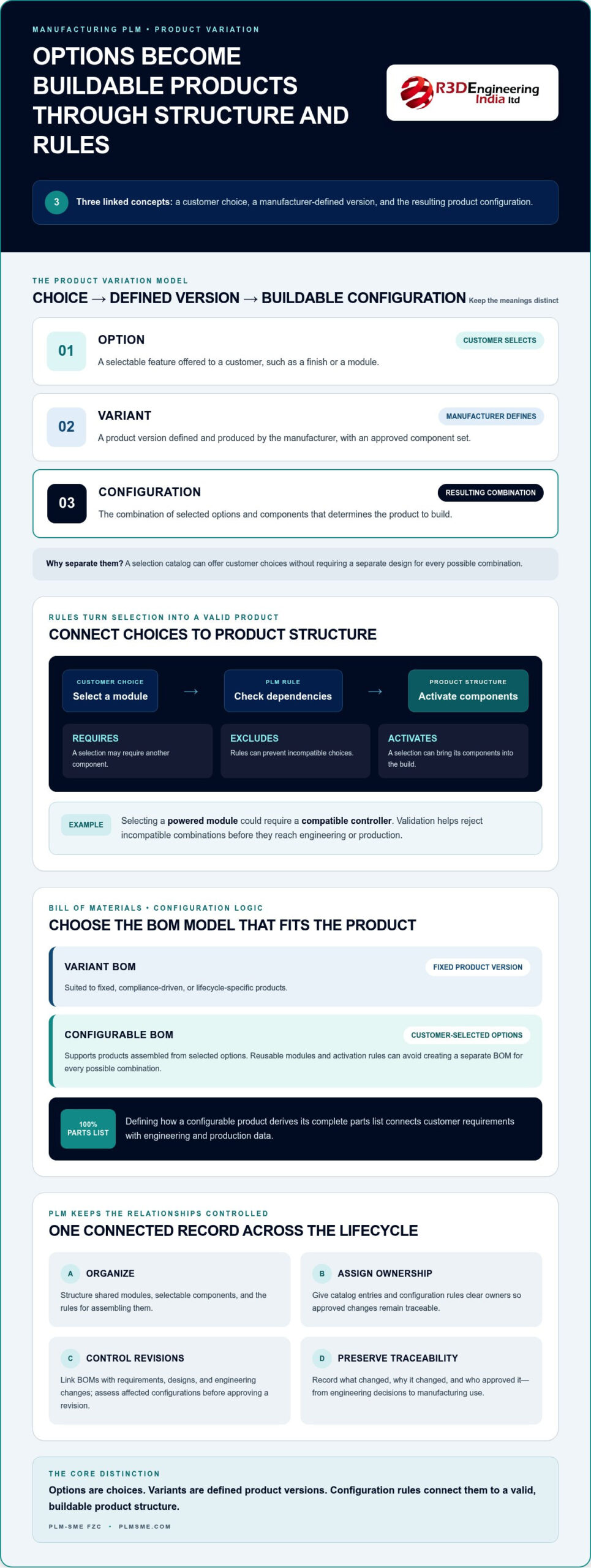
A bill of materials (BOM) describes the components and assemblies required for a product configuration. A variant BOM suits fixed, compliance-driven, or lifecycle-specific products; a configurable BOM supports products assembled from customer-selected options. Creating a separate BOM for every possible combination can multiply records. Instead, model reusable modules and define the rules that activate them.
PLM links BOMs with requirements, designs, and engineering changes. When a component changes, teams can assess affected variants and configurations before approving the revision. The system can record what changed, why it changed, and who approved it, preserving traceability from engineering decisions to manufacturing use.
What is the difference between product options and product variants?
Product variation management in manufacturing PLM organizes selectable options, predefined variants, and the configurations they create. For UAE manufacturers, applicable product requirements depend on the sector and destination market. PLM rules define valid combinations and revisions, but do not replace product-specific conformity obligations.
Options, Variants, and Configurations
An option is a customer-selectable feature, while a variant is a manufacturer-defined product version. A configuration is the resulting combination of selected options and components. This distinction matters because a selection catalog can offer choices without requiring a separate design for every combination. For example, a customer may choose a finish, while the manufacturer maintains a predefined variant with an approved component set.
Configurable Structures and Selection Catalogs
A configurable product structure organizes shared modules, selectable components, and the rules for assembling them. A selection catalog presents valid customer choices, while the structure connects each choice to engineering data. PLM can preserve this relationship through development and later revisions. To maintain version control, assign clear ownership of catalog entries and configuration rules so approved changes remain traceable throughout the product lifecycle.
Option Dependencies in Product Configurations
Option dependencies specify which selections require, exclude, or activate other components. They matter because a configuration system must reject incompatible combinations before they reach engineering or production. Product variation software typically supports feature and option rules, dependency constraints, and validation of proposed combinations. For example, selecting a powered module could require a compatible controller. These controls help manage complexity while keeping selection catalogs usable.
For teams connecting configuration rules across systems, explore PLM integration considerations as a next step.
PLM integration with ERP and manufacturing systems
PLM connects engineering product data with the enterprise systems that plan and execute production. PLM typically manages product design and engineering, while ERP manages planning, production, purchasing, and sales. For a UAE manufacturer, an approved engineering change can therefore affect both the product definition and operational records. Integration gives teams a controlled way to move released parts, revisions, and bills of materials into downstream processes.
Define which system owns each data type before designing interfaces. For example, PLM can own CAD files and engineering revisions, while ERP uses released material and planning data for procurement, costing, and production. A clear handoff prevents duplicate records and manual re-entry. It also makes change management more consistent: an engineering release can trigger the required ERP update, with status visible to engineering and operations.
CPQ adds the customer-selection layer to this flow. A CPQ system captures a requested configuration, PLM validates its product rules and structure, and ERP receives the resulting production definition. If a customer selects an incompatible component, configuration constraints should prevent the invalid order from reaching manufacturing. Connecting PLM, ERP, CPQ, and MES can reduce conflicts between sales choices, engineering definitions, and shop-floor execution.
Integration design also shapes scalability. Choose interfaces based on data ownership, transaction needs, security, and the systems already in use. XML, STEP, and web services are possible exchange technologies. A pilot using a representative product can expose mapping gaps before broader deployment. Test revision handling, failed messages, and configuration updates, too. This supports reliable collaboration across the product lifecycle without assuming every enterprise needs the same architecture.
Variant management implementation strategy
A variant management implementation defines product rules, data ownership, and workflows before software configuration begins. Common risks include poor data quality, integration gaps, low user adoption, excessive customization, and uncontrolled variant growth.
Planning a Variant Management Implementation
Start with core PLM capabilities, then establish how product teams will represent options, modules, and variants. Identify shared parts and assemblies for reuse, define module interfaces, and assign owners to configuration rules. This creates a business model the software can support, rather than reproducing inconsistent practices.
Next, select a real product for the pilot. Use its sample data to test configuration logic in a test system, including how modules activate and product structures change. IT should assess technical feasibility, while business teams evaluate whether the proposed workflows fit future operations. Resolve gaps iteratively before extending the model to other products.
Plan for organizational change alongside technical delivery. Train engineering and manufacturing users on revised responsibilities, explain how approvals work, and maintain executive support. Review whether existing product data is suitable for reuse, and establish a process for correcting it. These steps build the operational capability to manage variants consistently as product complexity grows.
Risks and Challenges in Variant Management
Unclear ownership can leave option rules outdated, while duplicate or incomplete product records can create conflicting configurations. Integration and migration gaps may also prevent released product data from reaching downstream systems correctly. For example, an ERP record that does not reflect an approved PLM revision can disrupt procurement or production planning.
Another risk is modeling every possible combination as a separate product structure. This can increase maintenance work and make engineering changes harder to assess across affected variants. Retire obsolete or rarely used variants, preserve reusable modules, and test change scenarios during the pilot. User adoption also matters: if teams bypass agreed workflows, product information can become inconsistent.
Build a controlled pilot and implementation roadmap with PLM implementation support to address data, process, and adoption risks in a coordinated way.
PLM-Sme FZC: Digital maturity assessments and reports
PLM-Sme FZC helps manufacturers assess digital maturity and identify where product variation processes need stronger foundations. A maturity assessment and report can inform decisions about data quality, system integration, configuration governance, and implementation priorities.
Turn to this work when product options and variants are difficult to control across engineering and production, or when your organization needs clearer direction before changing its systems. Digitalisation Vision & Roadmap Consulting can turn priorities into a practical plan, while System and Solution Architecture addresses how PLM connects with ERP and manufacturing applications. Industrial automation and AI solutions can also support broader digitalisation goals.
The next step is to discuss the variation-management challenges and outcomes your team is working toward. Contact PLM-Sme FZC to explore a suitable path.
Turn Configuration Strategy Into a Practical Roadmap
Decide which variation-management capability will make the greatest difference to your operation. Start with a specific pressure point, such as inconsistent product data, unclear ownership of configuration rules, or difficulty aligning engineering changes with manufacturing needs. A focused priority gives teams a practical basis for moving from discussion to action.
Manufacturing product variation management in PLM is most useful when it supports decisions across systems, teams, and the product lifecycle. PLM-Sme FZC offers digital maturity assessments and reports to identify improvement priorities, Digitalisation Vision & Roadmap Consulting to set a direction, and industrial automation and AI solutions for broader digitalisation needs.
If you’re ready to discuss how these priorities relate to your PLM environment, contact PLM-Sme FZC about PLM. A clear next step can help your team build a more coherent approach to managing product variation.
Frequently Asked Questions
What are Product Configurations?
A product configuration is a specific, valid combination of a product’s features, components, and requirements. For example, a machine order might specify a particular control unit, power input, and enclosure. The configuration describes the exact product being designed or built, helping teams distinguish that order’s requirements from other possible combinations in the same product family.
What is PLM Software?
PLM software manages product information and related processes across the product lifecycle, from early development through production and service. It can connect engineering records, documents, product structures, and change workflows in a controlled environment. For example, teams can find the approved design revision associated with a product instead of relying on separate files or informal handoffs.
How does PLM manage product variants, options, and configurations?
PLM associates selectable features with product rules and the engineering data needed to define each valid build. In manufacturing product variation management in PLM, teams can record available options, allowed combinations, and the effects of approved changes. For example, they can assess which configurations use a component before releasing its new revision, helping preserve accurate product definitions.
How does variant management integrate with CAD, ERP, and manufacturing systems?
Variant management connects configuration data to the records each system uses. CAD links a configuration to its engineering models; ERP uses released product definitions for operational planning; and manufacturing systems use relevant build information. Clear mappings help preserve product identity as data moves between systems. Teams should also define how to handle failed transfers, revision changes, and configuration updates.
How does product variation management reduce engineering costs and time to market?
Manufacturing product variation management in PLM can reduce repeated design effort by making shared components and approved modules reusable across products. Clear configuration rules help teams identify invalid combinations before they require engineering rework. When a product changes, assessing affected configurations helps focus reviews and release decisions, supporting efficient development when product data and change processes stay aligned.