
Teamcenter Software Patching and Maintenance Services: A Buyer’s Guide
A Teamcenter patch is never just a software change. Teamcenter software patching and maintenance services need to account for connected systems, customisations, and active engineering work. Without those checks, a routine update can create avoidable compatibility issues. The challenge is keeping the environment supported while protecting the people and processes that depend on it.
Maintenance therefore needs a clear process for planning, impact assessment, testing, approval, deployment, and post-change verification. When responsibilities are unclear or your internal team has limited capacity, balancing system continuity with the need to keep Teamcenter current can be difficult.
This guide explains how to evaluate support against your Teamcenter landscape and operational requirements. You’ll learn what to clarify about roles, test evidence, change records, integrations, and escalation before agreeing to a service scope. It also outlines how maintenance responsibilities differ between on-premise Teamcenter and Teamcenter X, so you can assess whether a potential support partner can connect day-to-day administration with architecture and integration needs.
Key Takeaways
- Distinguish targeted software fixes from broader Teamcenter maintenance, then define which activities your environment requires.
- Use a controlled process to assess patch relevance and dependencies, test changes, secure approval, deploy, and verify results.
- Compare Teamcenter software patching and maintenance services by scope, technical fit, governance, reporting, and knowledge transfer.
- Prepare release details, architecture diagrams, customisation records, integrations, and workflow priorities before engaging a provider.
- Assess how a provider’s administration, architecture, and integration capabilities fit your landscape, and confirm patch-specific scope and procedures.
Teamcenter software patching and maintenance services: what buyers need to manage
Siemens Digital Industries Software develops Teamcenter, but maintaining a working deployment involves more than applying a software fix. A patch applies an applicable fix; an upgrade moves the environment to a broader software release; ongoing maintenance covers recurring administration and coordination around system health and change.
This distinction matters because patching is one activity within a larger operating model. Buyers need to establish who reviews release information, assesses applicability, coordinates testing and approvals, and records the outcome. Responsibilities depend on the Teamcenter release, deployment architecture, customisations, integrations, and the agreement with the provider.
A patch should not be treated as automatically safe or necessary for every environment. Assess its relevance and dependencies against the implemented modules, connected systems, and local configuration. A fix that suits one environment may require additional compatibility checks in another. Confirm the applicable release guidance before planning a change.
What does Teamcenter maintenance typically cover?
Potential activities include reviewing the environment, planning changes, coordinating testing, supporting deployment, and documenting follow-up. Treat these as items to define, not assumed deliverables: confirm what is included, who owns each step, and what evidence or records will be provided. PLM-Sme FZC offers Teamcenter system administration, architecture, integration development, and ongoing administration retainers. Agree separately on any patch-specific planning or deployment scope.
Administration and architecture expertise can connect routine system oversight with the environment’s longer-term design. For example, understanding integration dependencies can inform an impact review before a change is scheduled. Clarify how this work fits the proposed engagement and who retains approval authority.
Why patching matters in a live PLM environment
Teamcenter supports engineering work and controlled product data, so changes can affect more than application availability. Custom workflows, configured behaviours, and connections to other business systems may rely on particular interfaces or processing sequences. Mapping these dependencies helps teams decide what to test and which stakeholders should review a proposed change.
That does not mean every patch must be applied immediately or that a patch guarantees better performance. Weigh documented applicability, compatibility, and operational priorities. A planned maintenance approach gives the organisation a basis for assessing risk, coordinating engineering users, and recording why a change was made, deferred, or rejected.
How a controlled Teamcenter patching process reduces avoidable change risk
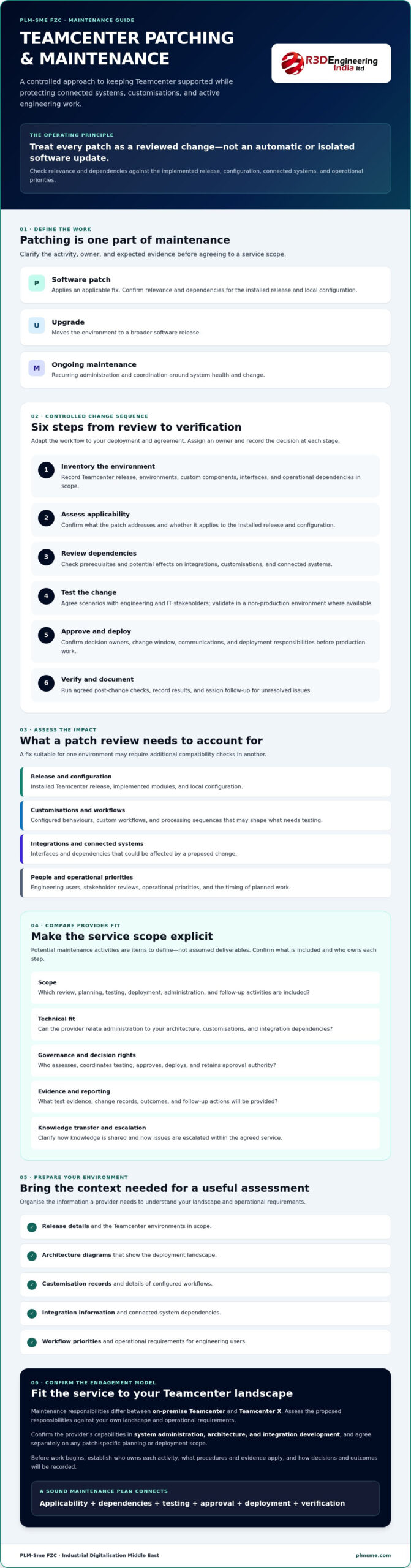
A repeatable workflow turns a proposed patch into a reviewed change rather than a production experiment. Adapt the steps to your deployment and contract, assigning an owner and recording the decision at each stage. NIST’s Guide to Enterprise Patch Management Planning offers a broader framework for organising patch management. Check Teamcenter-specific applicability and compatibility against authoritative, release-specific vendor documentation.
- Inventory: Record the environments, Teamcenter release, custom components, interfaces, and operational dependencies in scope.
- Assess applicability: Confirm what the patch addresses and whether it applies to the installed release and configuration.
- Review dependencies: Check prerequisites and potential effects on integrations, customisations, and connected systems.
- Test: Define scenarios with engineering and IT stakeholders, then validate in a non-production environment where available.
- Approve and deploy: Confirm decision owners, the change window, communications, and deployment responsibilities before production work begins.
- Verify: Run agreed post-change checks, document results, and assign follow-up actions for unresolved issues.
Assessing Teamcenter versions, customisations, and integrations
Start with an inventory that separates environments and identifies the components and interfaces in use. For example, an interface that exchanges product data with another business system may need different tests from a standalone user workflow. Compare release requirements and compatibility prerequisites with verified vendor documentation. If the owner or behaviour of a dependency is unclear, flag it for investigation rather than assuming it is unaffected.
Testing and documented approval should precede production changes. They give stakeholders evidence to assess potential impact and a clear record of who authorised the change.
Testing, approval, deployment, and verification
Agree on test scenarios before scheduling the change. Cover relevant engineering workflows, data access, and integration exchanges, tailoring checks to the environment instead of relying on a generic checklist. Set approval owners, user communications, the change window, and decision points for pausing or considering a rollback. Confirm in advance who can make those decisions and what rollback procedures are available.
After deployment, record the checks performed, their results, any issues, and the owner and status of follow-up actions. This creates an auditable change history, although testing cannot eliminate all disruption. Buyers evaluating Teamcenter software patching and maintenance services can use this workflow to clarify responsibilities and evidence requirements. A discussion of Teamcenter administration support can help define how administration, architecture, and integration needs fit the proposed scope.
Comparing Teamcenter maintenance providers: scope, controls, and fit
A provider’s name, size, or partner status can offer context, but none shows exactly how its service will fit your Teamcenter environment. Compare the proposed work, controls, and evidence. The IEEE Computer Society outlines different forms of software maintenance. For procurement, the key question is how the provider turns maintenance responsibilities into a clearly defined engagement.
Separate reactive incident support, planned maintenance, and a system administration retainer. Incident support responds to reported issues. Planned maintenance defines scheduled work and change controls. A retainer provides recurring administration within an agreed scope. These models can overlap, but confirm which activities and responsibilities are included rather than assuming patch work comes with general support.
What should a Teamcenter maintenance scope specify?
Ask providers to state which environments, releases, components, and activities are covered. Establish who owns approvals, testing coordination, deployment, and documentation. Also clarify how the provider handles exclusions, dependencies, and work outside the agreement. This is especially important when a change touches a custom component or interface that routine administration does not cover.
Comparison criteria
- Service scope: Which environments, releases, components, and maintenance activities are included or excluded?
- Technical fit: How will the provider understand your architecture, customisations, integrations, and dependencies before recommending changes?
- Governance: Who coordinates assessment, testing, approvals, deployment, and follow-up?
- Reporting: What change records, test evidence, issue tracking, and status updates will you receive?
- Knowledge transfer: How will decisions, system knowledge, and outstanding actions be documented for your team?
What evidence demonstrates operational capability?
Ask to review representative change records, test plans, handover materials, and reporting formats. Sensitive details can be removed if needed. Discuss how the provider investigates customisations and connected enterprise systems, and how it flags unknown dependencies instead of treating them as unaffected. Confirm which Teamcenter releases and patch types it supports, and which testing, rollback, documentation, and escalation procedures are available.
Evaluate evidence and working practices alongside credentials. PLM-Sme FZC is a Siemens Digital Industries Alliance Partner and offers Teamcenter administration, architecture, integration development, and administration retainers. Confirm directly whether the proposed engagement includes patch planning, deployment, or post-change verification. Do not infer these deliverables from partner status alone. A provider should understand your architecture before defining a scope with clear ownership, exclusions, and evidence requirements.
Preparing your Teamcenter environment for a maintenance engagement
A provider can assess fit only when it understands the environment the work must protect. Before requesting proposals for Teamcenter software patching and maintenance services, assemble an overview of the system, its users, and the responsibilities already assigned internally. Architecture readiness is particularly useful when custom components and integrations connect Teamcenter to other business processes. If diagrams are incomplete, identify that as an assessment need instead of filling gaps with assumptions.
Information to prepare before requesting service proposals
Gather available architecture diagrams, Teamcenter release details, environment ownership, known customisations, interfaces, and current support arrangements. Include recurring issues and planned engineering or operational changes, since these may affect timing and the scope of an initial review. Identify sensitive information and agree on appropriate access procedures before sharing system details or granting access.
- List environments and identify their purpose, owners, and known differences.
- Record custom components, connected systems, and known dependencies.
- Describe critical workflows, recurring issues, and planned changes.
- Mark information that needs restricted handling and define how access will be approved.
Ask the prospective provider to document assumptions, unknowns, dependencies, and any discovery work needed to define the engagement. Making these gaps visible early gives both parties a clearer basis for agreeing on scope.
Questions to resolve before maintenance begins
Set the decision structure before scheduling work. Clarify who gives technical approval, who confirms business acceptance, and who authorises production changes. Confirm what non-production test capacity is available and which engineering or IT users can participate in validation. If testing capacity is limited, record the constraint and agree how it affects the proposed scope.
Also agree on how the provider will report work, risks, and open actions. Specify what information belongs in a change record, how handover materials will be maintained, and how long records should be retained under your organisation’s practices. Confirm access management, escalation contacts, and how unresolved issues will be assigned and tracked. These arrangements clarify ownership without assuming a provider’s standard process fits your environment.
PLM-Sme FZC provides Teamcenter administration, system and solution architecture, and integration development. To discuss how these capabilities may fit your environment, share your Teamcenter administration requirements and define the scope to assess, including any patch-specific activities that need confirmation.
Engaging Teamcenter software patching and maintenance services with PLM-Sme FZC
Choosing support starts with matching the provider’s capabilities to your Teamcenter landscape, not assuming a general administration agreement covers every patching task. PLM-Sme FZC provides Teamcenter system administration, system and solution architecture, integration development, and ongoing administration retainers. Its architecture and integration capabilities may be relevant when assessing how a proposed maintenance change could affect custom components or connected systems.
PLM-Sme FZC is a Siemens Digital Industries Alliance Partner. Treat this as useful context, then verify the details that determine operational fit: which Teamcenter releases and patch types are supported, whether patch planning, deployment, and post-change verification are included, and which testing, documentation, rollback, and escalation procedures apply. Confirm any service levels and exclusions directly. Do not assume patch-specific scope or delivery procedures from a partner relationship or general administration offering.
When a PLM administration retainer may be a fit
A retainer may suit an organisation that needs continuing specialist administration rather than help limited to a single implementation or incident. When maintenance decisions involve integrations or customisations, consider administration alongside architecture and integration dependencies. Agree on the exact retainer scope: ask whether patch assessment, coordination, deployment, or verification is included, and clarify responsibilities and service commitments before relying on it for those activities.
For broader implementation and architecture context, consider how maintenance fits with your Teamcenter plans. A discussion informed by your existing system design can help distinguish recurring administration needs from project work or specific patch-related tasks.
Define the next steps for a scoped discussion
Before speaking with a prospective provider, prepare a concise system inventory, maintenance objectives, known constraints, and stakeholder roles. Include release information, environments, customisations, integrations, critical workflows, and existing approval arrangements. List what you need confirmed, such as supported releases, deliverables, exclusions, reporting, and procedures for testing, rollback, and follow-up.
Use the initial environment and requirements discussion to establish fit and responsibility before agreeing to a support arrangement. Ask PLM-Sme FZC to confirm relevant experience for your landscape and document what is and is not included. To start defining your requirements, discuss Teamcenter support requirements with PLM-Sme FZC.
Build a maintenance approach that fits your Teamcenter landscape
Reliable Teamcenter software patching and maintenance services depend on clear scope, informed impact assessment, and documented decisions. Confirm which environments and releases are covered, how customisations and integrations will be considered, and who owns testing, approvals, deployment, and follow-up. A repeatable process helps your team evaluate changes without treating every patch as risk-free or every maintenance task as automatically included.
PLM-Sme FZC is a Siemens Digital Industries Alliance Partner and offers ongoing PLM system administration retainers, system architecture, and Teamcenter integration development. These capabilities may be relevant when administration needs to be considered alongside architecture and connected systems. Confirm patch-specific deliverables, supported releases, service levels, and operating procedures directly before agreeing to a support arrangement.
Start with your environment inventory, maintenance objectives, known constraints, and stakeholder responsibilities. Then discuss your Teamcenter support requirements with PLM-Sme FZC to define potential fit and clarify scope.
Frequently Asked Questions
What do Teamcenter software patching and maintenance services include?
Teamcenter software patching and maintenance services vary by provider and contract. Potential activities include reviewing the environment, assessing patch applicability, planning changes, coordinating tests, supporting deployment, and checking the system afterward. Confirm which releases, environments, customisations, and integrations are covered. Request written responsibilities, exclusions, approval steps, and documentation expectations so your team knows what the provider will handle and what remains your responsibility.
How often should Teamcenter be patched?
There’s no single patching schedule that fits every Teamcenter environment. Timing depends on relevant vendor releases, compatibility requirements, system dependencies, business change windows, internal policies, and your organisation’s risk assessment. Ask the responsible administrator to review applicable release information and agree on a documented schedule. Don’t apply changes simply because an interval has passed or defer them without first assessing their relevance to your specific release and configuration.
Can a Teamcenter patch be applied directly to a production environment?
Production changes should follow your organisation’s approved change process. Where suitable non-production environments are available, use them to validate relevant workflows, customisations, and dependencies before scheduling a production deployment. Agree on approval owners, communications, verification checks, and rollback decision points in advance. The right approach depends on your architecture and the change being considered, so confirm the plan with the responsible technical team and service provider.
What happens if a Teamcenter patch affects a customisation or integration?
Follow the agreed incident and change process, then assess the affected component and its dependencies. Depending on the environment and available safeguards, the response may involve investigating the change, considering a rollback, or coordinating with the integration owner to restore expected behaviour. Review test results and change records to support the investigation. Before work begins, ask the provider how it documents issues, communicates decisions, and coordinates with your technical and business stakeholders.
How do I choose a Teamcenter maintenance service provider?
Compare providers on their understanding of your architecture, service scope, change controls, testing approach, reporting, and knowledge transfer. Ask how they assess customisations and integrations, and request clear inclusions, exclusions, and examples of relevant work. Confirm supported releases and any service commitments directly. PLM-Sme FZC is a Siemens Digital Industries Alliance Partner, but verify relevant experience and proposed deliverables rather than relying on credentials or broad claims alone.
Does Teamcenter maintenance include ERP, MES, or other integration support?
Not necessarily. A provider may limit maintenance to the PLM application, while another may also offer integration development or administration. Confirm which interfaces and connected systems are in scope, who assesses their impact, and how integration testing will be coordinated. PLM-Sme FZC lists Teamcenter integration development among its capabilities. Whether that work is included in a particular maintenance engagement, and which systems it covers, should be agreed directly.
Can Teamcenter administration and maintenance be outsourced?
Yes. An organisation can engage external specialists for defined administration and support responsibilities while retaining appropriate internal ownership and approvals. Before agreeing to an arrangement, document access controls, responsibilities, reporting, escalation routes, and knowledge transfer expectations. Confirm which activities the provider will perform and which stay with your team. A PLM system administration retainer may provide ongoing administration support, but confirm its scope and any patch-related duties in the agreement.