
Best PLM for NX and Solid Edge Users: 2026 Engineering Guide
Treating product lifecycle management as simple CAD file vaulting is the fastest way to derail complex discrete manufacturing programs. When industrial designers in NX hand off advanced surface geometry to mechanical teams in Solid Edge, fragile third-party connectors often fail, triggering painful revision desynchronization and corrupted assembly structures. Identifying the best PLM for NX and Solid Edge users demands looking well beyond basic check-in and check-out features; it requires kernel-level continuity that preserves geometric fidelity without ongoing administrative overhead.
You already know that synchronizing an engineering bill of materials with downstream manufacturing and enterprise systems shouldn’t depend on fragile custom translation pipelines. In this 2026 engineering guide, you’ll discover how leading platforms handle native Parasolid data exchange, lightweight JT visualization, and bi-directional system synchronization across complex multi-CAD environments. We evaluate deployment architectures ranging from native Teamcenter implementations to competitive alternatives, giving your team the objective clarity needed to build a dependable, single source of truth.
Key Takeaways
- Understand why native Parasolid kernel alignment and direct JT visualization prevent geometry corruption across mixed NX and Solid Edge workflows.
- Identify the best PLM for NX and Solid Edge users by comparing native Teamcenter capabilities with multi-CAD platforms like PTC Windchill and 3DEXPERIENCE on connector resilience and upgrade overhead.
- Learn how bridging CAD-centric design data with downstream ERP and MES systems transforms static EBOMs into actionable manufacturing instructions.
- Avoid costly deployment delays by conducting thorough digital maturity audits and CAD data normalization before configuring your PLM environment.
- Establish an independent system architecture that safeguards integrations and maintains custom data schemas across continuous CAD release cycles.
Evaluating PLM Systems for NX and Solid Edge Engineering Environments
High-performance discrete manufacturing demands continuous synchronization between initial concept modeling and shop-floor production detailing. When engineering departments deploy a dual-CAD strategy, NX and Solid Edge form a capable combination across distinct engineering disciplines. However, treating Product Lifecycle Management (PLM) as a static CAD file depository quickly undermines this advantage. Modern engineering operations require an enterprise orchestrator that manages complex product structures, coordinates engineering releases, and governs data lineage. Determining the best PLM for NX and Solid Edge users begins with recognizing how these two modelers interact across live development lifecycles.
The Technical Demands of NX and Solid Edge Dual-CAD Workflows
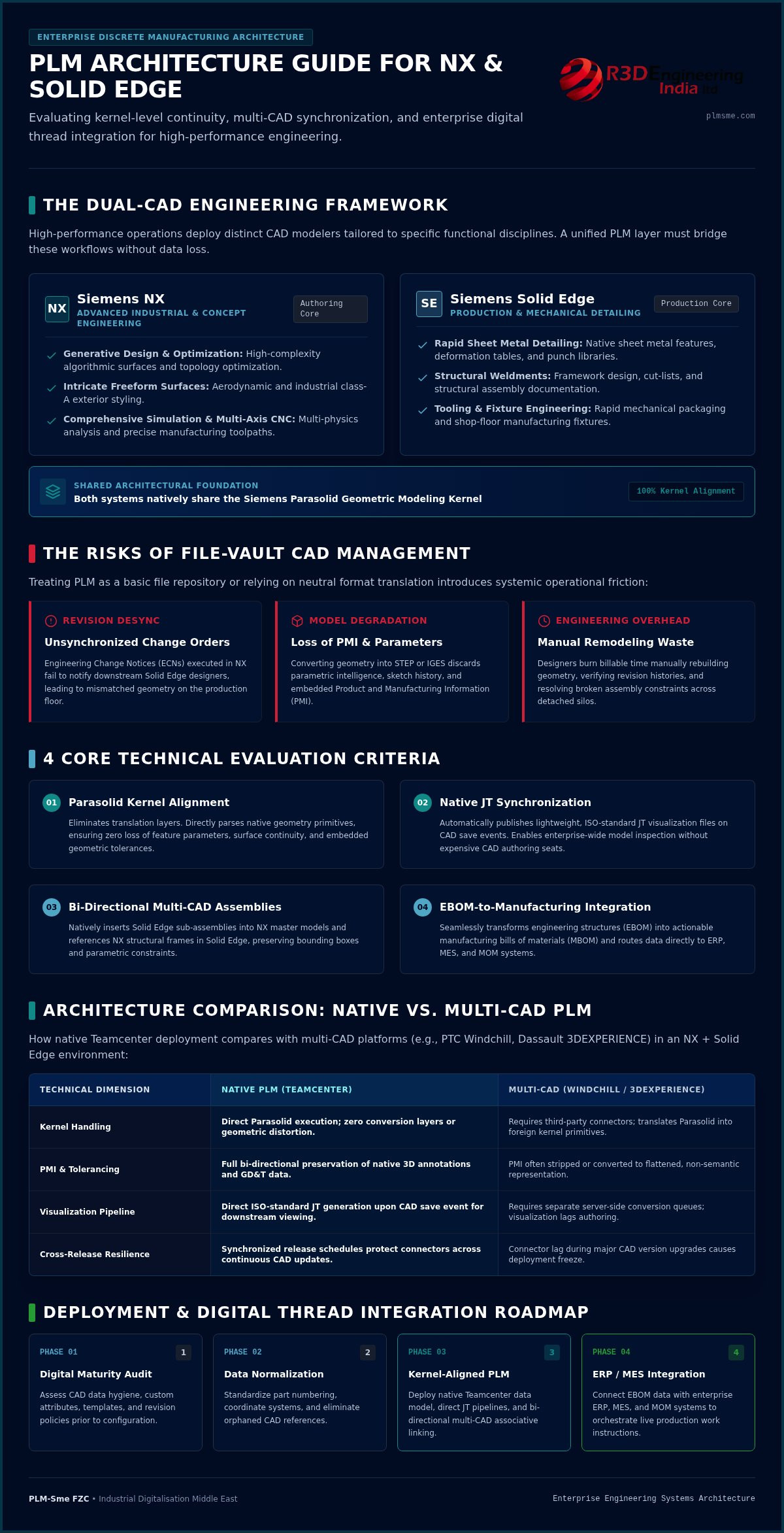
Industrial design and advanced development teams typically utilize NX for generative design, intricate freeform surfaces, comprehensive simulation, and multi-axis CNC machining. Concurrently, production-focused mechanical teams rely on Solid Edge for rapid sheet metal detailing, structural weldments, and tooling design. Harmonizing these environments within a unified digital thread requires robust multi-CAD assembly management and dependable bi-directional part family associativity. If the data management layer can’t resolve relationships between an NX master surface and a Solid Edge mounting bracket, parametric relationships break, forcing teams into inefficient manual workarounds.
The Operational Risks of Fragmented CAD Data Management
Relying on disconnected local vaults or basic network storage exposes discrete manufacturers to continuous delivery delays and expensive rework. Without centralized data governance, cross-functional collaboration creates recurring operational friction:
- Revision desynchronization: Engineering Change Notices (ECNs) executed in NX fail to notify downstream Solid Edge designers, resulting in mismatched components reaching the production floor.
- Model degradation: Converting native geometry into neutral formats like STEP or IGES discards critical parametric intelligence and embedded Product and Manufacturing Information (PMI).
- Wasted engineering hours: Designers expend billable time manually rebuilding geometry, verifying revision histories, and updating drawing sheets across detached repositories.
A poorly integrated environment isolates mechanical and industrial engineering teams into distinct silos. Identifying the best PLM for NX and Solid Edge users means selecting a platform that actively bridges these workgroups, eliminating translation overhead while preserving complete geometric and associative integrity.
Core Technical Criteria for Selecting CAD-Agnostic vs Native PLM
Evaluating the best PLM for NX and Solid Edge users requires looking under the hood at geometric modeling kernels and data schemas. Most platform comparisons focus on surface-level feature checklists, but CAD-to-PLM stability actually depends on how the underlying data management layer handles geometric primitives, visualization pipelines, and metadata mapping. When a system doesn’t have direct kernel alignment, multi-tier assembly resolution quickly deteriorates into translation failures and broken parametric references.
Parasolid Kernel Alignment and Native JT Synchronization
Both NX and Solid Edge are built natively on the Siemens Parasolid geometric modeling kernel. This shared foundation means that a kernel-aligned PLM system manages geometry without intermediate translation layers. Systems that rely on third-party translation engines to convert Parasolid data into neutral formats strip out feature parameters, sketch relations, and native Product and Manufacturing Information (PMI). Conversely, native pipelines automatically generate lightweight, ISO-standard JT visualization files upon file save events, giving non-CAD stakeholders enterprise-wide viewing access without requiring full authoring licenses.
Bi-Directional Multi-CAD Assembly Management
Engineering teams frequently need to insert Solid Edge sub-assemblies directly into master NX models or reference an NX structural frame within a Solid Edge assembly. An effective PLM manages these heterogeneous structures natively, maintaining geometric bounding boxes and assembly coordinate systems across both applications. True in-context design capability is essential here. When an NX designer alters a shared mounting interface, the PLM platform flags the update in Solid Edge, preserving spatial positioning and mating associativity without forcing engineers into manual export routines.
Embedded User Interface and Active Workspace Experience
Engineering adoption drops when users must leave their modeling canvas to complete basic data management tasks. Modern PLM embeds search, checkout, where-used inquiries, and release triggers directly within the CAD environment via intuitive interfaces like Active Workspace. Role-based security models govern project visibility, protecting proprietary CAD intellectual property when collaborating with external suppliers. Selecting the best PLM for NX and Solid Edge users hinges on balancing these embedded tools against broader enterprise requirements. Defining the right target state often starts with a comprehensive system and solution architecture assessment to ensure CAD data flows cleanly into downstream operations.
Comparing the Top PLM Platforms for NX and Solid Edge Users
Engineering leadership teams often struggle to determine whether staying entirely within the native Siemens ecosystem yields superior operational stability compared to deploying a CAD-agnostic enterprise system. Evaluating the best PLM for NX and Solid Edge users requires balancing out-of-the-box CAD responsiveness against enterprise flexibility, connector maintenance cycles, and long-term upgrade dependencies. While several systems deliver mature change management, their handling of Siemens CAD files differs significantly at an architectural level.
Siemens Teamcenter and Teamcenter X: The Architectural Benchmark
Sharing decades of common engineering heritage, Siemens Teamcenter functions as the native platform for both tools. Its core architectural advantage lies in native protocol communication and synchronous update schedules. When Siemens issues a continuous-release update for NX, Teamcenter supports that version immediately, avoiding the workflow disruptions typical of third-party interfaces. Teamcenter X provides this deep CAD integration through a cloud-delivered SaaS model, drastically simplifying underlying infrastructure management while ensuring uninterrupted synchronization across complex, multi-level assemblies.
PTC Windchill and Dassault 3DEXPERIENCE: Third-Party Connectors
Enterprise platforms like PTC Windchill and Dassault Systèmes 3DEXPERIENCE manage complex enterprise lifecycles effectively, but their integrations with NX and Solid Edge rely on dedicated connector software. Windchill uses Workgroup Managers to capture CAD structures and check-in metadata, whereas 3DEXPERIENCE typically routes non-native files through translation layers. This separation introduces clear operational risks:
- Certification delays: Major NX continuous-release updates often experience support delays while third-party vendors update, validate, and certify their external CAD connectors.
- Administrative overhead: Maintaining connector stability requires dedicated IT resources, custom translation validation scripts, and frequent synchronization patches.
- Kernel interpretation discrepancies: Non-native platforms must interpret Parasolid structures through proprietary translation bridges, which increases the likelihood of metadata loss during complex assembly check-ins.
Workgroup PDM and Agile Alternatives: Limitations in Complex Discrete Settings
Mid-market workgroup PDM tools offer lower upfront deployment friction and simple file vaulting. However, these tools quickly reach their architectural limits in sophisticated engineering operations. They lack the enterprise change management, date- and unit-based effectivity tracking, and multi-discipline variant configuration required for high-mix manufacturing. Organizations managing advanced dual-CAD operations across multiple sites inevitably outgrow basic workgroup vaults, making enterprise-grade platforms the only viable path to long-term digital continuity.
Architectural Integration: Connecting PLM to ERP, MES, and MOM
Engineering departments realize real return on investment only when CAD data breaks free from the engineering silo to drive enterprise execution. When selecting the best PLM for NX and Solid Edge users, evaluating CAD vaulting is only the initial hurdle. The broader challenge centers on converting high-fidelity models and assemblies into structured manufacturing records that downstream business engines can consume without manual intervention. Fragile batch scripts and point-to-point connections cannot sustain this workload; enterprises require modern, API-driven middleware integration frameworks that orchestrate bi-directional data flow across the entire production ecosystem.
Bridging the EBOM to MBOM Transformation Divide
Engineering bills of materials (EBOMs) created in NX and Solid Edge represent functional design intent, not physical production routines. Manufacturing planners must transform these structures into manufacturing bills of materials (MBOMs) by incorporating plant-specific routings, phantom assemblies, make-buy allocations, and assembly fixtures. Reliable PLM architectures maintain dynamic associativity between these two structures so design revisions propagate downstream systematically. Robust PLM system integration with ERP eliminates manual re-keying of part master records, preventing scrap events caused by procurement discrepancies or outdated drawing revisions.
Integrating Teamcenter with MES, MOM, and Shop Floor Operations
Connecting the engineering repository directly to Manufacturing Execution Systems (MES) and Manufacturing Operations Management (MOM) closes the loop between design intent and physical fabrication. Production technicians no longer navigate static PDF drawing sheets; instead, they consume released 3D JT visualization files, assembly work instructions, and model-based inspection definitions delivered right to their shop-floor terminals. This live connectivity yields measurable operational benefits:
- Direct quality feedback: Shop-floor non-conformance records captured inside the MES route automatically back into PLM engineering change workflows for corrective resolution.
- Synchronized design revisions: Automated holds halt assembly lines the moment an engineering change notice modifies a component revision, eliminating work-in-progress deviations.
- Traceable as-built records: Serialized component data captured during physical assembly attaches directly to the digital twin record, guaranteeing cradle-to-grave traceability.
Achieving this level of continuous enterprise automation requires specialized integration development rather than standard plug-ins. For discrete manufacturers deploying complex Siemens CAD environments, partnering on strategic Siemens Teamcenter consulting ensures your multi-CAD structures, enterprise integrations, and shop floor pipelines operate as a unified, highly resilient digital backbone. To modernize your cross-platform digital thread, explore our tailored Teamcenter integration development solutions designed specifically for complex discrete manufacturing environments.
Selecting and Implementing the Right PLM Architecture for Long-Term Scalability
Procuring software licenses solves only a fraction of the digital engineering equation. Successfully identifying and deploying the best PLM for NX and Solid Edge users requires rigorous operational alignment before installing any database schema. When engineering leaders neglect legacy data inconsistencies, ambiguous part-numbering logic, and undocumented approval cycles, even the most capable PLM platform simply accelerates existing organizational friction. Deciding between a managed cloud SaaS deployment and an on-premise infrastructure requires balancing continuous update cycles against specific enterprise data-sovereignty mandates.
Establishing Digital Maturity Benchmarks Before Platform Deployment
Engineering readiness audits provide the baseline metrics needed to configure workflows accurately. Teams must evaluate historical CAD model integrity, assembly naming conventions, and reuse ratios across existing repositories. Commissioning a comprehensive digital maturity report in manufacturing uncovers operational bottlenecks and clarifies system requirements before committing capital. Establishing measurable key performance indicators, such as engineering change cycle times and duplicate part rates, ensures the implementation delivers tangible operational gains.
The Strategic Value of Independent Solution Architecture over Software Resellers
Software resellers are inherently driven by license sales and predetermined software bundling. In contrast, vendor-independent solution architects focus entirely on practical business requirements, data structures, and cross-platform continuity. Independent guidance delivers distinct operational advantages:
- Targeted data schema design: Engineering workflows are configured around actual manufacturing handoffs rather than forced out-of-the-box software templates.
- Sustained system performance: Engaging a specialized PLM system administration retainer maintains data hygiene, user permissions, and connector health without overwhelming internal IT teams.
- Strategic phased rollouts: Formulating a tailored industrial digitalization roadmap establishes a logical progression from initial CAD cleanup to full enterprise automation.
Pinpointing the best PLM for NX and Solid Edge users is ultimately an architectural undertaking. When you prioritize objective system modeling, robust end-to-end PLM implementation support, and systematic integration design, your CAD environment transforms into an agile engine for scalable industrial growth.
Architecting Your Future-Ready Engineering Digital Thread
Achieving digital continuity across dual-CAD environments requires far more than basic file vaulting; it demands an integrated enterprise architecture. Pinpointing the best PLM for NX and Solid Edge users ultimately comes down to preserving parametric geometry, streamlining dynamic EBOM-to-MBOM transformations, and eliminating connector maintenance overhead across continuous software release cycles.
Software capability alone won’t guarantee operational success without disciplined data governance and structured execution. As an independent Siemens Digital Industries Alliance Partner, PLM-Sme FZC brings technical precision to discrete manufacturing, bridging complex environments across PLM, ERP, CRM, and MES systems. Whether your focus is eliminating multi-CAD friction or automating production handoffs, our vendor-neutral roadmap consulting ensures your digital thread remains resilient. Take the decisive step toward unified engineering operations: schedule a digital maturity assessment with PLM-Sme FZC to establish an actionable foundation for scalable growth.
Frequently Asked Questions
Why is Siemens Teamcenter considered the best PLM for NX and Solid Edge users?
Teamcenter shares a common Parasolid geometric modeling kernel and synchronized development cycles with both design tools. This architectural alignment prevents the translation lag and broken assembly links typical of third-party platforms. Native protocol connectivity provides automated JT visualization, embedded Active Workspace navigation, and immediate compatibility with NX continuous releases, explaining why technical directors consistently view it as the best PLM for NX and Solid Edge users.
Can PTC Windchill or Dassault 3DEXPERIENCE manage native NX and Solid Edge CAD files effectively?
Yes, both platforms manage native Siemens CAD files, but they rely on external connector modules and translation layers. PTC Windchill utilizes Workgroup Managers, while Dassault 3DEXPERIENCE processes files through translation bridges. While functional for standard check-in routines, these external connectors often lag behind major NX updates, creating persistent administrative overhead to validate connector stability and resolve geometric interpretation errors.
What is the difference between deploying Teamcenter on-premise versus Teamcenter X for CAD management?
The primary difference centers on infrastructure management, upgrade automation, and implementation lead time. On-premise deployments provide complete operational control over local database architecture, supporting customized server tuning and strict internal compliance protocols. Teamcenter X delivers identical CAD management capabilities via cloud SaaS, eliminating internal server maintenance while delivering automatic software upgrades and preconfigured best-practice engineering workflows.
How do NX and Solid Edge handle multi-CAD assemblies inside a single PLM environment?
They operate within heterogeneous assemblies by utilizing their shared Parasolid foundation and ISO-standard JT representations. A designer can insert a native Solid Edge component directly into an NX master assembly without manual file conversion. The PLM system preserves spatial coordinates, mating associativity, and bounding boxes, instantly alerting mechanical engineers if an interface change alters part clearance or alignment.
Is a dedicated PLM system necessary if our engineering department already uses basic workgroup PDM?
Dedicated PLM becomes necessary once engineering processes expand beyond local file checkouts and single-discipline revision control. Basic workgroup PDM prevents duplicate file overwrites but fails to support multi-site change workflows, date-based effectivity, and enterprise ERP synchronization. Assessing the best PLM for NX and Solid Edge users enables growing manufacturers to replace isolated file vaults with comprehensive digital thread orchestration.
What are the common pitfalls when migrating legacy CAD data into a new PLM platform?
The most damaging pitfalls involve unmanaged duplicate parts, broken CAD file dependencies, and inconsistent metadata attributes. Uploading uncleaned network directories into an enterprise PLM environment corrupts search indexing and inflates storage costs. Organizations must audit historical repositories, resolve missing assembly links, and normalize part-numbering schemas before configuring the target database structure.
How does PLM integration improve the transition from engineering BOM to manufacturing BOM in ERP?
Integrated architecture automates the transformation of design models into actionable manufacturing records without manual data re-entry. Engineering BOMs represent functional CAD geometry, whereas manufacturing BOMs incorporate plant-specific routings, consumables, and assembly sequences. Connecting PLM directly to ERP software maintains associative alignment between these structures, ensuring design revisions propagate immediately into procurement and production operations.