
How to Implement Teamcenter PLM: A Strategic Roadmap for Industrial Digitalization
Most industrial organizations treat PLM deployment as a software installation, but it’s actually a fundamental restructuring of your digital DNA. You understand that the stakes are high. In the UAE’s competitive industrial sector, a failed deployment doesn’t just waste capital; it creates technical debt that can paralyze production for years. Learning how to implement Teamcenter PLM correctly requires moving beyond basic configuration to a strategic architecture that bridges the gap between engineering and the factory floor.
This guide provides a structured, expert-led framework designed to help you master the complexities of Siemens Teamcenter, ensuring your system is both scalable and resilient. We’ll explore a phased roadmap that addresses integration with legacy ERP and MES systems while establishing a clear path toward a unified digital value chain. You’ll gain the insights needed to design a system architecture that supports long-term growth without the typical pitfalls of internal expertise gaps. By following this strategic roadmap, your organization can achieve seamless connectivity across every stage of the product lifecycle.
Key Takeaways
- Establish a clear baseline for organizational readiness by conducting a digital maturity assessment to identify potential roadblocks before deployment begins.
- Master how to implement Teamcenter PLM through a structured, two-phase framework focused on rigorous requirements gathering and scalable system architecture.
- Integrate Siemens Teamcenter as your central source of truth to ensure seamless data flow between engineering, ERP, and MES environments.
- Reduce technical debt by auditing legacy data quality and utilizing automated migration scripts for complex CAD and CAE datasets.
- Secure long-term operational success by prioritizing ongoing database optimization and system health through dedicated PLM administration retainers.
Establishing the Foundation with Digital Maturity Assessments
Successful PLM deployment isn’t merely a software installation; it’s a fundamental shift in how an organization handles its intellectual property. When considering how to implement Teamcenter PLM, the first step must always be a rigorous digital maturity assessment. This diagnostic phase identifies whether your current infrastructure, workflows, and culture are prepared for a high-performance PLM environment. A digital maturity report provides the objective data needed to secure stakeholder buy-in and sets a realistic baseline for the entire project.
Skipping this assessment is the primary reason for PLM implementation failure. Without a clear understanding of your starting point, you risk automating inefficient processes or selecting modules that don’t align with your actual engineering needs. We map your existing “As-Is” engineering workflows against the Siemens Teamcenter capability model. This comparison highlights specific areas where the software can provide immediate value and where your internal processes might require refinement before digitalization begins. Establishing this vision early ensures that the project remains focused on business outcomes rather than just technical milestones.
Identifying Industrial Digitalization Gaps
Digital maturity is the measure of an organization’s ability to create value through digital technologies. In the UAE’s industrial sector, gaps often surface in the lack of connectivity between CAD, CAM, and CAE environments. We evaluate these data silos to determine how much manual effort is currently required to move a design from engineering to production. We also scrutinize the current state of Bill of Materials (BOM) management. If your BOMs are trapped in disconnected spreadsheets, they can’t serve as the foundation for a digital twin. Identifying these gaps early prevents them from becoming expensive bottlenecks during the configuration phase of Siemens Teamcenter.
Creating a Digitalization Roadmap
A structured roadmap translates your long-term vision into manageable, phased milestones. It’s essential to balance ambitious transformation goals with short-term wins that demonstrate value to the executive team. This roadmap should align your PLM objectives with broader business goals, such as increasing throughput or preparing for AI-driven analytics. Understanding the strategic value of a digital maturity report in manufacturing helps you prioritize investments that reduce technical debt and build a scalable architecture. By linking your roadmap to AI readiness and digital thread connectivity, you ensure that your investment in how to implement Teamcenter PLM delivers sustained competitive advantage.
Executing the Phased Teamcenter Implementation Framework
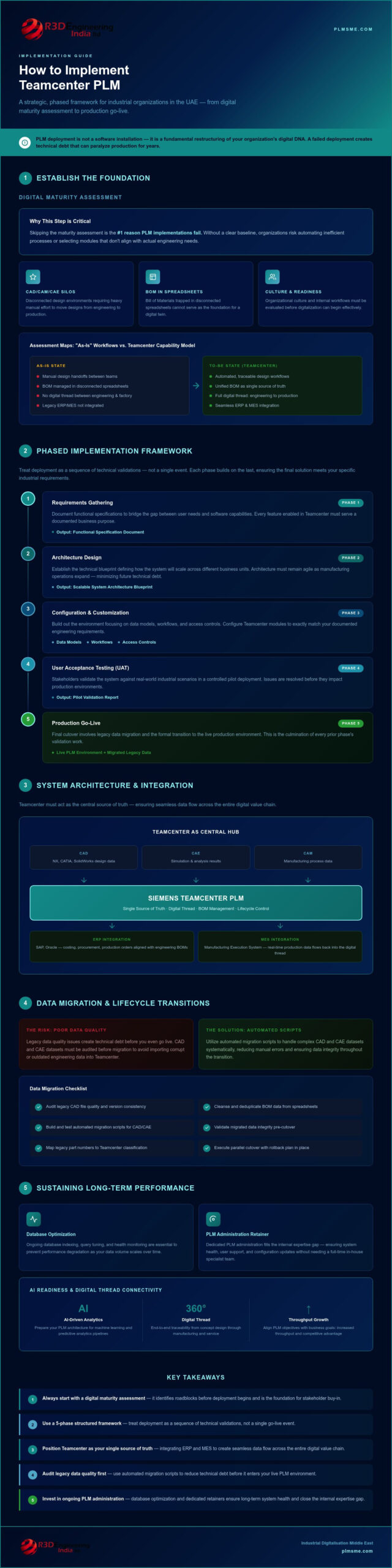
Transitioning from a strategic vision to a live environment requires a disciplined, multi-stage methodology. Many organizations encounter friction when learning how to implement Teamcenter PLM because they treat the deployment as a singular event rather than a sequence of technical validations. A phased framework provides the structure necessary to manage complexity while ensuring that the final solution meets your specific industrial requirements.
- Phase 1: Requirements Gathering. This stage involves documenting functional specifications to bridge the gap between user needs and software capabilities.
- Phase 2: Architecture Design. Here, the technical blueprint is established, defining how the system will scale across different business units.
- Phase 3: Configuration and Customization. The environment is built out, focusing on data models, workflows, and access controls.
- Phase 4: User Acceptance Testing (UAT). Stakeholders validate the system against real-world scenarios in a controlled pilot deployment.
- Phase 5: Production Go-Live. The final cutover involves legacy data migration and the formal transition to the live production environment.
Requirements Gathering and Solution Architecture
Success begins by translating high-level business objectives into granular technical configurations. This process ensures that every feature enabled in Siemens Teamcenter serves a documented purpose. During this phase, we focus on the role of PLM in system architecture consulting to design a foundation that minimizes technical debt. A robust architecture isn’t just about current needs; it’s about building a system that remains agile as your UAE-based manufacturing operations expand. If you need specialized guidance during these early stages, our end-to-end PLM implementation support can help align your technical specs with industry best practices.
Configuration vs. Customization Best Practices
One of the most critical decisions in how to implement Teamcenter PLM is the balance between out-of-the-box (OOTB) functionality and bespoke customization. We prioritize OOTB features whenever possible. This approach significantly reduces long-term maintenance costs and ensures that your system remains compatible with future Siemens software updates. Customization should be reserved for unique business logic that provides a genuine competitive advantage. When specialized code is necessary, it must be developed using standard Siemens APIs to prevent “version locking,” which can make future upgrades prohibitively expensive. By following these configuration standards, you protect your investment and maintain a clean, high-performance digital environment.
Designing Scalable System Architecture and Integration
Establishing Siemens Teamcenter as the single source of truth is the cornerstone of a resilient digital strategy. When organizations evaluate how to implement Teamcenter PLM, they often underestimate the architectural complexity required to synchronize disparate data streams. A scalable architecture ensures that product data remains consistent from the initial design phase through to end-of-life. This requires a robust integration strategy that connects PLM with other enterprise pillars, such as ERP and MES, creating a unified digital thread that eliminates manual data entry and reduces errors.
Choosing between custom middleware and standard Siemens connectors is a pivotal architectural decision. While custom scripts might offer a quick fix for specific legacy issues, they often become a maintenance burden. Standard Siemens connectors, such as the Active Integration (T4x) series, provide a more sustainable path by ensuring compatibility with future software versions. This approach allows for a more fluid exchange of data across the value chain, ensuring that every department works with the most current information without the risk of version conflicts. It’s about building a system that grows alongside your manufacturing capabilities.
Teamcenter and ERP Integration Strategies
The handshake between PLM and ERP is where engineering intent meets commercial reality. Synchronizing Part Masters and Bills of Materials (BOM) across these platforms is essential for maintaining data consistency between engineering teams and manufacturing finance. When an engineer updates a design in Siemens Teamcenter, the change should reflect in the ERP system to trigger accurate procurement and costing. This connectivity extends beyond the factory floor; for instance, you can find more details on unlocking Teamcenter CRM integration benefits to bridge the gap between product development and customer demand. Such integrations ensure that the digital backbone supports every facet of the business.
Connecting the Shop Floor: MES and MOM
Closing the loop between design and execution requires a deep integration with Manufacturing Execution Systems (MES) and Manufacturing Operations Management (MOM). This connectivity ensures that the shop floor receives precise design intent while providing engineering with real-time feedback on manufacturing performance. Integrating Siemens Teamcenter with MOM environments improves quality and traceability by linking specific production runs to their corresponding design revisions. Managing Engineering Change Orders (ECO) becomes significantly more efficient when the entire digital thread is connected. When a change is approved, it flows directly to the MES, ensuring that operators don’t work with outdated instructions and that every component’s history is fully documented. Mastering how to implement Teamcenter PLM in this context transforms the shop floor from a black box into a transparent, data-driven operation.
Managing Data Migration and Lifecycle Transitions
Managing the transition of legacy information into a new PLM environment is often the most resource-intensive phase of the project. When organizations explore how to implement Teamcenter PLM, they frequently discover that decades of accumulated data don’t naturally align with modern digital standards. A successful migration requires more than just moving files; it demands a rigorous audit of legacy data quality before any transfer begins. This ensures that the new system isn’t immediately cluttered with obsolete or incorrect information, which would undermine the “single source of truth” objective established in previous stages.
Developing automated scripts for CAD, CAM, and CAE data extraction is essential for maintaining the parent-child relationships inherent in complex assemblies. These scripts help in mapping metadata from legacy databases to specific Siemens Teamcenter attributes, ensuring that searchability and revision history remain intact. Organizations must choose between a “Big Bang” migration, where all data is moved at once, and a phased approach. While the Big Bang method minimizes the time spent running parallel systems, a phased migration often proves more manageable for UAE industrial firms with massive, interconnected datasets. If you’re struggling with legacy data complexity, our End-to-End PLM Implementation Support provides the technical expertise to manage these transitions securely.
Ensuring Data Integrity and Quality
Data integrity is the foundation of user trust. If engineers encounter duplicate parts or inconsistent naming conventions after go-live, they’ll quickly revert to offline spreadsheets. We prioritize cleaning data at the source, validating every migrated record against original engineering specifications. This validation process prevents “garbage in, garbage out” scenarios that can derail PLM user adoption. High-quality data migration doesn’t just support current operations; it’s a prerequisite for any future AI-driven analytics or automated reporting within the Siemens Teamcenter environment.
CAD/CAM/CAE Extension Management
Modern industrial projects often involve multi-CAD environments, requiring a single Teamcenter instance to manage files from various design platforms. During migration, managing complex assemblies and external references is critical to prevent broken links and lost geometry. We optimize the use of the JT format, a lightweight visualization file, to ensure that non-engineering stakeholders can view and mark up designs without needing native CAD licenses. This approach enhances collaboration across the digital value chain while maintaining the high performance of the underlying database. Correctly configuring these extensions is a vital part of learning how to implement Teamcenter PLM for long-term scalability.
Sustaining Performance with PLM Administration and AI
The final phase of any digital transformation involves securing the gains made during the initial rollout. Organizations often focus so heavily on how to implement Teamcenter PLM that they neglect the governance required to maintain system health post-cutover. Sustaining high performance requires a shift from project-based thinking to continuous operational excellence. This involves regular database optimization, proactive system monitoring, and a structured approach to training that ensures users can fully leverage the new digital environment.
A well-maintained PLM environment doesn’t just store data; it actively facilitates faster decision-making. If the system slows down or the database isn’t optimized, engineering productivity drops. We emphasize the importance of a structured support model that addresses both technical performance and user proficiency. This ensures that the digital thread remains robust as your organization scales its manufacturing operations across the UAE.
The Value of Expert PLM Administration
A PLM system administration retainer provides the specialized expertise needed to handle complex software patches and version upgrades without risking production downtime. Proactive monitoring identifies potential bottlenecks before they impact engineering workflows. By partnering with experts for strategic Siemens Teamcenter consulting, UAE firms can ensure their architecture remains resilient against evolving industrial demands. This independent oversight is often more cost-effective than building an entire internal team for niche administrative tasks. It’s about having a “thinking partner” who ensures the system stays aligned with your long-term vision.
Future-Proofing with Industrial AI
Looking ahead, the product data stored within Siemens Teamcenter serves as the essential training set for industrial AI. Future-proofing your deployment means developing an AI roadmap that moves beyond data management toward predictive engineering and generative design. Implementing governed AI agents can accelerate decision-making by analyzing historical change orders and manufacturing outcomes. As noted in recent reports on industrial automation solutions in the GCC, the integration of PLM and AI is a key trend for organizations seeking to automate the closed-loop manufacturing cycle. Mastering how to implement Teamcenter PLM with an eye toward AI readiness positions your company at the forefront of the next industrial revolution.
User ROI is ultimately determined by adoption. Training strategies must go beyond basic navigation to explain the logic behind new digital workflows. Providing ongoing support and a clear path for feedback allows the system to evolve based on real-world engineering challenges. This continuous improvement cycle ensures that your investment in Siemens Teamcenter delivers measurable value long after the initial go-live.
Advancing Your Digital Value Chain with Siemens Teamcenter
Mastering how to implement Teamcenter PLM is a journey that transforms raw data into a strategic asset for your entire organization. By prioritizing a digital maturity assessment and establishing a scalable system architecture, you build a foundation for long-term industrial success. This roadmap ensures that your digital thread remains unbroken from the initial design phase to the factory floor and beyond.
As a Siemens Digital Industries Alliance Partner, we provide the expert Teamcenter solution architects and specialized industrial AI roadmaps needed to navigate these technical complexities. Our approach combines vendor-independent objectivity with deep technical mastery, ensuring your deployment is optimized for your specific operational goals. We don’t just help you install software; we partner with you to sustain performance through proactive administration and future-proofed automation. Take the first step toward a resilient digital future by choosing a guide who understands the unique demands of the UAE industrial landscape.
Request a Digital Maturity Assessment for Your Teamcenter Journey and begin your transformation with confidence.
Frequently Asked Questions
How long does a typical Siemens Teamcenter implementation take?
A typical Siemens Teamcenter implementation timeline depends on the project’s scope and technical complexity. For organizations opting for pre-configured environments, the process often spans three to five months. However, a full-scale enterprise deployment involving custom integrations and global sites can require twelve to eighteen months. Factors such as data migration volume and the number of active integrations with ERP or MES systems significantly influence the final schedule.
What is the difference between Teamcenter Rapid Start and enterprise implementation?
Teamcenter Rapid Start is a pre-configured version of Siemens Teamcenter designed for quick deployment of essential product data management capabilities. It focuses on standard workflows and out-of-the-box functionality to reduce initial setup time. In contrast, an enterprise implementation offers a fully customizable architecture. This approach allows large organizations to tailor the system to unique engineering processes, complex multi-site requirements, and deep integrations across the digital value chain.
Can Teamcenter integrate with non-Siemens ERP systems like SAP or Oracle?
Yes, Siemens Teamcenter is designed to integrate seamlessly with non-Siemens ERP systems, including SAP, Oracle, and Microsoft Dynamics. These connections are typically established using the Active Integration framework or specialized middleware. This interoperability ensures that engineering data and manufacturing finance remain synchronized across the organization. It allows for the automated exchange of Part Masters and Bills of Materials without manual data entry or human error.
What are the most common challenges during PLM data migration?
The most frequent challenges include poor legacy data quality, broken CAD assembly links, and inconsistent metadata mapping. When organizations learn how to implement Teamcenter PLM, they often find that historical data lacks the structure required for modern digital threads. Duplicate part numbers and non-standard naming conventions can stall migration progress. Addressing these issues early through a rigorous data audit prevents technical debt from accumulating in the new environment.
How much does it cost to implement Teamcenter PLM for a mid-sized manufacturer?
Implementation costs vary significantly based on user count, module selection, and the depth of system integration. While license fees are standard, professional service fees for architecture design and data migration depend on the manufacturer’s specific technical needs. Mid-sized firms in the UAE should budget for both initial deployment and ongoing maintenance retainers. It’s essential to consider the long-term ROI gained from reduced engineering cycle times and minimized production errors.
Is a digital maturity assessment mandatory before implementation?
While not a software requirement, a digital maturity assessment is a critical prerequisite for a successful deployment. This assessment identifies organizational readiness and highlights gaps in current workflows that could lead to project failure. It provides the objective data needed to build a realistic roadmap for digitalization. Understanding your current state ensures that the configuration of Siemens Teamcenter aligns with your actual engineering needs rather than perceived requirements.
What are the benefits of using an independent PLM consultant vs a software vendor?
Independent consultants offer objective, vendor-neutral advice that focuses on your long-term business vision rather than software license quotas. As a Siemens Digital Industries Alliance Partner, a firm like PLM-Sme FZC combines deep technical expertise with the agility of a boutique specialist. This partnership model ensures you receive bespoke advice tailored to UAE market conditions while maintaining access to the latest Siemens software standards and best practices.
How does Teamcenter support multi-CAD integration for different engineering teams?
Siemens Teamcenter supports multi-CAD environments through specialized connectors that manage native files from various platforms like SolidWorks, Catia, or Autodesk. It uses the lightweight JT format to allow non-engineering stakeholders to view and mark up designs without needing native CAD licenses. This capability is vital for organizations discovering how to implement Teamcenter PLM across diverse engineering teams, as it ensures a single source of truth regardless of the design tool used.